2amigos/egmap
Composer 安装命令:
composer require 2amigos/egmap
包简介
Objet-oriented PHP abstraction to the Google Maps API to ease the process of adding a Google Map on your Yii projects.
README 文档
README
##Introduction
Nearly totally re-written, this extension is the new version of EGMap. I decided to include it as a new version as this one breaks backwards compatibility. I did that in order to implement a different approach, more like the Yii style.
With the new code it was also possible to do lot of code cleansing, making the classes more compact.
Now, magic getters and setters allows the use of options and functions pre-named as set or get, like properties, more or less what is happening with CComponent.
This version have (including all of the previous EGMap library):
-
LatLonControl
-
DragKeyZoom Control
-
MarkerWithLabel Control
-
Clusterer Marker Support
-
KML Support (it also includes the library EGMapKMLFeed, which was created to provide an easy way to create KML documents)
TODO LIST
- Ground Overlays
- AJAX marker rendering features
Note: Information about previous versions of this extension are on this Yii Forum Post
 I have created a GitHub repository for those willing to contribute on any of the extensions I created. Please, check the link at the bottom of this wiki.Change Log
- 19-12-2011 Added EGMapPolylineEncoder to encode polygon paths and Elevation API v3 support
- 19-12-2011 Update geolocation from V2 to V3 API by Matt Cheale
- 19-12-2011 Fixed reverse geocoding info bug
- 17-12-2011 Fixed a minor and silly bug
- 17-12-2011 Added Polygons [by Matt Kay], Rectangles and Circles support
- 16-12-2011 Fixed CURL open_basedir restriction and added marker animations
- 23-11-2011 Fixed IE 8 loading bug (thanks ghadad)
- 12-10-2011 Code improvements: Added support for InfoBox, included a Reverse Geolocation class tool with options to update form fields on center change.
- 23-03-2011 Updated Reverse GeoCoding from v2 to v3 (check Google Code SVN Repository)
- 20-03-2011 Included support for Polygons (check Google Code SVN Repository)
- 11-02-2011 Included support for language and region maps
- 11-02-2011 Included support for addDOMEventListenerOnce and addEventListenerOnce (thanks Johnatan)
- 03-02-2011 Fixed small bug on registerPlugin Function (thanks Rangel Reale)
Usage
Unpack the contents of the zip file and place it on your protected/extensions folder. This package names EGMap library folder EGMAP, so make sure you read http://www.yiiframework.com/doc/api/1.1/YiiBase#import-detail, to understand clearly how to setup correctly the folder's extension.
Markers and Markers with Labels
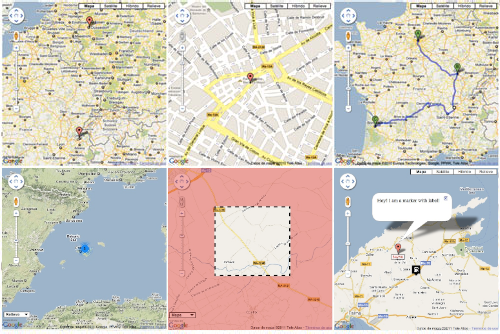
The following example shows you how you can use markers and markers with labels. It also shows how to enable a default marker clusterer
//
// ext is your protected.extensions folder
// gmaps means the subfolder name under your protected.extensions folder
//
Yii::import('ext.gmap.*');

$gMap = new EGMap();
$gMap->zoom = 10;
$mapTypeControlOptions = array(
  'position'=> EGMapControlPosition::LEFT_BOTTOM,
  'style'=>EGMap::MAPTYPECONTROL_STYLE_DROPDOWN_MENU
);

$gMap->mapTypeControlOptions= $mapTypeControlOptions;

$gMap->setCenter(39.721089311812094, 2.91165944519042);

// Create GMapInfoWindows
$info_window_a = new EGMapInfoWindow('<div>I am a marker with custom image!</div>');
$info_window_b = new EGMapInfoWindow('Hey! I am a marker with label!');

$icon = new EGMapMarkerImage("http://google-maps-icons.googlecode.com/files/gazstation.png");

$icon->setSize(32, 37);
$icon->setAnchor(16, 16.5);
$icon->setOrigin(0, 0);

// Create marker
$marker = new EGMapMarker(39.721089311812094, 2.91165944519042, array('title' => 'Marker With Custom Image','icon'=>$icon));
$marker->addHtmlInfoWindow($info_window_a);
$gMap->addMarker($marker);

// Create marker with label
$marker = new EGMapMarkerWithLabel(39.821089311812094, 2.90165944519042, array('title' => 'Marker With Label'));

$label_options = array(
  'backgroundColor'=>'yellow',
  'opacity'=>'0.75',
  'width'=>'100px',
  'color'=>'blue'
);

/*
// Two ways of setting options
// ONE WAY:
$marker_options = array(
  'labelContent'=>'$9393K',
  'labelStyle'=>$label_options,
  'draggable'=>true,
  // check the style ID
  // afterwards!!!
  'labelClass'=>'labels',
  'labelAnchor'=>new EGMapPoint(22,2),
  'raiseOnDrag'=>true
);

$marker->setOptions($marker_options);
*/

// SECOND WAY:
$marker->labelContent= '$425K';
$marker->labelStyle=$label_options;
$marker->draggable=true;
$marker->labelClass='labels';
$marker->raiseOnDrag= true;

$marker->setLabelAnchor(new EGMapPoint(22,0));

$marker->addHtmlInfoWindow($info_window_b);

$gMap->addMarker($marker);

// enabling marker clusterer just for fun
// to view it zoom-out the map
$gMap->enableMarkerClusterer(new EGMapMarkerClusterer());

$gMap->renderMap();
The style
.labels {
   color: red;
   background-color: white;
   font-family: "Lucida Grande", "Arial", sans-serif;
   font-size: 10px;
   font-weight: bold;
   text-align: center;
   width: 40px;
   border: 2px solid black;
   white-space: nowrap;
}
KML Service
As KML is a service that is readed from Google services, you cannot use localhost KML files, to do so, you need to specify that is localhost kml file on enableKMLService function and the geoxml3.js plugin should be automatically registered.
Yii::import('ext.gmap.*');

$gMap = new EGMap();
// using the new magic setters
// check available options per class
// objects with setMethod,getMethod and
// options array can be set now this way
$gMap->zoom = 10;
$mapTypeControlOptions = array(
   // yes we can position the controls now
   // where we want
   'position'=> EGMapControlPosition::LEFT_BOTTOM,
   'style'=>EGMap::MAPTYPECONTROL_STYLE_DROPDOWN_MENU
);

$gMap->mapTypeControlOptions= $mapTypeControlOptions;

// enabling KML Service. Second parameter of this
// function tells whether is localhost or not. GeoXML3.js
// is needed to read localhost KML files.
$gMap->enableKMLService('http://gmaps-samples.googlecode.com/svn/trunk/ggeoxml/cta.kml');

$gMap->renderMap();
Directions Example
How to work with directions and waypoints.
Yii::import('ext.gmap.*');
$gMap = new EGMap();

$gMap->setWidth(512);
// it can also be called $gMap->height = 400;
$gMap->setHeight(400);
$gMap->zoom = 8;

// set center to inca
$gMap->setCenter(39.719588117933185, 2.9087440013885635);

// my house when i was a kid
$home = new EGMapCoord(39.720991014764536, 2.911801719665541);

// my ex-school
$school = new EGMapCoord(39.719456079114956, 2.8979293346405166);

// some stops on the way
$santo_domingo = new EGMapCoord(39.72118906848983, 2.907628202438368);
$plaza_toros  = new EGMapCoord(39.71945607911511, 2.9049245357513565);
$paso_del_tren = new EGMapCoord( 39.718762871171776, 2.903637075424208 );

// Waypoint samples
$waypoints = array(
      new EGMapDirectionWayPoint($santo_domingo),
      new EGMapDirectionWayPoint($plaza_toros, false),
      new EGMapDirectionWayPoint($paso_del_tren, false)
    );

// Initialize GMapDirection
$direction = new EGMapDirection($home, $school, 'direction_sample', array('waypoints' => $waypoints));

$direction->optimizeWaypoints = true;
$direction->provideRouteAlternatives = true;

$renderer = new EGMapDirectionRenderer();
$renderer->draggable = true;
$renderer->panel = "direction_pane";
$renderer->setPolylineOptions(array('strokeColor'=>'#FFAA00'));

$direction->setRenderer($renderer);

$gMap->addDirection($direction);

$gMap->renderMap();
KeyDragZoom Example
How to make use of the KeyDragZoom plugin. When you use the following example, check the small magnifying glass under the zoom control or press the Shift Key to enable the Key Drag Zoom.
Yii::import('ext.gmap.*');

$gMap = new EGMap();
$gMap->zoom = 8;
// set center to inca
$gMap->setCenter(39.719588117933185, 2.9087440013885635);
$gMap->width = 400;
$gMap->height = 400;
// Enable Key Drag Zoom
$zoom_options = array(
  'visualEnabled'=>true,
  'boxStyle'=>array(
   'border'=>'4px dashed black', // strings with double quoted inside!
   'backgroundColor'=>'transparent',
   'opacity'=>1.0
  ),
  'veilStyle'=>array(
    'backgroundColor'=>'red',
    'opacity'=>0.35,
    'cursor'=>'crosshair'
  ));

$drag_Zoom = new EGMapKeyDragZoom($zoom_options);

$gMap->enableKeyDragZoom($drag_Zoom);

$gMap->renderMap();
A More Advanced Example
Where $map is model of database table to save coordinates of a marker point. Example provided by Johnatan
Yii::import('ext.gmap.*');
$gMap = new EGMap();
$gMap->setWidth(880);
$gMap->setHeight(550);
$gMap->zoom = 6;
$mapTypeControlOptions = array(
  'position' => EGMapControlPosition::RIGHT_TOP,
  'style' => EGMap::MAPTYPECONTROL_STYLE_HORIZONTAL_BAR
);

$gMap->mapTypeId = EGMap::TYPE_ROADMAP;
$gMap->mapTypeControlOptions = $mapTypeControlOptions;

// Preparing InfoWindow with information about our marker.
$info_window_a = new EGMapInfoWindow("<div class='gmaps-label' style='color: #000;'>Hi! I'm your marker!</div>");

// Setting up an icon for marker.
$icon = new EGMapMarkerImage("http://google-maps-icons.googlecode.com/files/car.png");

$icon->setSize(32, 37);
$icon->setAnchor(16, 16.5);
$icon->setOrigin(0, 0);

// Saving coordinates after user dragged our marker.
$dragevent = new EGMapEvent('dragend', "function (event) { $.ajax({
                                            'type':'POST',
                                            'url':'".$this->createUrl('catalog/savecoords').'/'.$items->id."',
                                            'data':({'lat': event.latLng.lat(), 'lng': event.latLng.lng()}),
                                            'cache':false,
                                        });}", false, EGMapEvent::TYPE_EVENT_DEFAULT);

// If we have already created marker - show it
if ($map) {

    $marker = new EGMapMarker($map->lat, $map->lng, array('title' => Yii::t('catalog', $items->type->name),
            'icon'=>$icon, 'draggable'=>true), 'marker', array('dragevent'=>$dragevent));
    $marker->addHtmlInfoWindow($info_window_a);
    $gMap->addMarker($marker);
    $gMap->setCenter($map->lat, $map->lng);
    $gMap->zoom = 16;

// If we don't have marker in database - make sure user can create one
} else {
    $gMap->setCenter(38.348850, -0.477551);

    // Setting up new event for user click on map,
    // so marker will be created on place and respectful event added.
    $gMap->addEvent(new EGMapEvent('click',
            'function (event) {var marker = new google.maps.Marker({position: event.latLng, map: '.$gMap->getJsName().
            ', draggable: true, icon: '.$icon->toJs().'}); '.$gMap->getJsName().
            '.setCenter(event.latLng); var dragevent = '.$dragevent->toJs('marker').
            '; $.ajax({'.
              '"type":"POST",'.
              '"url":"'.$this->createUrl('catalog/savecoords')."/".$items->id.'",'.
              '"data":({"lat": event.latLng.lat(), "lng": event.latLng.lng()}),'.
              '"cache":false,'.
            '}); }', false, EGMapEvent::TYPE_EVENT_DEFAULT_ONCE));
}
$gMap->renderMap(array(), Yii::app()->language);
InfoBox Example
InfoBox is a cool plugin that allows you to modify the info windows of your map.
Yii::import('site.common.components.egmap.*');

$gMap = new EGMap();
$gMap->setJsName('test_map');
$gMap->width = '100%';
$gMap->height = 300;
$gMap->zoom = 8;
$gMap->setCenter(39.737827146489174, 3.2830574338912477);

$info_box = new EGMapInfoBox('<div style="color:#fff;border: 1px solid black; margin-top: 8px; background: #000; padding: 5px;">I am a marker with info box!</div>');

// set the properties
$info_box->pixelOffset = new EGMapSize('0','-140');
$info_box->maxWidth = 0;
$info_box->boxStyle = array(
	'width'=>'"280px"',
	'height'=>'"120px"',
	'background'=>'"url(http://google-maps-utility-library-v3.googlecode.com/svn/tags/infobox/1.1.9/examples/tipbox.gif) no-repeat"'
);
$info_box->closeBoxMargin = '"10px 2px 2px 2px"';
$info_box->infoBoxClearance = new EGMapSize(1,1);
$info_box->enableEventPropagation ='"floatPane"';

// with the second info box, we don't need to
// set its properties as we are sharing a global
// info_box
$info_box2 = new EGMapInfoBox('<div style="color:#000;border: 1px solid #c0c0c0; margin-top: 8px; background: #c0c0c0; padding: 5px;">I am a marker with info box 2!</div>');
// Create marker
$marker = new EGMapMarker(39.721089311812094, 2.91165944519042, array('title' => 'Marker With Info Box'));
// add two
$marker2 = new EGMapMarker(39.721089311812094, 2.81165944519042, array('title' => 'Marker With Info Box 2'));
$marker->addHtmlInfoBox($info_box);
$marker2->addHtmlInfoBox($info_box2);

$gMap->addMarker($marker);
$gMap->addMarker($marker2);

$gMap->renderMap();
###Rectangle Example
Yii::import('site.common.components.egmap.*');

$gMap = new EGMap();
$gMap->setJsName('test_map');
$gMap->width = '100%';
$gMap->height = 300;
$gMap->zoom = 4;
$gMap->setCenter(25.774252, -80.190262);

$bounds = new EGMapBounds(new EGMapCoord(25.774252, -80.190262),new EGMapCoord(32.321384, -64.75737) );
$rec = new EGMapRectangle($bounds);
$rec->addHtmlInfoWindow(new EGMapInfoWindow('Hey! I am a rectangle!'));

$gMap->addRectangle($rec);

$gMap->renderMap();
###Circle Example
[php]
Yii::import('site.common.components.egmap.*');

$gMap = new EGMap();
$gMap->setJsName('test_map');
$gMap->width = '100%';
$gMap->height = 300;
$gMap->zoom = 4;
$gMap->setCenter(34.04924594193164, -118.24104309082031);


$circle = new EGMapCircle(new EGMapCoord(34.04924594193164, -118.24104309082031));
$circle->radius = 300000;
$circle->addHtmlInfoWindow(new EGMapInfoWindow('Hey! I am a circle!'));
$gMap->addCircle($circle);

$gMap->renderMap();
###Polygon Example
[php]
Yii::import('site.common.components.egmap.*');

$gMap = new EGMap();
$gMap->setJsName('test_map');
$gMap->width = '100%';
$gMap->height = 300;
$gMap->zoom = 4;
$gMap->setCenter(25.774252, -80.190262);

$coords = array(
       new EGMapCoord(25.774252, -80.190262),
       new EGMapCoord(18.466465, -66.118292),
       new EGMapCoord(32.321384, -64.75737),
       new EGMapCoord(25.774252, -80.190262)
);

$polygon = new EGMapPolygon($coords);
$polygon->addHtmlInfoWindow(new EGMapInfoWindow('Hey! I am a polygon!'));
$gMap->addPolygon($polygon);

$gMap->renderMap();
###Reverse Geocode Example
Yii::import('site.common.components.egmap.*');

$gMap = new EGMap();
$gMap->setWidth(500);
$gMap->setHeight(400);
$gMap->zoom = 5;

$sample_address = 'Czech Republic, Prague, Olivova';

// Create geocoded address
$geocoded_address = new EGMapGeocodedAddress($sample_address);
$geocoded_address->geocode($gMap->getGMapClient());

// Center the map on geocoded address
 $gMap->setCenter($geocoded_address->getLat(), $geocoded_address->getLng());

// Add marker on geocoded address
$gMap->addMarker(
     new EGMapMarker($geocoded_address->getLat(), $geocoded_address->getLng())
);

$gMap->renderMap();
###Elevation Example
$e = new EGMapElevationInfo(
     array('25.774252, -80.190262',
           '18.466465, -66.118292',
            new EGMapCoord(32.321384, -64.75737), /* we can also use EGMapCoord */
            new EGMapCoord(25.774252, -80.190262)));

$e->elevationRequestJson(new EGMapClient());
$loc =  $e->getLocations();

foreach($loc as $l)
{
	echo $l->lat.'<br/>';
	echo $l->lng.'<br/>';
	echo $l->resolution.'<br/>';
	echo $l->elevation.'<br/>';
	echo '--------------<br/>';
}
Follow
Be up-to-date with this extension on my blog. I will write demos and explain its total functionality there in order not to make this article too long.
I love what I do, if you appreciate my work I accept donations at Gittip
##Resources
2amigos/egmap 适用场景与选型建议
2amigos/egmap 是一款 基于 PHP 开发的 Composer 扩展包,目前已累计 18.7k 次下载、GitHub Stars 达 14, 最近一次更新时间为 2013 年 02 月 19 日, 在 PHP 生态内属于活跃度较高的组件。
它主要适用于以下技术方向: 「google」 「maps」 等业务场景。在实际项目中,围绕这些方向常见需要落地的问题包括:接口对接、性能调优、并发安全、与既有框架(Laravel / ThinkPHP / Yii / Webman 等)的兼容适配,以及生产环境的日志埋点与稳定性保障。
我们在过去多个企业项目中使用过 2amigos/egmap 或与其功能相近的方案,如果你在选型或落地过程中遇到问题,例如 版本兼容、二次改造、私有化封装、与内部系统对接、生产 BUG 排查,欢迎联系我们协助评估。
基于 2amigos/egmap 在你已有业务上做功能扩展、字段裁剪、UI 适配、与内部账号 / 权限 / 日志系统的深度对接。
线上偶发问题、内存泄漏、慢查询、并发异常等排查修复;针对高流量场景做缓存、队列、索引层面的调优。
承接完整的项目从需求 → 设计 → 开发 → 上线 → 长期运维;也可按月提供技术保姆服务。
与 2amigos/egmap 相关的其它包
同方向 / 同关键字的高下载量 PHP Composer 包推荐,方便对比选型:
A Laravel Nova Google Maps Field.
Google Maps PHP SDK.
Magento 2 Social Login extension is designed for quick login to your Magento 2 store without procesing complex register steps
A Google Maps library for WordPress.
An easy way to integrate Google Maps with Laravel.
Google Maps API for Laravel
统计信息
- 总下载量: 18.7k
- 月度下载量: 0
- 日度下载量: 0
- 收藏数: 14
- 点击次数: 24
- 依赖项目数: 0
- 推荐数: 0
其他信息
- 授权协议: BSD-3-Clause
- 更新时间: 2013-02-19