adadgio/gear-bundle
Composer 安装命令:
composer require adadgio/gear-bundle
包简介
A lot of cool utilities, helpers and connectors
README 文档
README
Installation
Install with composer.
composer require adadgio/gear-bundle
Add the bundle to your app kernel.
new Adadgio\GearBundle\AdadgioGearBundle();
Table of contents
- Api annotations and auth
- Configuration
- Annotation usage
- NodeRed connector(s) and loops
- Configuration
- Usage
- CSV exporter
- CSV reader
- Entity hydration from data
- Serializer
- [Others]
Api annotations and auth
Its very easy to create API endpoints and secure them through any kind of authentication system.
Configuration
# in config.yml (basic auth example)
adadgio_gear:
    auth:
        type: Basic     # options: Basic (more default types not available in current version)
        class: ~        # either define "class" or "provider", ex. "Adadgio\GearBundle\Component\Api\Authenticatir\AuthProvider"
        #provider: ~    # either define "class" or "provider", ex. "adadgio_gear.api.authenticator_example_service"
        user: benny
        password: test

# in config.yml (custom service auth example, like API client in database)
adadgio_gear:
    auth:
        #type: ~
        #class: ~       # either define "class" or "provider", ex. "Adadgio\GearBundle\Component\Api\Authenticatir\AuthProvider"
        provider: my_bundle.api.my_client_auth  # you create the service and define what to do: see "adadgio_gear.api.authenticator_example_service"
Annotation usage
use Adadgio\GearBundle\Component\Api\ApiRequest;
use Adadgio\GearBundle\Component\Api\ApiResponse;
use Adadgio\GearBundle\Component\Api\Annotation\Api;

/**
 * @Route("/test/gear/api", name="test_gear_api")
 * @Api(method={"POST","GET"}, enabled=true)
 */
public function myApiEndpointAction(Request $request, ApiRequest $apiRequest)
{
    return new ApiResponse(array('yes' => 'sir'));
}
Example using custom authenticator service.
use Adadgio\GearBundle\Component\Api\Authenticator\AuthProvider;
use Adadgio\GearBundle\Component\Api\Authenticator\AuthProviderInterface;

class ExampleAuthProviderService extends AuthProvider implements AuthProviderInterface
{
    /**
     * Build your service like you build services every day!
     */
    public function __construct()
    {
        // inject anything in here, like doctrien.orm.entity_manager, or whatever.
    }

    /**
     * Checks auth. You could get request headers key and check that
     * the secret key and client id are in your database for example...
     *
     * @return boolean
     */
    public function authenticate()
    {
        // your owns logic here
        $request = $this->getRequest();
        $headers = $request->getHeaders();

        return true;
    }
}
NodeRed connector(s) and loops
Configuration
# import routing
_adadgio_gear:
    resource: "@AdadgioGearBundle/Resources/config/routing.yml"
# in config.yml
adadgio_gear:
    nodered:
        host: 127.0.0.1
        port: 1880          # optional
        protocol: http://   # optional
        http_auth:          # optional (depends on Node Red httpNodeAuth param)
            user: ~
            pass: ~
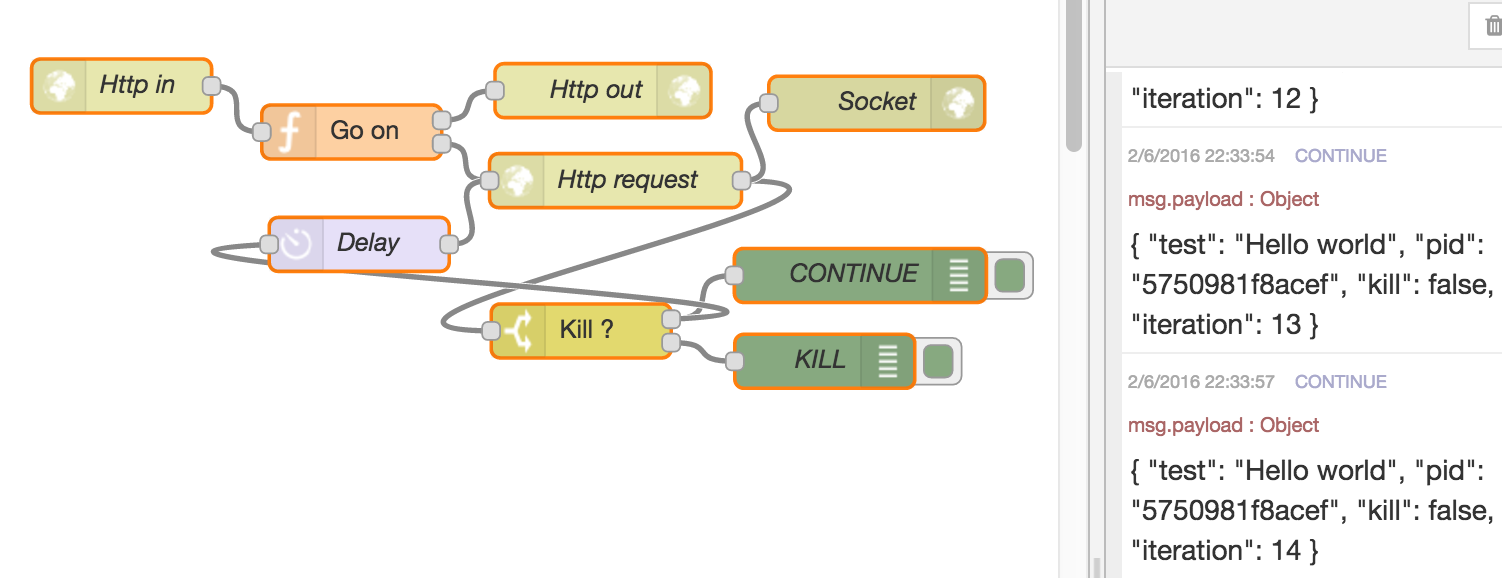
Then you need to install the flows in your NodeRed app.
$ php app/console adadgio:nodered:install --output=/destination/folder
You will need to manually import the flows in your NodeRed app (or use flows directory config in NodeRed settings.js).
Usage
To trigger a loop (or just a delayed message), you need to create a \Payload that node red will send back to the AdagagioGearBundle loop controller (see routing.yml for more info). The controller dispatches an event when it receives back the payload. You can listen to the event and modify the payload to achieve your goal.
use Adadgio\GearBundle\Connector\NodeRed\Payload;

// payload contains 3 initial params you cannot override (pid, kill, iteration)
// and they change automatically during the loop lifecycle
$payload = new Payload();

// add more params
$payload->setParameter('my_name', 'Romain'); // nb: 3 params are here by default

// use the connector to start (trigger) the loop
$this->get('adadgio_gear.nodered.connector')->send('POST', '/adadgio/gear/loop/start', $payload); // @todo pass this more transparently
The loop will never stop until you change the payload kill property. Now listen to the loop callbacks. Nodered will indefinitaly call it unless you kill the payload.
// in some listener, far, far away, a long long time ago
// the listener must listen to "adadgio_gear.nodered.payload_received"
public function onPayloadReceived(\Adadgio\GearBundle\Connector\NodeRed\Event\PayloadEvent $event)
{
    // you might need the request, who knows
    $request = $event->getRequest();

    $payload = $event->Payload();
    // notice iteration changed to +1, pid always stays the same (unless you trigger another process)
    // otherwise you get back the parameters you defined earlier

    // if you wanna stop the flow
    if ($payload->getIteration() > 3) {
        $payload->kill();
    }

    // process... something, or modify your input params at runtime
    $name = $payload->getParameter('my_name');
    $name = ... // change your name!
    $payload->setParameter('my_name', $name);
}
CSV exporter
use Adadgio\GearBundle\Component\Reader\CsvExporter;

$exporter = $this->get('adadgio_gear.csv_exporter')
    ->setName("exportFileName")
    ->setColumns(array('label', 'views'))
    ->setData(array(array('one','two'),array('three','for')))
    ->generate();
CSV reader
use Adadgio\GearBundle\Component\Reader\CsvReader;

$csv = new CsvReader('data/test.csv');

$data = $csv
    ->setDelimiter(';')
    ->read(5, 15) // reads rows from 5 to 15 included (pass null for no limit and offset)
    ->getData();
Entity hydration from data
```php use Adadgio\GearBundle\Component\Hydration\EntityHydrator;$hydrator = new EntityHydrator();
// $data = ... data from the previous example $hydrator ->hydrate('Adadgio\DoctrineDQLBundle\Entity\TestEntity') ->with($data) ->map(0, 'id') // map array column index to entity property ->map(1, 'name');
$entities = $hydrator->getEntities();
</sub>

## <a name="serializer"></a>Serializer

Transform an object in array. Possibilty to transform one object or a collection of objects.

```php
use Adadgio\GearBundle\Component\Serialization\EntitySerializer;

$entities = $em->getRepository('AppBundle:Product')->findAll();

$serializer = $this->get('adadgio_gear.entity_serializer');
$dataSerialized = $serializer->serialize($entitiesÂ);
Others
Starting NodeRed with custom settings file in dev environment (with Ngrok in this case).
# start node red with custom settings and pm2 process manager
pm2 start /usr/local/bin/node-red -- -v --settings=/Library/WebServer/home/symfony/360medical-v3/app/data/nodered/settings.js
adadgio/gear-bundle 适用场景与选型建议
adadgio/gear-bundle 是一款 基于 PHP 开发的 Composer 扩展包,目前已累计 2.54k 次下载、GitHub Stars 达 1, 最近一次更新时间为 2016 年 06 月 06 日, 在 PHP 生态内属于活跃度较高的组件。
我们在过去多个企业项目中使用过 adadgio/gear-bundle 或与其功能相近的方案,如果你在选型或落地过程中遇到问题,例如 版本兼容、二次改造、私有化封装、与内部系统对接、生产 BUG 排查,欢迎联系我们协助评估。
基于 adadgio/gear-bundle 在你已有业务上做功能扩展、字段裁剪、UI 适配、与内部账号 / 权限 / 日志系统的深度对接。
线上偶发问题、内存泄漏、慢查询、并发异常等排查修复;针对高流量场景做缓存、队列、索引层面的调优。
承接完整的项目从需求 → 设计 → 开发 → 上线 → 长期运维;也可按月提供技术保姆服务。
统计信息
- 总下载量: 2.54k
- 月度下载量: 0
- 日度下载量: 0
- 收藏数: 1
- 点击次数: 13
- 依赖项目数: 1
- 推荐数: 0
其他信息
- 授权协议: MIT
- 更新时间: 2016-06-06