adiliogobira/laravel-datagrid
Composer 安装命令:
composer require adiliogobira/laravel-datagrid
包简介
Laravel integration for Grid.js server side processing
README 文档
README

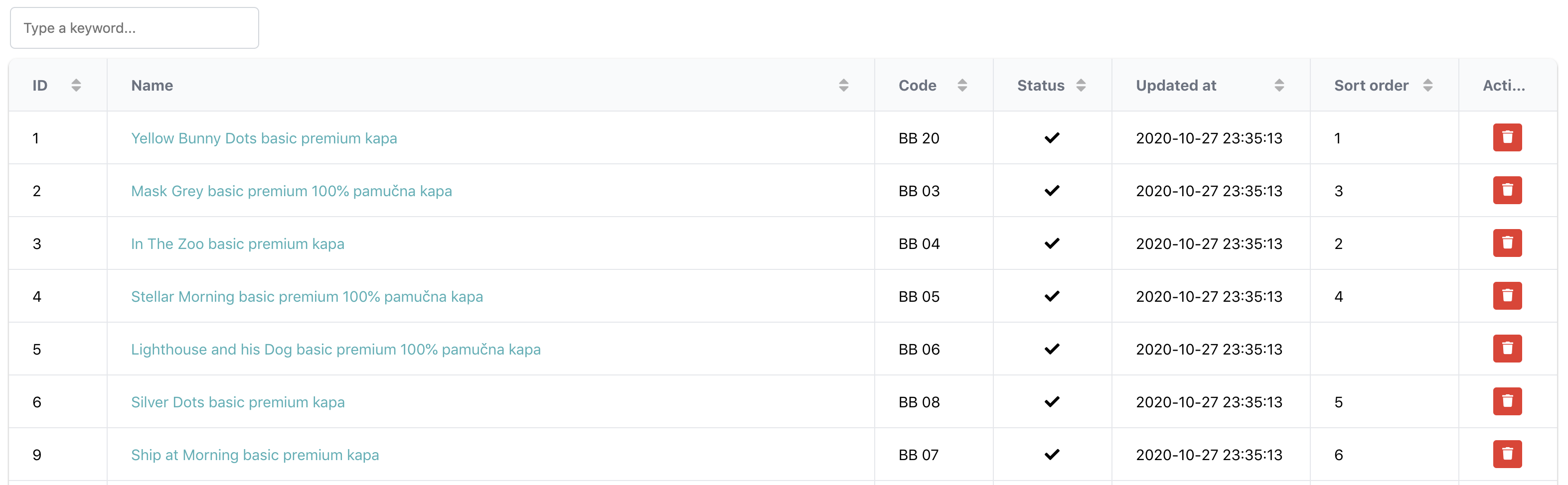
This package is a Laravel integration for the Grid.js. The packages makes it easy to create data-grid for your Laravel application, for example admin panel lists. It covers the basic server side functionalities for Grid.js like search, sorting and pagination.
Installation
You can install the package via composer:
composer require wdev-rs/laravel-datagrid
Install the Vue.js integration:
npm install gridjs-vue
Publish the vendor files by running
php artisan vendor:publish --provider="WdevRs\LaravelDatagrid\LaravelDatagridServiceProvider"
Register the DataGrid fronted Vue.js component by adding the following line to your app.js:
require('./vendor/laravel-datagrid/laravel-datagrid');
Usage
The base of this package is the \WdevRs\LaravelDatagrid\DataGrid\DataGrid class. This class is used to define the
columns and the behavior of the datagrid. While you can use this class directly from the controller, I'll
suggest extending it and create separate classes for each datagrid.
class CategoriesDataGrid extends DataGrid
{

    /**
     * CategoriesDataGrid constructor.
     */
    public function __construct()
    {
        $this->query(Category::query())
            ->column('id', 'ID', null, 50)
            ->column('name', 'Name', function ($category) {
                return view('admin.categories.actions.edit_link', ['category' => $category])->render();
            })
    }
}
Using the query method you can define what should be the base query for the DataGrid. It accepts a Laravel Query Builder object.
The column method is used to define the columns of the DataGrid, the argument are as follows:
id- the name of the field in the databasename- the label which should appear in the DataGrid column headerformatter- optional, callable allows you to format the display of the column. As you can see from the above example probably the most elegant way to do this is to include a blade view and render it.width- optional, the with of the column
When the DataGrid definition is ready, you can add it to the controller:
    public function index(CategoriesDataGrid $dataGrid, Request $request)
    {
        return $dataGrid->render();
    }
If the render method is called without arguments it will use the default view resources/views/vendor/laravel-datagrid/datagrid.blade.php,
or you can pass your own view and include the DataGrid blade file there:
    public function index(CategoriesDataGrid $dataGrid, Request $request)
    {
        return $dataGrid->render('admin.common.index');
    }
Frontend customisations
The frontend component of the DataGrid can be found in the resources/js/vendor/laravel-datagrid/components/DataGrid.vue
By default DataGrid comes with one row action, which is the delete action. This action can be found in the following file:
resources/js/vendor/laravel-datagrid/actions/delete.js
You can extend it with more custom actions by creating them based on the existing one. To add the to the datagrid,
extend the cols definition in the DataGrid.vue:
            cols: this.columns.map((col) => {col.formatter = (cell) => html(cell); return col;}).concat(
                [{
                    name: 'Actions',
                    sort: false,
                    width: 50,
                    formatter: (cell, row) => {
                        return h('div', {className: "text-center"},
                            deleteAction.call(this, row.cells[0].data,row.cells[1].data),
                            yourCustomAction.call(this, row.cells[0].data,row.cells[1].data)
                        )
                    }
                }]
            )
Testing
composer test
Changelog
Please see CHANGELOG for more information what has changed recently.
Contributing
Please see CONTRIBUTING for details.
Security
If you discover any security related issues, please email daniel@wdev.rs instead of using the issue tracker.
Credits
License
The MIT License (MIT). Please see License File for more information.
Laravel Package Boilerplate
This package was generated using the Laravel Package Boilerplate.
统计信息
- 总下载量: 8
- 月度下载量: 0
- 日度下载量: 0
- 收藏数: 0
- 点击次数: 1
- 依赖项目数: 0
- 推荐数: 0
其他信息
- 授权协议: MIT
- 更新时间: 2021-08-27