adrolli/filament-title-with-slug
Composer 安装命令:
composer require adrolli/filament-title-with-slug
包简介
TitleWithSlugInput - Easy Permalink Slugs for the FilamentPHP Form Builder (PHP / Laravel / Livewire)
README 文档
README

"Title With Slug" Input - Easy Permalink Slugs for Filament Forms (PHP / Laravel / Livewire)
This package for FilamentPHP adds the form component TitleWithSlugInput which allows to
edit titles and slugs easily.
It is inspired by the classic WordPress title & slug implementation.
The plugin is fully configurable. You can change all labels, use your own slugifier, use a route() to generate the " View" link, hide the host name, and many more. Read the full documentation
TitleWithSlugInput::make(
    fieldTitle: 'title', // The name of the field in your model that stores the title.
    fieldSlug: 'slug', // The name of the field in your model that will store the slug.
),
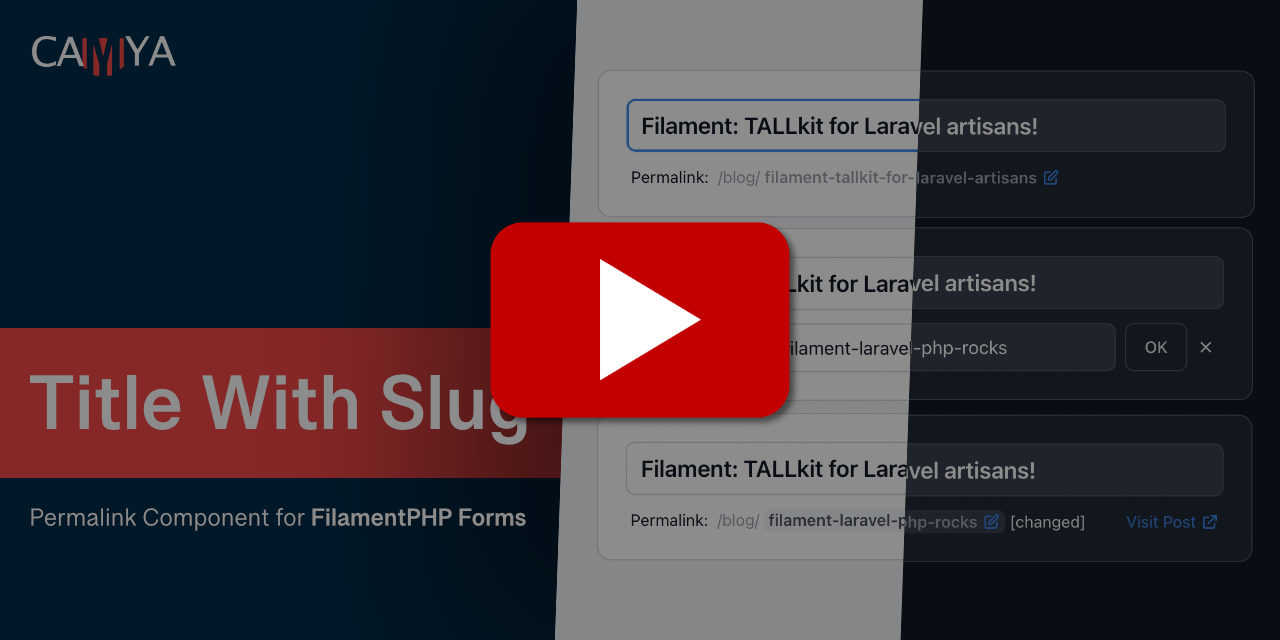
The output looks like this: (Watch » Demo Video «)


Features
- Slug edit form.
- "Visit" link to view the generated URL.
- Auto-generates the slug from the title, if it has not already been manually updated.
- Undo an edited slug.
- All texts customizable and translatable.
- Dark Mode supported.
- Fully configurable, see all available parameters.
Video
You can watch a short demo video of the packages below.
Support us
You can support my work with a donation.
Follow me on Twitter for DEV updates.
Support the package: Please give it a ⭐ Star on GitHub and on the official Filament plugin page, if it's helpful for you.
Visit the plugin's Composer Packagist page (The PHP Package Repository) for the current install count and more.
Table of contents
- Installation
- Usage & examples
- Basic usage - Add TitleWithSlugInput to a Filament Form
- Change model fields names
- Change labels, titles, placeholder
- Permalink preview: Hide host
- Permalink preview: Change host and path
- "Visit" link - Use router to generate URL with route()
- Hide "Visit" link
- Style the "title" input field
- Add extra validation rules for title or slug
- Custom error messages
- Custom unique validation rules for title (and slug)
- Custom slugifier
- Dark Mode
- How to set a empty homepage slug
- Use within a relationship repeater
- Make a URL slug sandwich. (path/slug/path)
- Use the slug as subdomain
- Package config file - Set default values
- All available parameters
- Changelog
- Contributing
- Credits
Installation
You can install the package via composer:
composer require adrolli/filament-title-with-slug
If needed, you can publish the config file with:
php artisan vendor:publish --tag="filament-title-with-slug-config"
Translation
If needed, you can publish the translation files with:
php artisan vendor:publish --tag="filament-title-with-slug-translations"
You'll find the published translations here: trans/vendor/filament-title-with-slug
This package is translated to:
- English (en)
- French (fr)
- Brazilian Portuguese (pt_BR)
- German (de)
- Dutch (nl)
- Indonesian (id)
- Arabic (ar)
You translated it too? Share your translation on our GitHub discussions page.
Usage & examples
Basic usage - Add TitleWithSlugInput to a Filament Form
This package provides the custom InputField TitleWithSlugInput for the Filament Form Builder.
Read the installation details for Filament here.
Below an example, where to put the new field inside your Filament Resource.
fieldTitle: The name of the field in your model that stores the title.fieldSlug: The name of the field in your model that will store the slug.
use Camya\Filament\Forms\Components\TitleWithSlugInput;

class PostResource extends Resource
{
    public static function form(Form $form): Form
    {
        return $form->schema([

            TitleWithSlugInput::make(
                fieldTitle: 'title',
                fieldSlug: 'slug',
            )

        ]);
    }
}
Tip: To occupy the full width, use
TitleWithSlugInput::make()->columnSpan('full').
The output looks like this:
Change model fields names
The package assumes, that you model fields are named title and slug.
You can easily change them according to your needs.
In the example below, the package now uses the database fields name for the title and identifier for the slug.
\Camya\Filament\Forms\Components\TitleWithSlugInput::make(
    fieldTitle: 'name',
    fieldSlug: 'identifier',
)
Change labels, titles, placeholder
It's possible to change all labels on the fly.
In this example, we also add the base path /books/.
\Camya\Filament\Forms\Components\TitleWithSlugInput::make(
    urlPath: '/book/',
    urlVisitLinkLabel: 'Visit Book',
    titleLabel: 'Title',
    titlePlaceholder: 'Insert the title...',
    slugLabel: 'Link:',
)
Tip: You can translate the package completely.
The output looks like this:


Permalink preview: Hide host
You can hide the host part of the permalink preview.
\Camya\Filament\Forms\Components\TitleWithSlugInput::make(
    urlHostVisible: false,
)
The output looks like this:

Permalink preview: Change host and path
You can set the path and the host for the preview.
\Camya\Filament\Forms\Components\TitleWithSlugInput::make(
    urlPath: '/category/',
    urlHost: 'https://project.local',
)
The output looks like this:

"Visit" link - Use router to generate URL with route()
You can use a named route, e.g. route('product.show', ['slug' => $record->slug]), to generated the "Visit" link.
\Camya\Filament\Forms\Components\TitleWithSlugInput::make(
    urlPath: '/product/',
    urlHost: 'camya.com',
    urlVisitLinkRoute: fn(?Model $record) => $record?->slug
        ? route('product.show', ['slug' => $record->slug])
        : null,
)
Laravel documentation: Generating URLs To Named Routes
By default, the package concatenates the strings host + path + slug to generate the "Visit" link.
Because the "Visit" link now is generated by an route, you can use partial hosts like urlHost: 'camya.com' to shorten
the permalink preview.
The output looks like this:

Hide "Visit" link
You can remove the "Visit" link completely.
\Camya\Filament\Forms\Components\TitleWithSlugInput::make(
    urlVisitLinkVisible: false,
)
Style the "title" input field
In order to style the "title" input field, you can pass the attributes class via titleExtraInputAttributes
parameter.
\Camya\Filament\Forms\Components\TitleWithSlugInput::make(
    titleExtraInputAttributes: ['class' => 'italic'],
)
The output looks like this:

Add extra validation rules for title or slug
You can add additional validation rules by passing in the variables titleRules or slugRules.
In addition, a unique validation rule is applied to the slug field automatically. In order to modify the unique rule, read Custom unique validation rules for title (and slug).
\Camya\Filament\Forms\Components\TitleWithSlugInput::make(
    titleRules: [
        'required',
        'string',
        'min:3',
        'max:12',
    ],
)
You can also customize the error messages.
Custom error messages
You can customize the error messages in your EditModel and CreateModel filament resources by adding the $messages member variable.
protected $messages = [
  'data.slug.regex' => 'Invalid Slug. Use only chars (a-z), numbers (0-9), and the dash (-).',
];
Custom unique validation rules for title (and slug)
Unique validation rules can be modified only by using the parameters titleRuleUniqueParameters and
the slugRuleUniqueParameters counterpart.
This is needed in order to set Filament's "ignorable" parameter correctly.
\Camya\Filament\Forms\Components\TitleWithSlugInput::make(
    titleRuleUniqueParameters: [
        'modifyRuleUsing' => fn(Unique $rule) => $rule->where('is_published', 1),
        'ignorable' => fn(?Model $record) => $record,
    ],
)
This array is inserted into the input field's ->unique(...[$slugRuleUniqueParameters]) method.
Read Filament's documentation for the Unique method.
Available array keys:
'ignorable' (Model | Closure)
'modifyRuleUsing' (?Closure)
'ignoreRecord' (bool)
'table' (string | Closure | null)
'column' (string | Closure | null)
Custom slugifier
This package uses Laravel's slugifier, Str::slug(), but it is possible to replace it with one of your own.
The following generates a slug with only the characters a-z and validates them with a regex.
\Camya\Filament\Forms\Components\TitleWithSlugInput::make(
    slugSlugifier: fn($string) => preg_replace( '/[^a-z]/', '', $string),
    slugRuleRegex: '/^[a-z]*$/',
)
Note: You can customize the validation error, see Custom error messages.
Dark Mode
The package supports Filaments dark mode. Dark mode output looks like this:


How to set a empty homepage slug
To set an empty slug, you must first remove the slug's required rule. You can do this by overwriting the slugRules array.
\Camya\Filament\Forms\Components\TitleWithSlugInput::make(
    slugRules: [],
),
In the input field of the component's slug form, use the / character to set the home page.
The
/character is necessary to bypass the auto slug-regenerate that would be triggered if the slug field is an empty string.
The input looks like this:

Use within a relationship repeater
You can use the TitleWithSlugInput inside a repeater with a database relation.
This example uses the Eloquent relationship "Post hasMany FAQEntries".
Read the Laravel Eloquent Relationship and the Filament Repeater docs for details.
\Filament\Forms\Components\Repeater::make('FAQEntries')
    ->relationship()
    ->collapsible()
    ->schema([

        \Camya\Filament\Forms\Components\TitleWithSlugInput::make(
            fieldTitle: 'title',
            fieldSlug: 'slug',
            urlPath: '/faq/',
            urlHostVisible: false,
            titleLabel: 'Title',
            titlePlaceholder: 'Insert FAQ title...'
        )

    ]),
The output looks like this:

Make a URL slug sandwich. (path/slug/path)
It is possible to create a URL with the slug in the middle of the path.
Example: "/books/ slug /detail/"
It is important to add a urlVisitLinkRoute closure to create a correct visit link. Please also read the "urlVisitLinkRoute with named route" documentation.
\Camya\Filament\Forms\Components\TitleWithSlugInput::make(
    urlPath: '/books/',
    urlVisitLinkRoute: fn (?Model $record) => $record?->slug
        ? '/books/'.$record->slug.'/detail'
        : null,
    slugLabelPostfix: '/detail/',
    urlVisitLinkLabel: 'Visit Book Details'
),
The output looks like this:

Use the slug as subdomain
You can use the package to create the subdomain part of a URL with the following setup.
Example: "https:// my-subdomain .camya.com"
It is important to add a urlVisitLinkRoute closure to create a correct visit link. Also, you need to set the name of the Eloquent model field for the subdomain using slugField.
Please also read the "urlVisitLinkRoute with named route" documentation.
\Camya\Filament\Forms\Components\TitleWithSlugInput::make(
    fieldSlug: 'subdomain',
    urlPath: '',
    urlHostVisible: false,
    urlVisitLinkLabel: 'Visit Domain',
    urlVisitLinkRoute: fn (?Model $record) => $record?->slug
        ? 'https://'.$record->slug.'.camya.com'
        : null,
    slugLabel: 'Domain:',
    slugLabelPostfix: '.camya.com',
),
The output looks like this:

Package config file - Set default values
This package comes with some default values that can be easily overridden programmatically.
If you have other defaults, you can publish the configuration file and change them globally.
php artisan vendor:publish --tag="filament-title-with-slug-config"
You'll find the published config here: config/filament-title-with-slug-config.php
The values can be programmatically overridden with: TitleWithSlugInput::make(fieldTitle: 'title')
[
    'field_title' => 'title', // Overwrite with (fieldTitle: 'title')
    'field_slug' => 'slug', // Overwrite with (fieldSlug: 'title')
    'url_host' => env('APP_URL'), // Overwrite with (urlHost: 'https://www.camya.com/')
];
All available parameters
You can call TitleWithSlugInput without parameters, and it will work and use its default values.
In order to set parameters, you use PHP8's Named Arguments syntax.
\Camya\Filament\Forms\Components\TitleWithSlugInput::make(
    fieldTitle: 'title',
    fieldSlug: 'slug',
);
Below is an example with some defaults overridden.
\Camya\Filament\Forms\Components\TitleWithSlugInput::make(

    // Model fields
    fieldTitle: 'title',
    fieldSlug: 'slug',

    // Url
    urlPath: '/blog/',
    urlHost: 'https://www.camya.com',
    urlHostVisible: true,
    urlVisitLinkLabel: 'View',
    urlVisitLinkRoute: fn(?Model $record) => $record?->slug
        ? route('post.show', ['slug' => $record->slug])
        : null,
    urlVisitLinkVisible: true,

    // Title
    titleLabel: 'The Title',
    titlePlaceholder: 'Post Title',
    titleExtraInputAttributes: ['class' => 'italic'],
    titleRules: [
        'required',
        'string',
    ],
    titleRuleUniqueParameters: [
        'callback' => fn(Unique $rule) => $rule->where('is_published', 1),
        'ignorable' => fn(?Model $record) => $record,
    ],
    titleIsReadonly: fn($context) => $context !== 'create',
    titleAutofocus: true,
    titleAfterStateUpdated: function ($state) {},

    // Slug
    slugLabel: 'The Slug: ',
    slugRules: [
        'required',
        'string',
    ],
    slugRuleUniqueParameters: [
        'callback' => fn(Unique $rule) => $rule->where('is_published', 1),
        'ignorable' => fn(?Model $record) => $record,
    ],
    slugIsReadonly: fn($context) => $context !== 'create',
    slugSlugifier: fn($string) => Str::slug($string),
    slugRuleRegex: '/^[a-z0-9\-\_]*$/',
    slugAfterStateUpdated: function ($state) {},
    slugLabelPostfix: null,

)->columnSpan('full'),
Changelog
Please see the release changelog for more information on what has changed recently.
Contributing
Want to implement a feature, fix a bug, or translate this package? Please see contributing for details.
Security Vulnerabilities
Please review our security policy on how to report security vulnerabilities.
Credits
- Andreas Scheibel (camya) (Developer at camya.com / epicbundle.com)
FilamentPHP is based on Laravel, Livewire, AlpineJS, and TailwindCSS. (aka Tall Stack)
This package was inspired by a package by awcodes and the work of spatie. Thanks also to ralphjsmit for his blueprint that I used to implement the Filament Component Pest Tests.
License
The MIT License (MIT). Please see License File for more information.
Tooling - Development tools I use
- PHPStorm IDE (+ Laravel Idea Plugin)
- Laravel with Valet and Lambo
- GitHub Desktop
- Translations with DeepL and LanguageTool
- Markdown TOC Generator
- SVG Icons by Heroicons
- iTerm2 Terminal
- Regex101 - Build, text, debug regex.
- Affinity Photo & Designer
- VSCode
adrolli/filament-title-with-slug 适用场景与选型建议
adrolli/filament-title-with-slug 是一款 基于 PHP 开发的 Composer 扩展包,目前已累计 21.24k 次下载、GitHub Stars 达 5, 最近一次更新时间为 2024 年 09 月 12 日, 在 PHP 生态内属于活跃度较高的组件。
它主要适用于以下技术方向: 「framework」 「slug」 「laravel」 「permalink」 「tailwindcss」 「livewire」 等业务场景。在实际项目中,围绕这些方向常见需要落地的问题包括:接口对接、性能调优、并发安全、与既有框架(Laravel / ThinkPHP / Yii / Webman 等)的兼容适配,以及生产环境的日志埋点与稳定性保障。
我们在过去多个企业项目中使用过 adrolli/filament-title-with-slug 或与其功能相近的方案,如果你在选型或落地过程中遇到问题,例如 版本兼容、二次改造、私有化封装、与内部系统对接、生产 BUG 排查,欢迎联系我们协助评估。
基于 adrolli/filament-title-with-slug 在你已有业务上做功能扩展、字段裁剪、UI 适配、与内部账号 / 权限 / 日志系统的深度对接。
线上偶发问题、内存泄漏、慢查询、并发异常等排查修复;针对高流量场景做缓存、队列、索引层面的调优。
承接完整的项目从需求 → 设计 → 开发 → 上线 → 长期运维;也可按月提供技术保姆服务。
与 adrolli/filament-title-with-slug 相关的其它包
同方向 / 同关键字的高下载量 PHP Composer 包推荐,方便对比选型:
PHP Framework HLEB2 is the foundation of the web application. Provides ease of development and application performance.
TitleWithSlugInput - Easy Permalink Slugs for the FilamentPHP Form Builder (PHP / Laravel / Livewire)
Adds slugify twig extensions to your craft install.
A library to extend Object capabilities.
A Laravel Filament Forms slug field.
Alfabank REST API integration
统计信息
- 总下载量: 21.24k
- 月度下载量: 0
- 日度下载量: 0
- 收藏数: 5
- 点击次数: 29
- 依赖项目数: 0
- 推荐数: 0
其他信息
- 授权协议: MIT
- 更新时间: 2024-09-12