adswerve/google-analytics-and-adwords
Composer 安装命令:
composer require adswerve/google-analytics-and-adwords
包简介
This TYPO3 extension installs gtag so you can use google analytics and google ads
README 文档
README
This Typo3 Extension provides an interface to implement Google Analytics and Google Ads by natively using gtag library. With this extension you can implement Universal Analytics, Google Analytics 4, and Google Ads together.
Code Repository: https://github.com/adswerve/google_analytics_and_adwords
Extension key: "google_analytics_and_adwords"
Contact
Requirements
- You have a Typo3 site up and running prior to extension installation
- You are using Typo3 version 10.4 - 10.9
- You have created a Google Analytics Account and created a Google Analytics Property.
- It is recommended to use the New Google Analytics (GA4) instead of the Universal Analytics property.
- To use the New Google Analytics (GA4) with this extension, follow this guide to make sure you have your Measurement ID (ex. G-XXXXXX)
- You can still use the [Universal Analytics] (https://support.google.com/analytics/answer/10269537) properties as well. You'll need to have your Tracking ID created. (ex. UA-XXXXXXX)
Compatible with
- 10.4-10.9|11.5.0
Installations
Composer
To follow this documentation, you must have TYPO3 up-and-running. Check out the [link text “Installation & upgrade guide”]: https://docs.typo3.org/m/typo3/guide-installation/master/en-us/QuickInstall/Composer/Index.html#install-via-composer for how to setup a TYPO3 installation with Composer
The system extensions extbase and fluid are required.
composer require adswerve/google-analytics-and-adwords
To install this extension by cloning the source, open the terminal and go to the directory typo3conf/ext/ and enter:
git clone https://github.com/adswerve/google_analytics_and_adwords.git .
To install this extension by downloading the source, open the url Extension Builder. There you can download a ZIP file, which you can import directly into the Extension Manager. Alternatively you copy the unpacked extension folder to the directory typo3conf/ext/. Then you can use the Extension Manager to activate the Extension Builder.
TER
- To download the extension with TER
a. Extension Manager
i. As a user with admin rights, navigate to the Extensions module.
i. In the select box, navigate to the Get Extensions sub-module.
iii. Click on "Update now“
iv. Enter the key google_analytics_and_adwords in the search field.
v. Click the cloud icon in the hit list to import and install the extension.
b. From the TYPO3 Extension Repository (https://extensions.typo3.org/)
i. Search for the key google_analytics_and_adwords
ii. Download the ZIP file.
iii. Unpack the ZIP file and move the content into the TYPO3 extension directory (typo3conf/ext/).
iv. Navigate in the TYPO3 Backend as a user with admin rights into the module Extensions.
v. Look for the extension google_analytics_and_adwords
vi. Click on the cube icon with the plus to install the extension
-
After successfully downloading the extension in step 1, go to "List" Modules within your Typo3 backend. a. Create a Sys Folder within any of your folders containing data and name it "Services"
i. I arbitrarily used my "Shared Content" folder but you could use any folder.

-
After Creating your Services folder, right click on the folder and enable it

-
To enter your Measurement ID(GA4) or Tracking ID(UA). Click the "+" icon to create a record to store your Measurement ID.
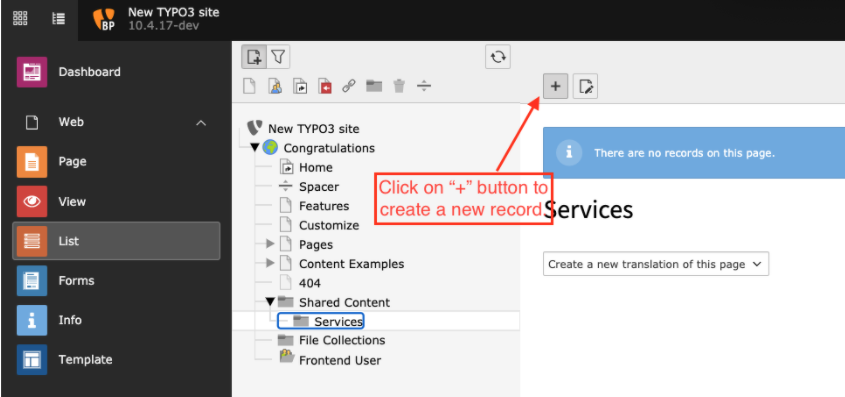
-
Find the "Global Site Tag (gtag.js) and click on Service.

-
Enter your ID and Click Save Depending on your service (GA4, UA, Google Ads), you'll need to make sure you enter the correct format.

-
Click Close
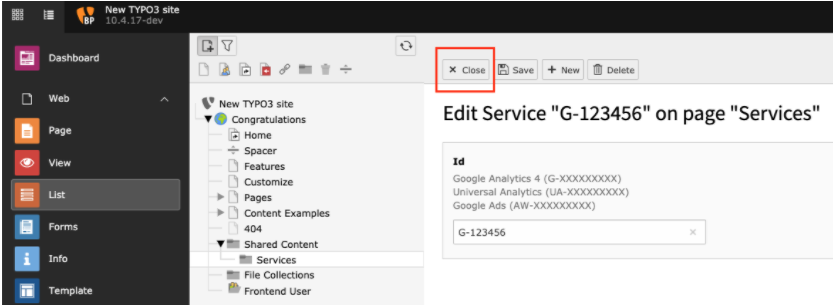
-
You now have stored your ID, this record is added into a relational database and will be referenced when adding the plugin to any page you want to track.
-
After activating the extension (and clearing the cache), the plugin can be inserted on a page. Don’t forget to set the sys_folder, where the services are stored as the starting point. This can be done at the end of the plugin entry form in the backend and globally in the page configuration TSConfig:
TCEFORM.tt_content.pages.PAGE_TSCONFIG_ID = 3
Note: Your PID may not be 3, you need to look at where your Services folder is by clicking into the folder and look at the top right.
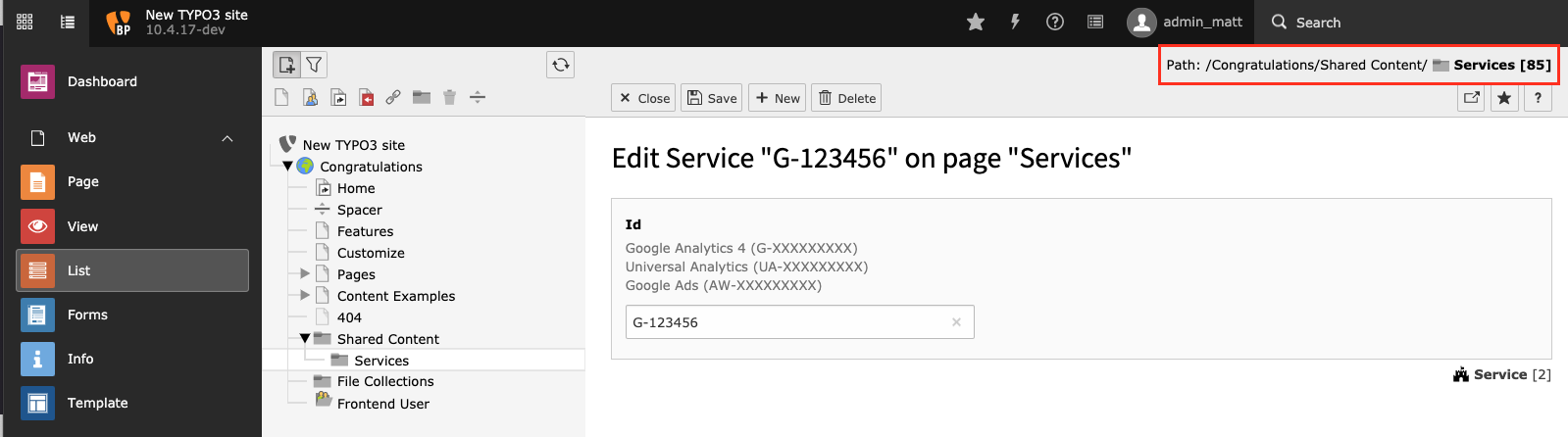
You must add this plugin to all pages within your website.
Version
v1.0
adswerve/google-analytics-and-adwords 适用场景与选型建议
adswerve/google-analytics-and-adwords 是一款 基于 PHP 开发的 Composer 扩展包,目前已累计 246 次下载、GitHub Stars 达 1, 最近一次更新时间为 2021 年 06 月 28 日, 在 PHP 生态内属于活跃度较高的组件。
它主要适用于以下技术方向: 「typo3」 「googleanalytics」 「gtag」 「GoogleAds」 「GoogleAnalytics4」 「UniversalAnalytics」 等业务场景。在实际项目中,围绕这些方向常见需要落地的问题包括:接口对接、性能调优、并发安全、与既有框架(Laravel / ThinkPHP / Yii / Webman 等)的兼容适配,以及生产环境的日志埋点与稳定性保障。
我们在过去多个企业项目中使用过 adswerve/google-analytics-and-adwords 或与其功能相近的方案,如果你在选型或落地过程中遇到问题,例如 版本兼容、二次改造、私有化封装、与内部系统对接、生产 BUG 排查,欢迎联系我们协助评估。
基于 adswerve/google-analytics-and-adwords 在你已有业务上做功能扩展、字段裁剪、UI 适配、与内部账号 / 权限 / 日志系统的深度对接。
线上偶发问题、内存泄漏、慢查询、并发异常等排查修复;针对高流量场景做缓存、队列、索引层面的调优。
承接完整的项目从需求 → 设计 → 开发 → 上线 → 长期运维;也可按月提供技术保姆服务。
与 adswerve/google-analytics-and-adwords 相关的其它包
同方向 / 同关键字的高下载量 PHP Composer 包推荐,方便对比选型:
Google Universal Analytics tracking code for Silverstripe
WordPress plugin to add Google's global site tag (gtag.js) to your site, the modern way.
Set Links with a specific language parameter
Google Tag Manager with new Google Analytics 4 for OXID eShop v6
Google UA, GA4 and GTM integration
TYPO3 CMS extension to create gallery content element with preset crop ratios and pagination
统计信息
- 总下载量: 246
- 月度下载量: 0
- 日度下载量: 0
- 收藏数: 2
- 点击次数: 15
- 依赖项目数: 0
- 推荐数: 0
其他信息
- 授权协议: GPL-2.0
- 更新时间: 2021-06-28