aimeos/aimeos-typo3
Composer 安装命令:
composer require aimeos/aimeos-typo3
包简介
Professional, full-featured and high performance TYPO3 e-commerce extension for online shops and complex B2B projects
README 文档
README
Aimeos TYPO3 extension
⭐ Star us on GitHub — it motivates us a lot!
Aimeos is THE professional, full-featured and high performance e-commerce extension for TYPO3! You can install it in your existing TYPO3 web site within 5 minutes and can adapt, extend, overwrite and customize anything to your needs.

Table Of Contents
Installation
This document is for the latest Aimeos TYPO3 25.10 release and later.
- Stable release: 26.04 (TYPO3 13/14 LTS)
- LTS release: 25.10 (TYPO3 12/13 LTS)
Composer
Note: composer 2.2+ is required!
The latest TYPO3 version can be installed via composer. This is especially useful, if you want to create new TYPO3 installations automatically or play with the latest code. You need to install the composer package first, if it isn't already available:
php -r "readfile('https://getcomposer.org/installer');" | php -- --filename=composer
To install the TYPO3 base distribution first, execute this command:
composer create-project typo3/cms-base-distribution myshop
# or install a specific TYPO3 version:
composer create-project "typo3/cms-base-distribution:^13" myshop
It will install TYPO3 into the ./myshop/ directory. Change into the directory and install TYPO3 using:
./vendor/bin/typo3 setup
Open the TYPO3 URL in your browser and follow the setup steps. Afterwards, install the Aimeos extension using:
composer req -W aimeos/aimeos-typo3:~25.10
If composer complains that one or more packages can't be installed because the required minimum stability isn't met, add this to your composer.json:
"minimum-stability": "dev",
"prefer-stable": true,
If you want a more or less working installation out of the box for new installations, you can install the Bootstrap package too:
composer req bk2k/bootstrap-package
Note: Remember to create a root page and a root template, which includes the Bootstrap package templates! (See also below.)
Finally, depending on your TYPO3 version, run the following commands from your installation directory:
php ./vendor/bin/typo3 extension:setup
php ./vendor/bin/typo3 aimeos:setup --option=setup/default/demo:1
If you don't want to add the Aimeos demo data, you should remove --option=setup/default/demo:1 from the Aimeos setup command.
If you experience any errors with the database, please check the Database Setup section below.
DDev
Note: Installation instructions for TYPO3 with ddev or Colima can be found here:
TYPO3 with ddev or colima
TER Extension
If you want to install Aimeos into a traditionally installed TYPO3 ("legacy installation"), the Aimeos extension from the TER is recommended. You can download and install it directly from the Extension Manager of your TYPO3 instance.
- Log into the TYPO3 backend
- Click on "Admin Tools::Extensions" in the left navigation
- Click the icon with the little plus sign left from the Aimeos list entry

Afterwards, you have to execute the update script of the extension to create the required database structure:
- Click on "Admin Tools::Upgrade"
- Click "Run Upgrade Wizard" in the "Upgrade Wizard" tile
- Click "Execute"

Aimeos Distribution
For new TYPO3 installations, there is a 1-click Aimeos distribution available, too. Choose the Aimeos distribution from the list of available distributions in the Extension Manager and you will get a completely set up shop system including demo data for a quick start.
TYPO3 Setup
Security
Since TYPO3 9.5.14+ implements SameSite cookie handling and restricts when browsers send cookies to your site. This is a problem when customers are redirected from external payment provider domain. Then, there's no session available on the confirmation page. To circumvent that problem, you need to set the configuration option cookieSameSite to None in your ./typo3conf/LocalConfiguration.php or ./config/system/settings.php:
    'FE' => [
        'cookieSameSite' => 'None'
    ]
Site Setup
TYPO3 10+ requires a site configuration which you have to add in "Site Management" > "Sites" available in the left navigation. When creating a root page (a page with a globe icon), a basic site configuration is automatically created (see below at Go to the Import View).
Page Setup
Download the Aimeos Page Tree file
The page setup for an Aimeos web shop is easy, if you import the example page tree for TYPO3 10/11. You can download the version you need from here:
- 25.10+ page tree and later
- 24.10 page tree
Note: The Aimeos layout expects Bootstrap providing the grid layout!
In order to upload and install the file, follow the following steps:
Go to the Import View
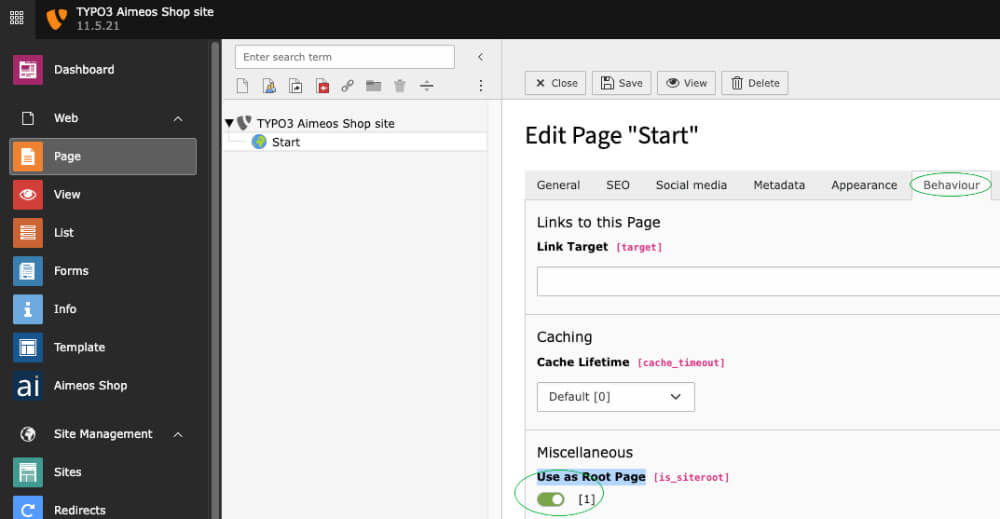
Note: It is recommended to import the Aimeos page tree to a page that is defined as "root page". To create a root page, simply create a new page and, in the "Edit page properties", activate the "Use as Root Page" option under "Behaviour". The icon of the root page will change to a globe. This will also create a basic site configuration. Don't forget to also create a typoscript root template and include the bootstrap templates with it!
- In "Web::Page", right-click on the root page (the one with the globe)
- Click on "More options..."
- Click on "Import"

Upload the page tree file
- In the page import dialog
- Select the "Upload" tab (2nd one)
- Click on the "Select" dialog
- Choose the T3D file you've downloaded
- Press the "Upload files" button

Import the page tree
- In Import / Export view
- Select the uploaded file from the drop-down menu
- Click on the "Preview" button
- The pages that will be imported are shown below
- Click on the "Import" button that has appeared
- Confirm to import the pages

Now you have a new page "Shop" in your page tree including all required sub-pages.
SEO-friendly URLs
TYPO3 9.5 and later can create SEO friendly URLs if you add the rules to the site config: https://aimeos.org/docs/latest/typo3/setup/#seo-urls
License
The Aimeos TYPO3 extension is licensed under the terms of the GPL Open Source license and is available for free.
Links
aimeos/aimeos-typo3 适用场景与选型建议
aimeos/aimeos-typo3 是一款 基于 PHP 开发的 Composer 扩展包,目前已累计 93.99k 次下载、GitHub Stars 达 1.53k, 最近一次更新时间为 2016 年 06 月 08 日, 在 PHP 生态内属于活跃度较高的组件。
它主要适用于以下技术方向: 「shop」 「ecommerce」 「e-commerce」 「typo3」 「portal」 「market place」 等业务场景。在实际项目中,围绕这些方向常见需要落地的问题包括:接口对接、性能调优、并发安全、与既有框架(Laravel / ThinkPHP / Yii / Webman 等)的兼容适配,以及生产环境的日志埋点与稳定性保障。
我们在过去多个企业项目中使用过 aimeos/aimeos-typo3 或与其功能相近的方案,如果你在选型或落地过程中遇到问题,例如 版本兼容、二次改造、私有化封装、与内部系统对接、生产 BUG 排查,欢迎联系我们协助评估。
基于 aimeos/aimeos-typo3 在你已有业务上做功能扩展、字段裁剪、UI 适配、与内部账号 / 权限 / 日志系统的深度对接。
线上偶发问题、内存泄漏、慢查询、并发异常等排查修复;针对高流量场景做缓存、队列、索引层面的调优。
承接完整的项目从需求 → 设计 → 开发 → 上线 → 长期运维;也可按月提供技术保姆服务。
与 aimeos/aimeos-typo3 相关的其它包
同方向 / 同关键字的高下载量 PHP Composer 包推荐,方便对比选型:
Implementation of the Omnibus Directive for Sylius application.
Nevogate Payment Gateway SDK
Livewire starter kit for Lunar e-commerce.
Admin Hub for GetCandy. A modern headless e-commerce solution for Laravel PHP framework.
Dealing with payments through the Egyptian payment gateway PayMob
Submodule for SilverShop which allows you to compare products in a table.
统计信息
- 总下载量: 93.99k
- 月度下载量: 0
- 日度下载量: 0
- 收藏数: 1527
- 点击次数: 47
- 依赖项目数: 4
- 推荐数: 1
其他信息
- 授权协议: LGPL-3.0-or-later
- 更新时间: 2016-06-08