andreia/filament-ui-switcher
Composer 安装命令:
composer require andreia/filament-ui-switcher
包简介
Add a modal with options to switch between different UI layouts and styles (colors, fonts, font sizes).
README 文档
README
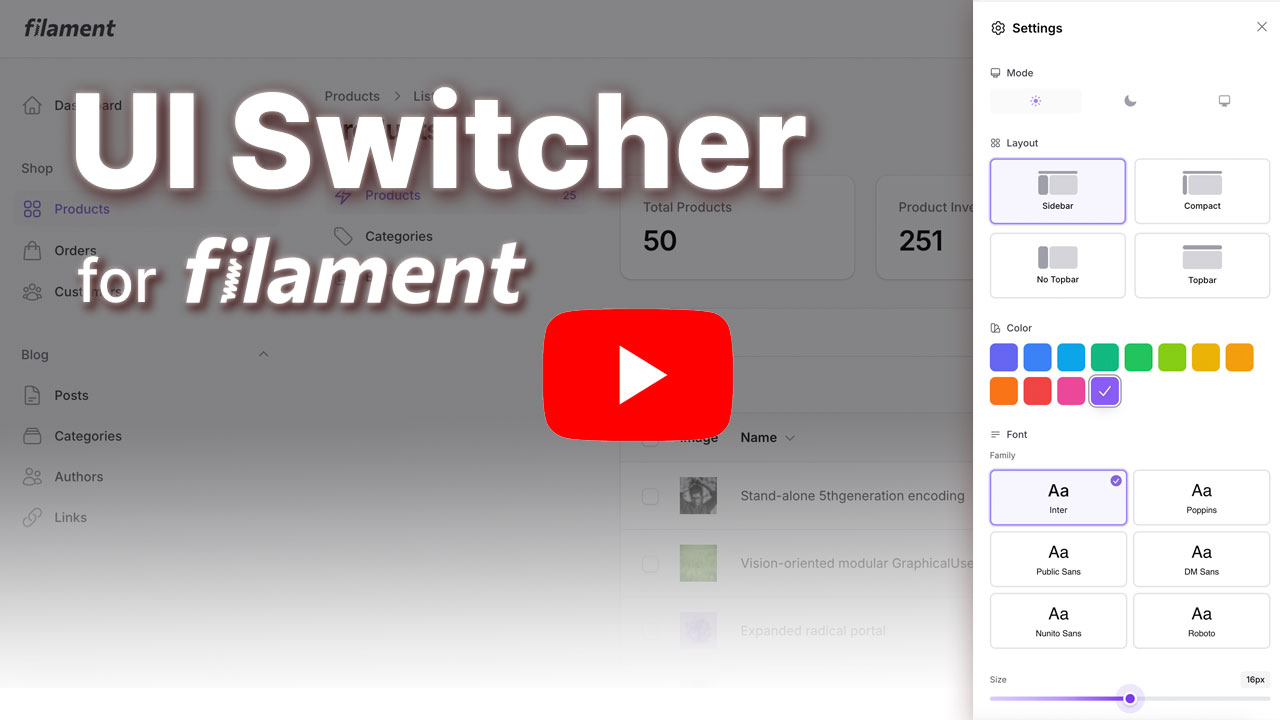
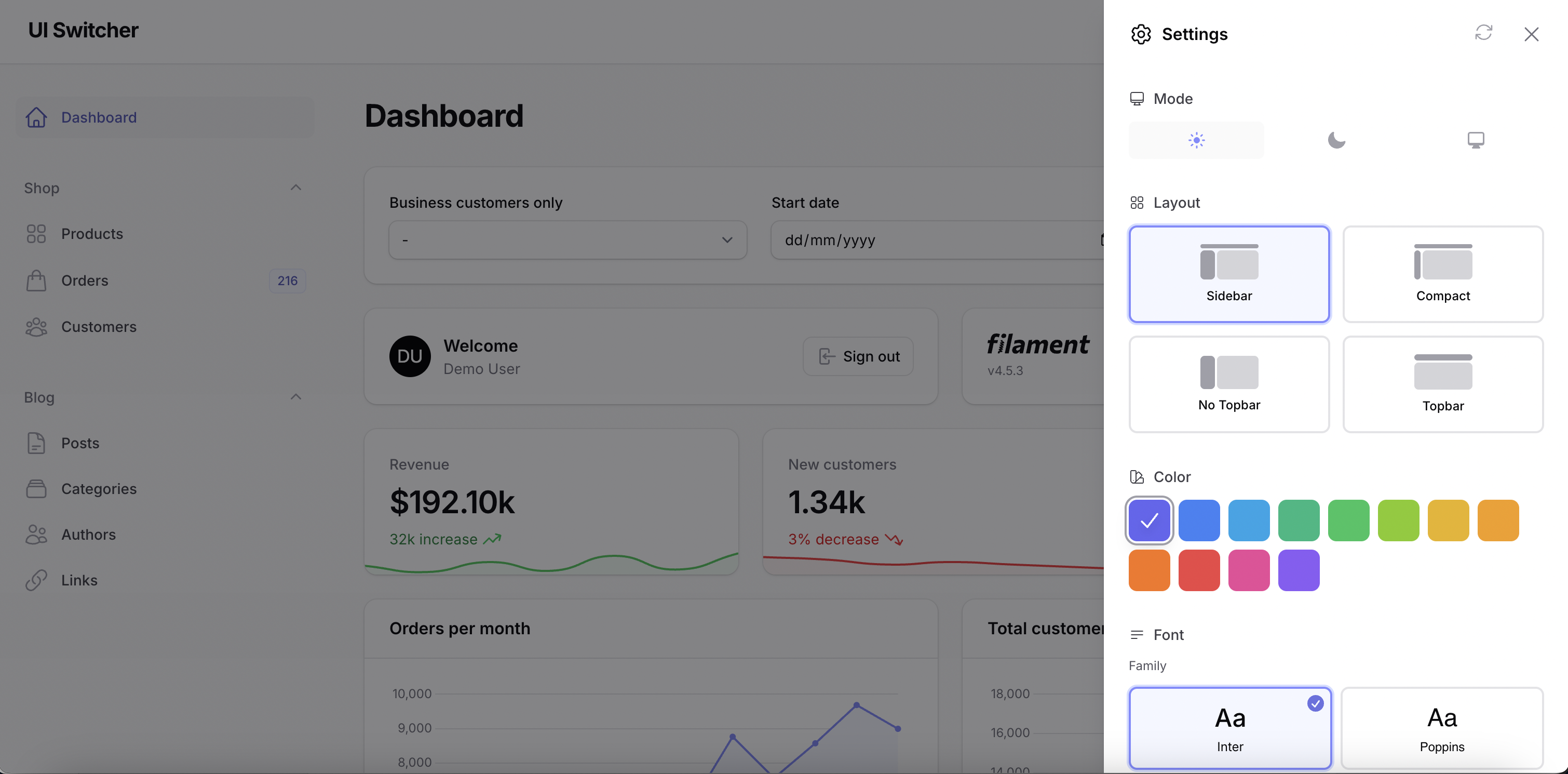
Switch between the available Filament layouts with a customizable UI settings slideover modal accessible from a ⚙️ icon in the topbar.
Features
Customization Options:
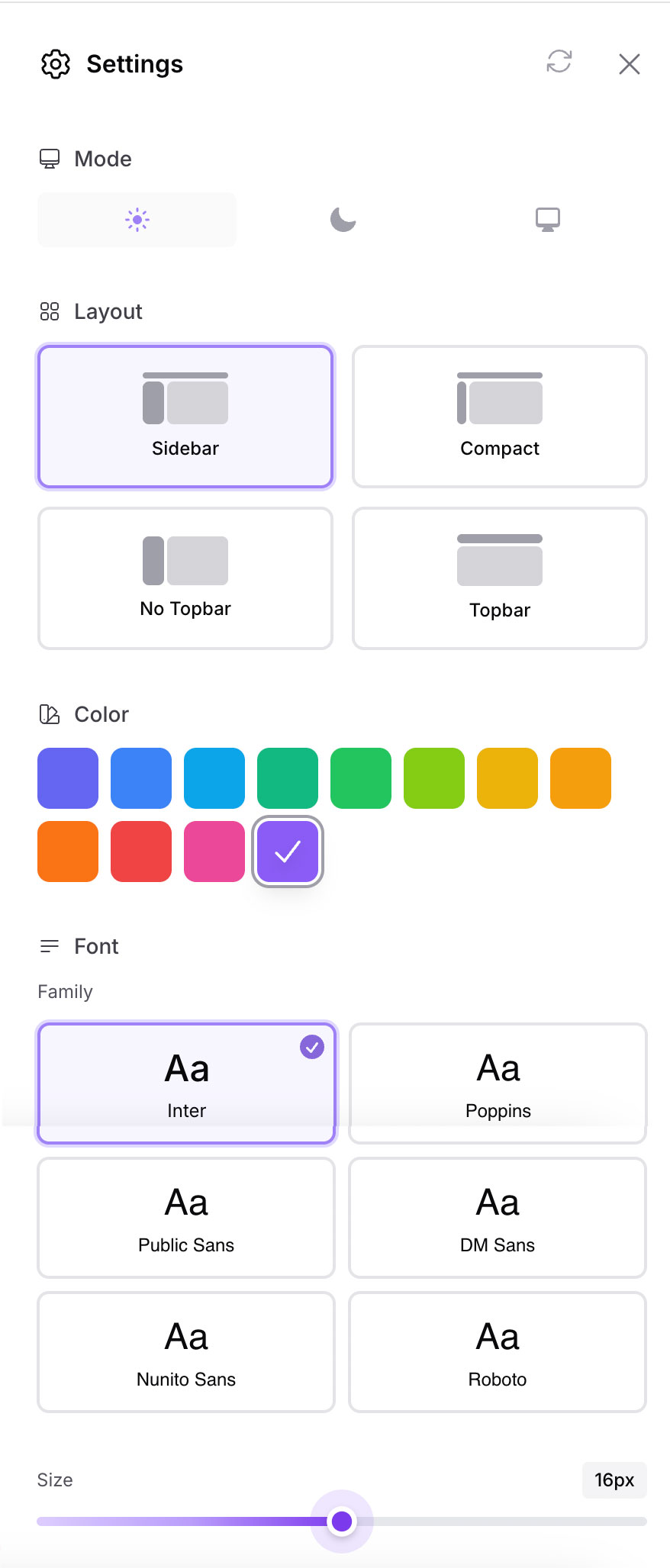
- Primary Color - Choose from the predefined colors or add your custom colors
- Font Family - Select from 6 popular Google Fonts (Inter, Poppins, Roboto, DM Sans, Nunito Sans, Public Sans)
- Font Size - Adjust base font size (12-20px)
- Layout - Switch between Sidebar, Compact Sidebar, and Topbar navigation
- Mode (optional) - Display Filament's mode switcher (dark, light, and system)
- Reset All - Quickly reset all customizations to default values with a single click
Storage Options:
- Session Storage (default) - Preferences stored in user session
- Database Storage - Persist preferences per user in database
Requirements
- PHP 8.2 or higher
- Laravel 11.x or 12.x
- Filament 4.1+ or 5.x
- Livewire 3.x or 4.x
Note: While the plugin technically works with Filament 4.0, the "No Topbar" layout option requires Filament 4.1+. Other layout options work on all Filament 4.x versions.
Installation
1. Install via Composer
composer require andreia/filament-ui-switcher
The package will auto-register via Laravel's package discovery.
2. Publish Assets
This package uses Filament's asset management system. After installing, you need to publish the assets:
php artisan filament:assets
This will publish the CSS assets to public/css/andreia/filament-ui-switcher/ where they will be automatically loaded by Filament and cached by your browser for better performance.
Note: If you update the package, run
php artisan filament:assetsagain to get the latest assets.
3. Publish Config
You can customize the colors, fonts, and more with the config file:
# Publish config
php artisan vendor:publish --tag=filament-ui-switcher-config

# Publish translations
php artisan vendor:publish --tag=filament-ui-switcher-translations
This will create a config/ui-switcher.php file where you can customize:
Default Preferences:
'defaults' => [
    'font' => 'Inter',           // Default font family
    'color' => '#6366f1',      // Default primary color
    'layout' => 'sidebar',       // Default layout
    'font_size' => 16,           // Default font size in pixels
    'density' => 'default',      // Default UI density
],
Available Fonts: Add or remove Google Fonts from the font picker:
'fonts' => [
    'Inter',
    'Poppins',
    'Public Sans',
    'DM Sans',
    'Nunito Sans',
    'Roboto',
    // Add any Google Font you want:
    // 'Montserrat',
    // 'Open Sans',
],
Custom Colors: Customize the color palette shown in the color picker:
'custom_colors' => [
    '#6366f1', '#3b82f6', '#0ea5e9', '#10b981',
    '#22c55e', '#84cc16', '#eab308', '#f59e0b',
    '#f97316', '#ef4444', '#ec4899', '#8b5cf6',
    // Add your brand colors:
    // '#yourBrandColor',
],
Custom UI icon: Customize the UI icon modal trigger:
'icon' => 'heroicon-o-cog-6-tooth',
Font Size Range: Set the min and max values for the font size slider:
'font_size_range' => [
    'min' => 12,  // Minimum font size in pixels
    'max' => 20,  // Maximum font size in pixels
],
Available Layouts: Control which layout options are available to users:
'layouts' => [
    'sidebar',               // Full sidebar with icons and labels
    'sidebar-collapsed',     // Collapsed sidebar (icons only)
    'sidebar-no-topbar',     // Sidebar without topbar (Filament v4.1+)
    'topbar',                // Top navigation bar
],
3. Publish View (Optional)
If you want to customize the view:
# Publish view (optional)
php artisan vendor:publish --tag=filament-ui-switcher-views
4. Register the Plugin
Add the plugin to your Filament Panel Provider (e.g., app/Providers/Filament/AdminPanelProvider.php):
use Andreia\FilamentUiSwitcher\FilamentUiSwitcherPlugin;

public function panel(Panel $panel): Panel
{
    return $panel
        ->id('admin')
        ->path('admin')
        // ... other config
        ->plugin(FilamentUiSwitcherPlugin::make());
}
Customize Icon Position
By default, the settings icon appears before the user menu (USER_MENU_BEFORE) on topbar. You can customize where the icon appears using any Filament render hook:
use Andreia\FilamentUiSwitcher\FilamentUiSwitcherPlugin;
use Filament\View\PanelsRenderHook;

->plugin(
    FilamentUiSwitcherPlugin::make()
        ->iconRenderHook(PanelsRenderHook::TOPBAR_END)
)
Available render hooks for the icon:
PanelsRenderHook::USER_MENU_BEFORE(default) - Before the user menuPanelsRenderHook::USER_MENU_AFTER- After the user menuPanelsRenderHook::TOPBAR_START- Start of topbarPanelsRenderHook::TOPBAR_END- End of topbarPanelsRenderHook::GLOBAL_SEARCH_BEFORE- Before global searchPanelsRenderHook::GLOBAL_SEARCH_AFTER- After global search- Or any custom render hook you've defined
Enable Mode Switcher (Optional)
By default, the mode switcher is hidden. If you want to include Filament's native mode switcher (to switch between light, dark, and system) in the settings modal, enable it using the ->withModeSwitcher() method:
->plugin(
    FilamentUiSwitcherPlugin::make()
        ->withModeSwitcher()
)
5. Add the UI switcher path in your theme file
Filament recommends developers create a custom theme to better support plugin's additional TailwindCSS classes. After you have created your custom theme, add the UI swicher vendor directory to your theme's theme.css file usually located in resources/css/filament/admin/theme.css:
/* ... */

@source '../../../../vendor/andreia/filament-ui-switcher';
and execute:
npm run build
That's it! A ⚙️ settings icon will now appear in your topbar.
Appearance
Usage
Resetting Preferences
The settings modal includes a reset button in the header that allows users to quickly restore all customizations to their default values. When clicked, it will reset:
- Primary color
- Font family
- Font size
- Layout
- Mode (dark/light/system)
All preferences will be restored to the values defined in your config/ui-switcher.php file under the defaults key.
Configuration
The config file (config/ui-switcher.php) allows you to choose storage driver:
return [
    /*
    |--------------------------------------------------------------------------
    | Storage Driver
    |--------------------------------------------------------------------------
    | Where to store UI preferences.
    | Options: 'session' (default), 'database'
    */
    'driver' => 'session',

    /*
    |--------------------------------------------------------------------------
    | Database Column
    |--------------------------------------------------------------------------
    | Only used if driver = 'database'.
    | The column on the users table where preferences are stored as JSON.
    */
    'database_column' => 'ui_preferences',
];
Database Storage (Optional)
If you want to persist preferences per user across sessions and devices:
Step 1: Publish and Run Migration
php artisan vendor:publish --tag=filament-ui-switcher-migrations
php artisan migrate
This adds a ui_preferences JSON column to your users table.
Step 2: Add HasUiPreferences Trait to User Model
Update your User model adding the HasUiPreferences trait and a 'ui_preferences' => 'array' cast, like so:
use Andreia\FilamentUiSwitcher\Models\Traits\HasUiPreferences;

class User extends Authenticatable
{
    use HasUiPreferences;

    protected function casts(): array
    {
        return [
            // ...
            'ui_preferences' => 'array',
        ];
    }
}
Step 3: Update Config
Set the driver to database in config/ui-switcher.php:
'driver' => 'database',
Now preferences are saved per-user and persist across logins!
Programmatic Access
You can also access and modify preferences programmatically:
use Andreia\FilamentUiSwitcher\Support\UiPreferenceManager;

// Get a preference
$font = UiPreferenceManager::get('ui.font', 'Inter');

// Set a preference
UiPreferenceManager::set('ui.color', '#10b981');
If using database storage with the HasUiPreferences trait:
// Get user's preference
$font = auth()->user()->getUiPreference('ui.font', 'Inter');

// Set user's preference
auth()->user()->setUiPreference('ui.color', '#10b981');
Testing
composer test
Changelog
Please see CHANGELOG for more information on what has changed recently.
Contributing
Contributions are welcome! Please feel free to submit a Pull Request.
Security
If you discover any security related issues, please email andreiabohner@gmail.com instead of using the issue tracker.
Credits
License
The MIT License (MIT). Please see License File for more information.
Made with ❤️ for the Filament community
andreia/filament-ui-switcher 适用场景与选型建议
andreia/filament-ui-switcher 是一款 基于 PHP 开发的 Composer 扩展包,目前已累计 6.28k 次下载、GitHub Stars 达 24, 最近一次更新时间为 2025 年 11 月 02 日, 在 PHP 生态内属于活跃度较高的组件。
它主要适用于以下技术方向: 「ui」 「layout」 「laravel」 「dashboard」 「switcher」 「customization」 等业务场景。在实际项目中,围绕这些方向常见需要落地的问题包括:接口对接、性能调优、并发安全、与既有框架(Laravel / ThinkPHP / Yii / Webman 等)的兼容适配,以及生产环境的日志埋点与稳定性保障。
我们在过去多个企业项目中使用过 andreia/filament-ui-switcher 或与其功能相近的方案,如果你在选型或落地过程中遇到问题,例如 版本兼容、二次改造、私有化封装、与内部系统对接、生产 BUG 排查,欢迎联系我们协助评估。
基于 andreia/filament-ui-switcher 在你已有业务上做功能扩展、字段裁剪、UI 适配、与内部账号 / 权限 / 日志系统的深度对接。
线上偶发问题、内存泄漏、慢查询、并发异常等排查修复;针对高流量场景做缓存、队列、索引层面的调优。
承接完整的项目从需求 → 设计 → 开发 → 上线 → 长期运维;也可按月提供技术保姆服务。
与 andreia/filament-ui-switcher 相关的其它包
同方向 / 同关键字的高下载量 PHP Composer 包推荐,方便对比选型:
A short description of what your package does
Scout support for MoonShine
Listener to change layout for different module
Production-ready Laravel Prometheus metrics package with built-in collectors for HTTP, database, cache, queue, events, errors, filesystem, and mail monitoring
Flexible Content & Repeater Fields for Laravel Nova.
Laravel Package for integrating Tabler template and this package is Laravel Mix friendly.
统计信息
- 总下载量: 6.28k
- 月度下载量: 0
- 日度下载量: 0
- 收藏数: 24
- 点击次数: 40
- 依赖项目数: 0
- 推荐数: 0
其他信息
- 授权协议: MIT
- 更新时间: 2025-11-02