anza-eve/seat-ipb-connector
Composer 安装命令:
composer require anza-eve/seat-ipb-connector
包简介
A SeAT plugin which maintain user access on Invision Power Board forum software based on defined pattern.
README 文档
README
A SeAT plugin which maintain user access on an Invision Community forum based on defined pattern.
Setup
Create Application
- Go to your forum Admin CP and navigate to the
REST & OAuthpage. Create a new API Key by clicking theCreate Newbutton on the API Keys tab. - Give it a reference name; so user will be able to know what it is related to later.
- Fill in the endpoint permissions, enabling
accessnext to the required groups and members endpoints as shown: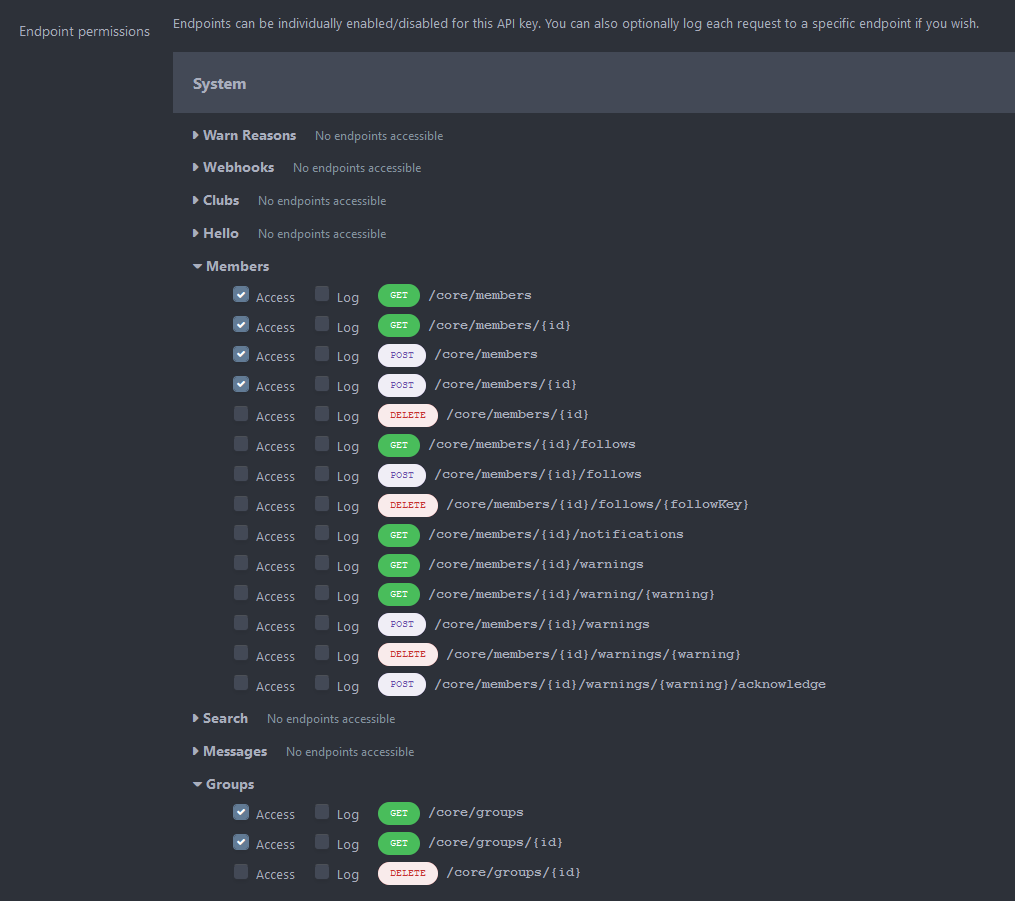
- Once done, click on the
Saveat the bottom of the form.

Install Package
Since SeAT 3.0 - it's become super easy to install package. Just require anza-eve/seat-ipb-connector, publish vendor and run migrations scripts :)
- Firstly, run the following command
composer require anza-eve/seat-ipb-connector. - Then, publish vendors
php artisan vendor:publish --force(this will show you a prompt - input the number related to the following lineAnza\Seat\Connector\Ipb\IpbConnectorServiceProvider). - Finally, run migrations scripts with
php artisan migrate
Don't forget to restart supervisor with service supervisor restart.
IMPORTANT
All upper command have to be run using the SeAT instance user
www-data,seator whatever you've done with your installation. They need to be run at root SeAT directory which used to be/var/www/seat
Setup Package
Authenticate yourself using admin user on your SeAT instance. If all upper statements have been executed properly, you'll seed a new section into the sidebar called Connector.
Open it, then go into Settings and fill the form using collected information at the beginning of this Walkthrough. Confirm using the Update button.
Next, you can select Forums and hit the Update Sets green button which will seed SeAT with Groups available on your forum.
Setup Access
To build the mapping between SeAT and IPB, go into Connector > Access Management.
In case you're seeing no groups in the form, go into Connector > Settings and hit the Update Sets button.
In Forums, there are 6 kind of mapping called Filter. Their scope are explained in the table bellow.
| Filter | Description |
|---|---|
| User | This filter is applied to specific user group (meaning all linked characters) |
| Role | This filter is applied to all members of specific SeAT role (ACL) |
| Corporation | This filter is applied to all user with at least one character inside a specific corporation |
| Title | This filter is applied to all user with at least one character owning a specific corporation title |
| Alliance | This filter is applied to all user with at least one character inside a specific alliance |
| Squad | This filter is applied to all user with at least one character inside a specific squad |
| Public | This filter is applied to all user |
To create a filter, simply fill the form available on the left accordingly to your needs. Then, hit the Add button.
At all time, you're able to check which filter are set in the table available on the right side. You can also drop mapping using the red Remove button near each mapping line.
anza-eve/seat-ipb-connector 适用场景与选型建议
anza-eve/seat-ipb-connector 是一款 基于 PHP 开发的 Composer 扩展包,目前已累计 10 次下载、GitHub Stars 达 0, 最近一次更新时间为 2021 年 01 月 12 日, 在 PHP 生态内属于活跃度较高的组件。
我们在过去多个企业项目中使用过 anza-eve/seat-ipb-connector 或与其功能相近的方案,如果你在选型或落地过程中遇到问题,例如 版本兼容、二次改造、私有化封装、与内部系统对接、生产 BUG 排查,欢迎联系我们协助评估。
基于 anza-eve/seat-ipb-connector 在你已有业务上做功能扩展、字段裁剪、UI 适配、与内部账号 / 权限 / 日志系统的深度对接。
线上偶发问题、内存泄漏、慢查询、并发异常等排查修复;针对高流量场景做缓存、队列、索引层面的调优。
承接完整的项目从需求 → 设计 → 开发 → 上线 → 长期运维;也可按月提供技术保姆服务。
统计信息
- 总下载量: 10
- 月度下载量: 0
- 日度下载量: 0
- 收藏数: 0
- 点击次数: 1
- 依赖项目数: 0
- 推荐数: 0
其他信息
- 授权协议: GPL-3.0-or-later
- 更新时间: 2021-01-12