asmit/resized-column
Composer 安装命令:
composer require asmit/resized-column
包简介
Resizeable column for filament
README 文档
README
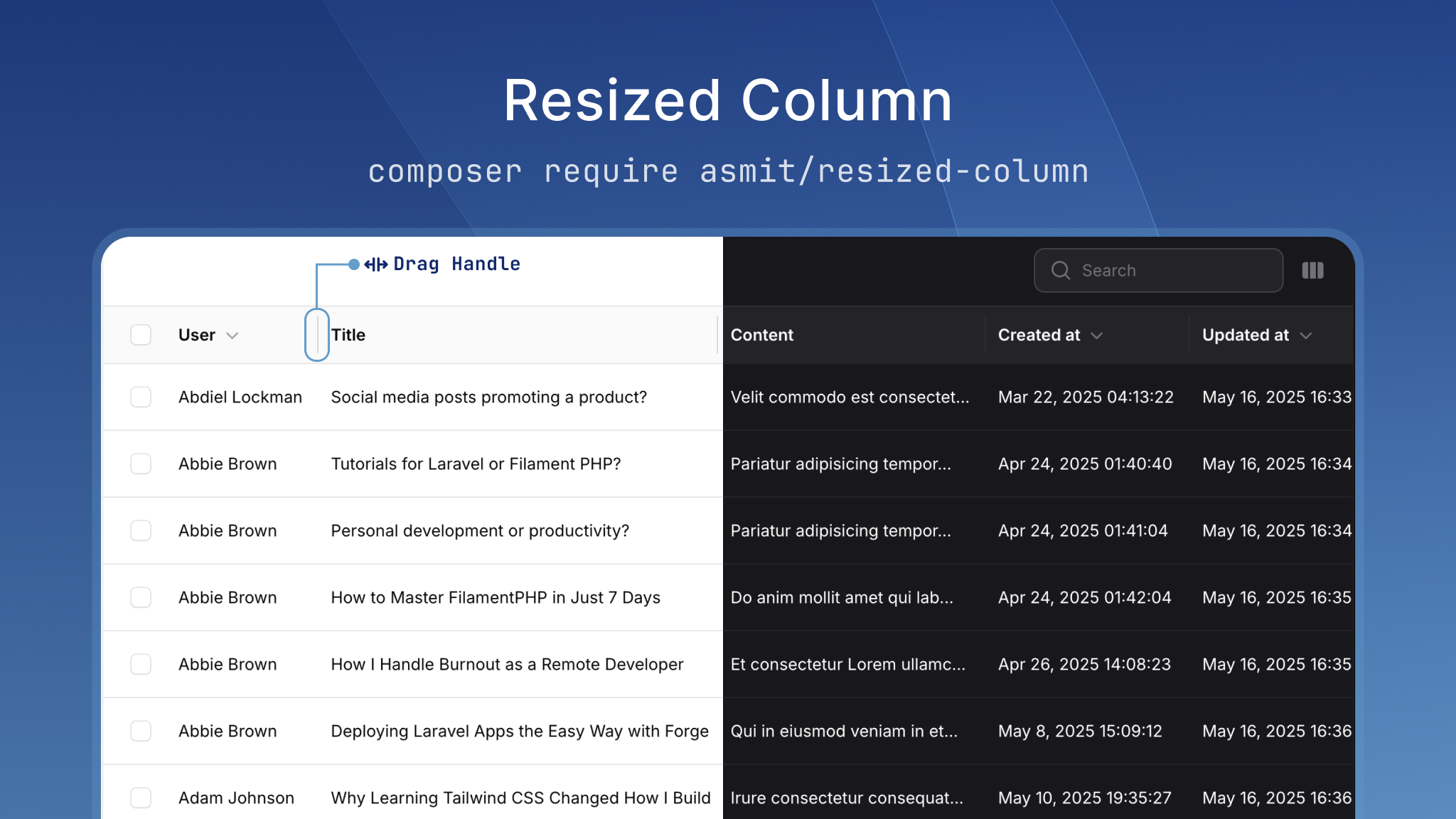
The Resizable Columns plugin allows you to resize table columns in Filament with persistent width settings. This package provides a seamless way to customize table layouts by letting users adjust column widths according to their preferences.
Features
- Drag-to-resize column functionality
- Persistent column width settings
- Per-user width preferences
- Session and database storage options
- Works inside Filament panels and in standalone Livewire components
- Easy integration with existing Filament tables
- Customizable storage mechanisms
Installation
You can install the package via composer:
composer require asmit/resized-column
Registering the Plugin
Add the plugin to your Filament panel configuration in app/Providers/Filament/AdminPanelProvider.php:
use Asmit\ResizedColumn\ResizedColumnPlugin;

public function panel(Panel $panel): Panel
{
    return $panel
        // ... other configuration
        ->plugins([
            // ... other plugins
            ResizedColumnPlugin::make()
                ->preserveOnDB() // Enable database storage (optional)
        ]);
}
Publishing filament assets
php artisan filament:assets
Publishing Migrations
# Publish migrations
php artisan vendor:publish --provider="Asmit\ResizedColumn\ResizedColumnServiceProvider" --tag=resized-column-migrations

# Run migrations
php artisan migrate
Usage
To use the Resized Column functionality, simply include the HasResizableColumn trait in your Filament List Page or your custom page class. This will automatically enable the resizable column feature for all tables in that resource.
use Asmit\ResizedColumn\HasResizableColumn;

class ListUsers extends ListRecords
{
    use HasResizableColumn;

    protected static string $resource = UserResource::class;

    // Your existing table definition...
}
Storage Configuration
The package provides two storage mechanisms:
-
Session Storage (Enabled by default)
- Stores column widths in the user's session
- No database required
- Storage is browser/device specific
-
Database Storage (Optional)
- Stores column widths in the database
- Requires migration to create the
table_settingstable - Works across browsers/devices for the same user
You can enable or disable database storage in your panel configuration:
ResizedColumnPlugin::make()
    ->preserveOnDB(true) // Enable database storage
Configuration Options
You can override any of the following methods in your class to customize behavior:
| Method | Description |
|---|---|
persistColumnWidthsToDatabase() |
Customize how column widths are saved to database |
persistColumnWidthsToSession() |
Customize how column widths are saved to session |
loadColumnWidthsFromDatabase() |
Customize how column widths are loaded from database |
loadColumnWidthsFromSession() |
Customize how column widths are loaded from session |
getUserId() |
Customize how user identification is handled |
Example: Custom Database Storage
use Asmit\ResizedColumn\HasResizableColumn;

class ListUsers extends ListRecords
{
    use HasResizableColumn;

    protected function persistColumnWidthsToDatabase(): void
    {
        // Your custom database save logic here
        YourCustomModel::updateOrCreate(
            [
                'user_id' => $this->getUserId(),
                'resource' => $this->getResourceModelFullPath(), // e.g., 'App\Models\User'
            ],
            ['settings' => $this->columnWidths]
        );
    }
}
Using Outside the Filament Panel
Filament tables can be used in any Livewire component without a panel. This package fully supports that use case. Add the HasResizableColumn trait to your Livewire component just as you would inside a panel.
use Asmit\ResizedColumn\HasResizableColumn;
use Filament\Forms\Concerns\InteractsWithForms;
use Filament\Forms\Contracts\HasForms;
use Filament\Tables\Concerns\InteractsWithTable;
use Filament\Tables\Contracts\HasTable;
use Filament\Tables\Table;
use Livewire\Component;

class UsersTable extends Component implements HasForms, HasTable
{
    use InteractsWithForms;
    use InteractsWithTable;
    use HasResizableColumn;

    public function table(Table $table): Table
    {
        return $table
            ->query(User::query())
            ->columns([
                TextColumn::make('name'),
                TextColumn::make('email'),
            ]);
    }

    public function render(): View
    {
        return view('livewire.users-table');
    }
}
Enabling Database Storage Outside the Panel
Since there is no AdminPanelProvider to register the plugin, the package provides two alternative ways to enable database storage.
Option A — App-wide via AppServiceProvider (recommended for global config)
Call ResizedColumnPlugin::standalone() once in AppServiceProvider::boot(). This stores a shared config instance for the entire request that all HasResizableColumn components will pick up automatically.
// app/Providers/AppServiceProvider.php
use Asmit\ResizedColumn\ResizedColumnPlugin;

public function boot(): void
{
    ResizedColumnPlugin::standalone()
        ->preserveOnDB();

    // Optionally disable session storage app-wide:
    // ResizedColumnPlugin::standalone()->preserveOnDB()->preserveOnSession(false);
}
Option B — Per table via Table macro (recommended for granular control)
Chain ->preserveColumnWidthsInDatabase() at the end of your table() method. This only affects that specific table and overrides any global config.
⚠️ Always call this as the last method in the chain, after
->columns(),->filters(),->actions(), and all other table configuration. This ensures the Livewire component reference is fully resolved when the macro runs.
public function table(Table $table): Table
{
    return $table
        ->query(User::query())
        ->columns([
            TextColumn::make('name'),
            TextColumn::make('email'),
        ])
        ->filters([...])
        ->actions([...])
        ->preserveColumnWidthsInDatabase();   // ← always last
}
You can combine both macros to fully control storage per table:
->preserveColumnWidthsInDatabase()      // save to DB
->preserveColumnWidthsInSession(false)  // disable session for this table
Configuration Priority
When the package decides whether to save column widths to the database, it checks configuration in the following order. The first match wins.
| Priority | Method | Scope |
|---|---|---|
| 1 — Highest | ->preserveColumnWidthsInDatabase() table macro |
Single table only |
| 2 | ResizedColumnPlugin::standalone() in AppServiceProvider |
All components, no panel required |
| 3 — Lowest | ResizedColumnPlugin::make() in panel provider |
Inside a Filament panel |
This means a table macro will always win over the global standalone config, which will always win over the panel plugin config.
Troubleshooting
CSS Styles Not Loading
If the resize handles are not displaying correctly:
-
Make sure you have published the Filament assets:
php artisan filament:assets
-
Clear your browser cache or try a hard refresh (Ctrl+F5)
Credits
Security
If you discover a security vulnerability within this package, please send an e-mail to asmitnepali99@gmail.com. All security vulnerabilities will be promptly addressed.
Contributing
Please see CONTRIBUTING for details.
📄 License
The MIT License (MIT). Please see License File for more information.
asmit/resized-column 适用场景与选型建议
asmit/resized-column 是一款 基于 PHP 开发的 Composer 扩展包,目前已累计 100.35k 次下载、GitHub Stars 达 51, 最近一次更新时间为 2025 年 05 月 17 日, 在 PHP 生态内属于活跃度较高的组件。
我们在过去多个企业项目中使用过 asmit/resized-column 或与其功能相近的方案,如果你在选型或落地过程中遇到问题,例如 版本兼容、二次改造、私有化封装、与内部系统对接、生产 BUG 排查,欢迎联系我们协助评估。
基于 asmit/resized-column 在你已有业务上做功能扩展、字段裁剪、UI 适配、与内部账号 / 权限 / 日志系统的深度对接。
线上偶发问题、内存泄漏、慢查询、并发异常等排查修复;针对高流量场景做缓存、队列、索引层面的调优。
承接完整的项目从需求 → 设计 → 开发 → 上线 → 长期运维;也可按月提供技术保姆服务。
统计信息
- 总下载量: 100.35k
- 月度下载量: 0
- 日度下载量: 0
- 收藏数: 51
- 点击次数: 13
- 依赖项目数: 1
- 推荐数: 0
其他信息
- 授权协议: MIT
- 更新时间: 2025-05-17