backpack/download-operation
Composer 安装命令:
composer require backpack/download-operation
包简介
Quickly add a Download button to your Laravel/Eloquent entries. But let's face it, you'll use this as Download Invoice PDF, won't you?
关键字:
README 文档
README
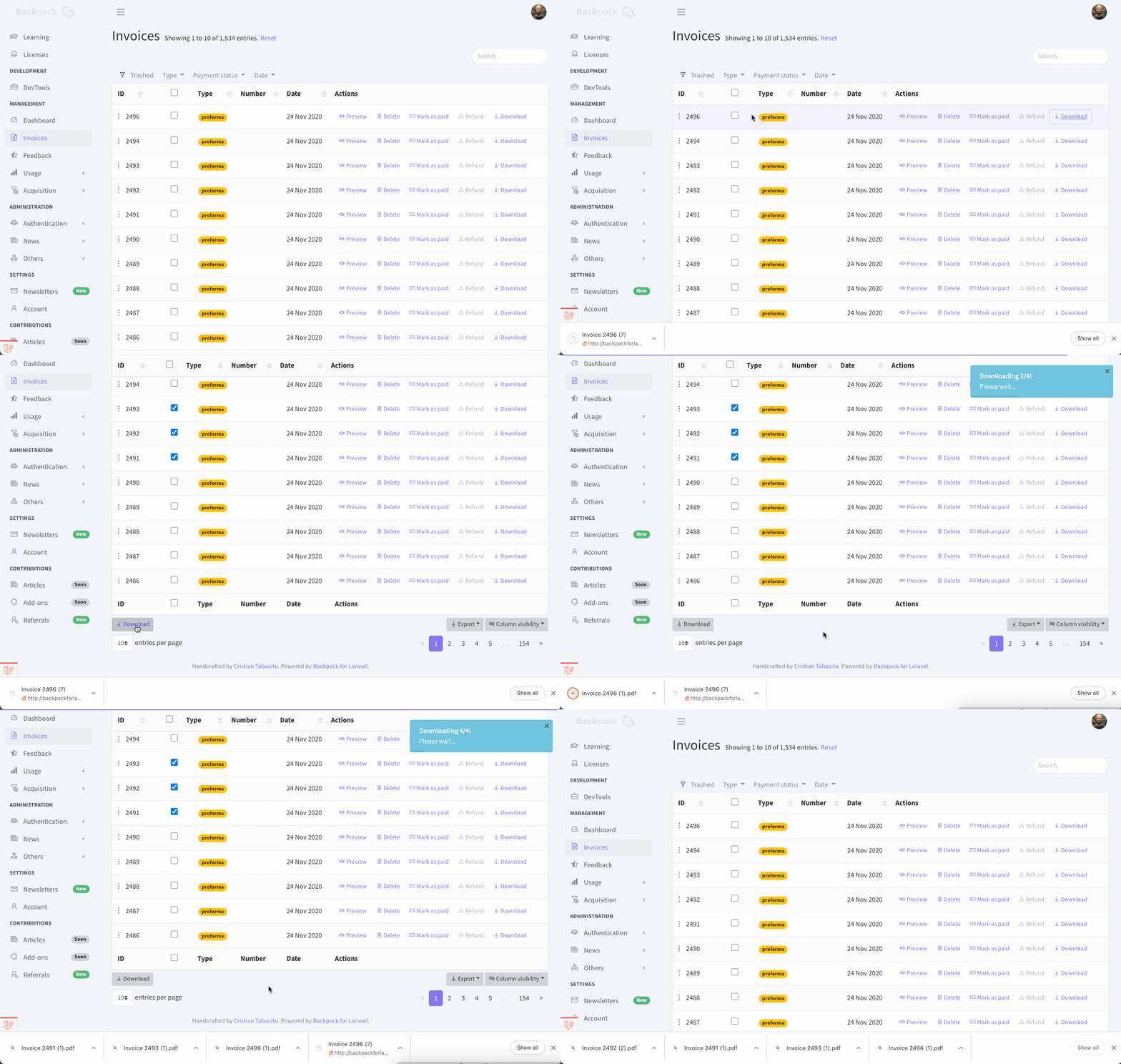
This package provides a way to add "Download" buttons to your Backpack CRUDs. By default:
- the file format will be a PDF;
- the file will show a list of CRUD fields, similar to the Show Operation;
Demo
Requirements
This package uses Backpack for Laravel (of course) but also spatie/browsershot, which itself uses Puppeteer, which itself uses a headless Chrome browser to generate the PDFs. Because of that:
- PRO: you don't need to code special views for them to look good in PDF form; if it looks good in the browser, it'll probably look good in the PDF;
- CON: you need to install a bunch of stuff on your server (Puppeteer and Chrome); so you probably can't use this on shared hosting;
Installation
Step 0. Install Puppeteer and spatie/browsershot, as instructed by Browsershot documentation. Then test your installation by runnning a tinker session (php artisan tinker) with the following code: \Spatie\Browsershot\Browsershot::url('https://google.com')->ignoreHttpsErrors()->save('example.pdf');. If that simple code triggers errors, please fix your Browsershot / Puppeteer installation before going any further. We've provided a few troubleshooting tips & tricks at the bottom of this page.
Step 1. Install this package via Composer
composer require backpack/download-operation
Step 2. To add a "Download" button next to each entry inside your EntityCrudController and a bulk button at the bottom of the table, use these operations on your EntityCrudController:
class InvoiceCrudController extends CrudController
{
    use \Backpack\CRUD\app\Http\Controllers\Operations\ListOperation;
    use \Backpack\CRUD\app\Http\Controllers\Operations\DeleteOperation;
+    use \Backpack\DownloadOperation\DownloadOperation;
+    use \Backpack\DownloadOperation\BulkDownloadOperation;
Please note that BulkDownloadOperation is not a "real" operation. It's just a button that points to the normal "Download" operation. So you cannot use BulkDownloadOperation without DownloadOperation. The inverse is possible, only using DownloadOperation without BulkDownloadOperation.
Step 3. Configure your download operation by defining your fields and settings in setupDownloadOperation()
    /**
     * Configure what the Download button actually downloads.
     */
    public function setupDownloadOperation()
    {
        // [OPTION 1] - you can manually add your columns:
        CRUD::column('title');

        // [OPTION 2] - since you've probably already defined columns in your List or Show operation, you could do:
        $this->setupListOperation(); // or $this->setupShowOperation();

        // in addition, in case you want to change settings:
        CRUD::set('download.view', 'user.invoice.download'); // default is: crud::show
        CRUD::set('download.format', 'A3'); // default is: A4
        CRUD::set('download.headers', ['Content-Type' => 'application/pdf']); // default is: ['Content-Type' => 'application/pdf']

        // in case you want to configure browsershot instance. more info on Overriding section.
        CRUD::set('download.browsershot', \App\DownloadInvoice::class); // default is: null
    }
Configuration
Publish the config file
You can optionally publish the config file to overwrite the default settings:
php artisan vendor:publish --provider="Backpack\DownloadOperation\AddonServiceProvider" --tag=config
Configure the Browsershot instance
If you need to change the way the PDF is generated, you can create a new __invokable() class. The class should return the Browsershow result we will stream to the browser. Here is an example:
    // in your EntityCrudController.php
    protected function setupDownloadOperation() {
        // ...
        CRUD::set('download.browsershot', \App\DownloadInvoice::class);
    }

    // create the following file in App\DownloadInvoice.php
    namespace App;

    use Spatie\Browsershot\Browsershot;

    class DownloadInvoice
    {
        public function __invoke($data)
        {
            // check spatie docs for more options
            return Browsershot::html(view($data['view'], $data))
                ->noSandbox()
                ->setChromePath('/usr/bin/google-chrome-stable')
                ->format($data['format'])
                ->pdf();
        }
    }
Configure the download method
If you need to change the way the file is downloaded, you can create a new downloadFile() method in your EntityCrudController. Here is an example:
    protected function downloadFile($data)
    {
        return response()->streamDownload(function () use ($data) {
            echo Browsershot::html(view($data['view'], $data))
                ->format($data['format'])
                ->pdf();
        }, $data['filename'], $data['headers']);
    }
Changelog
Changes are documented here on Github. Please see the Releases tab.
Contributing
Please see contributing.md for a todolist and howtos.
Security
If you discover any security related issues, please email cristian.tabacitu@backpackforlaravel.com instead of using the issue tracker.
Credits
License
This project was released under MIT, so you can install it on top of any Backpack & Laravel project. Please see the license file for more information.
Troubleshooting
This package uses spatie/browsershot, which uses Puppetteer, which itself uses a headless Chrome. So... a lot can go wrong during the installation phase. It can either go silky-smooth or be a nightmare. To help you out, here are a few issues we've encountered, and their solutions.
How to test if the Puppeteer installation is working
We recommend you run a tinker (php artisan tinker) and try the following:
use Spatie\Browsershot\Browsershot;

Browsershot::url('https://google.com')->ignoreHttpsErrors()->save('example.pdf');
If that triggers errors... the problem is with your Puppeteer installation. Take a hard look at the error message, it might provide steps to fix or clues.
Could not find Chromium (rev. 1095492)
We've gotten this error, along the years, for multiple reasons:
- we had to upgrade the node version
- we were not using that node version
- the chache path was indeed incorrect (see below)
Cache path is wrong (eg. on MacOS when using Laravel Valet)
In your error message, see what cache path is being used. Most likely it's trying to use .cache/puppeteer inside the PROJECT DIRECTORY. Which is wrong, because it definitely won't find Chrome there. You want it to use the GLOBAL DIRECTORY. To define a cache path for a particular project, you can define a new .ENV variable:
PUPPETEER_CACHE_DIR="/Users/tabacitu/.cache/puppeteer"
You might also need to create that directory and restart your server. After that, it should work.
Does not work on M1 Mac (aka. chromium arm64 bug)
If you're running an M1 or M2 Mac, you might need to follow this tutorial.
Other problems
We heavily recommend you check Puppeteer's troubleshooting page: https://pptr.dev/troubleshooting
backpack/download-operation 适用场景与选型建议
backpack/download-operation 是一款 基于 PHP 开发的 Composer 扩展包,目前已累计 3.83k 次下载、GitHub Stars 达 13, 最近一次更新时间为 2023 年 02 月 28 日, 在 PHP 生态内属于活跃度较高的组件。
它主要适用于以下技术方向: 「laravel」 「Download Image」 「backpack」 「Backpack for Laravel」 「Backpack Addon」 「Download Operation」 等业务场景。在实际项目中,围绕这些方向常见需要落地的问题包括:接口对接、性能调优、并发安全、与既有框架(Laravel / ThinkPHP / Yii / Webman 等)的兼容适配,以及生产环境的日志埋点与稳定性保障。
我们在过去多个企业项目中使用过 backpack/download-operation 或与其功能相近的方案,如果你在选型或落地过程中遇到问题,例如 版本兼容、二次改造、私有化封装、与内部系统对接、生产 BUG 排查,欢迎联系我们协助评估。
基于 backpack/download-operation 在你已有业务上做功能扩展、字段裁剪、UI 适配、与内部账号 / 权限 / 日志系统的深度对接。
线上偶发问题、内存泄漏、慢查询、并发异常等排查修复;针对高流量场景做缓存、队列、索引层面的调优。
承接完整的项目从需求 → 设计 → 开发 → 上线 → 长期运维;也可按月提供技术保姆服务。
与 backpack/download-operation 相关的其它包
同方向 / 同关键字的高下载量 PHP Composer 包推荐,方便对比选型:
The NzoFileDownloaderBundle is a Symfony Bundle used to Download all types of files from servers and Web applications safely and with ease. You can also read/show the file content in the Web Browser.
Yii2 LightBox image galary widget uses Lightbox v2.10.0 by Lokesh Dhakar
Adds a download link next to assets
The Yii2 extension uses jQuery jquery.carousel-1.1.min.js and makes image carousel from php array of structure defined.
The Yii2 extension uses jQuery PrettyPhoto and OwlCarousel js and makes image galary from php array of structure defined.
Based on Youtube-dl and FFMPEG. Downloads Youtube and Facebook videos from the url.
统计信息
- 总下载量: 3.83k
- 月度下载量: 0
- 日度下载量: 0
- 收藏数: 13
- 点击次数: 22
- 依赖项目数: 0
- 推荐数: 0
其他信息
- 授权协议: MIT
- 更新时间: 2023-02-28