batdan/midjourney-api-php
Composer 安装命令:
composer require batdan/midjourney-api-php
包简介
Generate images Midjourney (Discord API). URLs in prompt accepted
关键字:
README 文档
README
This PHP library offers a user-friendly interface for creating images with the Midjourney Bot, leveraging the capabilities of the Discord API.
This version has the capability to incorporate example images via URLs into the Midjourney prompts, providing full compatibility with both private and public channels.
Installation
You can seamlessly integrate this library into your project using Composer. To do so, execute the following command in your project's root directory:
composer require batdan/midjourney-api-php
Usage
Fundamental Usage Instructions
To generate an image with the Midjourney Bot, initiate an instance of the Midjourney class:
use batdan\ai\MidjourneyImageCreator;

$discordChannelId = 'YOUR_DISCORD_CHANNEL_ID';
$discordUserToken = 'YOUR_DISCORD_USER_TOKEN';

$midjourney = new MidjourneyImageCreator($discordChannelId, $discordUserToken);

// Example of a prompt: text is separated from tags
$promptText = "aerial view of a giant fish tank shaped like a tower in the middle of new york city, https://depuismonhamac.jardiland.com/wp-content/uploads/2019/06/AdobeStock_196378179.jpeg";
$promptTags = "8k octane render, photorealistic --ar 9:20 --v 5";

/**
 * The imageCreationV2 method is responsible for randomly selecting an image from the 4 options provided by Midjourney.
 * If you want to specify a particular image, you can pass its identifier (ranging from 0 to 3) as the third parameter.
 *
 * Example: $midjourneyImageCreator->imageCreation($promptText, $promptTags, 0);
 *
 * This will generate an image for the given prompt, using the specified image identifier (in this case, 0).
 */
$message = $midjourney->imageCreationV2($promptText, $promptTags);
$imgUrl  = $message->upscaled_photo_url;

echo chr(10) . chr(10);
echo $imgUrl;
echo chr(10) . chr(10);
Constructor
-
$discordChannelId:- Substitute this value with the Channel ID where the Midjourney Bot has been installed. The Channel ID can be obtained by right-clicking on the channel and selecting Copy Channel ID.
- Keep in mind that you can invite the Midjourney Bot to your own server to better organize your work. For more information, refer to https://docs.midjourney.com/docs/invite-the-bot
-
$discordUserToken:-
To retrieve your Discord User Token, you will need to use the Developer Tools in your browser and look into the network data. Here are the steps:
- Open Discord in your browser (not the app).
- Open the Developer Tools (you can typically open this by pressing F12 or Ctrl + Shift + I on Windows/Linux or Cmd + Option + I on MacOS).
- Navigate to the "Network" tab.
- In the filter box, type "messages" to narrow down the list of network requests.
- Send a message in any Discord channel.

- Look at the network requests that pop up after sending the message, select the one that has "messages" in its name.
- Within the Headers tab, look for the request header named "Authorization". The value of this header is your User Token.
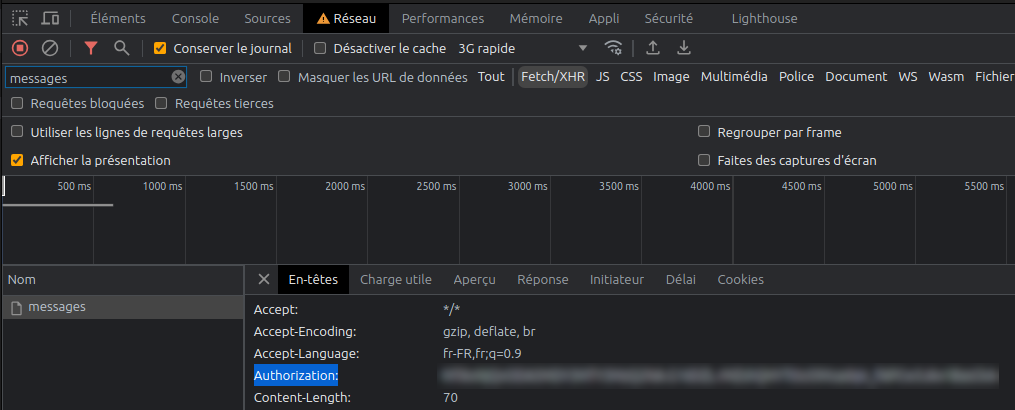
Important Note: Keep your User Token strictly confidential. Anyone who has your token can take control of your Discord account. Never share it with anyone and don't publish it online. If you think your token may have been compromised, change your password immediately as this will cause your current token to become invalid.
-


Optimal Performance: Consider Using the CLI Script
To ensure optimal performance and avoid any potential execution time issues, we recommend utilizing the CLI (Command Line Interface) script for your task. The CLI script provides a streamlined and efficient environment, allowing for faster processing and smoother execution.
Before running the script, please fill in the Channel ID and User Token in the example.php file:


The process can take approximately one minute.
Automatically Generated Image:

batdan/midjourney-api-php 适用场景与选型建议
batdan/midjourney-api-php 是一款 基于 PHP 开发的 Composer 扩展包,目前已累计 2.31k 次下载、GitHub Stars 达 22, 最近一次更新时间为 2023 年 06 月 26 日, 在 PHP 生态内属于活跃度较高的组件。
它主要适用于以下技术方向: 「graphics」 「php」 「image-manipulation」 「image-processing」 「image-generation」 「midjourney」 等业务场景。在实际项目中,围绕这些方向常见需要落地的问题包括:接口对接、性能调优、并发安全、与既有框架(Laravel / ThinkPHP / Yii / Webman 等)的兼容适配,以及生产环境的日志埋点与稳定性保障。
我们在过去多个企业项目中使用过 batdan/midjourney-api-php 或与其功能相近的方案,如果你在选型或落地过程中遇到问题,例如 版本兼容、二次改造、私有化封装、与内部系统对接、生产 BUG 排查,欢迎联系我们协助评估。
基于 batdan/midjourney-api-php 在你已有业务上做功能扩展、字段裁剪、UI 适配、与内部账号 / 权限 / 日志系统的深度对接。
线上偶发问题、内存泄漏、慢查询、并发异常等排查修复;针对高流量场景做缓存、队列、索引层面的调优。
承接完整的项目从需求 → 设计 → 开发 → 上线 → 长期运维;也可按月提供技术保姆服务。
与 batdan/midjourney-api-php 相关的其它包
同方向 / 同关键字的高下载量 PHP Composer 包推荐,方便对比选型:
Add text or image watermark on images.
Imagine (Wrapper) Component for Laravel
SDL FFI bindings for the PHP language
ImageMagick wrapper
A class drawing multiline and aligned text on pictures. Uses GD extension.
Image processing for PHP 5.3
统计信息
- 总下载量: 2.31k
- 月度下载量: 0
- 日度下载量: 0
- 收藏数: 22
- 点击次数: 29
- 依赖项目数: 0
- 推荐数: 0
其他信息
- 授权协议: MIT
- 更新时间: 2023-06-26