beebmx/kirby-courier
Composer 安装命令:
composer require beebmx/kirby-courier
包简介
Courier offers a convenient and painless solution for creating emails tailored for your Kirby website.
README 文档
README

Courier for Kirby
Courier offers a convenient and painless solution for creating emails tailored for your Kirby website.
With Courier, you can streamline the process of email design and implementation for your site.
Overview
- 1. Installation
- 2. Usage
- 3. Snippets
- 4. Console
- 5. Helper
- 6. Challenge
- 7. Testing email
- 8. Options
- 9. License
- 10. Credits
Installation
Download
Download and copy this repository to /site/plugins/kirby-courier.
Composer
composer require beebmx/kirby-courier
Usage
Courier comes with two email message types, and you can customize them for your convenience.
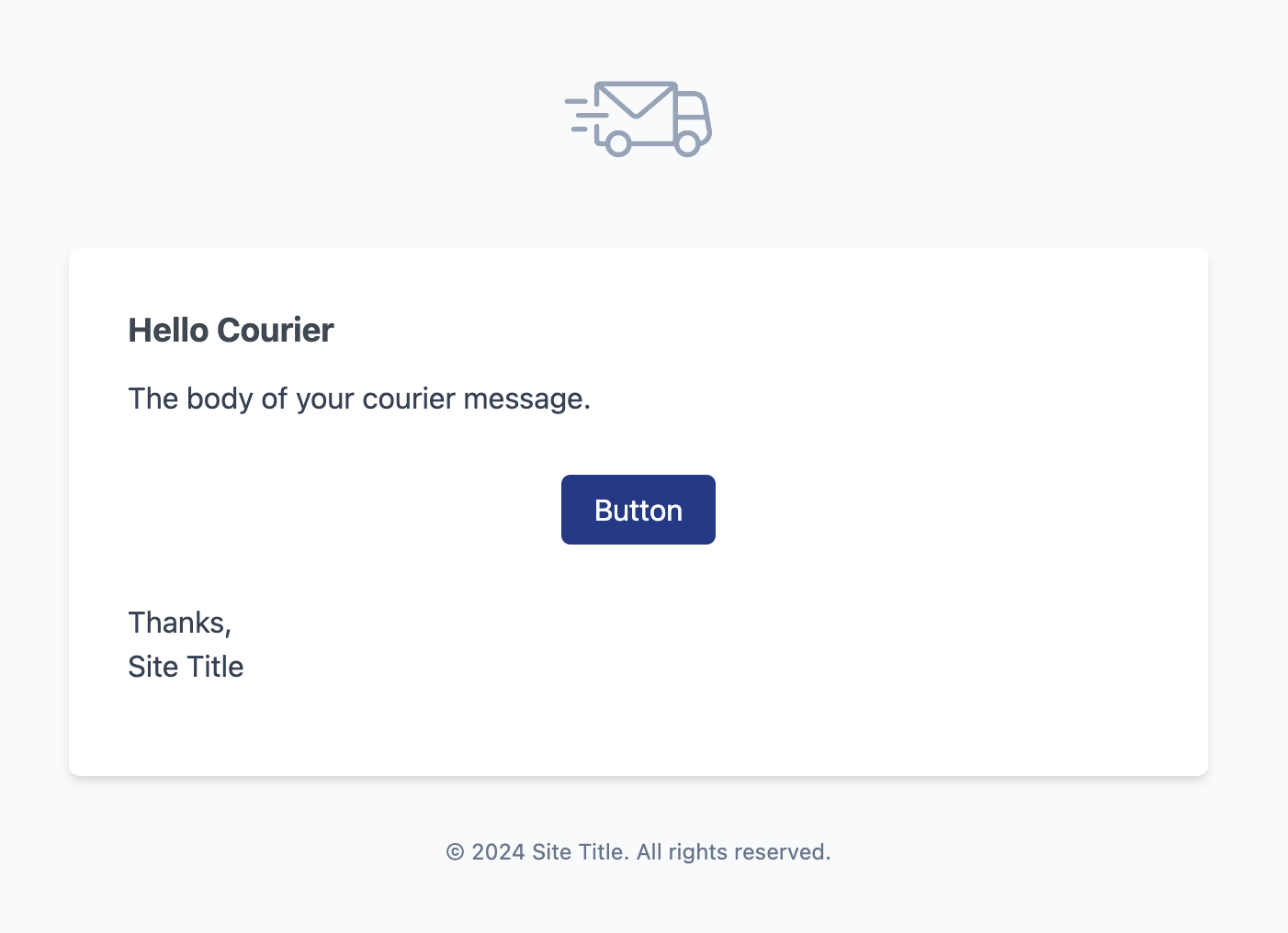
Notification message
The Notification message is the easiest way to send an email. You only need to use the Beebmx\KirbyCourier\Notification\Message class
in your controller or in your own implementation. Here's an example:
use Beebmx\KirbyCourier\Notification\Message;

(new Message)
    ->to('john@doe.co')
    ->line('Welcome to Kirby Courier')
    ->action('Visit', 'https://beeb.mx')
    ->send()
Formating notification messages
You have several methods to customize your Notification message.
Here's an example with all the methods:
use Beebmx\KirbyCourier\Notification\Message;

(new Message)
    ->to('john@doe.co')
    ->greeting('Hello friend!')
    ->line('Welcome to Kirby Courier')
    ->line('You can add more lines before an action')
    ->lines(['Multiple line 01', 'Multiple line 02'])
    ->lineIf($someCondition === true, 'You can add more lines before an action')
    ->linesIf($someCondition === false, ['Line 03', 'Line 04'])
    ->success()         // To set the action button as successful
    ->error()           // To set the action button as an error
    ->action('Action button', 'https://beeb.mx')
    ->line('You can add lines after an action')
    ->salutation('Good bye!')
    ->send()
Warning
You can only add one action per Notification message.
Mail message
The Mail message is the easiest way to send an email if you need to customize all the body of your email, you only need to use the Beebmx\KirbyCourier\Mail\Message class
in your controller or in your own implementation. Here's an example:
use Beebmx\KirbyCourier\Mail\Message;

(new Message)
    ->to('john@doe.co')
    ->template('marketing')
    ->send()
Note
It's important that you set a template to display your own customization.
Every template should be located in your courier directory.
Formating mail messages
To create your own template for your mail messages, you need to create a file in the default location for Courier.
Here's an example for a marketing message:
/*** /site/template/courier/marketing.php ***/

<?php snippet('courier/message', slots: true) ?>
<?php slot('body') ?>
# Hello Courier

The body of your courier message.

<?php snippet('courier/button', ['url' => ''], slots: true) ?>
Button
<?php endsnippet() ?>

Thanks,
<?= site()->title() ?>
<?php endslot() ?>
<?php endsnippet() ?>
Note
You can add content as markdown and it will be processed by kirbytext.
Message methods
For both Notifications and Mail messages, there are shared methods. Here's an example with all the methods:
use Beebmx\KirbyCourier\Mail\Message;

(new Message)
    ->preset('contact')                     // The preset should be available in your config.php file
    ->from('no-reply@example.co')
    ->from('no-reply@example.co', 'Webmaster')  // You can add a name to from address
    ->to('john@doe.co')
    ->to('jane@doe.co')                     // You can add multiple recipients (TO)
    ->cc('john@doe.co')
    ->cc('jane@doe.co')                     // You can add multiple recipients (CC)
    ->bcc('john@doe.co')
    ->bcc('jane@doe.co')                    // You can add multiple recipients (BCC)
    ->replyTo('john@doe.co')
    ->subject('Thank you for your contact request')
    ->theme('dark')                         // The theme should be available in your themes
    ->data(['name' => 'John Doe', 'position' => 'CEO']) // All the data available for the template
    ->attach($page->file('image.jpg'))
    ->attach($page->file('file.pdf'))       // You can add multiple files
    ->attachMany([$page->file('file.pdf'), $page->file('file.jpg')])
    ->render()                              // Returns a Content instance to visualize
    ->send()                                // Trigger to send the email
If you want to previsualize your email, you can do it in any template. Here's an example:
<?= (new Beebmx\KirbyCourier\Mail\Message)
    ->template('marketing')
    ->data(['name' => 'John Doe'])
    ->render()
    ->toHtml() ?>
Note
The render method doesn't trigger any email, and doesn't require any email settings
like subject, from or to.
Snippets
For your convenience, Courier has some snippets to speed up your email building flow.
You can add them in your courier template.
Note
You can create your own snippets if you want and apply it to the courier/message snippet.
Just be sure to add it in the slot('body').
Button
<?php snippet('courier/button', ['url' => ''], slots: true) ?>
Button
<?php endsnippet() ?>
Panel
<?php snippet('courier/panel', slots: true) ?>
This is a panel
<?php endsnippet() ?>
Table
<?php snippet('courier/table', slots: true) ?>
| Content      | Info          | Currency  |
| ------------ | :-----------: | --------: |
| Content 01   | Centered      | $100      |
| Content 02   | Is centered   | $150      |
<?php endsnippet() ?>
Subcopy
<?php snippet('courier/subcopy', slots: true) ?>
This is a subcopy
<?php endsnippet() ?>
Console
If you are a Kirby CLI user, Courier also has you covered.
The Courier commands can help you create Mail messages faster or even create your own Courier Theme.
You can create your Mail template with:
$ kirby make:courier <template>
$ kirby courier:make <template>
Note
courier:make is an alias of make:courier
Or may be you want to customize your messages with your own theme with:
$ kirby courier:theme <theme>
Helper
If dealing with namespaces is hard, or you feel confused using the same Message class name,
you can simplify it with the courier helper:
For Notification message you can use:
courier('notification')
    ->to('john@doe.co')
    ->line('This is a line')
    ->send()
For Mail message you can use:
courier('mail')
    ->to('john@doe.co')
    ->template('marketing')
    ->send()
And of course, you can use it in a template to render it:
<?= courier('mail')
        ->template('marketing')
        ->render()
        ->toHtml() ?>
Challenge
Courier also provides a challenge message type to help you with your login and password reset flows.
First, you need to set the challenge in your config.php file:
'auth' => [
    'challenges' => ['courier', 'email'],
],
Then, you can specify the methods you want to use in your config.php file:
'auth' => [
    'challenges' => ['courier', 'email'],
    'methods'   => ['password', 'code'],
],
Warning
Right now only code and password-reset are supported for the courier challenge.
Testing email
Courier comes out of the box with a panel area to help you test your email messages. You can change the label and icon from the config.php file.
'beebmx.courier' => [
    'panel' => [
        'label' => 'Testing',
        'icon' => 'wand',
    ],
],
Note
If you change the icon, be sure to use an available Kirby Panel icon from the official list.
If you only want to enable the testing area for specific user roles, you can do it with the roles option:
#bluprints/users/editor.yml

permissions:
  access:
    courier: false
If this option is not for you or all your users, you can disable it completely with:
'beebmx.courier' => [
    'panel' => false
],
Options
| Option | Type | Default | Description |
|---|---|---|---|
| beebmx.courier.logo | Closure,string,null |
null | Set your own logo in every message. |
| beebmx.courier.path | string |
courier | Set a path where the templates and themes are located. |
| beebmx.courier.from.address | int |
4 | Set the default form.address for every message. |
| beebmx.courier.from.name | int |
2 | Set the default form.name for every message. |
| beebmx.courier.message.greeting | string |
Hello! | Set the default message.greeting for every message. |
| beebmx.courier.message.rights | string |
All rights reserved. | Set the default message.rights for every message. |
| beebmx.courier.message.salutation | string |
Regards | Set the default message.salutation for every message. |
| beebmx.courier.message.subject | string |
Message from courier | Set the default message.subject for every message. |
| beebmx.courier.message.notify | string |
Set the default message.notify for every message. |
|
| beebmx.courier.message.brand_name | ?string |
null | Set the default message.brand_name for every message. |
| beebmx.courier.challenge.theme | ?string |
default | Set the default theme for your challenge message. |
| beebmx.courier.challenge.greeting | ?string |
null | Set the greeting message for your challenge. |
| beebmx.courier.challenge.email.login.before | ?string |
null | Set the text before code for login message. |
| beebmx.courier.challenge.email.login.after | ?string |
null | Set the text after code for login message. |
| beebmx.courier.challenge.email.password-reset.before | ?string |
null | Set the text before code for password-reset message. |
| beebmx.courier.challenge.email.password-reset.after | ?string |
null | Set the text after code for password-reset message. |
| beebmx.courier.panel.label | string |
Courier | Set a path where the templates and themes are located. |
| beebmx.courier.panel.icon | string |
Set a path where the templates and themes are located. |
Here's an example of a full use of the options from the config.php file:
'beebmx.courier' => [
    'logo' => function() {
        return site()->file('logo.png');
    },
    'path' => 'courier',
    'from' => [
        'address' => 'hello@example.com',
        'name' => 'Example',
    ],
    'message' => [
        'greeting' => 'Hello friend!',
        'rights' => 'Copyrights.',
        'salutation' => 'Thanks',
        'subject' => 'Message from courier',
        'notify' => 'If you’re having trouble clicking the button, copy and paste the URL below into your web browser.',
        'brand_name' => null,
    ],
    'challenge' => [
        'theme' => 'your-own-theme',
        'greeting' => 'Hello friend!',
        'email' => [
            'login' => [
                'before' => 'Recently, a login attempt was made on your account. You have X minutes to complete the login.',
                'after' => 'DO NOT share this code with anyone. If you did not request this login, you can ignore this email.',
            ],
            'password-reset' => [
                'before' => 'Recently, a login attempt was made on your account. You have X minutes to complete the login.',
                'after' => 'DO NOT share this code with anyone. If you did not request this password reset, you can ignore this email.',
            ],
        ],
    ],
    'panel' => [
        'label' => 'Courier',
        'icon' => 'email',
    ],
],
Warning
Since version 1.2.0, Courier changes the plugin prefix from beebmx.kirby-courier to beebmx.courier.
License
Licensed under the MIT.
Credits
Courier is inspired by the Laravel Notifications and Laravel Mail.
- Fernando Gutierrez @beebmx
- Jonas Ceja @jonatanjonas
logo - All Contributors
beebmx/kirby-courier 适用场景与选型建议
beebmx/kirby-courier 是一款 基于 PHP 开发的 Composer 扩展包,目前已累计 3.83k 次下载、GitHub Stars 达 40, 最近一次更新时间为 2024 年 08 月 07 日, 在 PHP 生态内属于活跃度较高的组件。
它主要适用于以下技术方向: 「mail」 「email」 「courier」 「kirby」 「kirby3」 「kirby-plugin」 等业务场景。在实际项目中,围绕这些方向常见需要落地的问题包括:接口对接、性能调优、并发安全、与既有框架(Laravel / ThinkPHP / Yii / Webman 等)的兼容适配,以及生产环境的日志埋点与稳定性保障。
我们在过去多个企业项目中使用过 beebmx/kirby-courier 或与其功能相近的方案,如果你在选型或落地过程中遇到问题,例如 版本兼容、二次改造、私有化封装、与内部系统对接、生产 BUG 排查,欢迎联系我们协助评估。
基于 beebmx/kirby-courier 在你已有业务上做功能扩展、字段裁剪、UI 适配、与内部账号 / 权限 / 日志系统的深度对接。
线上偶发问题、内存泄漏、慢查询、并发异常等排查修复;针对高流量场景做缓存、队列、索引层面的调优。
承接完整的项目从需求 → 设计 → 开发 → 上线 → 长期运维;也可按月提供技术保姆服务。
与 beebmx/kirby-courier 相关的其它包
同方向 / 同关键字的高下载量 PHP Composer 包推荐,方便对比选型:
统计信息
- 总下载量: 3.83k
- 月度下载量: 0
- 日度下载量: 0
- 收藏数: 40
- 点击次数: 6
- 依赖项目数: 1
- 推荐数: 0
其他信息
- 授权协议: MIT
- 更新时间: 2024-08-07