bnhashem/deploy-bitbucket
Composer 安装命令:
composer require bnhashem/deploy-bitbucket
包简介
Deploy your project to server using bitbucket
README 文档
README
Installation
You can install the package via composer:
composer require bnhashem/deploy-bitbucket
You can publish and run the bitbucket yml file with:
php artisan vendor:publish --provider="Bnhashem\DeployBitbucket\DeployBitbucketServiceProvider"
- This command publish this files
- bitbucket.php
- bitbucket-pipelines.yml
- deployment-exclude-list.txt
- Envoy.blade.php
bitbucket-pipelines.yml
- you can set your repositories setthing from this file, you can manage branches and tasks.
Config File Optimizations
- can find this file in project_name/config/bitbucket.php
| Variable | Type | Description |
|---|---|---|
clearCache |
bool |
Required. set it true if you want to clear cache |
clearConfig |
bool |
Required. set it true if you want to clear config |
clearRoute |
bool |
Required. set it true if you want to clear route |
clearView |
bool |
Required. set it true if you want to clear view |
cleanupVersions |
bool |
Required. set it true if you want to clear oldest version of your code |
cleanupVersionsCount |
integer |
Required. how many versions do you want to delete it |
migration, migrate:fresh, migrate:refresh --seed, migrate:refresh --seed, migrate:refresh |
string |
Required. you can but any artisan migrations commands such as 'migrate', 'migrate:refresh --seed', but be carful don't write 'php artisan we handle it from our side' |
additionalTasks |
array |
Required. put your custom commands in this array, Separate commands with a comma |
Bitbucket Optimizations
1. Go to Repository setting
- Note: Make sure you are admin to show this tab
2. Choose Deployments tab

2. Choose which environment you want to deploy your code
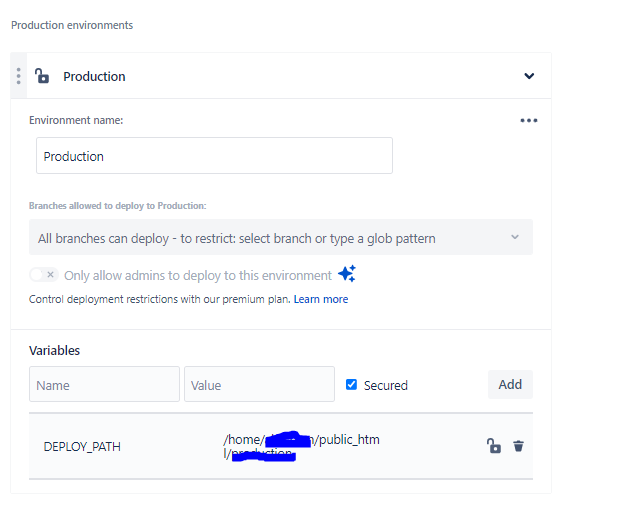 Note: Adding this Variable name
 DEPLOY_PATH with the project path value /home/username/public_html/project_name
3. Choose Repository variables tab
 Note: Adding this Variable name
1.
Note: Adding this Variable name
1. DEPLOY_HOST Adding your host value 87.1833.487.980
2. DEPLOY_USER Adding your username value username_value
4. Choose Access Keys tab from General section
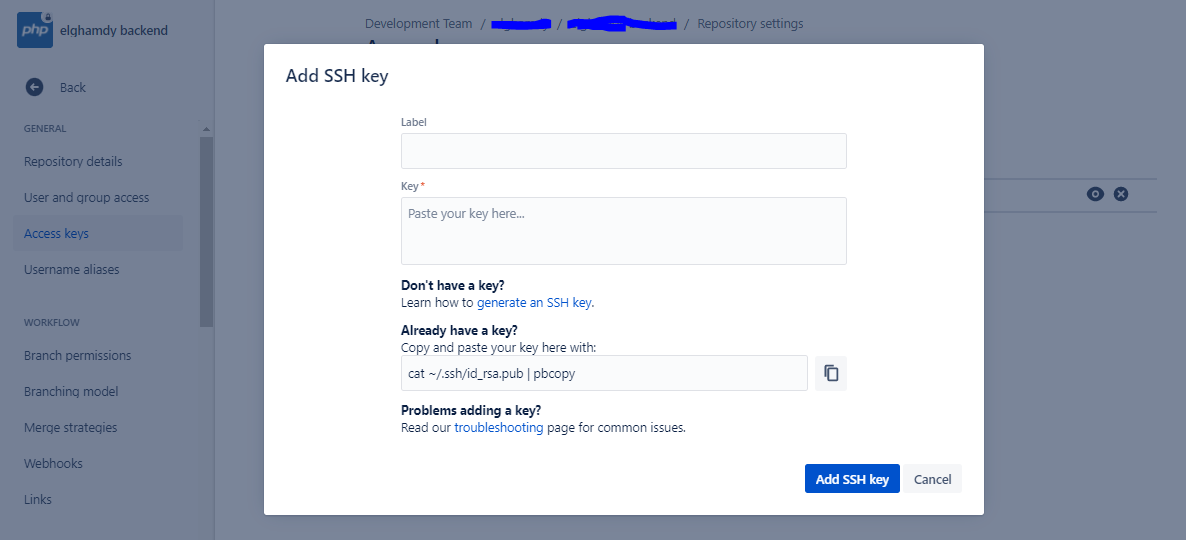 Note: Adding your server public key
5. Choose SSH Keys tab from Pipeline section
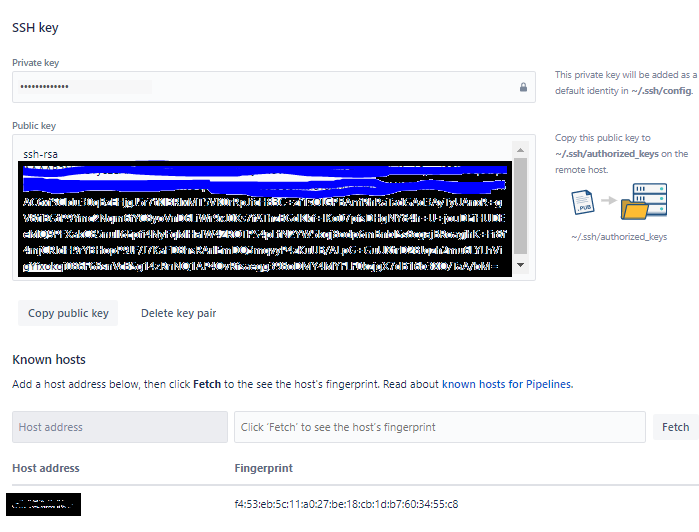 Notes:
- Copy this public key to ~/.ssh/authorized_keys on the remote host.
- Adding Host address
- Click Fetch
Server Optimizations
1. create your folder of your project
2. Go to the project directory
Using the Linux terminal, use the following commands to create the directory structure.
  cd /path/to/project_name
  mkdir -p storage/framework/{sessions,views,cache}
You also need to set permissions to allow Laravel to write data in this directory.
chmod -R 777 framework
chown -R username:username /path/to/your/project_name/storage
3. copy .env file of your project and check variables values
Please see CHANGELOG for more information on what has changed recently.
Contributing
Please see CONTRIBUTING for details.
Security Vulnerabilities
Please review our security policy on how to report security vulnerabilities.
Credits
License
The MIT License (MIT). Please see License File for more information.
统计信息
- 总下载量: 16
- 月度下载量: 0
- 日度下载量: 0
- 收藏数: 0
- 点击次数: 1
- 依赖项目数: 0
- 推荐数: 0
其他信息
- 授权协议: MIT
- 更新时间: 2021-11-15