bymayo/content-freeze
最新稳定版本:1.0.3
Composer 安装命令:
composer require bymayo/content-freeze
包简介
Allows a content freeze in the CMS
README 文档
README

Content Freeze for Craft CMS 5
Content Freeze is a Craft CMS plugin that allows you to freeze adding/editing of content for users within the CMS so you can schedule server transfers, major updates etc without content between environments being lost.
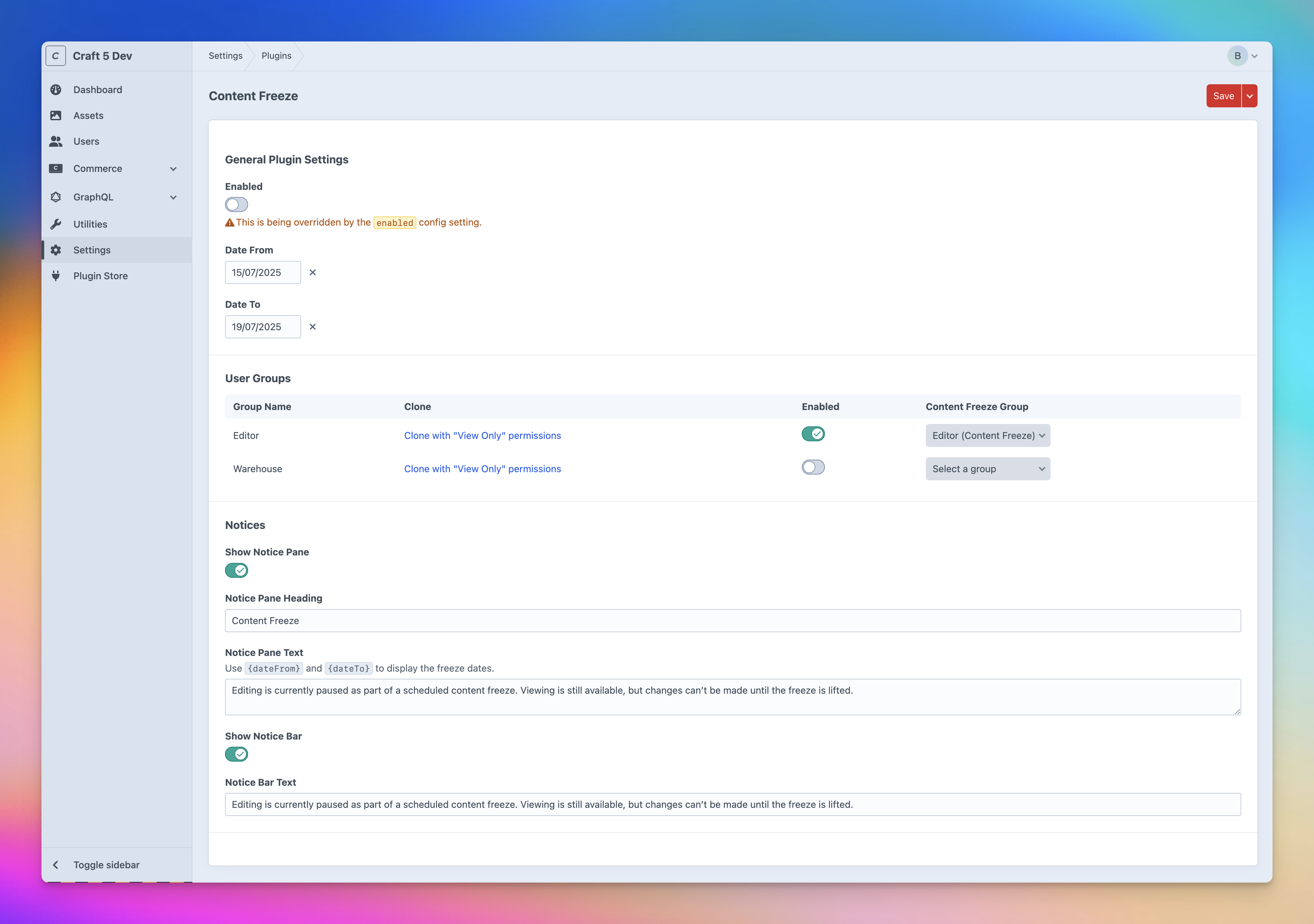
Features
- Set a date range for the content freeze
- Move users to a new group when the content freeze is active
- Show a notice bar at the top of the CMS once users login
- Show a notice pane in the CMS once users login
Install
- Install with Composer via
composer require bymayo/content-freezefrom your project directory - Enable / Install the plugin in the Craft Control Panel under
Settings > Plugins - Follow the Setup instructions below
You can also install the plugin via the Plugin Store in the Craft Admin CP by searching for Content Freeze.
Requirements
- Craft CMS 5.x
- PHP 8.2
- MySQL (No PostgreSQL support)
Setup
This plugin works by moving users to a new user group when the content freeze is active which has limited permissions (Particularly "View" or "Manage" permissions only).
- Ensure you have at least one user group, and that your content editing users are sorted in to groups.
- In the plugin settings you can use the "Clone" button to create a new user group with the same permissions as the original group, but with "View" or "Manage" permissions only.
- Choose a user group to move users to when the content freeze is active - Per user group.
- You can then enable the freeze per member group (This is particularly useful if you have member groups that don't have CMS access, e.g. "Customers" which don't need permissions changing)
- Once you want to freeze content hit "Enabled" or edit this via the
config.phpfile or via aenvvar. - You should now see a pane/notice bar in the CMS (If these settings are enabled)
- Once you disable the freeze, users will be moved back to their original group.
Config
You can configure the plugin via the plugin settings in the Craft Control Panel.
You can also configure the plugin via the config.php file or using env vars within the config.php file.
Supported Plugins
- Craft Commerce
- (More to come)
Caveats
- This plugin does not move admin users. The reason for this is because it can be too risky to block admin users from the CMS. So it's important that all users who can edit content are sorted in to groups - Not just marked as "Admin".
- Member groups are required to make this plugin function.
- Large amounts of users could potentially cause performance issues (See roadmap)
Support
If you have any issues (Surely not!) then I'll aim to reply to these as soon as possible. If it's a site-breaking-oh-no-what-has-happened moment, then hit me up on the Craft CMS Discord - @bymayo
Roadmap
- Widget to enable a content freeze from the dashboard
- Move users via a queue job to fix performance issues with large amounts of users
- Add a permission for accessing the content freeze settings
- Block front end option/variable e.g.
{% if craft.contentFreeze.enabled %}useful for hiding forms, or stopping purchases etc - CLI command to start freeze
- More plugin support - Freeform, Formie etc
- Hide cloned groups in User Groups settings if there are a lot of groups
统计信息
- 总下载量: 36
- 月度下载量: 0
- 日度下载量: 0
- 收藏数: 2
- 点击次数: 1
- 依赖项目数: 0
- 推荐数: 0
其他信息
- 授权协议: mit
- 更新时间: 2025-07-15