bymayo/craft-points
Composer 安装命令:
composer require bymayo/craft-points
包简介
A loyalty rewards system - points, levels, leaderboards, Commerce redemptions for Craft CMS
README 文档
README

Points for Craft CMS
A loyalty, rewards, and gamification system for Craft. Award points for any action - signups, shares, comments, purchases - tier users into levels, and build leaderboards. Add Craft Commerce and customers can redeem their points as store credit at checkout.
Features
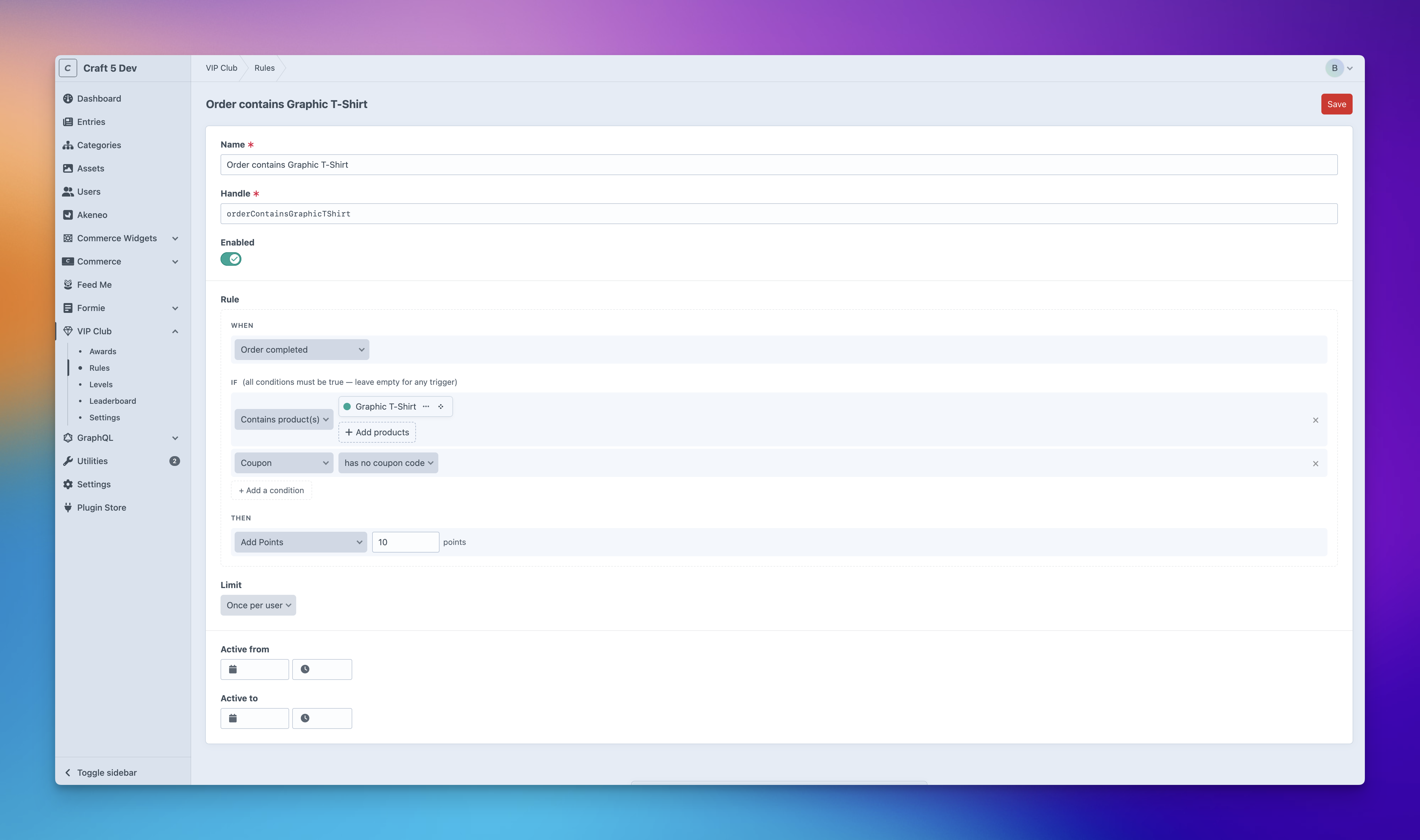
- Visual rule builder: E.g. When X happens, if Y is true, then award Z, max once per day
- Automatic triggers: Entries, Users, Assets - plus Commerce Orders & Subscriptions on Pro
- Conditions: Entry in section, user group, order total, contains product, and more - keep rules precise
- Limits: Once per user, Max N per period, cooldowns
- Levels: Tier users into Bronze / Silver / Gold (or your own names) with colours and badges
- Leaderboard: CP page with avatars and live filtering
- Dashboard widgets: Leaderboard and Latest Awards out of the box, with more on the way
- Order redemptions: Customers redeem points as store credit at checkout - any payment gateway (Pro + Commerce)
- Integrations: Auto-works with Formie, Freeform, and Craft Commerce when installed
- Renameable: rebrand the plugin and its currency - e.g. "VIP Club" earning "Stars", or "Rewards" earning "Credits"
- Developer APIs: Twig, GraphQL queries, and a GraphQL mutation for headless apps
- Cache-safe JS helper: Fire Manual rules from inside Blitz and
{% cache %}blocks - Granular permissions: view / create / edit / delete per resource
- Extension events: Plug in your own triggers, conditions, limits, and rewards
Contents
- Editions
- Install
- Requirements
- Integrations
- How it works
- Building your first rule
- Firing a rule from your site
- Reading points in Twig
- Levels & leaderboard
- Spending points at checkout (Pro + Commerce)
- Dashboard widgets
- Examples
- Settings
- Permissions
- GraphQL
- Twig reference
- Extending the plugin
Editions
| Lite | Pro | |
|---|---|---|
| Rules, Awards, Levels, Leaderboard | ✅ | ✅ |
| Dashboard widgets | ✅ | ✅ |
| Triggers for Entries, Users, Assets | ✅ | ✅ |
| Formie & Freeform integrations | ✅ | ✅ |
| Twig + GraphQL APIs | ✅ | ✅ |
| Renameable plugin & currency labels | ✅ | ✅ |
| Commerce triggers (orders, subscriptions) | - | ✅ |
| Percentage-of-order rewards | - | ✅ |
| Commerce conditions (order total, contains product, …) | - | ✅ |
| Redeem points as store credit at checkout | - | ✅ |
Install
- Install with Composer via
composer require bymayo/craft-pointsfrom your project directory - Enable / Install the plugin in the Craft Control Panel under
Settings > Plugins
You can also install the plugin via the Plugin Store in the Craft Admin CP by searching for Points.
Requirements
- Craft CMS 5.6+
- PHP 8.2+
- Craft Commerce 5.x (only for Pro Commerce features - orders, subscriptions, redemptions)
Integrations
Points hooks into other Craft plugins to unlock extra triggers, conditions, and rewards. Integrations activate automatically when the matching plugin is detected - nothing to configure.
| Plugin | What it adds | Edition |
|---|---|---|
| Craft Commerce | Order triggers (paid · completed · refunded · first ever), Subscription triggers (created · renewed · cancelled · plan changed), Commerce conditions (order total · item count · contains product · has coupon), percentage-of-order rewards, customer redemptions at checkout, money columns on the Users index and Leaderboard | Pro |
| Formie | "Form submitted" trigger and the "Form is" condition to scope to specific forms | Lite |
| Freeform | "Form submitted" trigger and the "Form is" condition to scope to specific forms | Lite |
Your Points → Settings → General page shows which integrations are detected on your site, so you can see at a glance what features are available. Third-party developers can plug their own triggers / conditions / limits / rewards into the rule builder via Craft events - see Extending the plugin.
How it works
Three concepts cover everything:
- Rule - a "When this happens, give this many points" sentence. e.g. "When a customer pays for an order over £50, give them 100 points, max once per day".
- Award - a single payout of a rule to a user. The amount is snapshotted at the time, so editing the rule later doesn't rewrite history.
- Level - an optional tier (Bronze / Silver / Gold) a user reaches once their balance crosses a threshold.
Defaults call everything "Points" - but you can rename. The plugin can show up in the sidebar as "Rewards" or "VIP Club", the unit can be "Coins" or "Stars". Set it all under Points → Settings → General.
Building your first rule
Go to Points → Rules → New rule.
| Section | What it is |
|---|---|
| Name | What you call this rule |
| When | The trigger - Entry created, Order paid, etc. Or "Manual" if your own code will fire it. |
| If | Optional conditions - e.g. only when the entry is in the "Reviews" section. |
| Then | The reward - flat amount, percentage of order total (Pro), or a deduction. |
| Limit | How often it can fire per user - Once, Max N per day/week/month, optional cooldown. |
| Active period | Optional date range - handy for campaigns. |
Triggers that come with the plugin
| Subject | Triggers | Available on |
|---|---|---|
| Manual | (fired by your own code, see below) | Lite |
| Entry | Created · Updated | Lite |
| Asset | Created | Lite |
| User | Registered · Logged in · Birthday · Anniversary | Lite |
| Formie | Form submitted | Lite |
| Freeform | Form submitted | Lite |
| Order | Paid · Completed · Refunded · First ever | Pro |
| Subscription | Created · Renewed · Cancelled · Plan changed | Pro |
Each non-Manual trigger awards the right person automatically: the entry's author, the order's customer, the asset's uploader, etc. Manual rules don't fire on their own - your code (a form, JS button, or GraphQL mutation) decides when, as explained in Firing a rule from your site.
Birthday trigger: needs a Date field on the user layout. Set its handle in Settings → Triggers. The trigger fires on the user's next login after their birthday - it'll only appear in the rule picker once you've configured it.
Firing a rule from your site
For "Manual" rules (no trigger), pick whichever fits your setup:
1. A regular form - server-rendered pages
Best for claim-style actions where the click itself is the qualifying event - a daily-bonus button, "mark profile complete", "activate promo", etc. Pair with a Once per user or Max 1 / day limit on the rule so the button stays safe to click.
{# "Claim today's bonus" button, gated to once per day by the rule's limit #}
<form method="post">
    {{ csrfInput() }}
    {{ actionInput('points/awards/add') }}
    {{ redirectInput('account/dashboard') }}
    <input type="hidden" name="ruleHandle" value="dailyBonus">
    <button>Claim today's bonus</button>
</form>
To reverse an award, post to points/awards/remove with the same shape.
For actions that require something else to happen first (a real signup, a real share), don't use the form pattern directly - the user could click it without doing the underlying action. Either fire the rule from your own controller's PHP after the real action completes, or call
Points.addAward()from the JS confirmation page.
Forms don't play nicely inside Blitz /
{% cache %}blocks - the embedded CSRF token gets stale. Use the JS helper on cached pages.
2. The JS helper - for buttons & cached pages
Drop this once in your layout:
{{ craft.points.script() }}
Now you have window.Points everywhere. Cache-safe - works inside Blitz, {% cache %}, anything:
<button onclick="Points.addAward('shared')">Share</button>
Both methods return a Promise:
const res = await Points.addAward('shared');
if (res.success) {
    alert(`You earned ${res.points} ${res.currency}!`);
}
| Method | Args |
|---|---|
Points.addAward(handle) |
rule handle (string) |
Points.removeAward(handle) |
rule handle (string) |
Both resolve to an object with these fields:
| Field | Type | When |
|---|---|---|
success |
bool | Always - true on success, false on failure |
points |
int | addAward success - number of points awarded |
currency |
string | addAward success - the configured plural reward-unit label (e.g. Points, Coins) |
awardId |
int | addAward success - id of the new PointAward element |
error |
string | On failure - a human-readable reason (rule disabled, limit reached, not logged in, etc.) |
Works with React, Vue, Alpine, Stimulus, htmx - anything that can call a global function.
3. A GraphQL mutation - for headless / decoupled apps
For Next.js, Nuxt, native apps, or anything where your frontend lives outside Craft's templates:
mutation FireRule($handle: String!) {
    pointsAddAward(ruleHandle: $handle) {
        success error points currency awardId
    }
}
Same security rules as the form and JS API - the user must be logged in, the rule must be Manual, and points always go to the authenticated user.
Behind the scenes (the boring but important bit)
All three options share the same safety net: login required, CSRF protected, only Manual rules, current-user-only (no userId ever gets accepted from the client), Limits enforced, and the rule's active dates honoured.
That said, the client is trusted to ask politely. Someone could open devtools and call Points.addAward('shared') without actually sharing. Keep Manual rules low-value, and use trigger-based rules (Order paid, Entry created, …) for anything worth gaming.
Server-side awards
From a module, controller, or console command:
use bymayo\points\Points;

Points::getInstance()->awards->addAward($userId, 'profileCompleted');
Points::getInstance()->awards->removeAward($userId, 'profileCompleted');
| Call | Returns |
|---|---|
Points::getInstance()->awards->addAward($userId, $handle) |
PointAward on success, null if the rule isn't found or a limit blocked the award |
Points::getInstance()->awards->removeAward($userId, $handle) |
true if an award was removed, false if there was nothing to remove |
This is the only API that can target a user other than the one currently logged in.
Reading points in Twig
{{ craft.points.sumForUser() }}        {# total for current user #}
{{ craft.points.sumForUser(5) }}        {# total for user 5 #}
{{ craft.points.countForUser() }}       {# how many awards they have #}

{{ craft.points.spendForUser() }}        {# their balance as money - needs Commerce #}
Loop through someone's awards:
{% for award in craft.points.awardsByUser() %}
    {{ award.rule.name }} - {{ award.pointsSnapshot }} ({{ award.dateCreated|datetime }})
{% endfor %}
Levels & leaderboard
Levels are tiers your users earn by accumulating points. Create them in Points → Levels with a threshold, colour, and optional badge icon.
{% set level = craft.points.levelForUser() %}
{% if level %}
    You're a <span style="color: {{ level.colour }}">{{ level.name }}</span> member.
{% endif %}
Leaderboard:
{% for row in craft.points.leaderboard(10) %}
    <p>{{ loop.index }}. {{ row.user.name }} - {{ row.points }}
        {% if row.level %}<small>({{ row.level.name }})</small>{% endif %}
    </p>
{% endfor %}
There's also a paginated Points → Leaderboard page in the CP and a matching dashboard widget.
Spending points at checkout
Available on Pro + Craft Commerce. Customers apply points against an order - it shows up like a coupon discount, works with any payment gateway.
{% set cart = craft.commerce.carts.cart %}
{% set balance = craft.points.sumForUser() %}
{% set applied = craft.points.appliedToOrder(cart.id) %}

<p>You have {{ balance }} {{ craft.points.currencyPlural|lower }}
   ({{ craft.points.spendForUser() }}).</p>

{% if applied %}
    <p>{{ applied }} applied to this order.</p>
    <form method="post">
        {{ csrfInput() }}{{ actionInput('points/redeem/remove') }}
        <input type="hidden" name="orderId" value="{{ cart.id }}">
        <button>Remove</button>
    </form>
{% else %}
    <form method="post">
        {{ csrfInput() }}{{ actionInput('points/redeem/apply') }}
        <input type="hidden" name="orderId" value="{{ cart.id }}">
        <input type="number" name="points" min="1" max="{{ balance }}">
        <button>Apply points</button>
    </form>
{% endif %}
What happens behind the scenes:
- Customer applies points → the plugin validates and records the intent.
- Commerce shows it as a discount line on the order.
- Customer pays the reduced total via any gateway.
- On
Order::EVENT_AFTER_ORDER_PAID, the points are taken from their balance (recorded as a negative award for the audit trail). - On refund, points are restored according to your refund-behaviour setting.
Configure conversion rate, minimum redemption, max % of order, and refund behaviour in Settings → Commerce.
Dashboard widgets
Add via the Craft dashboard → + New widget. Both are grouped under your plugin name (e.g. Rewards - Leaderboard):
| Widget | Shows |
|---|---|
| Leaderboard | Top N users by balance. Columns: Customer · Level · Total. |
| Latest Awards | The N most recent awards across all users. Columns: Customer · {currency} · Date. |
Each widget respects your renames - column headers follow whatever you set in Settings.
Examples
A few real-world rule setups to get you started.
General
Welcome bonus on signup
- Trigger: User registered · Reward: 100 points · Limit: Once per user.
Daily login bonus
- Trigger: User logged in · Reward: 10 points · Limit: Max 1 / day.
Birthday gift
- Trigger: User birthday · Reward: 250 points · Limit: Max 1 / year.
Share button (Manual)
-
Trigger: Manual · Reward: 5 points · Limit: Max 1 / day per user.
<button onclick="Points.addAward('shared')">Share</button>
Commented on a post
- Trigger: Entry created · Condition: in section "Comments" · Limit: Max 5 / day · Reward: 5 points.
Commerce (Pro)
1 point per £1 spent
- Trigger: Order paid · Reward: Percentage of order total.
First-order bonus
- Trigger: First order · Reward: 500 points.
Big spender bonus (stacks with above)
- Trigger: Order paid · Condition: Total > £100 · Reward: 200 points.
Subscriber loyalty
- Trigger: Subscription renewed · Reward: 50 points per renewal.
Don't reward coupon orders
- Trigger: Order paid · Condition: Order has coupon = No · Reward: 50 points.
Settings
Settings can be edited at Points → Settings:
| Key | Tab | Default | What it does |
|---|---|---|---|
pluginName |
General | Points |
Label shown in the CP sidebar and breadcrumbs |
currencyName |
General | Point |
Reward unit, singular - e.g. Coin, Star |
currencyNamePlural |
General | Points |
Reward unit, plural - e.g. Coins, Stars |
conversionPointsCount |
Commerce (Pro) | 100 |
The points side of the X:Y conversion ratio |
conversionCurrencyUnits |
Commerce (Pro) | 1 |
The currency side - so by default 100 points = 1 unit of store currency |
redemptionMinPoints |
Commerce (Pro) | 1 |
Fewest points a customer can apply in one redemption |
redemptionMaxOrderPercent |
Commerce (Pro) | 100 |
Most of an order's total a customer can pay with points (1-100) |
redemptionRefundBehaviour |
Commerce (Pro) | restoreProportional |
What to do with redeemed points on refund: restoreProportional, restoreFullOnly, or none |
birthdayFieldHandle |
Triggers | (empty) | Handle of a Date field on the user layout used by the User Birthday trigger |
Settings save to the plugin's own DB table - not Project Config. That means admins can rename things on production without the next deploy from staging overwriting their changes. Developers can still pin per-environment values in config/points.php - anything there takes precedence over the DB row:
return [
    '*' => [
        // Any of the settings keys above can go here
        'pluginName' => 'Points',
        'currencyName' => 'Point',
        'currencyNamePlural' => 'Points',
        'birthdayFieldHandle' => '',
        'conversionPointsCount' => 100,
        'conversionCurrencyUnits' => 1,
        'redemptionMinPoints' => 1,
        'redemptionMaxOrderPercent' => 100,
        'redemptionRefundBehaviour' => 'restoreProportional',
    ],

    // Per-environment overrides work the same as any Craft config file
    'staging' => [
        'redemptionMaxOrderPercent' => 100,
    ],
];
The store currency itself isn't a setting - it tracks your Craft Commerce primary store automatically. Money helpers (toMoney, spendForUser, the Available Spend / Redeemed columns) only work when Commerce is installed.
Permissions
The plugin ships granular permissions under a Points heading on each user group's permissions page:
Points
  ▸ View awards          ↳ Create / Edit / Delete awards
  ▸ View rules           ↳ Create / Edit / Delete rules
  ▸ View levels          ↳ Create / Edit / Delete levels
  ☐ View leaderboard
  ☐ Manage settings
A few role recipes:
- Customer-success agent - View awards + View leaderboard. Can look things up, can't change anything.
- Loyalty manager - Everything except Delete * and Manage settings. Can build the programme, can't drop existing rules/levels.
- Admin - All permissions.
Frontend endpoints (form, JS, GraphQL) don't use CP permissions. They only check login + the rule is Manual.
GraphQL
query Player($userId: Int!) {
    points: pointsSumForUser(userId: $userId)
    level:  pointsLevelForUser(userId: $userId) { name colour }
}

query Top10 {
    pointsLeaderboard(limit: 10) {
        userId userName points
        level { name colour }
    }
}
| Query | Args | Returns |
|---|---|---|
pointsRules / pointsRule |
(handle) | [PointsRule] / PointsRule |
pointsLevels / pointsLevelForUser |
(userId) | [PointsLevel] / PointsLevel |
pointsAwards |
userId, ruleId, limit, offset | [PointsAward] |
pointsSumForUser / pointsCountForUser |
userId | Int |
pointsLeaderboard |
limit, offset | [PointsLeaderboardRow] |
Mutation for firing Manual rules from a headless app:
| Mutation | Args | Returns |
|---|---|---|
pointsAddAward |
ruleHandle: String! |
PointsAddAwardResult { success, error, points, currency, awardId } |
Twig reference
| Call | Returns |
|---|---|
craft.points.sumForUser(id?) |
int - total points |
craft.points.countForUser(id?) |
int - number of awards |
craft.points.awardsByUser(id?) |
PointAward[] |
craft.points.levelForUser(id?) |
Level or null |
craft.points.levelForPoints(n) |
Level or null |
craft.points.leaderboard(limit?, offset?) |
rows of { user, points, level } |
craft.points.toMoney(points?) |
float - needs Commerce |
craft.points.spendForUser(id?) |
string - their balance as money, e.g. "£2.50" - needs Commerce |
craft.points.appliedToOrder(orderId) |
int - points currently applied to that order |
craft.points.script() |
inline <script> defining window.Points.addAward() |
craft.points.pluginName |
string - configured plugin name (e.g. "VIP Club") |
craft.points.currency |
string - configured reward unit, singular (e.g. "Coin") |
craft.points.currencyPlural |
string - configured reward unit, plural (e.g. "Coins") |
craft.points.symbol |
string - store currency symbol from Commerce (e.g. "£", "$") - empty outside Pro+Commerce |
craft.points.currencyCode |
string or null - 3-letter ISO code from Commerce (e.g. "GBP") |
craft.points.rules |
Rule[] - every rule, in CP-defined order |
craft.points.levels |
Level[] - every level, ordered by threshold |
craft.points.awards |
PointAward[] - every award (use sparingly on large sites) |
craft.points.rule(handle) |
Rule or null - look up a rule by its handle |
craft.points.ruleById(id) |
Rule or null - look up a rule by id |
craft.points.awardById(id) |
PointAward or null - look up a single award |
craft.points.levelById(id) |
Level or null - look up a level by id |
craft.points.levelByHandle(handle) |
Level or null - look up a level by handle |
craft.points.user(id) |
User or null - look up the user behind an award |
craft.points.orderRedemption(orderId) |
OrderRedemption or null - the pending/applied redemption on an order |
craft.points.isPro |
bool - true on Pro |
Awards are a first-class element, so you can use element queries too:
{% set recent = craft.app.elements
    .createElementQuery('bymayo\\points\\elements\\PointAward')
    .userId(currentUser.id)
    .limit(20)
    .all() %}
Extending the plugin
Custom triggers (and their conditions)
Need points to fire on something Points doesn't ship with - a comment, a forum post, a download, anything? Write one PHP class that wraps the Yii event you care about, return a TriggerContext describing who earned what, and you're in. The trigger then shows up in the rule builder alongside the built-ins.
If your trigger has its own purpose-built conditions (e.g. "only award when the comment is longer than 100 characters"), declare them on the trigger and they're auto-registered. WHEN + IF lives in one file.
Here's a complete example - a "Comment posted" trigger with a "Comment length" condition. Drop it anywhere in your plugin, module, or site code:
<?php
namespace mysite\points;

use bymayo\points\conditions\BaseConditionRule;
use bymayo\points\conditions\RuleEvaluationContext;
use bymayo\points\triggers\BaseTrigger;
use bymayo\points\triggers\TriggerContext;
use craft\base\Element;
use craft\events\ModelEvent;
use yii\base\Event;
use yourvendor\comments\elements\Comment; // wherever your Comment element lives

class CommentPostedTrigger extends BaseTrigger
{
    public function handle(): string  { return 'mysite.commentPosted'; }
    public function label(): string   { return 'Comment posted'; }
    public function group(): string   { return 'Comments'; }
    public function subject(): string { return 'comment'; }

    // One or more [Class, EVENT_CONST] pairs to subscribe to.
    public function events(): array
    {
        return [[Comment::class, Element::EVENT_AFTER_SAVE]];
    }

    // Companion conditions, auto-registered when this trigger registers.
    public function conditions(): array
    {
        return [new CommentLengthCondition()];
    }

    // Return a TriggerContext to award points, or null to skip this event.
    public function handleEvent(Event $event): ?TriggerContext
    {
        /** @var ModelEvent $event */
        if (!($event->isNew ?? false)) {
            return null; // edits don't earn points, only new comments
        }

        /** @var Comment $comment */
        $comment = $event->sender;
        if (!$comment->authorId) {
            return null; // anonymous comments can't earn points
        }

        return new TriggerContext(userId: (int) $comment->authorId);
    }
}

class CommentLengthCondition extends BaseConditionRule
{
    public function handle(): string { return 'mysite.commentLength'; }
    public function label(): string  { return 'Comment length'; }
    public function group(): string  { return 'Comments'; }

    // Only show this condition when the rule's trigger has subject 'comment'.
    public function appliesToSubjects(): ?array { return ['comment']; }

    // Render the "is at least N characters" input in the rule builder.
    // Points wraps the result in <div class="cnd-variant" data-variant="…" hidden>.
    public function isInline(): bool { return true; }

    public function renderConfigUi(int $index, array $config): string
    {
        return \craft\helpers\Cp::textHtml([
            'name' => "conditions[{$index}][min]",
            'type' => 'number',
            'value' => (string) ($config['min'] ?? ''),
        ]) . ' <span class="cnd-suffix">characters or more</span>';
    }

    public function evaluate(array $config, RuleEvaluationContext $ctx): bool
    {
        $min = (int) ($config['min'] ?? 0);
        $comment = $ctx->triggerEvent?->sender ?? null;
        $length = $comment ? mb_strlen((string) $comment->body) : 0;
        return $length >= $min;
    }
}
Register it in one line from your plugin or module's init():
use bymayo\points\Points;
use mysite\points\CommentPostedTrigger;

public function init(): void
{
    parent::init();
    Points::getInstance()->triggers->register(new CommentPostedTrigger());
    // CommentLengthCondition is pulled in via conditions() — no extra call needed.
}
That's everything. The trigger appears in the rule builder under "Comments", the condition shows when an admin picks it, the Yii listener is attached automatically, and matching events flow through the normal conditions → limits → reward pipeline.
Both classes above are also bundled as a single copy-paste file at
examples/CustomTrigger.php- grab it, swap the namespace +Commentelement reference, and you're off.
A few details worth knowing:
TriggerContextcarriesuserId(required), plus optionalamount(for percentage rewards - e.g. an order total) andorderId(so the resulting award links back to a Commerce order). Anything else rides along inmetadata.- One trigger, many events: return multiple pairs from
events()if the same conceptual trigger fires on more than one Yii event. isAvailable()is your kill switch - returnfalseto hide the trigger from the rule builder while a dependency is missing (e.g. a configured field handle that doesn't exist yet).- Labels:
subject(),subjectLabel(), andactionLabel()are auto-inferred fromhandle()andlabel()- override them only if the inferred values read badly. - Standalone conditions: if you only want to add a condition (no trigger), call
Points::getInstance()->conditions->register(new MyCondition())from yourinit(). - Condition UI:
renderConfigUi($index, $config)returns the picker's inner HTML.$configis the saved values when active,[]otherwise — use it forvalue=""defaults. Return''(the default) if the condition takes no config. Build markup withcraft\helpers\Cp::selectHtml/textHtml/elementSelectHtml, or$this->renderFormTemplate('_includes/forms/checkboxSelect.twig', [...])for templates without a PHP helper.isInline()switches block layout to a single line. - Use
register(), not the event API: Points also firesTriggers::EVENT_REGISTER_TRIGGERSandConditions::EVENT_REGISTER_CONDITION_RULES, but those fire during Points' owninit()- if your plugin loads alphabetically afterpoints, your listener will be attached too late and your trigger/condition will silently never appear. Always usePoints::getInstance()->triggers->register(...)and->conditions->register(...)from yourinit()- they work regardless of load order.
Award lifecycle events
Need to react to points being awarded, or block one entirely?
use bymayo\points\events\AwardEvent;
use bymayo\points\services\Awards;
use yii\base\Event;

// Block an award (e.g. fraud check)
Event::on(Awards::class, Awards::EVENT_BEFORE_ADD_AWARD, function(AwardEvent $e) {
    if (suspiciousActivity($e->userId)) {
        $e->isValid = false;
    }
});

// Send a "you earned points!" email
Event::on(Awards::class, Awards::EVENT_AFTER_ADD_AWARD, function(AwardEvent $e) {
    sendThankYouEmail($e->userId, $e->rule, $e->award);
});
Events available:
| Event | When |
|---|---|
Awards::EVENT_BEFORE_ADD_AWARD |
Before an award is saved (cancellable; can change points) |
Awards::EVENT_AFTER_ADD_AWARD |
After an award is saved |
Awards::EVENT_BEFORE_REMOVE_AWARD |
Before deletion (cancellable) |
Awards::EVENT_AFTER_REMOVE_AWARD |
After deletion |
Levels::EVENT_LEVEL_CHANGED |
When a user crosses a level threshold |
Support
If you have any issues (surely not!) then I'll aim to reply to these as soon as possible. If it's a site-breaking-oh-no-what-has-happened moment, then hit me up on the Craft CMS Discord - @bymayo.
bymayo/craft-points 适用场景与选型建议
bymayo/craft-points 是一款 基于 PHP 开发的 Composer 扩展包,目前已累计 0 次下载、GitHub Stars 达 29, 最近一次更新时间为 2026 年 05 月 14 日, 在 PHP 生态内属于活跃度较高的组件。
我们在过去多个企业项目中使用过 bymayo/craft-points 或与其功能相近的方案,如果你在选型或落地过程中遇到问题,例如 版本兼容、二次改造、私有化封装、与内部系统对接、生产 BUG 排查,欢迎联系我们协助评估。
基于 bymayo/craft-points 在你已有业务上做功能扩展、字段裁剪、UI 适配、与内部账号 / 权限 / 日志系统的深度对接。
线上偶发问题、内存泄漏、慢查询、并发异常等排查修复;针对高流量场景做缓存、队列、索引层面的调优。
承接完整的项目从需求 → 设计 → 开发 → 上线 → 长期运维;也可按月提供技术保姆服务。
统计信息
- 总下载量: 0
- 月度下载量: 0
- 日度下载量: 0
- 收藏数: 29
- 点击次数: 45
- 依赖项目数: 0
- 推荐数: 1
其他信息
- 授权协议: proprietary
- 更新时间: 2026-05-14