casperlaitw/filesys
Composer 安装命令:
composer require casperlaitw/filesys
包简介
Laravel - Filemanager extension, Fork from crip-laravel/filesys
README 文档
README
This package easily integrates filesystem manager in to your website. You can use it with TinyMCE editor or just stand alone popup for your input fields. CRIP Filesys Manager is based on Vue.js framework and is stand alone single page application for your filesystem control on server side.
Manager is using Laravel Filesystem to read and write files on the server side. This means that you can configure your Laravel driver and manager will fit to it. Amazon S3, FTP or local storage - your choice where keep files.
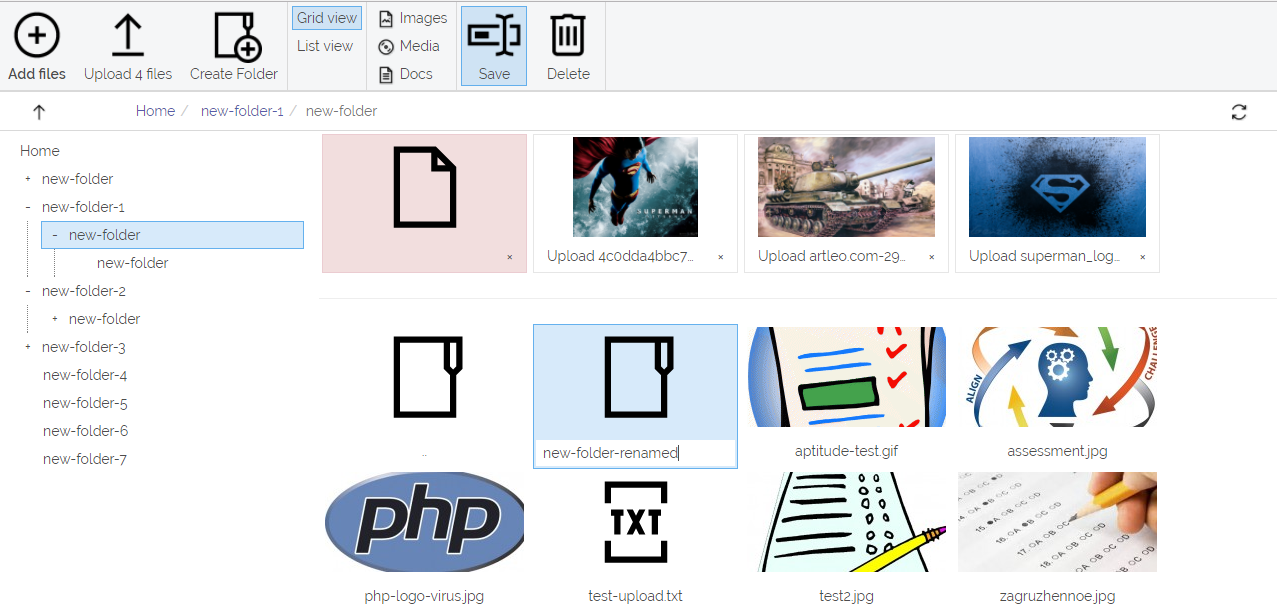
Installation
Require package with composer:
composer require crip-laravel/filesys
If you are on lower Laravel version that 5.5 (or choose not to use package auto
discovery) add this to ServiceProvider in configuration file of your Laravel
application config/app.php:
'providers' = [
    ...
    Crip\Filesys\CripFilesysServiceProvider::class,
],
Copy the package resources and views to your local folders with the publish command:
php artisan vendor:publish --provider="Crip\Filesys\CripFilesysServiceProvider"
This allows you to override package resource files by updating them directly from your application: views -
/resources/views/vendor/cripfilesysand assets in a/public/vendor/crip/cripfilesysfolder.
Additionally you can override package configuration file publishing it to your application config folder:
php artisan vendor:publish --provider="Crip\Filesys\CripFilesysServiceProvider" --tag=config
Filesystem manager is not configured to any of routes and you should do it manually. This allows to ad any middleware and will not conflict with any application routes, as it can be anything you choose.
Add new methods in your app\Providers\RouteServiceProvider.php
...

/**
 * Define your route model bindings, pattern filters, etc.
 *
 * @return void
 */
public function boot()
{
    Route::pattern('crip_file', '[a-zA-Z0-9.\-\/\(\)\_\% ]+');
    Route::pattern('crip_folder', '[a-zA-Z0-9.\-\/\(\)\_\% ]+');

    parent::boot();
}

/**
 * Define the routes for the application.
 *
 * @return void
 */
public function map()
{
    $this->mapApiRoutes();
    $this->mapWebRoutes();
    $this->mapPackageRoutes();
}

/**
 * Define the "package" routes for the application.
 */
protected function mapPackageRoutes() {
    Route::prefix('packages')
        ->group(base_path('routes/package.php'));
}

...
Now you can add new routes file to map package controllers tou your application
routes. Create new file routes/package.php and add content:
<?php

Route::group(['prefix' => 'filemanager'], function () {
    Route::resource('api/crip-folders', Crip\Filesys\App\Controllers\FolderController::class);
    Route::resource('api/crip-files', Crip\Filesys\App\Controllers\FileController::class);
    Route::get('api/crip-tree', Crip\Filesys\App\Controllers\TreeController::class);
    Route::get('/', Crip\Filesys\App\Controllers\ManagerController::class);
});
Remember - route names for FolderController and FileController are important
and should be registered in RouteServiceProvider boot method with pattern to
correctly allocate file location in server filesystem.
Configuration
public_url - Public url to assets folder. By default assets are published to
/vendor/crip/cripfilesys and this configuration default value
is set to this folder.
public_storage - This feature may increase application speed, but in this
case files will have public access for everyone, no matter
what. If you choose enable it make sure
symbolic link
is created for your storage directory in case if you use
local/public storage configuration.
absolute_url - Make urls to a files absolute. Useful when file manager is
located under different domain.
user_folder - This value is indicates value of the subfolder of currently
configured storage. This may be useful in case if you want each
user or user group to have their own folder - by default single
folder is shared for everyone. This can be done creating
middleware for routes and defining value on application
start-up. Take a look for sample below.
authorization - This value may be useful if your application is SPA and you do
not use Laravel sessions to identify users. For packages as
JWT you need pass token in a request or may be used Bearer
authorization for API. For web routes you may pass 'token'
property with value and then all API calls will contain Bearer
authorization replacing placeholder with passed token
value in a first request of UI part of filesys manager.
thumbs - Uploaded images will be sized to this configured Array. First
argument is width and second is height. Third argument describes
crop type:
resize- crop image to width and height;width- resize the image to a width and constrain aspect ratio (auto height);height- resize the image to a height and constrain aspect ratio (auto width);
icons.url - Public url to images folder. By default images are published to
/vendor/crip/cripfilesys/images/ and this configuration default
value is set to this folder.
icons.files - Mapping array between file mime type name and icon image
([type].png).
mime.types - Mapping from file full mime type to type name (array).
mime.media - Mapping between mime type name and media type (array).
mime.map - Mapping between file extension and media type. Used in cases when
storage may not get mime type (array).
block - Blocked file extensions and mime types.
actions - Controller actions to allocate file and directory actions.
Usage
TinyMCE
Download and set up TinyMCE editor. Copy plugins
folder from published resources \public\vendor\crip\cripfilesys\tinymce\plugins
to installed TinyMCE editor plugins directory. Configure TinyMCE to enable
cripfilesys plugin in it:
if (tinymce) {
  tinymce.init({
    plugins: [
      'advlist autolink link image lists charmap print preview hr anchor',
      'pagebreak searchreplace wordcount visualblocks visualchars',
      'insertdatetime media nonbreaking table contextmenu directionality',
      'emoticons paste textcolor',
      /* Creates 'Insert file' button under 'Insert' menu. */
      'cripfilesys'
    ],

    /* Add 'cripfilesys-btn' to editor toolbar. */
    toolbar: 'undo redo | insert | styleselect | bold italic | ' +
    'alignleft aligncenter alignright alignjustify | ' +
    'bullist numlist outdent indent | link image cripfilesys-btn',

    relative_urls: false,
    language: 'en',
    selector: '.tinymce',
    external_filemanager_path: '/packages/filemanager',

    /* Enables select buttons for 'media' and 'image' plugins. */
    external_plugins: {filemanager: '/vendor/crip/cripfilesys/tinymce/plugin.js'}
  })
}
CKEditor
Download and set up CKEditor and configure it to enable
cripfilesys plugin in it:
if (CKEDITOR) {
  CKEDITOR.replace('ckeditor', {
    filebrowserBrowseUrl: '/packages/filemanager?target=ckeditor&type=file',
    filebrowserImageBrowseUrl: '/packages/filemanager?target=ckeditor&type=image'
  })
}
Stand-alone filesystem manager
You can use iframe, FancyBox or Lightbox iframe to open the Fylesystem
manager. To handle selected file, add GET parameter to the end of the path:
/packages/filemanager?target=callback. You can filter visible files by they
type: /packages/filemanager?target=callback&type=[type]. Supported types are:
document- excel, word, pwp, html, txt and js;image- any file with mime type starting fromimage/*. Additionally you can specify default size of selected image by addingselectproperty in a request with value of configured thumb size;media- audio and video;file- all files. This type is set by default;
Types could be configured in package configuration file mime.media section.
To handle filesystem manager selected file url, window object should contain
window.cripFilesystemManager function witch will be called on file select with
selected file url and all GET parameters of opened window.
Sample
<!DOCTYPE html>
<html>
<head>
    <meta http-equiv="Content-Type" content="text/html; charset=UTF-8"/>
    <link rel="stylesheet" crossorigin="anonymous"
          href="https://maxcdn.bootstrapcdn.com/bootstrap/3.3.7/css/bootstrap.min.css"
          integrity="sha384-BVYiiSIFeK1dGmJRAkycuHAHRg32OmUcww7on3RYdg4Va+PmSTsz/K68vbdEjh4u">
    <link href="https://cdnjs.cloudflare.com/ajax/libs/fancybox/3.0.47/jquery.fancybox.css"
          rel="stylesheet" type="text/css">
    <script src="/tinymce/tinymce.min.js"></script>
    <script src="/ckeditor/ckeditor.js"></script>
    <script src="//code.jquery.com/jquery-3.2.1.min.js"></script>
    <script src="https://cdnjs.cloudflare.com/ajax/libs/fancybox/3.0.47/jquery.fancybox.js"></script>
    <script>
      tinymce.init({
        plugins: [
          'advlist autolink link image lists charmap print preview hr anchor',
          'pagebreak searchreplace wordcount visualblocks visualchars',
          'insertdatetime media nonbreaking table contextmenu directionality',
          'emoticons paste textcolor cripfilesys',
        ],
        toolbar: 'undo redo | insert | styleselect | bold italic | ' +
        'alignleft aligncenter alignright alignjustify | ' +
        'bullist numlist outdent indent | link image cripfilesys-btn',
        relative_urls: false,
        language: 'en',
        selector: '.tinymce',
        external_filemanager_path: '/packages/filemanager',
        external_plugins: {filemanager: '/vendor/crip/filesys/tinymce/plugin.js'}
      })

      // Callback method for input group btn
      window.cripFilesystemManager = function(fileUrl, params) {
        // will recive params.flag and params.one parameter as they are
        // presented in href below
        console.log(fileUrl, params)

        if (params.flag == 'link' && params.one == 1) {
          $('#input-id').val(fileUrl)
          $.fancybox.close()
        }
      }

      $(document).ready(function () {
        $('.fancybox').fancybox({
          iframe: {
            preload : false,
            scrolling : 'yes',
            css: {
              maxWidth: '1200px'
            }
          }
        })
      })

      CKEDITOR.replace('ckeditor', {
        filebrowserBrowseUrl: '/packages/filemanager?target=ckeditor&type=file',
        filebrowserImageBrowseUrl: '/packages/filemanager?target=ckeditor&type=image',
        filebrowserUploadUrl: '/packages/filemanager?target=ckeditor&type=file',
        filebrowserImageUploadUrl: '/packages/filemanager?target=ckeditor&type=image'
      })
    </script>
</head>
<body>
  <form>

    <div class="form-group">
      <textarea class="tinymce">Hello, World from TinyMCE !</textarea>
    </div>


    <div class="form-group">
      <textarea id="ckeditor">Hello, World from CKEditor !</textarea>
    </div>

    <div class="form-group">
      <div class="input-group">
        <input type="text" id="input-id" class="form-control" placeholder="File...">
        <span class="input-group-btn">
          <a class="btn btn-default fancybox" type="button"
             href="/packages/filemanager?target=callback&flag=link&one=1&type=image">
            Select image
          </a>
        </span>
      </div>
    </div>
  </form>
</body>
</html>
User folder configuration sample
Create new Middleware
app/Http/Middleware/RegisterUserStorageFolder.php:
<?php namespace App\Http\Middleware;

use Closure;
use Illuminate\Support\Facades\Auth;
use Illuminate\Support\Facades\Config;

/**
 * Class RegisterUserStorageFolder
 * @package App\Http\Middleware
 */
class RegisterUserStorageFolder
{
    /**
     * Handle an incoming request.
     * @param  \Illuminate\Http\Request $request
     * @param  \Closure $next
     * @param  string|null $guard
     * @return mixed
     */
    public function handle($request, Closure $next, $guard = null)
    {
        if (!Auth::guard($guard)->check()) {
            return redirect('/login');
        }

        if (!Auth::user()->isAdmin()) {
            // For users who is not in group of administrators set their own
            // folder for manager and make impossible to see/change files of
            // other users.
            Config::set('cripfilesys.user_folder', Auth::user()->slug());
        }

        return $next($request);
    }
}
In this sample I use user methods
isAdminandslugwhere one is returning boolean indicating that user belongs to administrators group of my application and other one gets unique slug of user name.
Register new Middleware
app/Http/Kernel.php:
    /**
     * The application's route middleware.
     * These middleware may be assigned to groups or used individually.
     * @var array
     */
    protected $routeMiddleware = [
        ...
        'user.storage' => \App\Http\Middleware\RegisterUserStorageFolder::class,
    ];
Then protect your routes
routes/package.php:
Route::group(['prefix' => 'filemanager', 'middleware' => ['auth', 'user.storage']], function () {
    ...
});
casperlaitw/filesys 适用场景与选型建议
casperlaitw/filesys 是一款 基于 PHP 开发的 Composer 扩展包,目前已累计 3.9k 次下载、GitHub Stars 达 0, 最近一次更新时间为 2019 年 12 月 27 日, 在 PHP 生态内属于活跃度较高的组件。
我们在过去多个企业项目中使用过 casperlaitw/filesys 或与其功能相近的方案,如果你在选型或落地过程中遇到问题,例如 版本兼容、二次改造、私有化封装、与内部系统对接、生产 BUG 排查,欢迎联系我们协助评估。
基于 casperlaitw/filesys 在你已有业务上做功能扩展、字段裁剪、UI 适配、与内部账号 / 权限 / 日志系统的深度对接。
线上偶发问题、内存泄漏、慢查询、并发异常等排查修复;针对高流量场景做缓存、队列、索引层面的调优。
承接完整的项目从需求 → 设计 → 开发 → 上线 → 长期运维;也可按月提供技术保姆服务。
统计信息
- 总下载量: 3.9k
- 月度下载量: 0
- 日度下载量: 0
- 收藏数: 0
- 点击次数: 0
- 依赖项目数: 0
- 推荐数: 0
其他信息
- 授权协议: MIT
- 更新时间: 2019-12-27