chartron/app
Composer 安装命令:
composer require chartron/app
包简介
Advanced charts for laravel
README 文档
README
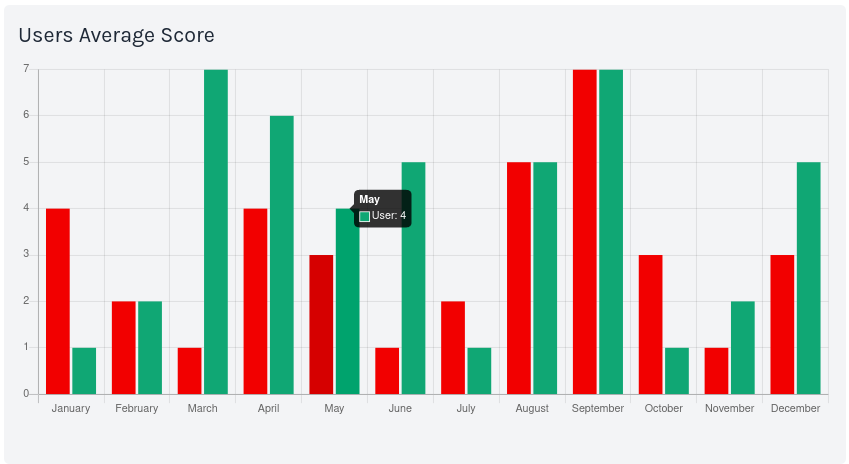
About Chartron
Chartron is a PHP library with elegant syntax. The easiest way to setup your dataset.
If you are using the Laravel framework i highly recommend the usage of chartron-routes
Example usage
This example code generates the dataset for the graph above.
//declare the library
use Chartron\APP\Chartron;

//build and configurations
$chartron = Chartron::build();
$chartron->monthLabels("EN");

//chart customization options
$options1 = ["backgroundColor"=>"#F20000"];
$options2 = ["backgroundColor"=>"#10A774"];

//set chartron datasets
$chartron->dataset("Team",[4,2,1,4,3,1,2,5,7,3,1,3],$options1);
$chartron->dataset('User',[1,2,7,6,4,5,1,5,7,1,2,5],$options2);

//return the json data object
return $chartron->keep();
Instalation
composer require chartron/app
First Steps
First initiate the cartron object
$chartron = Chartron::build();
Setup the chart label
$chartron->labels(["First","Second","Third"]);
Setup the dataset
$chartron->dataset("Users",[4,2,1]);
Then use the method keep to generate the JSON object;
$chartron->keep();
Options
Inside the option field you have the possibily to customtize with whenever you want based in the front end library chart you are using.
$options = ["backgroundColor"=>"#F20000"];
In this example i'm using Chart JS so i set the backgroundColor to #F20000 according to the Chart JS documentation
License
统计信息
- 总下载量: 56
- 月度下载量: 0
- 日度下载量: 0
- 收藏数: 1
- 点击次数: 1
- 依赖项目数: 0
- 推荐数: 0
其他信息
- 授权协议: Unknown
- 更新时间: 2022-08-10