codedungeon/phpunit-result-printer
Composer 安装命令:
composer require --dev codedungeon/phpunit-result-printer
包简介
PHPUnit Pretty Result Printer
README 文档
README
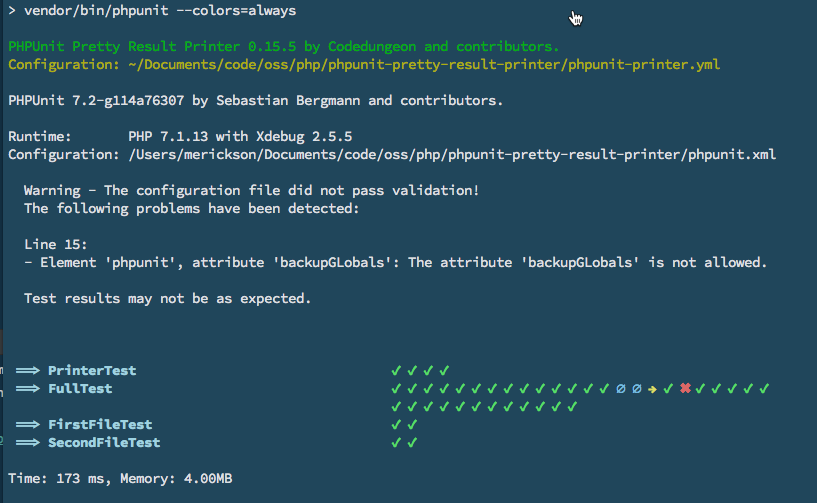
Version 0.29.2 Extend the default PHPUnit Result Printer with a modern, pretty printer!
📦 PHPUnit Pretty Result Printer -- Packagist
Installation
Installation provided via composer and can be done with the following command, the current version requires PHP 7.1 or greater:
> composer require --dev codedungeon/phpunit-result-printer
Upgrading to >= 0.29.x
If you are upgrading from previous verison and have published phpunit-printer.yml locally, make sure add the following to the options section
  ...
  cd-printer-dont-format-classname: false
  ...
Execute Initialization Script (Optional)
The following steps are optional, but will provide zero configuration for implementing phpunit-pretty-result-printer
- Adds
printerClass="Codedungeon\PHPUnitPrettyResultPrinter\Printer"tophpunit.xmlfile - Copies default
phpunit-printer.ymlto project root for easier customization
> php ./vendor/codedungeon/phpunit-result-printer/src/init.php
Manual Configuration
Alternately, if you wish to configure phpunit-pretty-result-printer manually, you will need to update your phpunit.xml file as follows
<?xml version="1.0" encoding="UTF-8"?>
  <phpunit printerClass="Codedungeon\PHPUnitPrettyResultPrinter\Printer">
    // ....
  </phpunit>
Or from Command-Line:
> phpunit --printer=Codedungeon\\PHPUnitPrettyResultPrinter\\Printer
Laravel 5.3 with PHP version 7.0.x
If you are using PHP 7.0.x, you will need to use a compatible version of PHPUnit Result Printer (version 0.8.x)
> composer require --dev codedungeon/phpunit-result-printer:^0.8
AnyBar Integration
If you have AnyBar installed, it will be enabled by default. You can disable using cd-printer-anybar-enabled option (see below)
https://github.com/tonsky/AnyBar
**Anybar is off by default, thus you will need to set the cd-printer-anybar option in the phpunit-printer.yml to true if you wish to use Anybar.
This has been done to address issues with using CI tools such as travis (please see Issue 122 for details) **
NOTE: AnyBar is only available with PHPUnit 7.1 or greater. If you need support for previous versions, please let us know. We are slowly deprecating versions before 7.1.
Configuration Options
- Create a
phpunit-printer.ymlfile in your application root to override default (or anywhere use up the parent tree. It will search recursively up the tree until a configuration file is found. If not found, default configuration will be used). The following options are available (along with their default values):
Options
| Property Name | Default | Description |
|---|---|---|
cd-printer-hide-class |
false | Hides the display of the test class name |
cd-printer-simple-output |
false | Uses the default PHPUnit markers (but still uses Printer) |
cd-printer-show-config |
true | Show path to used configuration file |
cd-printer-hide-namespace |
true | Hide test class namespaces (will only show print class name) |
cd-printer-anybar |
true | Enable AnyBar (if anybar is not installed, settings will be ignored) |
cd-printer-anybar-port |
1738 | Define AnyBar port number |
cd-printer-dont-format-classname |
false | Show entire classname* |
- If
cd-printer-hide-namespaceset tofalseandcd-printer-dont-format-classnametofalsewill attempt to keep everyting formatted - If
cd-printer-dont-format-classnamenothing will be formatted and full classname will be displayed
Markers
You can customize the markers which are used for success, fail, error, skipped, incomplete by modifying the phpunit-printer.yml file.
| Marker | Value * |
|---|---|
| cd-pass | "✔ " |
| cd-fail | "✖ " |
| cd-error | "⚈ " |
| cd-skipped | "→ " |
| cd-incomplete | "∅ " |
| cd-risky | "⌽ " |
* Notice space after each marker. This makes the output a little more visually appealing, thus keep that in mind when creating your own custom markers
License
Copyright © 2017-2021 Mike Erickson Released under the MIT license
Credits
phpunit-result-printer written by Mike Erickson
E-Mail: codedungeon@gmail.com
Twitter: @codedungeon
Website: https://github.com/mikeerickson
Screenshot
codedungeon/phpunit-result-printer 适用场景与选型建议
codedungeon/phpunit-result-printer 是一款 基于 PHP 开发的 Composer 扩展包,目前已累计 8.96M 次下载、GitHub Stars 达 1.19k, 最近一次更新时间为 2017 年 07 月 17 日, 在 PHP 生态内属于活跃度较高的组件。
它主要适用于以下技术方向: 「package」 「testing」 「phpunit」 「composer」 「TDD」 「printer」 等业务场景。在实际项目中,围绕这些方向常见需要落地的问题包括:接口对接、性能调优、并发安全、与既有框架(Laravel / ThinkPHP / Yii / Webman 等)的兼容适配,以及生产环境的日志埋点与稳定性保障。
我们在过去多个企业项目中使用过 codedungeon/phpunit-result-printer 或与其功能相近的方案,如果你在选型或落地过程中遇到问题,例如 版本兼容、二次改造、私有化封装、与内部系统对接、生产 BUG 排查,欢迎联系我们协助评估。
基于 codedungeon/phpunit-result-printer 在你已有业务上做功能扩展、字段裁剪、UI 适配、与内部账号 / 权限 / 日志系统的深度对接。
线上偶发问题、内存泄漏、慢查询、并发异常等排查修复;针对高流量场景做缓存、队列、索引层面的调优。
承接完整的项目从需求 → 设计 → 开发 → 上线 → 长期运维;也可按月提供技术保姆服务。
与 codedungeon/phpunit-result-printer 相关的其它包
同方向 / 同关键字的高下载量 PHP Composer 包推荐,方便对比选型:
HiDev plugin for PHPUnit
Testing Suite For Lumen like Laravel does.
A cli tool which generates unit tests.
The PHP SDK for Checkmango
PHPUnit DbUnit Native Array-based Fixtures
统计信息
- 总下载量: 8.96M
- 月度下载量: 0
- 日度下载量: 0
- 收藏数: 1200
- 点击次数: 25
- 依赖项目数: 445
- 推荐数: 2
其他信息
- 授权协议: MIT
- 更新时间: 2017-07-17