codesoup/acf-admin-categories
Composer 安装命令:
composer require codesoup/acf-admin-categories
包简介
A WordPress plugin that adds category organization to Advanced Custom Fields (ACF) field groups for better management and organization.
README 文档
README
CodeSoup ACF Admin Categories extends the Advanced Custom Fields plugin by adding a custom taxonomy system that allows you to categorize and organize your field groups. This makes it easier to manage large numbers of field groups by providing filtering, sorting, and visual organization tools.

Use Cases
- Large Projects: Organize field groups by project sections (Header, Footer, Content, etc.)
- Development Workflow: Separate field groups by development status (Active, Testing, Deprecated)
Requirements
- WordPress 6.0 or higher
- PHP 8.1 or higher
- Advanced Custom Fields (ACF) Pro or Free version
Installation
Via WordPress Admin (Recommended)
- Download the plugin ZIP file from the releases page
- Navigate to Plugins > Add New > Upload Plugin
- Choose the downloaded ZIP file and click Install Now
- Activate the plugin through the Plugins menu
No additional configuration required. The plugin includes a built-in autoloader and works out of the box.
Via Composer (Theme Integration)
composer require codesoup/acf-admin-categories
Load the plugin from your theme's functions.php:
// Load ACF Admin Categories plugin
$acf_categories = get_template_directory() . '/vendor/codesoup/acf-admin-categories/index.php';
if ( file_exists( $acf_categories ) ) {
    require_once $acf_categories;

    // Configure plugin assets URL for Composer installation
    add_filter( 'codesoup_acf_admin_categories_plugin_dir_url', function( $base_url ) {
        return get_stylesheet_directory_uri() . '/vendor/codesoup/acf-admin-categories';
    });
}
Note: The plugin automatically uses your theme's Composer autoloader when available, or falls back to its own PSR-4 autoloader.
Manual Installation
- Download the plugin files
- Upload the
acf-admin-categoriesfolder to your/wp-content/plugins/directory - Activate the plugin through the Plugins menu in WordPress
Usage
Creating Field Categories
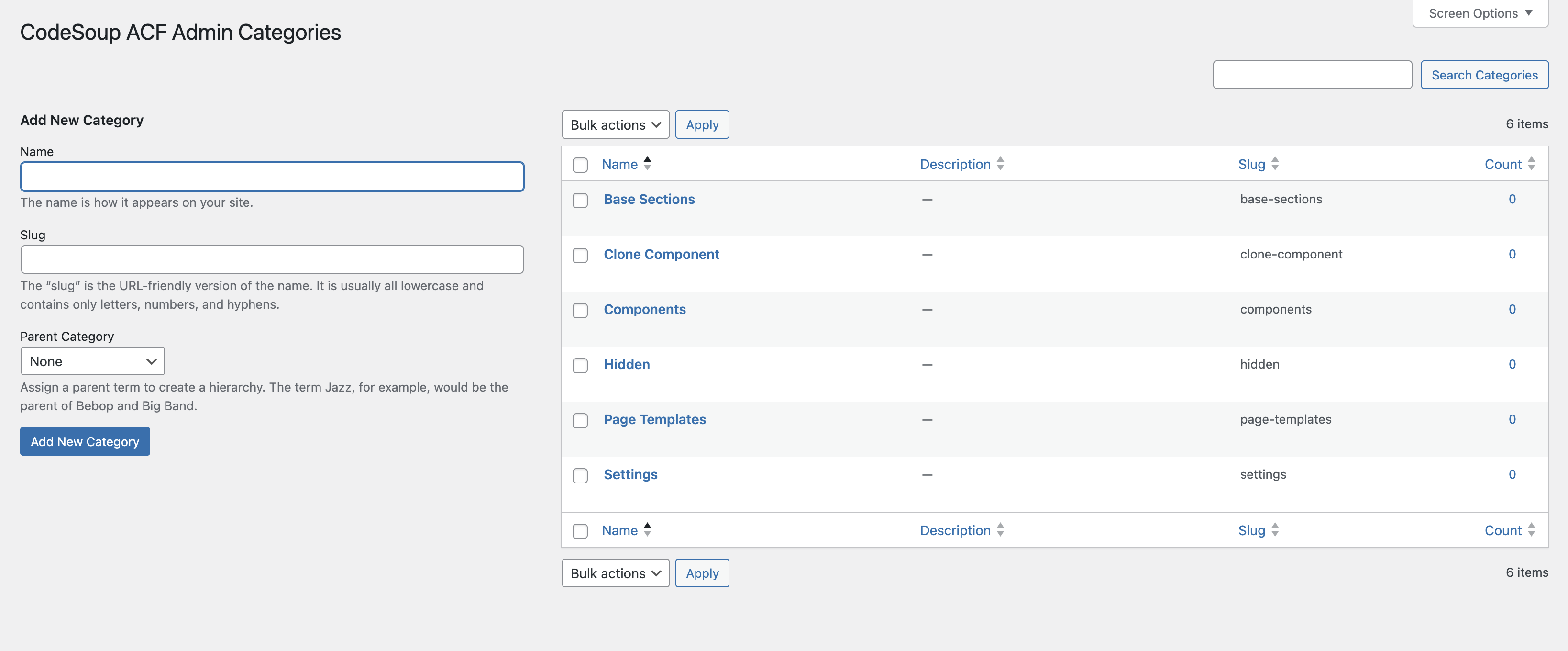
- Navigate to Custom Fields > Field Categories in your WordPress admin
- Click Add New Category
- Enter a name and optional description for your category
- Click Add New Category to save
Assigning Categories to Field Groups
- Edit any ACF Field Group
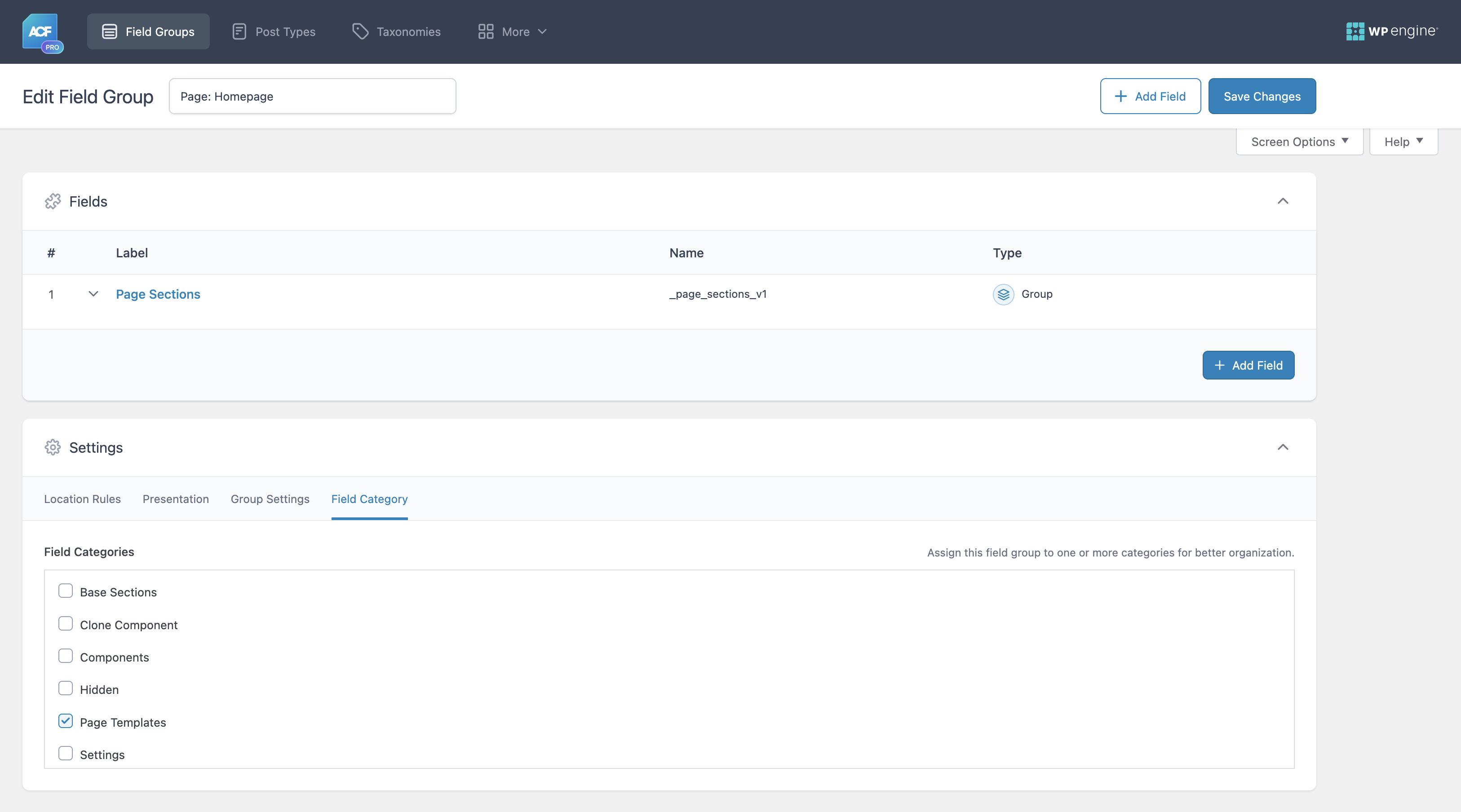
- Click the Field Category tab in the field group settings
- Check the categories you want to assign to this field group
- Save the field group
Filtering and Sorting Field Groups
- Go to Custom Fields > Field Groups
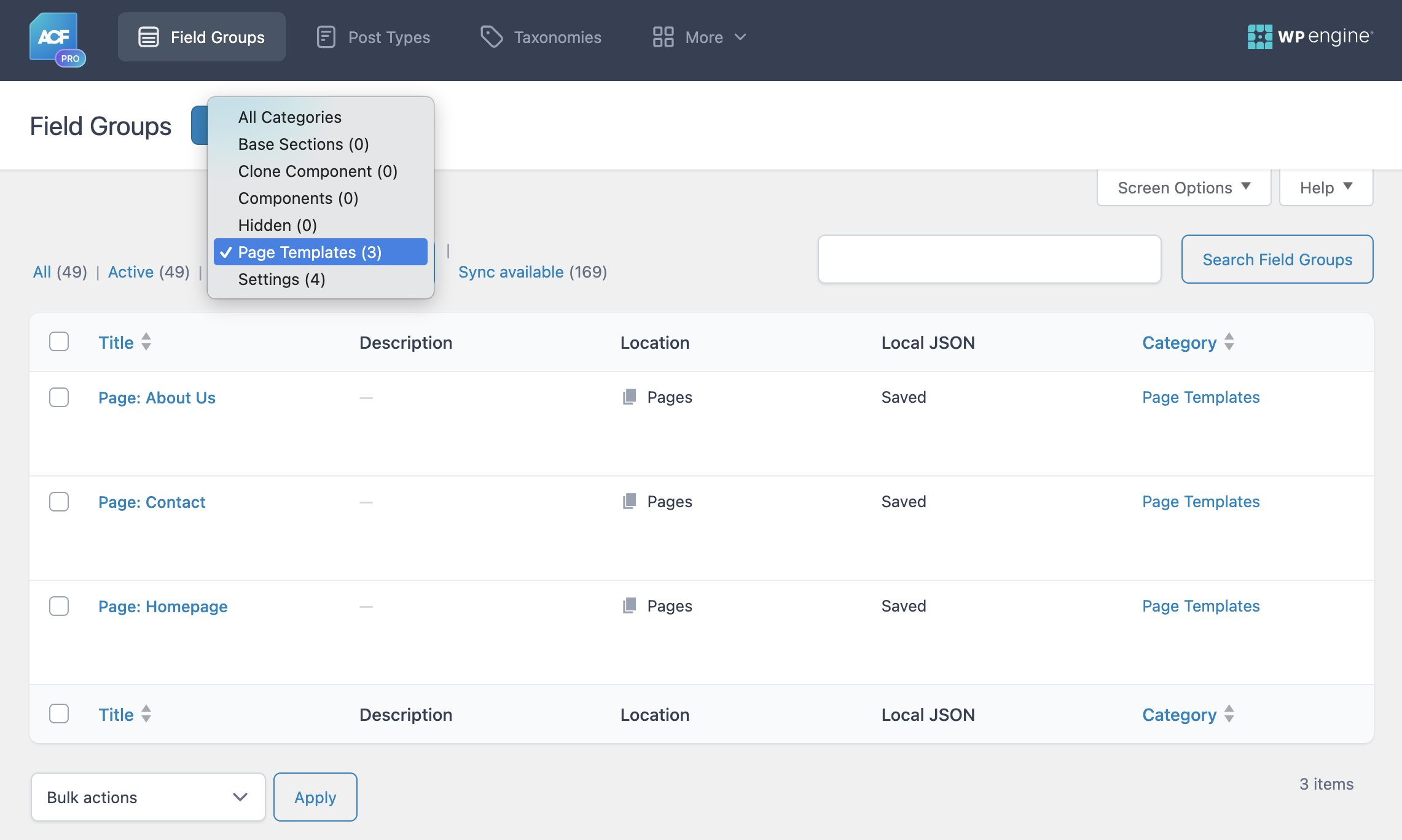
- Use the category dropdown filter above the list to filter by specific categories
- Click on any category name in the Category column to filter by that category
- Click the Category column header to sort field groups alphabetically by category name
Managing Categories
- Edit Categories: Go to Custom Fields > Field Categories to edit existing categories
- Hierarchical Structure: Create parent/child relationships between categories
- Bulk Management: Use WordPress's built-in bulk actions for category management
Features
- Categorize Field Groups: Organize ACF field groups with custom categories
- Composer Ready: Install via Composer or WordPress plugin directory
Screenshots
-
Filter and Sort Field Groups - Filter field groups by category using dropdown, click category names to filter, and sort alphabetically by clicking column header
-
Category Assignment - Assign categories directly from field group settings using the Field Category tab
-
Category Management - Create and manage your field group categories with hierarchical support


Changelog
See CHANGELOG.md for detailed version history.
Support
Please use GitHub Issues to submit any bugs or feature requests.
License
This project is licensed under the GPL v3 or later - see the LICENSE.txt file for details.
codesoup/acf-admin-categories 适用场景与选型建议
codesoup/acf-admin-categories 是一款 基于 PHP 开发的 Composer 扩展包,目前已累计 327 次下载、GitHub Stars 达 1, 最近一次更新时间为 2025 年 12 月 06 日, 在 PHP 生态内属于活跃度较高的组件。
它主要适用于以下技术方向: 「wordpress」 「options」 「Settings」 「acf」 「custom-post-type」 「composer-package」 等业务场景。在实际项目中,围绕这些方向常见需要落地的问题包括:接口对接、性能调优、并发安全、与既有框架(Laravel / ThinkPHP / Yii / Webman 等)的兼容适配,以及生产环境的日志埋点与稳定性保障。
我们在过去多个企业项目中使用过 codesoup/acf-admin-categories 或与其功能相近的方案,如果你在选型或落地过程中遇到问题,例如 版本兼容、二次改造、私有化封装、与内部系统对接、生产 BUG 排查,欢迎联系我们协助评估。
基于 codesoup/acf-admin-categories 在你已有业务上做功能扩展、字段裁剪、UI 适配、与内部账号 / 权限 / 日志系统的深度对接。
线上偶发问题、内存泄漏、慢查询、并发异常等排查修复;针对高流量场景做缓存、队列、索引层面的调优。
承接完整的项目从需求 → 设计 → 开发 → 上线 → 长期运维;也可按月提供技术保姆服务。
与 codesoup/acf-admin-categories 相关的其它包
同方向 / 同关键字的高下载量 PHP Composer 包推荐,方便对比选型:
Persistent settings package for Laravel framework.
Lightweight configuration interfaces and utilities
This extension provide application configuration support stored in database.
A Zend Framework module to quickly and easily set PHP settings.
Settings Card for Laravel Nova.
Array wrapper that eases the retrieval of values. Has parameters, options and settings and traits for inclusion in other libraries.
统计信息
- 总下载量: 327
- 月度下载量: 0
- 日度下载量: 0
- 收藏数: 1
- 点击次数: 26
- 依赖项目数: 0
- 推荐数: 0
其他信息
- 授权协议: GPL-3.0-or-later
- 更新时间: 2025-12-06