codewithdennis/filament-select-tree
Composer 安装命令:
composer require codewithdennis/filament-select-tree
包简介
The multi-level select field enables you to make single selections from a predefined list of options that are organized into multiple levels or depths.
README 文档
README
If you're using Filament 3.x, check out the compatible version of this package here.
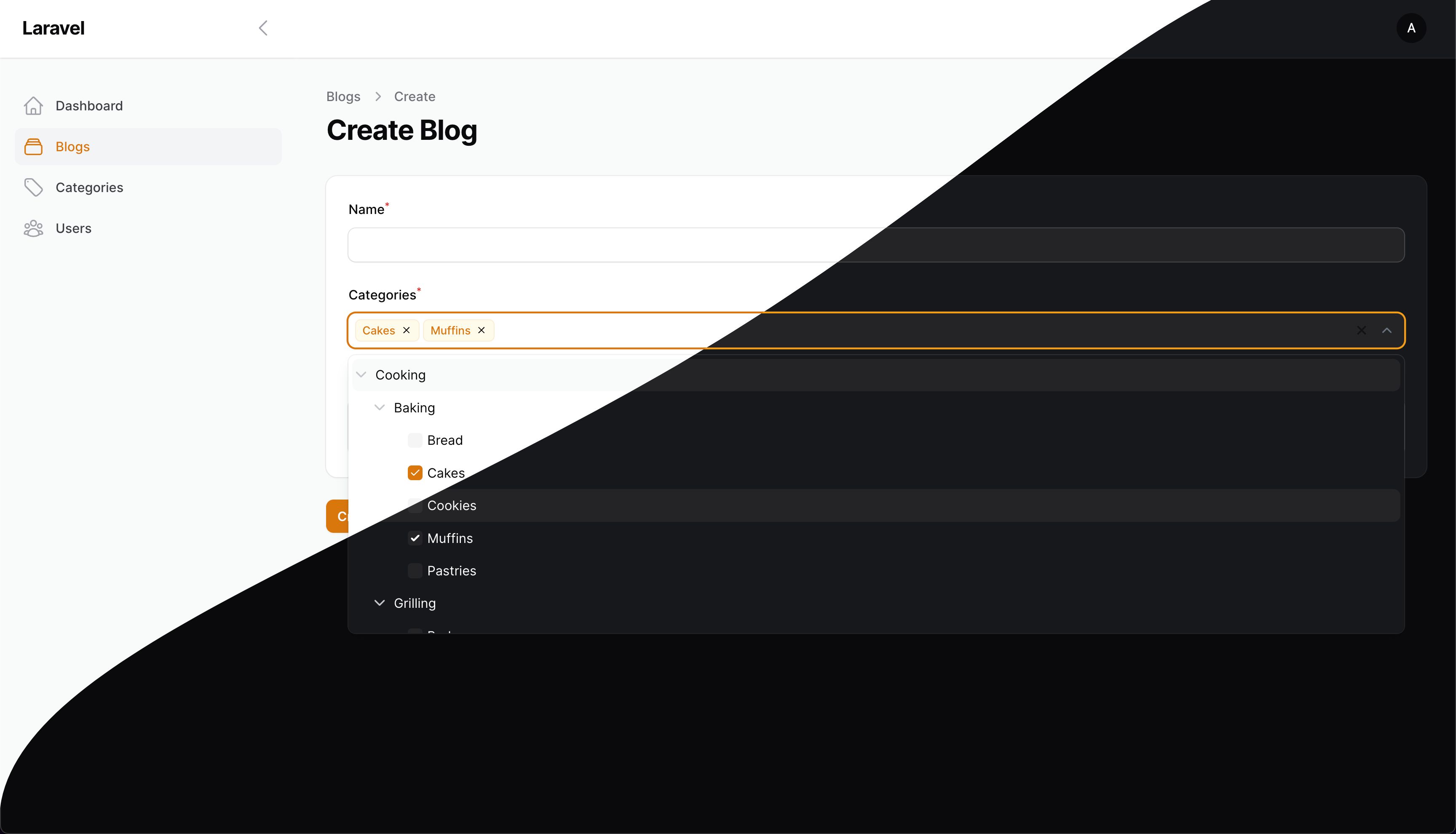
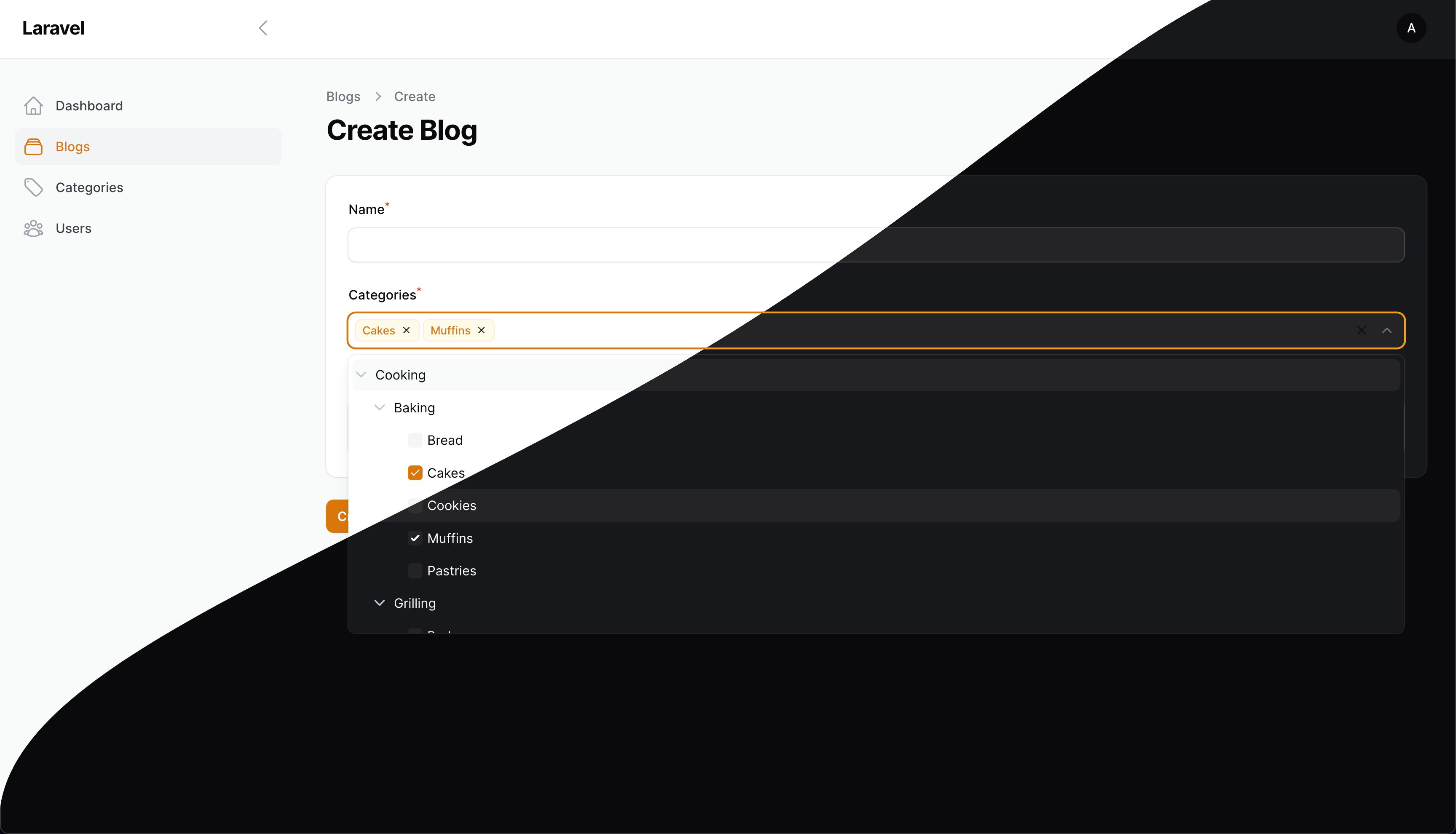
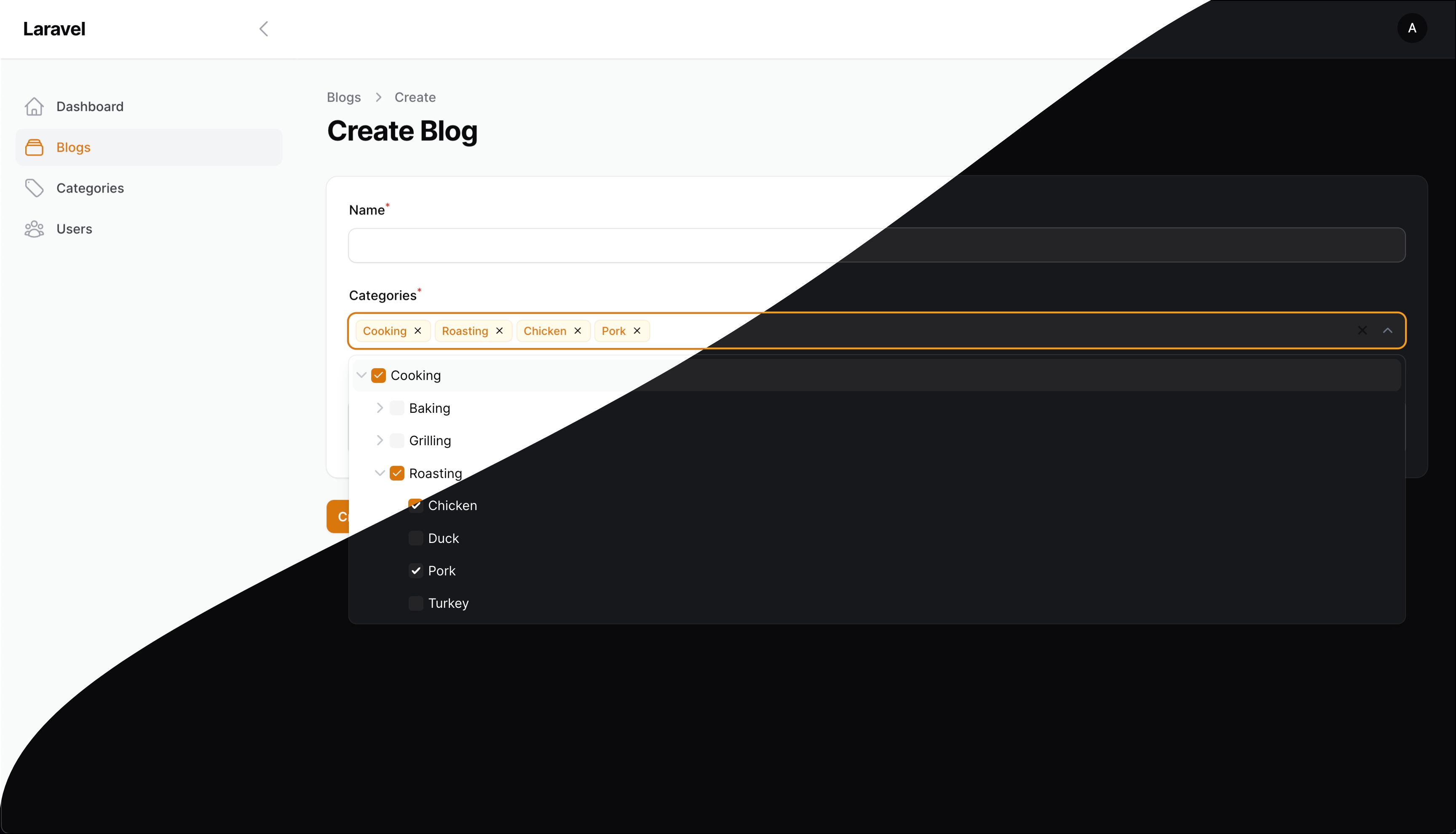
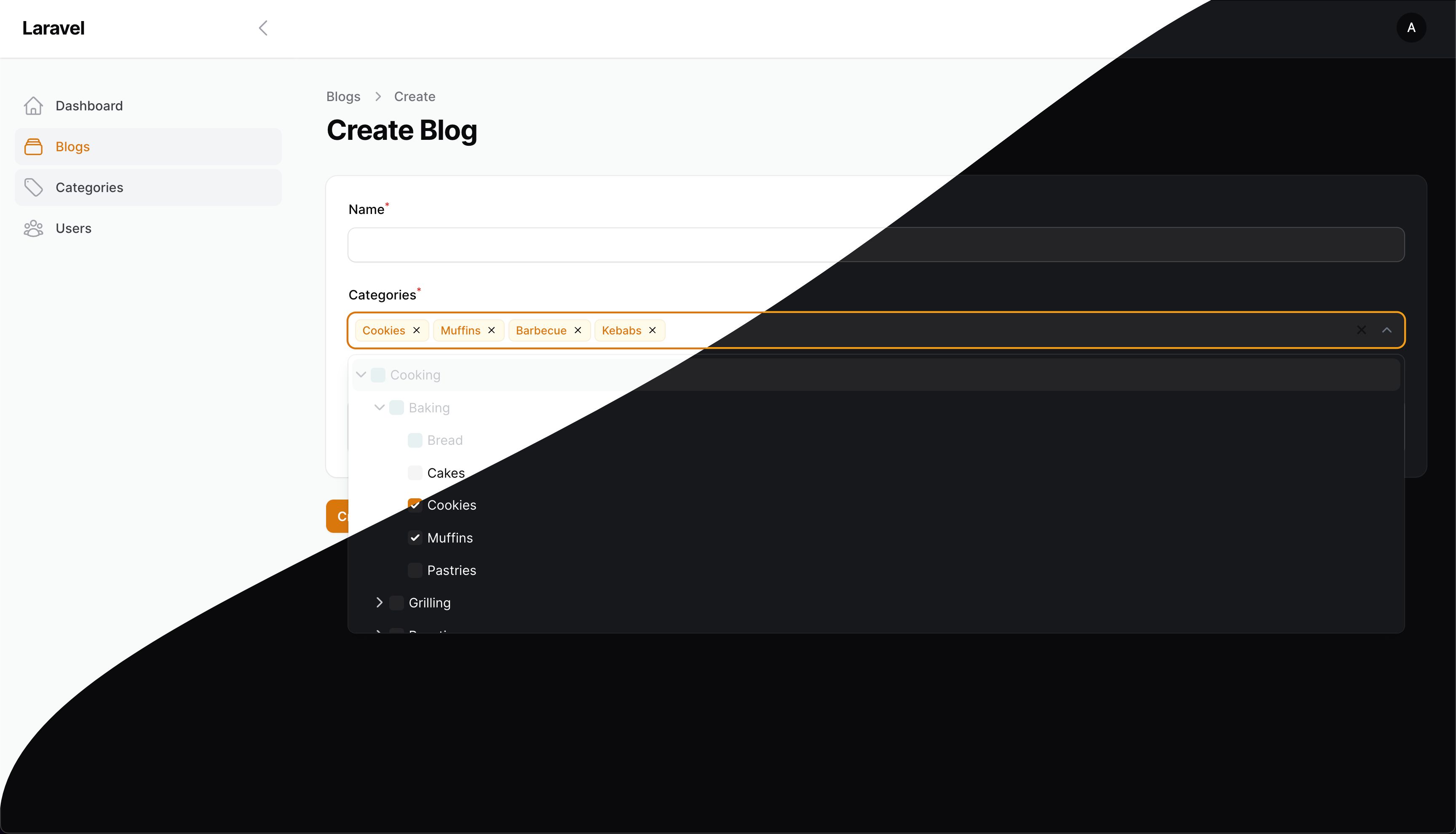
This package adds a dynamic select tree field to your Laravel / Filament application, allowing you to create interactive hierarchical selection dropdowns based on relationships. It's handy for building selection dropdowns with various customization options.
Installation
You can install the package via composer:
composer require codewithdennis/filament-select-tree:4.x
php artisan filament:assets
Relationships
Use the tree for a BelongsToMany relationship
SelectTree::make('categories')
    ->relationship('categories', 'name', 'parent_id')
Use the tree for a BelongsTo relationship
SelectTree::make('category_id')
    ->relationship('category', 'name', 'parent_id')
Usage without relationships
Use the tree without relationship
SelectTree::make('category_id')
    ->query(fn() => Category::query(), 'name', 'parent_id')
Custom Query
Customize the parent query
SelectTree::make('categories')
    ->relationship(relationship: 'categories', titleAttribute: 'name', parentAttribute: 'parent_id', modifyQueryUsing: fn($query) => $query));
Customize the child query
SelectTree::make('categories')
    ->relationship(relationship: 'categories', titleAttribute: 'name', parentAttribute: 'parent_id', modifyChildQueryUsing: fn($query) => $query));
Note: when you filter the parent query, any results found by the child query whose parents have been filtered out will be promoted to root nodes by default (to prevent empty result sets).
To disable this feature, use the strictNullParentRootNodes() configuration method
SelectTree::make('categories')
    ->relationship(relationship: 'categories', titleAttribute: 'name', parentAttribute: 'parent_id', modifyQueryUsing: fn($query) => $query->where('id', 1))
    ->strictNullParentRootNodes(); // only children of parent results from the parent query will be included in the tree
Methods
Set a custom placeholder when no items are selected
->placeholder(__('Please select a category'))
Enable the selection of groups
->enableBranchNode()
Customize the label when there are zero search results
->emptyLabel(__('Oops, no results have been found!'))
Display the count of children alongside the group's name
->withCount()
Keep the dropdown open at all times
->alwaysOpen()
Add the list as a static DOM element so that it doesn't overlap content
->staticList()
Set nodes as dependent
->independent(false)
Expand the tree with selected values (only works if field is dependent)
->expandSelected(false)
Set the parent's null value to -1, allowing you to use -1 as a sentinel value (default = null)
->parentNullValue(-1)
All groups will be opened to this level
->defaultOpenLevel(2)
Specify the list's force direction. Options include: auto (default), top, and bottom.
->direction('top')
Display individual leaf nodes instead of the main group when all leaf nodes are selected
->grouped(false)
Return parent node value if all of its children are selected, instead of individual leaf nodes.
->isGroupedValue()
Hide tags and display a count of selected items instead
->showTags(false)
Customize the text shown if showTags is set to false, e.g. "{count} {tagsCountText}"
->tagsCountText('elements selected')
Hide the clearable icon
->clearable(false)
Activate the search functionality
->searchable();
Disable specific options in the tree
->disabledOptions([2, 3, 4])
Hide specific options in the tree
->hiddenOptions([2, 3, 4])
Allow soft deleted items to be displayed
->withTrashed()
Specify a different key for your model. For example: you have id, code and parent_code. Your model uses id as key, but the parent-child relation is established between code and parent_code
->withKey('code')
Store fetched models for additional functionality
->storeResults()
Now you can access the results in disabledOptions or hiddenOptions
->disabledOptions(function ($state, SelectTree $component) {
    $results = $component->getResults();
})
By default, the type of selection in the tree (single or multiple) is determined by the relationship type: BelongsTo for single selection and BelongsToMany for multiple selection. If you want to
explicitly set the selection type, use:
->multiple(false)
you can change the tree key with the following method.
->treeKey('my-cool-tree')
If you need to prepend an item to the tree menu, use the prepend method. This method accepts an array or a closure. It is useful when the tree-select is used as a filter (see example below).
use Filament\Tables\Filters\Filter;
use Illuminate\Database\Eloquent\Builder;
use CodeWithDennis\FilamentSelectTree\SelectTree;
->filters([
    Filter::make('tree')
        ->form([
            SelectTree::make('category')
                ->relationship('categories', 'name', 'parent_id')
                ->enableBranchNode()
                ->multiple(false)
                ->prepend([
                    'name' => 'Uncategorized Records',
                    'value' => -1,
                    'parent' => null, // optional
                    'disabled' => false, // optional
                    'hidden' => false, // optional
                    'children' => [], // optional
                ])
        ])
        ->query(function (Builder $query, array $data) {
            return $query->when($data['categories'], function (Builder $query, $categories) {
                if (collect($categories)->contains('-1')) {
                    $query->whereDoesntHave('categories');
                }
                return $query->orWhereHas('categories',
                    fn(Builder $query) => $query->whereIn('id', $categories));
            });
        })
])
If you need to append an item to the tree menu, use the append method. This method also accepts an array or a closure.
->schema([
    SelectTree::make('category')
        ->relationship('categories', 'name', 'parent_id')
        ->enableBranchNode()
        ->multiple(false)
        ->append([
            'name' => 'Uncategorized Records',
            'value' => -1,
            'parent' => null, // optional
            'disabled' => false, // optional
            'hidden' => false, // optional
            'children' => [], // optional
        ])
    ])
If you need full control over the tree structure, you can use getTreeUsing to provide a custom tree array, or a closure that resolves to an array.
Using an array:
SelectTree::make('categories')
    ->getTreeUsing([
        [
            'name' => 'Parent Category',
            'value' => '1',
            'children' => [
                [
                    'name' => 'Child Category',
                    'value' => '2',
                    'children' => [],
                ],
            ],
        ],
        [
            'name' => 'Another Category',
            'value' => '3',
            'children' => [],
        ],
    ])
Using a closure for dynamic data:
SelectTree::make('categories')
    ->getTreeUsing(function () {
        return Category::query()
            ->get()
            ->map(fn ($category) => [
                'name' => $category->name,
                'value' => $category->id,
                'children' => $category->children->map(fn ($child) => [
                    'name' => $child->name,
                    'value' => $child->id,
                    'children' => [],
                ])->toArray(),
            ])
            ->toArray();
    })
The tree structure should follow this format:
[
    [
        'name' => 'Display Name',
        'value' => 'option_value',
        'disabled' => false, // optional
        'hidden' => false, // optional
        'children' => [], // optional
    ],
]
Filters
Use the tree in your table filters. Here's an example to show you how.
use Filament\Tables\Filters\Filter;
use Illuminate\Database\Eloquent\Builder;
use CodeWithDennis\FilamentSelectTree\SelectTree;
->filters([
    Filter::make('tree')
        ->form([
            SelectTree::make('categories')
                ->relationship('categories', 'name', 'parent_id')
                ->independent(false)
                ->enableBranchNode(),
        ])
        ->query(function (Builder $query, array $data) {
            return $query->when($data['categories'], function ($query, $categories) {
                return $query->whereHas('categories', fn($query) => $query->whereIn('id', $categories));
            });
        })
        ->indicateUsing(function (array $data): ?string {
            if (! $data['categories']) {
                return null;
            }

            return __('Categories') . ': ' . implode(', ', Category::whereIn('id', $data['categories'])->get()->pluck('name')->toArray());
        })
])
Screenshots
Contributing
Please see CONTRIBUTING for details.
Security Vulnerabilities
Please review our security policy on how to report security vulnerabilities.
Credits
License
The MIT License (MIT). Please see License File for more information.
codewithdennis/filament-select-tree 适用场景与选型建议
codewithdennis/filament-select-tree 是一款 基于 PHP 开发的 Composer 扩展包,目前已累计 510.47k 次下载、GitHub Stars 达 328, 最近一次更新时间为 2023 年 09 月 09 日, 在 PHP 生态内属于活跃度较高的组件。
它主要适用于以下技术方向: 「tree」 「laravel」 「filament」 「CodeWithDennis」 「filament-select-tree」 等业务场景。在实际项目中,围绕这些方向常见需要落地的问题包括:接口对接、性能调优、并发安全、与既有框架(Laravel / ThinkPHP / Yii / Webman 等)的兼容适配,以及生产环境的日志埋点与稳定性保障。
我们在过去多个企业项目中使用过 codewithdennis/filament-select-tree 或与其功能相近的方案,如果你在选型或落地过程中遇到问题,例如 版本兼容、二次改造、私有化封装、与内部系统对接、生产 BUG 排查,欢迎联系我们协助评估。
基于 codewithdennis/filament-select-tree 在你已有业务上做功能扩展、字段裁剪、UI 适配、与内部账号 / 权限 / 日志系统的深度对接。
线上偶发问题、内存泄漏、慢查询、并发异常等排查修复;针对高流量场景做缓存、队列、索引层面的调优。
承接完整的项目从需求 → 设计 → 开发 → 上线 → 长期运维;也可按月提供技术保姆服务。
与 codewithdennis/filament-select-tree 相关的其它包
同方向 / 同关键字的高下载量 PHP Composer 包推荐,方便对比选型:
jsTree widget for yii2
Doctrine2 behavior traits - slowhop fork
A fast and dynamic Merkle tree implementation
Data structure collections, helpers and utilities for yii2 ActiveRecord models(trees, sorts and etc.)
Yii2 DynaTree Menu widget uses Dynamic tree view control jquery.dynatree.js
JQuery ZTree Yii2
统计信息
- 总下载量: 510.47k
- 月度下载量: 0
- 日度下载量: 0
- 收藏数: 330
- 点击次数: 28
- 依赖项目数: 18
- 推荐数: 0
其他信息
- 授权协议: MIT
- 更新时间: 2023-09-09