coolsam/laravel-report-generator
Composer 安装命令:
composer require coolsam/laravel-report-generator
包简介
Rapidly Generate Simple Pdf & Excel Report on Laravel 5 (Using Barryvdh/DomPdf or Barryvdh/laravel-snappy & maatwebsite/excel)
README 文档
README
Rapidly Generate Simple Pdf Report on Laravel (Using barryvdh/laravel-dompdf or barryvdh/laravel-snappy) or CSV / Excel Report (using Maatwebsite/Laravel-Excel)
This package provides a simple pdf, csv & excel report generators to speed up your workflow
Installation
Add package to your composer:
composer require coolsam/laravel-report-generator
If you are running Laravel > 5.5 that's all you need to do. If you are using Laravel < 5.5 add the ServiceProvider to the providers array in config/app.php
Coolsam\ReportGenerator\ServiceProvider::class,
Optionally, you can add this to your aliases array in config/app.php
'PdfReport' => Coolsam\ReportGenerator\Facades\PdfReportFacade::class,
'ExcelReport' => Coolsam\ReportGenerator\Facades\ExcelReportFacade::class,
'CSVReport' => Coolsam\ReportGenerator\Facades\CSVReportFacade::class,
For more better speed on generating pdf report, I recommend you to use laravel snappy package. To using laravel snappy, you should install wkhtmltopdf to work with this package (Jump to wkhtmltopdf installation)
Information
This package can use either cursor or chunk method (Eloquent / Query Builder) so it can handle big data faster than chunk and minimizing memory usage.
| Method | On Version |
|---|---|
| chunk() | 1.0.* |
| cursor() | ^1.1.0 |
Find the comparison between chunk and cursor in here
Also, You can use PdfReport, ExcelReport or CSVReport facade for shorter code that already registered as an alias.
Example Display PDF Code
use PdfReport;

public function displayReport(Request $request)
{
    $fromDate = $request->input('from_date');
    $toDate = $request->input('to_date');
    $sortBy = $request->input('sort_by');

    $title = 'Registered User Report'; // Report title

    $meta = [ // For displaying filters description on header
        'Registered on' => $fromDate . ' To ' . $toDate,
        'Sort By' => $sortBy
    ];

    $queryBuilder = User::select(['name', 'balance', 'registered_at']) // Do some querying..
                        ->whereBetween('registered_at', [$fromDate, $toDate])
                        ->orderBy($sortBy);

    $columns = [ // Set Column to be displayed
        'Name' => 'name',
        'Registered At', // if no column_name specified, this will automatically seach for snake_case of column name (will be registered_at) column from query result
        'Total Balance' => 'balance',
        'Status' => function($result) { // You can do if statement or any action do you want inside this closure
            return ($result->balance > 100000) ? 'Rich Man' : 'Normal Guy';
        }
    ];

    // Generate Report with flexibility to manipulate column class even manipulate column value (using Carbon, etc).
    return PdfReport::of($title, $meta, $queryBuilder, $columns)
                    ->editColumn('Registered At', [ // Change column class or manipulate its data for displaying to report
                        'displayAs' => function($result) {
                            return $result->registered_at->format('d M Y');
                        },
                        'class' => 'left'
                    ])
                    ->editColumns(['Total Balance', 'Status'], [ // Mass edit column
                        'class' => 'right bold'
                    ])
                    ->showTotal([ // Used to sum all value on specified column on the last table (except using groupBy method). 'point' is a type for displaying total with a thousand separator
                        'Total Balance' => 'point' // if you want to show dollar sign ($) then use 'Total Balance' => '$'
                    ])
                    ->limit(20) // Limit record to be showed
                    ->stream(); // other available method: download('filename') to download pdf / make() that will producing DomPDF / SnappyPdf instance so you could do any other DomPDF / snappyPdf method such as stream() or download()
}
Note: For downloading to excel / CSV, just change PdfReport facade to ExcelReport / CSVReport facade with no more modifications
Data Manipulation
$columns = [
    'Name' => 'name',
    'Registered At' => 'registered_at',
    'Total Balance' => 'balance',
    'Status' => function($customer) { // You can do data manipulation, if statement or any action do you want inside this closure
        return ($customer->balance > 100000) ? 'Rich Man' : 'Normal Guy';
    }
];
Will produce a same result with:
$columns = [
    'Name' => function($customer) {
        return $customer->name;
    },
    'Registered At' => function($customer) {
        return $customer->registered_at;
    },
    'Total Balance' => function($customer) {
        return $customer->balance;
    },
    'Status' => function($customer) { // You can do if statement or any action do you want inside this closure
        return ($customer->balance > 100000) ? 'Rich Man' : 'Normal Guy';
    }
];
Report Output
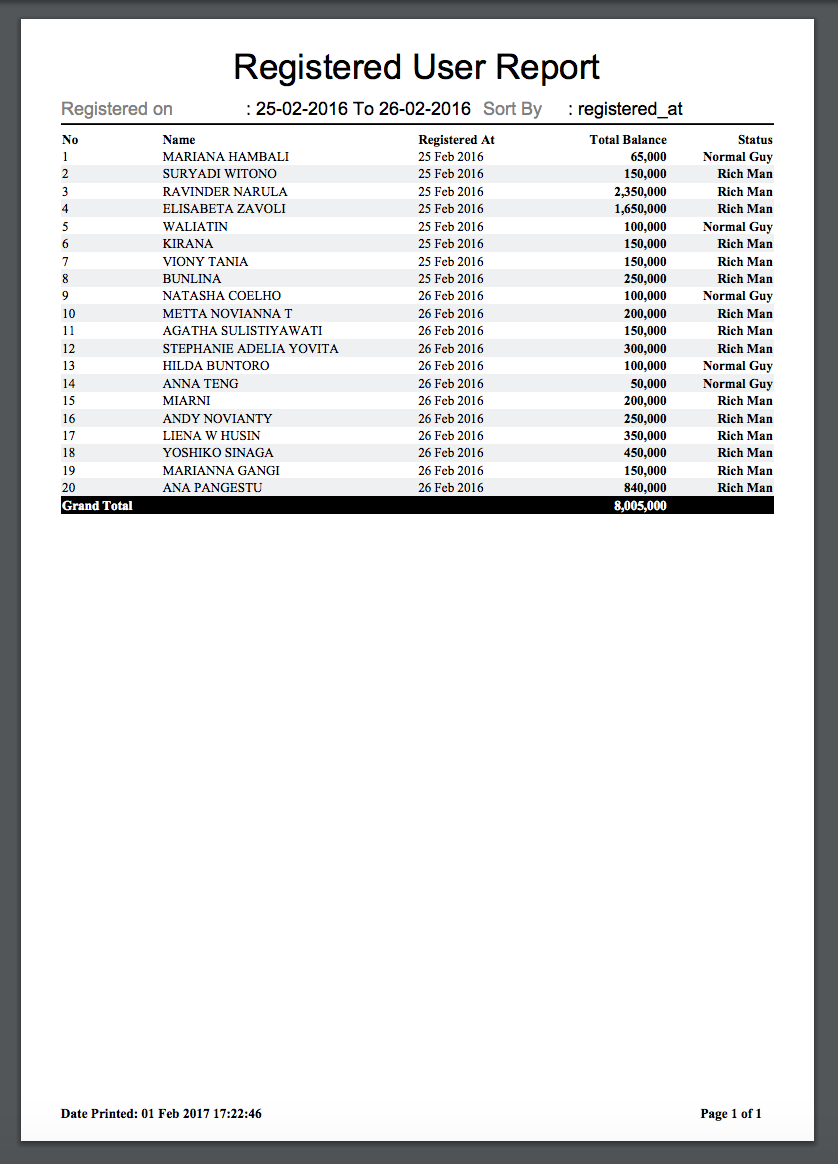
With this manipulation, you could do some eager loading relation like:
$post = Post::with('comments')->where('active', 1);

$columns = [
    'Post Title' => function($post) {
        return $post->title;
    },
    'Slug' => 'slug',
    'Latest Comment' => function($post) {
        return $post->comments->first()->body;
    }
];
Example Code With Group By
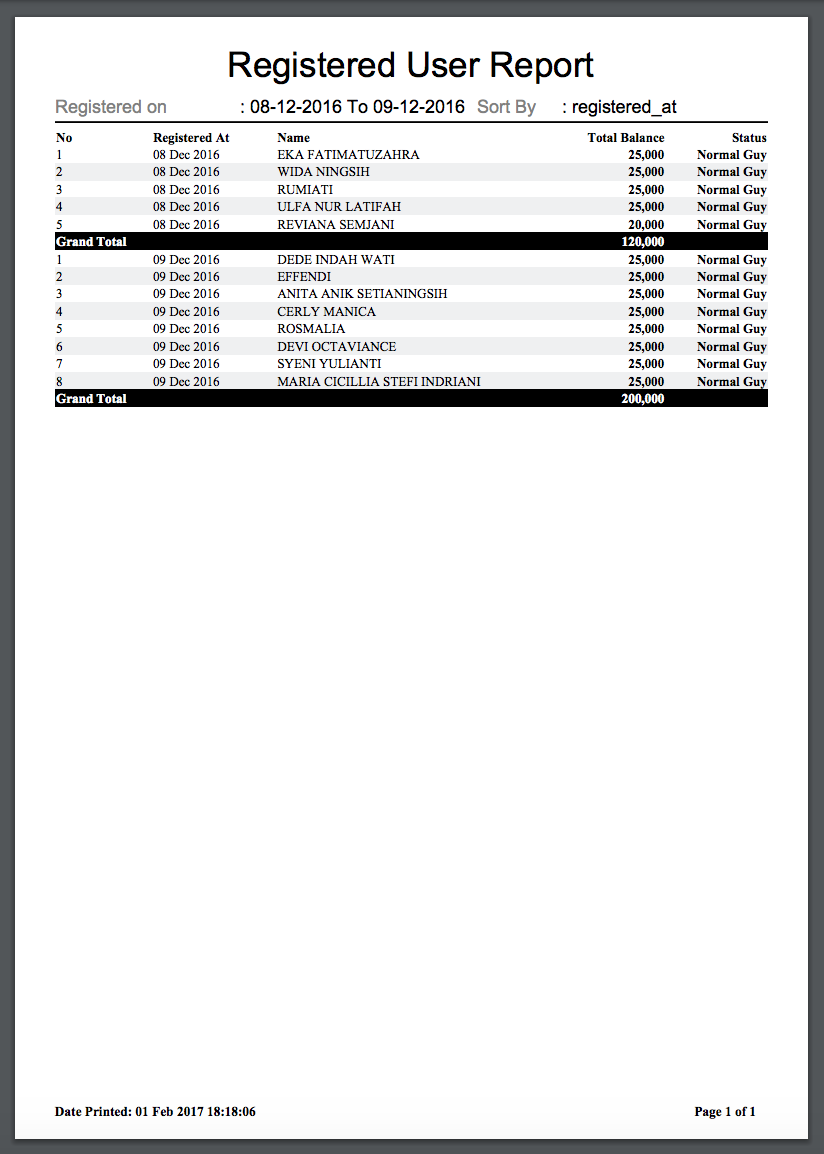
Or, you can total all records by group using groupBy method
    ...
    // Do some querying..
    $queryBuilder = User::select(['name', 'balance', 'registered_at'])
                        ->whereBetween('registered_at', [$fromDate, $toDate])
                        ->orderBy('registered_at', 'ASC'); // You should sort groupBy column to use groupBy() Method

    $columns = [ // Set Column to be displayed
        'Registered At' => 'registered_at',
        'Name' => 'name',
        'Total Balance' => 'balance',
        'Status' => function($result) { // You can do if statement or any action do you want inside this closure
            return ($result->balance > 100000) ? 'Rich Man' : 'Normal Guy';
        }
    ];

    return PdfReport::of($title, $meta, $queryBuilder, $columns)
                    ->editColumn('Registered At', [
                        'displayAs' => function($result) {
                            return $result->registered_at->format('d M Y');
                        }
                    ])
                    ->editColumn('Total Balance', [
                        'class' => 'right bold',
                        'displayAs' => function($result) {
                            return thousandSeparator($result->balance);
                        }
                    ])
                    ->editColumn('Status', [
                        'class' => 'right bold',
                    ])
                    ->groupBy('Registered At') // Show total of value on specific group. Used with showTotal() enabled.
                    ->showTotal([
                        'Total Balance' => 'point'
                    ])
                    ->stream();
PLEASE TAKE NOTE TO SORT GROUPBY COLUMN VIA QUERY FIRST TO USE THIS GROUP BY METHOD.
Output Report With Group By Registered At
Wkhtmltopdf Installation
- Download wkhtmltopdf from https://wkhtmltopdf.org/downloads.html
- Change your snappy config located in
/config/snappy.php(runphp artisan vendor:publishifsnappy.phpfile is not created) to:
    'pdf' => array(
        'enabled' => true,
        'binary'  => '/usr/local/bin/wkhtmltopdf', // Or specified your custom wkhtmltopdf path
        'timeout' => false,
        'options' => array(),
        'env'     => array(),
    ),
Other Method
1. setPaper($paper = 'a4')
Supported Media Type: PDF
Description: Set Paper Size
Params:
- $paper (Default: 'a4')
Usage:
PdfReport::of($title, $meta, $queryBuilder, $columns)
         ->setPaper('a6')
         ->make();
2. setCss(Array $styles)
Supported Media Type: PDF, Excel
Description: Set a new custom styles with given selector and style to apply
Params:
- Array $styles (Key: $selector, Value: $style)
Usage:
ExcelReport::of($title, $meta, $queryBuilder, $columns)
            ->editColumn('Registered At', [
                'class' => 'right bolder italic-red'
            ])
            ->setCss([
                '.bolder' => 'font-weight: 800;',
                '.italic-red' => 'color: red;font-style: italic;'
            ])
            ->make();
3. setOrientation($orientation = 'portrait')
Supported Media Type: PDF
Description: Set Orientation to Landscape or Portrait
Params:
- $orientation (Default: 'portrait')
Usage:
PdfReport::of($title, $meta, $queryBuilder, $columns)
         ->setOrientation('landscape')
         ->make();
4. withoutManipulation()
Supported Media Type: PDF, Excel, CSV
Description: Faster generating report, but all columns properties must be matched the selected column from SQL Queries
Usage:
$queryBuilder = Customer::select(['name', 'age'])->get();
$columns = ['Name', 'Age'];
PdfReport::of($title, $meta, $queryBuilder, $columns)
         ->withoutManipulation()
         ->make();
5. showMeta($value = true)
Supported Media Type: PDF, Excel, CSV
Description: Show / hide meta attribute on report
Params:
- $value (Default: true)
Usage:
PdfReport::of($title, $meta, $queryBuilder, $columns)
         ->showMeta(false) // Hide meta
         ->make();
6. showHeader($value = true)
Supported Media Type: PDF, Excel, CSV
Description: Show / hide column header on report
Params:
- $value (Default: true)
Usage:
PdfReport::of($title, $meta, $queryBuilder, $columns)
         ->showHeader(false) // Hide column header
         ->make();
7. showNumColumn($value = true)
Supported Media Type: PDF, Excel, CSV
Description: Show / hide number column on report
Params:
- $value (Default: true)
Usage:
PdfReport::of($title, $meta, $queryBuilder, $columns)
         ->showNumColumn(false) // Hide number column
         ->make();
8. simple()
Supported Media Type: Excel
Description: Generate excel in simple mode (no styling on generated excel report, but faster in generating report)
Params:
- None
Usage:
ExcelReport::of($title, $meta, $queryBuilder, $columns)
         ->simple()
         ->download('filename');
coolsam/laravel-report-generator 适用场景与选型建议
coolsam/laravel-report-generator 是一款 基于 HTML 开发的 Composer 扩展包,目前已累计 8 次下载、GitHub Stars 达 0, 最近一次更新时间为 2019 年 04 月 26 日, 在 PHP 生态内属于活跃度较高的组件。
它主要适用于以下技术方向: 「excel」 「pdf」 「report」 「laravel」 「excel report」 「pdf report」 等业务场景。在实际项目中,围绕这些方向常见需要落地的问题包括:接口对接、性能调优、并发安全、与既有框架(Laravel / ThinkPHP / Yii / Webman 等)的兼容适配,以及生产环境的日志埋点与稳定性保障。
我们在过去多个企业项目中使用过 coolsam/laravel-report-generator 或与其功能相近的方案,如果你在选型或落地过程中遇到问题,例如 版本兼容、二次改造、私有化封装、与内部系统对接、生产 BUG 排查,欢迎联系我们协助评估。
基于 coolsam/laravel-report-generator 在你已有业务上做功能扩展、字段裁剪、UI 适配、与内部账号 / 权限 / 日志系统的深度对接。
线上偶发问题、内存泄漏、慢查询、并发异常等排查修复;针对高流量场景做缓存、队列、索引层面的调优。
承接完整的项目从需求 → 设计 → 开发 → 上线 → 长期运维;也可按月提供技术保姆服务。
与 coolsam/laravel-report-generator 相关的其它包
同方向 / 同关键字的高下载量 PHP Composer 包推荐,方便对比选型:
This Symfony bundle integrates PhpSpreadsheet into Symfony using Twig.
Reportico Open Source PHP Report Designer
PHPExcel - OpenXML - Read, Create and Write Spreadsheet documents in PHP - Spreadsheet engine
Yii2 export extension
PHP Excel Library
Allow KoolReport to use twig template engine to render view
统计信息
- 总下载量: 8
- 月度下载量: 0
- 日度下载量: 0
- 收藏数: 0
- 点击次数: 8
- 依赖项目数: 0
- 推荐数: 0
其他信息
- 授权协议: MIT
- 更新时间: 2019-04-26