daniel-de-wit/lighthouse-sanctum
Composer 安装命令:
composer require daniel-de-wit/lighthouse-sanctum
包简介
Laravel Sanctum support for Laravel Lighthouse.
README 文档
README

Add Laravel Sanctum support to Lighthouse
Requirements
Installation
1. Install using composer:
composer require daniel-de-wit/lighthouse-sanctum
2. Publish configuration and schema
php artisan vendor:publish --tag=lighthouse-sanctum
3. Import the published schema into your main GraphQL schema (./graphql/schema.graphql)
type Query
type Mutation

#import sanctum.graphql
4. HasApiTokens
Apply the Laravel\Sanctum\HasApiTokens trait to your Authenticatable model as described in the Laravel Sanctum documentation.
use Illuminate\Auth\Authenticatable;
use Laravel\Sanctum\Contracts\HasApiTokens as HasApiTokensContract;
use Laravel\Sanctum\HasApiTokens;

class User extends Authenticatable implements HasApiTokensContract
{
    use HasApiTokens;
}
5. Configuration
This package relies on API Token Authentication, which uses stateless Bearer tokens to authenticate requests.
By default, Laravel Sanctum assumes that requests made from localhost should use the stateful Spa Authentication instead. To disable this behaviour, remove any lines within the stateful section of your sanctum configuration:
// File: ./config/sanctum.php

    /*
    |--------------------------------------------------------------------------
    | Stateful Domains
    |--------------------------------------------------------------------------
    |
    | Requests from the following domains / hosts will receive stateful API
    | authentication cookies. Typically, these should include your local
    | and production domains which access your API via a frontend SPA.
    |
    */

    'stateful' => [
        // Remove entries here
    ],
Make sure the following middleware is enabled for Lighthouse:
// File: ./config/lighthouse.php
    'middleware' => [
        ...

        \Nuwave\Lighthouse\Support\Http\Middleware\AttemptAuthentication::class,

        ...
    ],
Configure Lighthouse to use the Sanctum guard:
// File: ./config/lighthouse.php
    /*
    |--------------------------------------------------------------------------
    | Authentication Guard
    |--------------------------------------------------------------------------
    |
    | The guard to use for authenticating GraphQL requests, if needed.
    | This setting is used whenever Lighthouse looks for an authenticated user, for example in directives
    | such as `@guard` and when applying the `AttemptAuthentication` middleware.
    |
    */

    'guard' => 'sanctum',
Usage
- Login
- Logout
- Register
- Email Verification
- Resend Email Verification Link
- Forgot Password
- Reset Password
- Update Password
Login
Authenticate the user to receive a Bearer token.
mutation {
    login(input: {
        email: "john.doe@gmail.com"
        password: "secret"
    }) {
        token
    }
}
Apply the Authorization header on subsequent calls using the token
"Authorization": "Bearer 1|lJo1cMhrW9tIUuGwlV1EPjKnvfZKzvgpGgplbwX9"
(Using something other than email? See Custom Identification)
Logout
Revoke the current token.
mutation {
    logout {
        status
        message
    }
}
Register
Successfully registering a user will immediately yield a bearer token (unless email verification is required).
mutation {
    register(input: {
        name: "John Doe"
        email: "john.doe@gmail.com"
        password: "secret"
        password_confirmation: "secret"
    }) {
        token
        status
    }
}
☝️ Want to disable password confirmation? Update your schema

When registering a user in combination with the MustVerifyEmail contract you can optionally define the url for email verification.
Both __ID__ and __HASH__ will be replaced with the proper values.
When use_signed_email_verification_url is enabled in the configuration, the placeholders __EXPIRES__ and __SIGNATURE__ will be replaced.
mutation {
    register(input: {
        name: "John Doe"
        email: "john.doe@gmail.com"
        password: "secret"
        password_confirmation: "secret"
        verification_url: {
            url: "https://my-front-end.com/verify-email?id=__ID__&token=__HASH__"
# Signed:   url: "https://my-front-end.com/verify-email?id=__ID__&token=__HASH__&expires=__EXPIRES__&signature=__SIGNATURE__"
        }
    }) {
        token
        status
    }
}
Email Verification
The verification_url provided at register or resendEmailVerification contains the id and hash for the mutation:
mutation {
  verifyEmail(input: {
    id: "1"
    hash: "af269947ed80d4a7bc3f78a6dfd05ec369373f9d"
  }) {
    status
  }
}
When use_signed_email_verification_url is enabled in the configuration, the input requires two additional fields.
mutation {
  verifyEmail(input: {
    id: "1"
    hash: "af269947ed80d4a7bc3f78a6dfd05ec369373f9d"
    expires: 1619775828
    signature: "e923636f1093c414aab39f846e9d7a372beefa7b628b28179197e539c56aa0f0"
  }) {
    status
  }
}
Resend Email Verification Link
Use default Laravel email verification notification.
mutation {
    resendEmailVerification(input: {
        email: "john.doe@gmail.com",
    }) {
        status
    }
}
Or use the custom verification flow by uncommenting the verification_url argument within the ResendEmailVerificationInput:
input ResendEmailVerificationInput {
    email: String! @rules(apply: ["email"])
    verification_url: VerificationUrlInput!
}
Example mutation:
mutation {
    resendEmailVerification(input: {
        email: "john.doe@gmail.com",
         verification_url: {
             url: "https://my-front-end.com/verify-email?id=__ID__&token=__HASH__"
             # or use signed url:
             # url: "https://my-front-end.com/verify-email?id=__ID__&token=__HASH__&expires=__EXPIRES__&signature=__SIGNATURE__"
        }
    }) {
        status
    }
}
Forgot Password
Sends a reset password notification.
Optionally use custom reset url using both __EMAIL__ and __TOKEN__ placeholders.
mutation {
    forgotPassword(input: {
        email: "john.doe@gmail.com"
        reset_password_url: {
            url: "https://my-front-end.com/reset-password?email=__EMAIL__&token=__TOKEN__"
        }
    }) {
        status
        message
    }
}
Reset Password
Reset the user's password.
mutation {
    resetPassword(input: {
        email: "john.doe@gmail.com",
        token: "af269947ed80d4a7bc3f78a6dfd05ec369373f9d"
        password: "secret"
        password_confirmation: "secret"
    }) {
        status
        message
    }
}
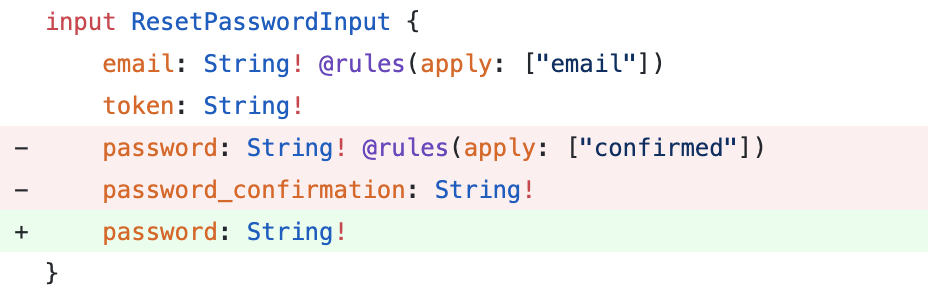
☝️ Want to disable password confirmation? Update your schema
Update Password
Updates the current user's password.
mutation {
    updatePassword(input: {
        current_password: "mypass",
        password: "secret",
        password_confirmation: "secret"
    }) {
        status
    }
}
Custom Identification
You can customize which fields are used for authenticating users.
For example, using username instead of the default email.
/*
|--------------------------------------------------------------------------
| Identification
|--------------------------------------------------------------------------
|
| Configure the credential fields by which the user will be identified.
| Default: email
*/

'user_identifier_field_name' => 'username',
Update the GraphQL schema accordingly
input LoginInput {
    username: String! @rules(apply: ["required"])
}
Docker
Develop locally using Docker & Docker Compose.
Setup
This will build the Docker image and prepare the container.
make setup
- CLI:
make app - Destroy:
make destroy
CLI
Enter the container with shell to start developing.
make app
Destroy
Shutdown and remove the container.
make app
Testing
composer test
Coverage
composer coverage
Static Analysis
composer analyze
Contributing
Please see CONTRIBUTING for details.
Credits
License
The MIT License (MIT). Please see License File for more information.
daniel-de-wit/lighthouse-sanctum 适用场景与选型建议
daniel-de-wit/lighthouse-sanctum 是一款 基于 PHP 开发的 Composer 扩展包,目前已累计 124.22k 次下载、GitHub Stars 达 60, 最近一次更新时间为 2021 年 04 月 27 日, 在 PHP 生态内属于活跃度较高的组件。
它主要适用于以下技术方向: 「lighthouse」 「laravel-sanctum」 「lighthouse-sanctum」 等业务场景。在实际项目中,围绕这些方向常见需要落地的问题包括:接口对接、性能调优、并发安全、与既有框架(Laravel / ThinkPHP / Yii / Webman 等)的兼容适配,以及生产环境的日志埋点与稳定性保障。
我们在过去多个企业项目中使用过 daniel-de-wit/lighthouse-sanctum 或与其功能相近的方案,如果你在选型或落地过程中遇到问题,例如 版本兼容、二次改造、私有化封装、与内部系统对接、生产 BUG 排查,欢迎联系我们协助评估。
基于 daniel-de-wit/lighthouse-sanctum 在你已有业务上做功能扩展、字段裁剪、UI 适配、与内部账号 / 权限 / 日志系统的深度对接。
线上偶发问题、内存泄漏、慢查询、并发异常等排查修复;针对高流量场景做缓存、队列、索引层面的调优。
承接完整的项目从需求 → 设计 → 开发 → 上线 → 长期运维;也可按月提供技术保姆服务。
与 daniel-de-wit/lighthouse-sanctum 相关的其它包
同方向 / 同关键字的高下载量 PHP Composer 包推荐,方便对比选型:
Lighthouse GraphQL Directives for Paperclip attachment support
Adds the missing category handler that was removed from Lighthouse 6.0
Interface for the Google Lighthouse project
Interface for the Google Lighthouse project
Google lighthouse for Robo Task Runner
Adds translatable directive for automatic schema generation for translatable fields
统计信息
- 总下载量: 124.22k
- 月度下载量: 0
- 日度下载量: 0
- 收藏数: 61
- 点击次数: 22
- 依赖项目数: 0
- 推荐数: 0
其他信息
- 授权协议: MIT
- 更新时间: 2021-04-27