delboy1978uk/form
Composer 安装命令:
composer require delboy1978uk/form
包简介
Super Easy HTML form generation.
README 文档
README

A super easy Bootstrap ready HTML form generator for PHP
Installation
Install via composer
composer require delboy1978uk/form
Usage
There are several ways too use this library, dependimng on your style. You can build everything up yourself by adding fields to your form instance, or you can extend the form and define it there, or you can add a trait to your object and add attributes to your properties, which you can pass into the form factory.
Here's the 'long way'. Firstly, "use" all the classes you'll need for your form. Then create your form and fields.
<?php

use Del\Form\Form;
use Del\Form\Field\Text;
use Del\Form\Field\CheckBox;
use Del\Form\Field\Submit;

// Create a form
$form = new Form('registration');

// Create a username, email, spamlist checkbox, and submit button.
$userName = new Text('username');
$email = new Text('email');
$spamMe = new CheckBox('spam');
$submit = new Submit('submit');

// Set labels
$userName->setLabel('User Name');
$email->setLabel('Email Address');
$spamMe->setLabel('Join our (and 3rd parties) email list(s)');

// Add the fields to the form
$form->addField($userName)
      ->addField($email)
      ->addField($spamMe)
      ->addField($submit);

// Render the form
echo $form->render();
FormFactory
As of v2.6.0, you can create and populate a form by passing in an object that has #[Field] attributes on the properties:
<?php

declare(strict_types=1);

namespace Del\Test\Form;

use Del\Form\Field\Attributes\Field;

class SomeEntity
{
    #[Field('integer|required')]
    public int $id;

    #[Field('email|required|min:2|max:50')]
    public string $email;

    #[Field('password|required|min:2|max:50')]
    public string $password;
}
The first argument is always the field type. The following arguments are additional validation grules you can add. Valid field types are:
- checkbox
- file
- float
- hidden
- integer
- multiselect
- password
- radio
- select
- text
- textarea
The validator list so far looks like this:
- file
file|gif,jpg,png(comma separated extensions) - float
- integer
- max
max:50(maximum string length) - mime
mime:application/json,image/jpeg,text/html(for uploads, restrict by mime) - min
min:3(minimum string length) - required
Using thge form factory is simple. Just pass your object cotaining the attributes in.
$factory = new FormFactory();
$form = $factory->createFromEntity('user', $user);
$form->populate($postOrPatchData);
Creating Custom Forms
Of course, it's also nice to create your own form than build one up every time, so just create a class and extend
Del\Form\AbstractForm and add your fields in the init() function:
<?php
namespace My\Cool;

use Del\Form\AbstractForm;
use Del\Form\Field\Text\EmailAddress;
use Del\Form\Field\Text\Password;
use Del\Form\Field\Submit;

class LoginForm extends AbstractForm
{
    public function init()
    {
        $email = new EmailAddress('email');
        $password = new Password('passord');
        $submit = new Submit('submit');
        $this->addField($email);
        $this->addField($password);
        $this->addField($submit);
    }
}
Then using your form is as simple as:
<?php
use My\Cool\LoginForm;

$form = new LoginForm('login');
$form->render();
Fitering and validating input
For filtering input, add a Del\Form\Filter\Interface to your field object. For validating the filtered input, add a
Del\Form\Validator\ValidatorInterface. Currently there is an adapter for Laminas\Filter and Laminas\Validate, but feel free to
write an adapter for you favourite library. Setting a required field adds a Del\Form\Validator\NotEmpty validator.
<?php

// A text field, and an adapter for the filters and the validators
use Del\Form\Field\Text;
use Del\Form\Filter\Adapter\FilterAdapterZf;
use Del\Form\Validator\Adapter\ValidatorAdapterZf;

// Some sensible default string filters for username/email fields
use Laminas\Filter\StripTags;
use Laminas\Filter\StringTrim;
use Laminas\Filter\StringToLower;

// Validation rules
use Laminas\Validator\CreditCard;;

// Create the field
$creditCard = new Text('credit-card');

// Create the filters
$stripTags = new FilterAdapterZf(new StripTags());
$trim = new FilterAdapterZf(new StringTrim());
$lowerCase = new FilterAdapterZf(new StringToLower());

// Create the validators
$emailAddress = new ValidatorAdapterZf(new CreditCard());

// Add them to the field
$creditCard->addFilter($stripTags)
      ->addFilter($trim)
      ->addFilter($lowerCase)
      ->addValidator($emailAddress);
Setting and getting values
Del\Form\FormInterface has a populate method which takes an array (usually the post data, but not necessarily ;-).
<?php
if (isset($_POST['submit'])) { // or ask your request object ;-)
    $data = $_POST;
    $form->populate($data);
    if ($form->isValid()) {
        $filteredData = $form->getValues();
    }
}
After populate has been called, if you call Form::render(), it will display any validation error messages.
Field Types
Text
Del\Form\Field\Text fields are the most basic field, and come with a built in StripTags and StringTrim filter.
Del\Form\Field\Text\EmailAddress extends Text, and adds an EmailAddress validator for convenience.
Del\Form\Field\Text\Password is a password field which also extends Text.
<?php
use Del\Form\Field\Text;

$text = new Text('text');
$text->setLabel('Needed Details');
$text->setRequired(true);
$text->setPlaceholder('type some text..');
$text->setValue('Blah');
TextArea
Del\Form\Field\TextArea fields are pretty much the same as the Text field
<?php
use Del\Form\Field\TextArea;

$textArea = new TextArea('message');;
Select
Del\Form\Field\Select needs initialised with setOptions():
<?php
use Del\Form\Field\Select;

$select = new Select('choose');
$select->setOptions([
    'BK' => 'Burger King',
    'McD' => 'McDonalds',
    'Q' => 'Quick',
]);
MultiSelect
Del\Form\Field\MultiSelect also needs initialised with setOptions(), and works in the same way as a Select field.
Radio
Del\Form|Field\Radio can be rendered inline (side by side) or not, also needs initialised with setOptions():
<?php
use Del\Form\Field\Radio;

$radio = new Radio('choose');
$radio->setRenderInline(true);
$radio->setOptions([
    'BK' => 'Burger King',
    'McD' => 'McDonalds',
    'Q' => 'Quick',
]);
Checkbox
Del\Form|Field\Checkbox can be rendered inline or not, also needs initialised with setOptions():
<?php
use Del\Form\Field\CheckBox;

$check = new CheckBox('choose');
$check->setOptions([
    'BK' => 'Burger King',
    'McD' => 'McDonalds',
    'Q' => 'Quick',
]);
FileUpload
Del\Form\Field\FileUpload fields come with a nifty looking Bootstrap compatible renderer, but it uses some javascript.
If you don't want that, just call setRenderer() and pass it a default TextRender class instance. Also, don't forget to set
the encryption type on the form to Form::ENC_TYPE_MULTIPART_FORM_DATA
<?php
use Del\Form\Field\FileUpload;

$form->setEncType(Form::ENC_TYPE_MULTIPART_FORM_DATA);
$fileUpload = new FileUpload('photo');
$fileUpload->setUploadDirectory('/path/to/destination');
Submit`
Del\Form|Field\Submit doesn't really need much:
<?php
use Del\Form\Field\Submit;

$submit = new Submit('submit');
$submit->setValue('Send');
Dynamic Forms
You can have for example a radio button with two choices, and each choice can have a separate form relevant to the checked value. For instance, a radio with a choice of food or drink could then display a dynamic form upon clicking the drink option, and the drinks form will display.
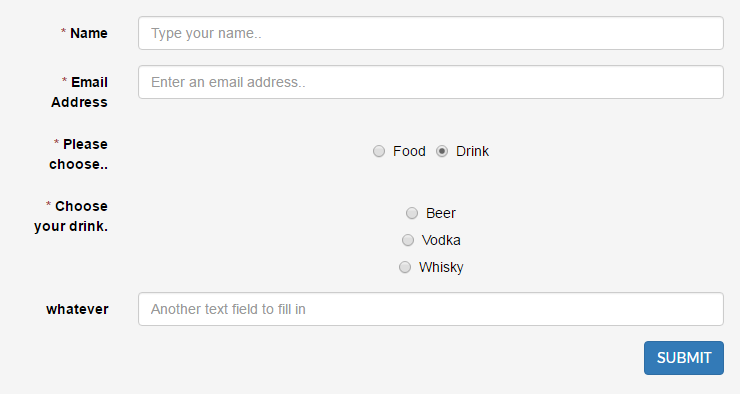
<?php

$radio = new Radio('choice');
$radio->setLabel('Please choose..');
$radio->setRenderInline(true);
$radio->setRequired(true);
$radio->setOptions([
    1 => 'Food',
    2 => 'Drink',
]);

$foodForm = new Form('food');  // This form appears when radio choice 1 is selected
$foodRadio = new Radio('foodchoice');
$foodRadio->setLabel('Choose your food.');
$foodRadio->setRequired(true);
$foodRadio->setOptions([
    1 => 'Cheeseburger',
    2 => 'Pizza',
    3 => 'Steak',
]);
$foodForm->addField($foodRadio);
$radio->addDynamicForm($foodForm, 1);

$drinkForm = new Form('drink');  // This form appears when radio choice 2 is selected
$drinkRadio = new Radio('drinkchoice');
$drinkRadio->setRequired(true);
$drinkRadio->setLabel('Choose your drink.');
$drinkRadio->setOptions([
    1 => 'Beer',
    2 => 'Vodka',
    3 => 'Whisky',
]);
$moreText = new Text('moretext');
$moreText->setLabel('whatever');
$moreText->setPlaceholder('Another text field to fill in');
$drinkForm->addField($drinkRadio);
$drinkForm->addField($moreText);
$radio->addDynamicForm($drinkForm, 2);
Transformers
You can create an object implementing De\Form\Field\TransformerInterface to take in input and convert to a form value.
Do the opposite in the output method and return the object representation.
Bone MVC comes with one built in Transformer for DateTime fields:
<?php

$format = 'Y-m-d';
$form = new Form('some-form');
$date = new Text('date');
$date->setTransformer(new DateTimeTransformer($format));
$form->addField($date);
Now the array you populate the form with can contain either the string or the DateTime representation.
When getting the values from the form, you pass true to use the transformers:
<?php

$values = $form->getValues(); // $values['date'] === '2014-09-18' (for instance)
$values = $form->getValues(true); // $values['date'] instanceof DateTime
delboy1978uk/form 适用场景与选型建议
delboy1978uk/form 是一款 基于 PHP 开发的 Composer 扩展包,目前已累计 6.13k 次下载、GitHub Stars 达 7, 最近一次更新时间为 2016 年 11 月 19 日, 在 PHP 生态内属于活跃度较高的组件。
我们在过去多个企业项目中使用过 delboy1978uk/form 或与其功能相近的方案,如果你在选型或落地过程中遇到问题,例如 版本兼容、二次改造、私有化封装、与内部系统对接、生产 BUG 排查,欢迎联系我们协助评估。
基于 delboy1978uk/form 在你已有业务上做功能扩展、字段裁剪、UI 适配、与内部账号 / 权限 / 日志系统的深度对接。
线上偶发问题、内存泄漏、慢查询、并发异常等排查修复;针对高流量场景做缓存、队列、索引层面的调优。
承接完整的项目从需求 → 设计 → 开发 → 上线 → 长期运维;也可按月提供技术保姆服务。
统计信息
- 总下载量: 6.13k
- 月度下载量: 0
- 日度下载量: 0
- 收藏数: 7
- 点击次数: 11
- 依赖项目数: 7
- 推荐数: 0
其他信息
- 授权协议: MIT
- 更新时间: 2016-11-19