derekashauer/support-access-manager
Composer 安装命令:
composer require derekashauer/support-access-manager
包简介
Creates temporary WordPress admin accounts with expiration and access limits
README 文档
README
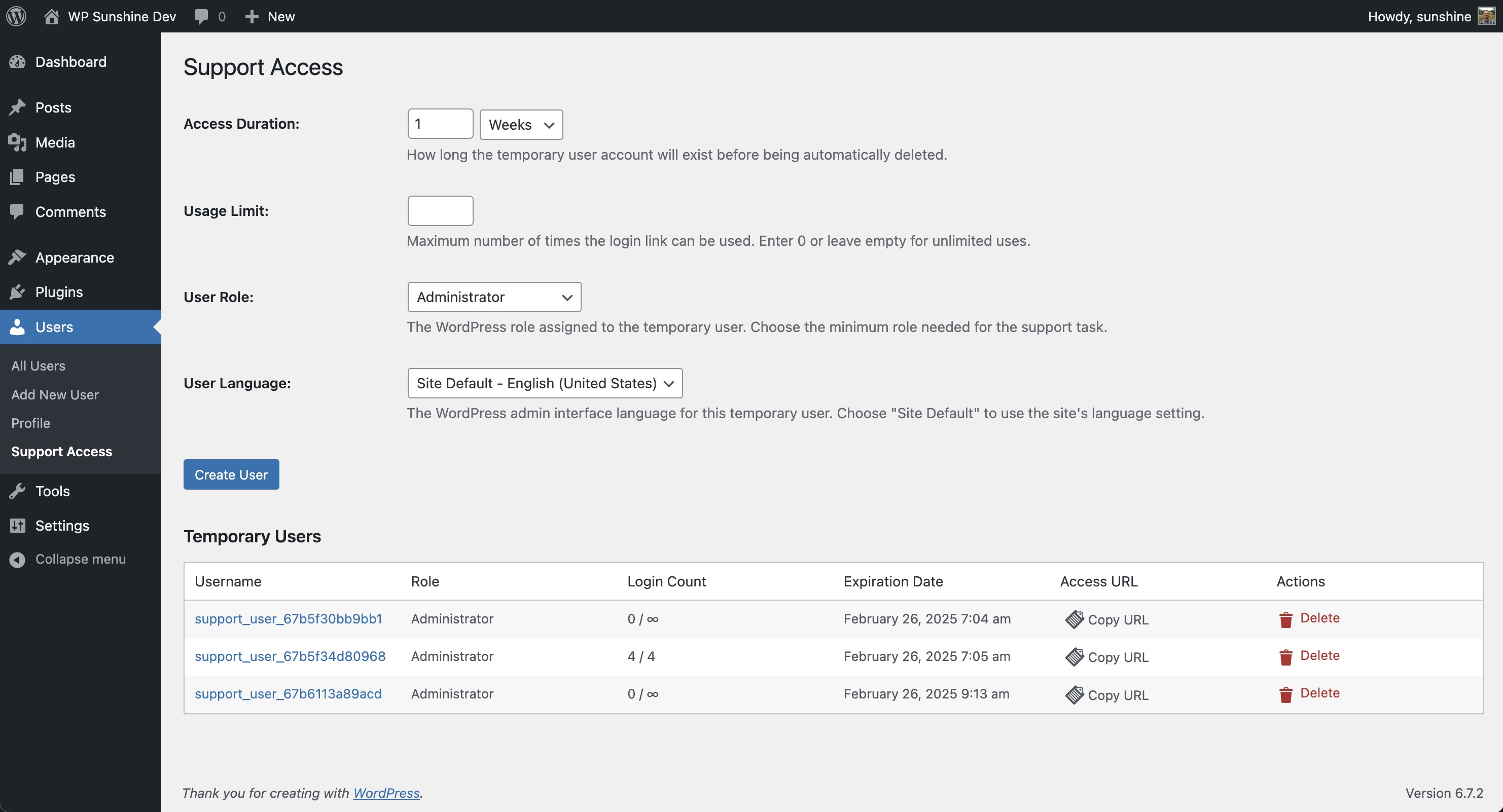
Support Access Manager is a lightweight PHP class for WordPress that allows temporary admin accounts to be created with expiration and access limits. It can be easily dropped into any project or installed via Composer.
✅ Create temporary admin accounts
✅ Set expiration times (e.g., auto-delete after 24 hours)
✅ Limit number of logins per account
✅ Secure login URLs for support access
✅ Cron-based cleanup of expired accounts
Install via Composer (Recommended)
To include Support Access Manager in your WordPress plugin or theme, add it as a dependency:
composer require derekashauer/support-access-manager
Then run:
composer update
Usage
Once installed be sure to include the autoload file:
require_once ABSPATH . 'vendor/autoload.php';
Manually Include the Class
If you prefer not to use Composer, simply download class-support-access-manager.php and include it in your project:
require_once 'path/to/class-support-access-manager.php';
Usage
Basic Usage (Single Instance)
// Get the instance with default settings
Support_Access_Manager::instance();

// Or get the instance with custom settings
Support_Access_Manager::instance( array(
    'menu_label' => 'Support Users',
    'menu_slug'  => 'support-users',
    'textdomain' => 'my-plugin',
    'defaults'   => array(
        'duration'      => 2,
        'duration_unit' => 'days',
        'role'          => 'editor',
    ),
) );
Custom Instance
If you need a completely separate instance with its own settings, you can extend the class:
class My_Custom_Support_Access extends Support_Access_Manager {
    // Override the singleton functionality
    public static function instance( $args = array() ) {
        return new self( $args );
    }

    // Make constructor public
    public function __construct( $args = array() ) {
        parent::__construct( $args );
    }
}

// Create your custom instance
$my_support = My_Custom_Support_Access::instance( array(
    'menu_slug'   => 'my-custom-support',
    'menu_label'  => 'My Custom Support',
    'parent_slug' => 'tools.php',
    'textdomain'  => 'my-plugin',
) );
This approach allows you to:
- Have multiple instances with different settings
- Override or extend functionality
- Place the menu item in different locations
- Use your own translations
Menu Settings
-
menu_slug(string) - The URL slug for the admin page- Default: 'support-access'
- Example: 'temp-users'
-
menu_label(string) - The text shown in the admin menu- Default: 'Support Access'
- Example: 'Temporary Users'
-
parent_slug(string) - Where to place the menu item- Default: 'users.php' (Users menu)
- Common values: 'tools.php', 'options-general.php', 'settings.php'
-
textdomain(string) - Text domain for translations- Default: 'support-access'
- Example: 'my-plugin'
- Use your plugin's textdomain to provide your own translations
Form Defaults
The defaults array allows you to set default values for all form fields:
-
duration(int) - Default number for duration- Default: 1
- Example: 2
-
duration_unit(string) - Default time unit- Default: 'weeks'
- Options: 'hours', 'days', 'weeks', 'months'
-
timeout(int|string) - Default link timeout in hours- Default: '' (empty string)
- Example: 24 (link expires after 24 hours)
- Set to empty string for no timeout
-
usage_limit(int|string) - Default usage limit- Default: '' (empty string)
- Example: 3 (link can be used 3 times)
- Set to 0 or empty string for unlimited uses
-
role(string) - Default WordPress role- Default: 'administrator'
- Options: Any valid WordPress role ('editor', 'author', etc.)
-
locale(string) - Default language- Default: '' (site default)
- Example: 'es_ES' (Spanish)
- Use WordPress locale codes
Example Configurations
Set custom defaults for menu label, duration, role
new Support_Access_Manager( array(
    'menu_label' => 'Contractor Access',
    'defaults'   => array(
        'duration'      => 1,
        'duration_unit' => 'months',
        'role'          => 'author',
    ),
) );
Set custom defaults for login link timeout, usage limit, language
new Support_Access_Manager( array(
    'defaults' => array(
        'timeout'       => 48,
        'usage_limit'   => 5,
        'role'          => 'editor',
        'locale'        => 'es_ES',
    ),
) );
Use custom text domain
new Support_Access_Manager( array(
    'textdomain' => 'my-plugin',
) );
Then in your plugin's translation files, you can include translations for all the strings used by Support Access Manager.
Notes
- All default values can be overridden when creating individual temporary users
- The menu will only be visible to users with the 'manage_options' capability
- Temporary users are automatically deleted when they expire
- Access URLs can be configured to expire independently of the user account
License
This project is licensed under the MIT License.
See the LICENSE file for details.
Contributing
If you'd like to contribute, fork the repository and submit a pull request. Issues and feature requests are welcome.
Author
Derek Ashauer
GitHub
My Plugins: Conversion Bridge | WP Sunshine | Sunshine Photo Cart
derekashauer/support-access-manager 适用场景与选型建议
derekashauer/support-access-manager 是一款 基于 PHP 开发的 Composer 扩展包,目前已累计 12 次下载、GitHub Stars 达 24, 最近一次更新时间为 2025 年 02 月 19 日, 在 PHP 生态内属于活跃度较高的组件。
我们在过去多个企业项目中使用过 derekashauer/support-access-manager 或与其功能相近的方案,如果你在选型或落地过程中遇到问题,例如 版本兼容、二次改造、私有化封装、与内部系统对接、生产 BUG 排查,欢迎联系我们协助评估。
基于 derekashauer/support-access-manager 在你已有业务上做功能扩展、字段裁剪、UI 适配、与内部账号 / 权限 / 日志系统的深度对接。
线上偶发问题、内存泄漏、慢查询、并发异常等排查修复;针对高流量场景做缓存、队列、索引层面的调优。
承接完整的项目从需求 → 设计 → 开发 → 上线 → 长期运维;也可按月提供技术保姆服务。
统计信息
- 总下载量: 12
- 月度下载量: 0
- 日度下载量: 0
- 收藏数: 24
- 点击次数: 15
- 依赖项目数: 0
- 推荐数: 0
其他信息
- 授权协议: MIT
- 更新时间: 2025-02-19