devoashim/test
最新稳定版本:2
Composer 安装命令:
composer require devoashim/test
包简介
Manage your application's translation strings in Filament.
README 文档
README

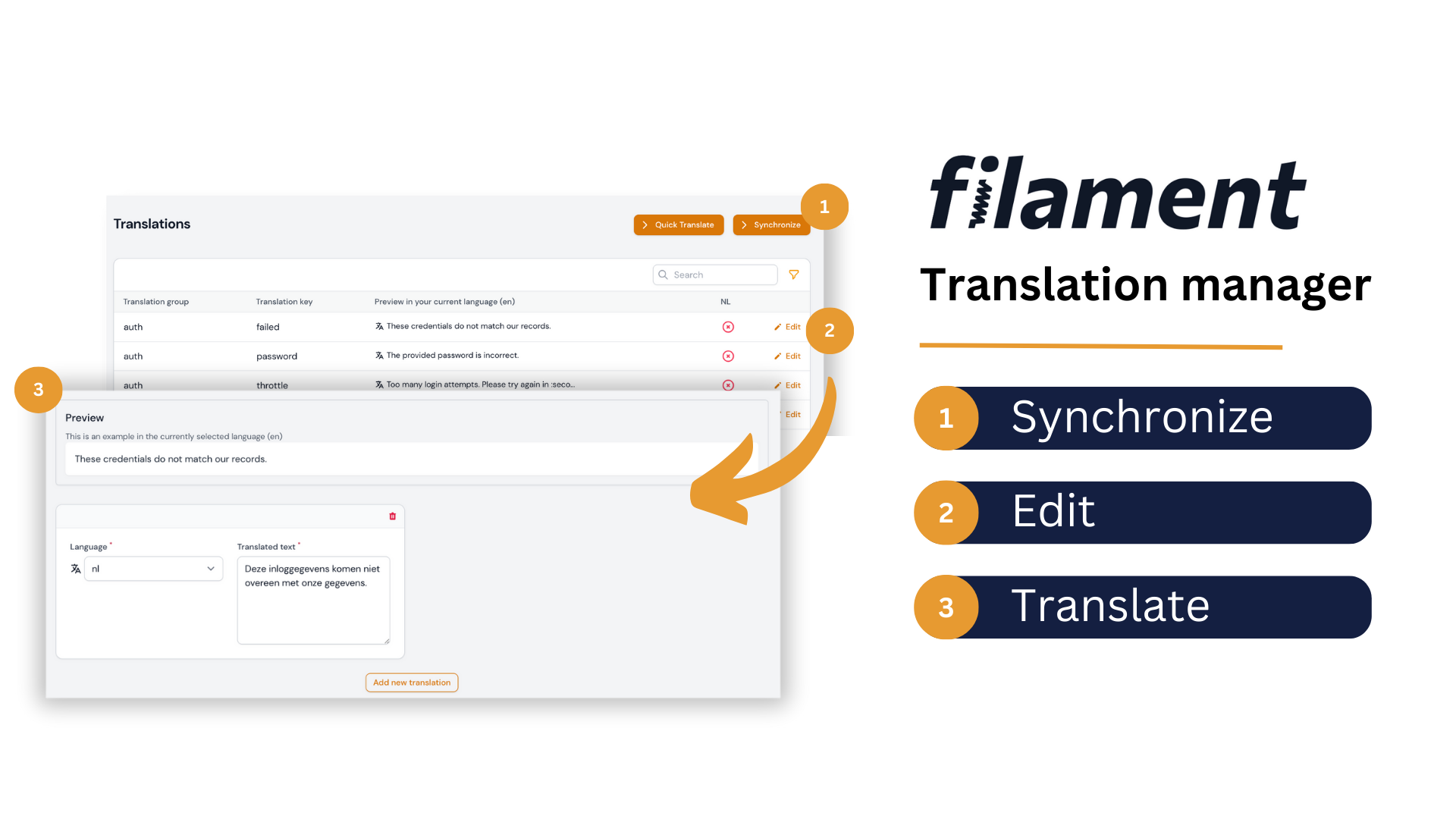
Introducing our Filament translation management tool, which allows you to easily manage, preview, and sync translations with your language files all within your Filament admin dashboard. Say goodbye to relying on developers to edit language files and streamline your localization workflow today.
Installation
You can install the package via composer:
Install via Composer.
| Plugin Version | Filament Version | PHP Version |
|---|---|---|
| <= 3.x | 2.x | > 8.0 |
| 4.x | 3.x | > 8.1 |
| 5.x | 4.x or 5.x | > 8.2 |
composer require kenepa/translation-manager
This package uses spatie/laravel-translation-loader, publish their migration file using:
php artisan vendor:publish --provider="Spatie\TranslationLoader\TranslationServiceProvider" --tag="translation-loader-migrations"
php artisan migrate
You have to update the migration file to the following:
Schema::create('language_lines', function (Blueprint $table) {
    $table->bigIncrements('id');
    $table->string('group')->index();
    $table->string('key')->index();
    $table->json('text')->default(new \Illuminate\Database\Query\Expression('(JSON_ARRAY())'));
    $table->timestamps();
});
Finally, run the migration.
Custom Theme Required
In order to compile the package views correctly, we need to create a custom Filament theme first, and then add the following path to its content. In the theme.css file of the theme, add the following line:
@source '../../../../vendor/kenepa/translation-manager/resources/**/*.blade.php';
Register the plugin with a panel
use Kenepa\TranslationManager\TranslationManagerPlugin;
use Filament\Panel;

class AdminPanelProvider extends PanelProvider
{
    public function panel(Panel $panel): Panel
    {
        return $panel
            // ...
            ->plugin(TranslationManagerPlugin::make());
    }
}
Configuration
From version 5.x onwards, the main configuration is done through the plugin class. The traditional config file is still supported for compatibility, but all new configurations should be done through the plugin.
Plugin Configuration
Configure the plugin using fluent method chaining:
use Kenepa\TranslationManager\TranslationManagerPlugin;

TranslationManagerPlugin::make()
    ->availableLocales([
        ['code' => 'en', 'name' => 'English', 'flag' => 'gb'],
        ['code' => 'nl', 'name' => 'Nederlands', 'flag' => 'nl'],
        ['code' => 'fr', 'name' => 'Français', 'flag' => 'fr'],
        ['code' => 'de', 'name' => 'Deutsch', 'flag' => 'de'],
    ])
    ->languageSwitcher(true)
    ->languageSwitcherRenderHook('panels::user-menu.before')
    ->navigationGroup('Settings')
    ->navigationIcon('heroicon-o-globe-alt')
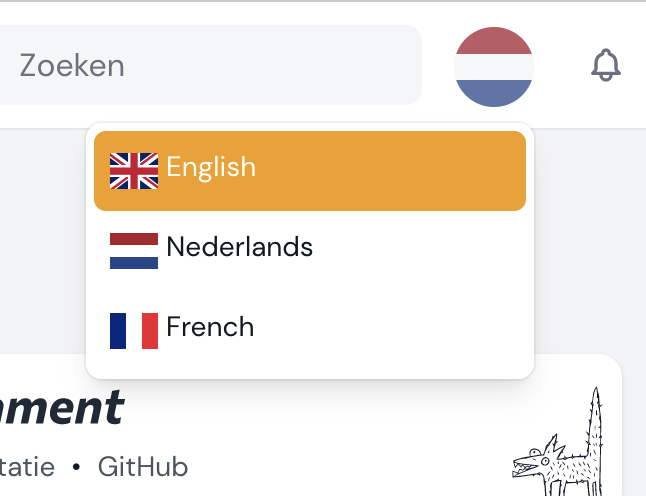
    ->showFlags(true)
    ->disableKeyAndGroupEditing(false)
    ->quickTranslateNavigationRegistration(true)
    ->dontRegisterNavigationOnPanelIds(['guest'])
    ->prependDirectoryPathToGroupName(false)
Available Configuration Methods
availableLocales(array $locales)- Set available application localesdisableKeyAndGroupEditing(bool $disable = true)- Control key/group editinglanguageSwitcher(bool $enable = true)- Enable/disable language switcherlanguageSwitcherRenderHook(string $hook)- Set render hook for language switchernavigationGroupTranslationKey(?string $key)- Set navigation group translation keynavigationGroup(?string $group)- Set navigation groupcluster(?string $cluster)- Set clusternavigationIcon(mixed $icon)- Set navigation icon (supportsfalseto disable)quickTranslateNavigationRegistration(bool $register = true)- Control quick translate navigationdontRegisterNavigationOnPanelIds(array $panelIds)- Exclude panels from navigationshowFlags(bool $show = true)- Show flags in language switcherprependDirectoryPathToGroupName(bool $prepend = true)- Control group naming
Config File
You can run the following command to publish the configuration file:
php artisan vendor:publish --tag=translation-manager-config
Authorization
By default, the translation manager cannot be used by anyone. You need to define the following gate in your AppServiceProvider boot method:
// app/Providers/AppServiceProvider.php

use Illuminate\Support\Facades\Gate;

/**
 * Bootstrap any application services.
 */
public function boot(): void
{
    Gate::define('use-translation-manager', function (?User $user) {
        // Your authorization logic
        return $user !== null && $user->hasRole('admin');
    });
}
If you want to learn more about gates, check out the official documentation.
Legacy Configuration Examples
available_locales
Determines which locales your application supports. For example:
'available_locales' => [
    ['code' => 'en', 'name' => 'English', 'flag' => 'gb'],
    ['code' => 'nl', 'name' => 'Nederlands', 'flag' => 'nl'],
    ['code' => 'de', 'name' => 'Deutsch', 'flag' => 'de']
]
language_switcher
Enable or disable the language switcher feature. This allows users to switch their language - disable if you have your own implementation.
dont_register_navigation_on_panel_ids
Disable registering the translation manager navigation on certain panel IDs. The following will disable the translation navigation for the guest panel but still allow guest panel users to change the language.
    'dont_register_navigation_on_panel_ids' => [
        'guest'
    ],
Adding to cluster
Example of adding the translation manager to a cluster:
// config/translation-manager.php
[
  // ...Other config
 'cluster' => \App\Filament\Clusters\Products::class,
]
Usage
Once installed, the Translation Manager can be accessed via the Filament sidebar menu. Simply click on the "Translation Manager" link to access the translation management screen.
Upgrade Guide
Upgrading to Filament 5.x (Livewire 4)
Filament 5 introduces Livewire 4 + Tailwind 4 support. There are no API breaking changes — your plugin configuration and panel setup remain identical.
Prerequisites
- PHP: 8.2+
- Laravel: 11.28+
- Filament: Upgrade to Filament 5.x
- Livewire: Upgrade to Livewire 4.x
Step 1: Upgrade Filament and Livewire
composer require livewire/livewire:"^4.0" filament/filament:"^5.0" -W
Step 2: Run the Filament upgrade script
composer require filament/upgrade:"^5.0" -W --dev
vendor/bin/filament-v5
Step 3: Rebuild your theme assets
Filament 5 requires Tailwind CSS v4. Rebuild your custom theme after upgrading:
npm install && npm run build
No changes are required to your
TranslationManagerPluginconfiguration or any Blade views — everything works as-is with Filament 5.
Upgrading from 4.x to 5.x
Version 5.x introduces Filament v4 support and a new plugin-based configuration system. Follow these steps to upgrade:
Prerequisites
- PHP: Upgrade to PHP 8.2+
- Filament: Upgrade to Filament 4.x
Step 1: Theme Configuration (Required)
Breaking Change: Filament v4 requires a different approach for including package assets.
Remove from tailwind.config.js (if present):
// Remove this from your tailwind.config.js content array:
'./vendor/kenepa/translation-manager/resources/**/*.blade.php'
Add to your custom theme CSS file:
- Create a custom theme if you don't have one (Filament v4 theme docs)
- Add this line to your theme's CSS file:
@source '../../../../vendor/kenepa/translation-manager/resources/**/*.blade.php';
Step 2: Migrate Configuration (Recommended)
Migrate your config file settings to the plugin configuration:
// In your AdminPanelProvider.php
use Kenepa\TranslationManager\TranslationManagerPlugin;

public function panel(Panel $panel): Panel
{
    return $panel
        ->plugin(
            TranslationManagerPlugin::make()
                ->availableLocales([
                    ['code' => 'en', 'name' => 'English', 'flag' => 'gb'],
                    ['code' => 'nl', 'name' => 'Nederlands', 'flag' => 'nl'],
                    ['code' => 'fr', 'name' => 'Français', 'flag' => 'fr'],
                ])
                ->languageSwitcher(true)
                ->languageSwitcherRenderHook('panels::user-menu.before')
                ->navigationGroup('Settings')
                ->navigationIcon('heroicon-o-globe-alt')
                ->showFlags(true)
                ->disableKeyAndGroupEditing(false)
                ->quickTranslateNavigationRegistration(true)
                ->dontRegisterNavigationOnPanelIds(['guest'])
        );
}
License
The MIT License (MIT). Please see License File for more information.
devoashim/test 适用场景与选型建议
devoashim/test 是一款 基于 PHP 开发的 Composer 扩展包,目前已累计 1 次下载、GitHub Stars 达 0, 最近一次更新时间为 2026 年 04 月 30 日, 在 PHP 生态内属于活跃度较高的组件。
它主要适用于以下技术方向: 「translation」 「laravel」 「localization」 「filament」 「Kenepa」 等业务场景。在实际项目中,围绕这些方向常见需要落地的问题包括:接口对接、性能调优、并发安全、与既有框架(Laravel / ThinkPHP / Yii / Webman 等)的兼容适配,以及生产环境的日志埋点与稳定性保障。
我们在过去多个企业项目中使用过 devoashim/test 或与其功能相近的方案,如果你在选型或落地过程中遇到问题,例如 版本兼容、二次改造、私有化封装、与内部系统对接、生产 BUG 排查,欢迎联系我们协助评估。
基于 devoashim/test 在你已有业务上做功能扩展、字段裁剪、UI 适配、与内部账号 / 权限 / 日志系统的深度对接。
线上偶发问题、内存泄漏、慢查询、并发异常等排查修复;针对高流量场景做缓存、队列、索引层面的调优。
承接完整的项目从需求 → 设计 → 开发 → 上线 → 长期运维;也可按月提供技术保姆服务。
与 devoashim/test 相关的其它包
同方向 / 同关键字的高下载量 PHP Composer 包推荐,方便对比选型:
Package for convenient work with Laravel's localization features
Field for number with restricted count of digits and decimal places
A custom URL rule class for Yii 2 which allows to create translated URL rules
A Laravel Eloquent model trait for translatable resource
Deepl Automated translations for Laravel lang files
Bureaux A Partager Edit - Parse, validate, manipulate, and display dates in PHP w/ i18n support. Inspired by moment.js
统计信息
- 总下载量: 1
- 月度下载量: 0
- 日度下载量: 0
- 收藏数: 0
- 点击次数: 34
- 依赖项目数: 0
- 推荐数: 0
其他信息
- 授权协议: MIT
- 更新时间: 2026-04-30