devskio/content-element-registry
Composer 安装命令:
composer require devskio/content-element-registry
包简介
Content element registry - helper for registering Typo3 content elements
README 文档
README
Typo3 extension simplify process of creating new content elements (CE) in Typo3 way
Install
Install extension via composer composer req devskio/content-element-registry and activate it in Extension module
Setup
After activating extension, you have to define your Content elements configuration classes. It can be done in two ways:
-
By defining paths in extension configuration (aka extConf). Can contain comma separated list of paths to directories Example:
EXT:your_ext_1/Classes/ContentElements/,EXT:your_ext_2/Classes/ContentElements/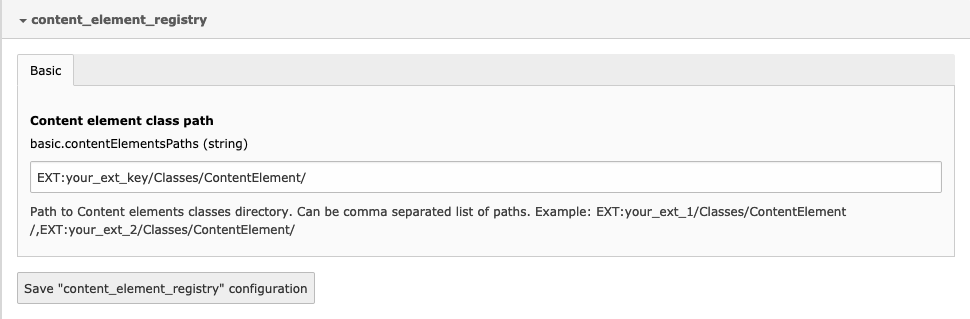
-
By registering Listener in
Services.yamlof your extension as follows:

  Vendor\Extension\EventListeners\ContentElementRegistryListener:
    tags:
      - name: event.listener
        identifier: 'contentElementRegistryListener'
        event: Devsk\ContentElementRegistry\Events\ContentElementRegistryClassEvent
Method Vendor\Extension\EventListeners\ContentElementRegistryListener can looks like this:
<?php
declare(strict_types=1);
namespace Vendor\Extension\EventListeners;

class ContentElementRegistryListener
{
    /**
     * @param RegisterContentElementRegistryClassEvent $event
     */
    public function __invoke(RegisterContentElementRegistryClassEvent $event): void
    {
        $contentElementRegistry = $event->getContentElementRegistry();
        $contentElementsClassMap = \Composer\ClassMapGenerator\ClassMapGenerator::createMap(
            \TYPO3\CMS\Core\Utility\GeneralUtility::getFileAbsFileName("EXT:your_extension/Classes/ContentElement/")
        );
        foreach ($contentElementsClassMap as $elementClass => $elementClassPath) {
            $contentElementRegistry->registerContentElement(
                \TYPO3\CMS\Core\Utility\GeneralUtility::makeInstance($elementClass)
            );
        }
    }
}
Creating new content element
To create new Content element you have to create new Class inside your folder defined in Setup section which extends Devsk\ContentElementRegistry\ContentElement\AbstractContentElementRegistryItem
<?php
namespace \YourVendor\YourExtension\ContentElement;

use Devsk\ContentElementRegistry\ContentElement\AbstractContentElementRegistryItem;

class YourNewContentElement extends AbstractContentElementRegistryItem
{

}
After clearing typo3 caches you should now see new content element in wizard

As you can see, there is neither title nor description of the content element. These are automatically fetched and translated from locallang file inside of your extension:
EXT:your_extension/Resources/Private/Language/locallang_db.xlf. You can now define your CE title and description as follows:
<trans-unit id="tt_content.yourextension_yournewcontentelement.title">
    <source>Your new content element</source>
</trans-unit>
<trans-unit id="tt_content.yourextension_yournewcontentelement.description">
    <source>Your new content element description</source>
</trans-unit>
<trans-unit id="tt_content.yourextension_yournewcontentelement.palette.default">
    <source>Default palette</source>
</trans-unit>
When you add this new CE it will contain only default CE fields:

Adding CE fields
To add new fields you have to define it in \YourVendor\YourExtension\ContentElement\YourNewContentElement:
<?php
namespace \YourVendor\YourExtension\ContentElement;

use Devsk\ContentElementRegistry\ContentElement\AbstractContentElementRegistryItem;

class YourNewContentElement extends AbstractContentElementRegistryItem
{

    /**
     * YourNewContentElement constructor.
     * @throws \Exception
     */
    public function __construct()
    {
        parent::__construct();
        $this->addPalette(
            'default',
            'header, --linebreak--, bodytext'
        );
    }
}
By this, we defined new CE palette with name default with two fields header and bodytext.
Code description:
- Name of the palette must be unique per CE. Label for palette can be defined in
locallang_db.xlfwith following key:tt_content.yourextension_yournewcontentelement.palette.default - Fields definition syntax must follows TCA palette showitem syntax
- Used fields must be properly configured in tt_content TCA
- You can add as many palettes as you need ;)
Our CE now should looks like this:

If you need to override field configuration you can do this in this way: (In following example we've enabled rich text editor for bodytext field)
<?php
    /**
     * @return array
     */
    public function getColumnsOverrides()
    {
        return [
            'bodytext' => [
                'config' => [
                    'enableRichtext' => true,
                ],
            ],
        ];
    }
CE Template
Template path of content element must be configured in typoscript as follow:
lib.contentElement {
    layoutRootPaths {
        10 = EXT:your_extension/Resources/Private/Layouts
    }

    partialRootPaths {
        10 = EXT:your_extension/Resources/Private/Partials
    }

    templateRootPaths {
        10 = EXT:your_extension/Resources/Private/Templates/ContentElements
    }
}
Template name is matched by CE class name. E.g. if is registered CE with class name YourNewContentElement this
template must exists EXT:your_extension/Resources/Private/Templates/ContentElements/YourNewContentElement.html.
Content of template can looks like this:
<html xmlns="http://www.w3.org/1999/xhtml" lang="en"
      xmlns:f="http://typo3.org/ns/TYPO3/Fluid/ViewHelpers"
      data-namespace-typo3-fluid="true">

<f:layout name="ContentElements/{contentElement.layout}" />

<f:section name="Main">
  ...
</f:section>

<f:section name="Preview">
  ...
</f:section>

</html>
Whether you use <f:layout /> and <f:section /> it's fully up to you. You can also add section
<f:section name="Preview"> which is used for BE preview.
CE Icon
If you don't want to use the defaut icon, you can change it:
- Add an icon to the folder
EXT:your_extension/Resources/Public/Icons/ContentElement/yourextension_yournewcontentelement.svg
CE Domain Model
Model name is matched by CE class name. E.g. if is registered CE with class name YourNewContentElement this model can
exists in EXT:your_extension/Classes/Domain/Model/YourNewContentElement.php Content of model can
looks like this:
<?php
declare(strict_types=1);
namespace \YourVendor\YourExtension\Domain\Model\ContentElement;

use Devsk\ContentElementRegistry\Domain\Model\ContentElement;

/**
 * Class YourNewContentElement
 * @package YourVendor\YourExtension\Domain\Model\ContentElement
 */
class YourNewContentElement extends ContentElement
{

}
Into class you can write some functions, getters, setters, etc. Some of them are inherited from
Devsk\ContentElementRegistry\Domain\Model\ContentElement (take a look ;).
Model in template
Model is accessible in the template of element with variable name {contentElement}. To find out what data is loaded in the model in the template use:
<f:debug>{contentElement}</f:debug>.
Create a new field and setup
Create a new field
- Create a field in the table
ext_table.sql, e.g.new_field. - In the TCA
EXT:your_extension/Configuration/TCA/Overrides/tt_content.phpcreate new column and config Typo3 Columns Config:
<?php
defined('TYPO3') or die();

$ttContentNewColumns = [
    'new_field' => [
        'label' => 'New field',
        'config' => [
            'type' => 'input',
            'eval' => 'trim',
         ],
    ],
];

\TYPO3\CMS\Core\Utility\ExtensionManagementUtility::addTCAcolumns('tt_content', $ttContentNewColumns);
Setup a new field
- In Class
\YourVendor\YourExtension\ContentElement\YourNewContentElementadd created fieldnew_field:
<?php
namespace \YourVendor\YourExtension\ContentElement;

use YourVendor\ContentElementRegistry\ContentElement\AbstractContentElementRegistryItem;

class YourNewContentElement extends AbstractContentElementRegistryItem
{

    /**
     * YourNewContentElement constructor.
     * @throws \Exception
     */
    public function __construct()
    {
        parent::__construct();
        $this->addPalette(
            'default',
            'new_field'
        );
    }
}
- In Model of CE
EXT:your_extension/Classes/Domain/Model/YourNewContentElement.phpadd property of created field$newField. You must follow the syntax, e.g.new_fieldwhich is written in ext_table.php, you must writenewFieldin the model.
Content element with IRRE
Mapping
Map in ext_typoscript_setup.typoscript relation table to CE model:
      YourVendor\YourExtension\Domain\Model\ContentElement\YourNewContentElement\YourNewRelation {
        mapping {
         tableName = tx_contentelementregistry_domain_model_relation
         recordType = yourextension_yournewcontentelement_yournewrelation
        }
      }
Register relation icon
You can register relation icon using Typo3 Icon API
Relation TCA
In TCA EXT:your_extension/Configuration/TCA/Overrides/tx_contentelementregistry_domain_model_relation.php create:
$tempTca = [
    'ctrl' => [
        'typeicon_classes' => [
            'yourextension_yournewcontentelement_yournewrelation' => 'yourextension_yournewcontentelement_yournewrelation',
        ],
    ],
    'types' => [
        'yourextension_yournewcontentelement_yournewrelation' => [
                    'showitem' => '--palette--;;mediaPalette,',
                ],
    ],
    'palettes' => [
        'mediaPalette' => [
            'showitem' => 'title, media',
        ],
    ],
    'columns' => [
        'title' => [
            'label' => 'Title',
            'config' => [
                'type' => 'text',
            ],
        ],

    ],
];

$GLOBALS['TCA']['tx_contentelementregistry_domain_model_relation'] = array_replace_recursive($GLOBALS['TCA']['tx_contentelementregistry_domain_model_relation'], $tempTca);
Relation add to CE
Add name of relation to palette:
<?php
namespace \YourVendor\YourExtension\ContentElement;

use YourVendor\ContentElementRegistry\ContentElement\AbstractContentElementRegistryItem;

class YourNewContentElement extends AbstractContentElementRegistryItem
{
  public function __construct()
    {
        parent::__construct();
        $this->addPalette(
            'default',
            'tx_contentelementregistry_relations'
        );
    }
}
Relation model
- In model of CE create property and getter:
<?php
namespace \YourVendor\YourExtension\Domain\Model\ContentElement;

use Devsk\ContentElementRegistry\Domain\Model\ContentElement;

/**
 * Class YourNewContentElement
 * @package YourVendor\YourExtension\Domain\Model\ContentElement
 */
class YourNewContentElement extends ContentElement
{
    /**
     * @var \TYPO3\CMS\Extbase\Persistence\ObjectStorage<\YourVendor\YourExtension\Domain\Model\ContentElement\YourNewContentElement\YourNewRelation>
     */
    protected $relations = null;

    /**
     * @return ObjectStorage|null
     */
    public function getRelations(): ? ObjectStorage
    {
        return $this->relations;
    }

}
- Create a new file
YourNewRelation.phpin\YourVendor\YourExtension\Domain\Model\ContentElement\YourNewContentElement. Here you can write getters and properties for fields in TCA of Relation:
<?php
namespace \YourVendor\YourExtension\Domain\Model\ContentElement\YourNewContentElement;

use Devsk\ContentElementRegistry\Domain\Model\Relation;

/**
 * Class YourNewRelation
 * @package YourVendor\YourExtension\Domain\Model\ContentElement\YourNewContentElement
 */
class YourNewRelation extends Relation
{
    /**
     * @var string
     */
    protected $type = '';

    /**
     * @return string
     */
    public function getType(): string
    {
        return $this->type;
    }

}
CE field mapping
In Class of CE you can map field, when you want to use it in model, e.g. tx_contentelementregistry_relations is called in the model txContentelementregistryRelation,
but after mapping 'tx_contentelementregistry_relations' => 'relations',tx_contentelementregistry_relations is called in the model relations.
namespace \YourVendor\YourExtension\Domain\Model\ContentElement;

use Devsk\ContentElementRegistry\Domain\Model\ContentElement;

/**
* Class YourNewContentElement
* @package YourVendor\YourExtension\Domain\Model\ContentElement
*/
class YourNewContentElement extends ContentElement
{
  /**
   * @var array
   */
  protected $columnsMapping = [
      'tx_contentelementregistry_relations' => 'relations',
  ];

}
##Changelog
v12.1.0
- Major: Namespace migration from
Digitalwerk\ContentElementRegistry\...toDevsk\ContentElementRegistry\...
v1.0.0
- dropped support for typo3 8 and typo3 9
- supported only typo3 v10.4
- experimental headless support
devskio/content-element-registry 适用场景与选型建议
devskio/content-element-registry 是一款 基于 PHP 开发的 Composer 扩展包,目前已累计 3.34k 次下载、GitHub Stars 达 0, 最近一次更新时间为 2023 年 08 月 22 日, 在 PHP 生态内属于活跃度较高的组件。
我们在过去多个企业项目中使用过 devskio/content-element-registry 或与其功能相近的方案,如果你在选型或落地过程中遇到问题,例如 版本兼容、二次改造、私有化封装、与内部系统对接、生产 BUG 排查,欢迎联系我们协助评估。
基于 devskio/content-element-registry 在你已有业务上做功能扩展、字段裁剪、UI 适配、与内部账号 / 权限 / 日志系统的深度对接。
线上偶发问题、内存泄漏、慢查询、并发异常等排查修复;针对高流量场景做缓存、队列、索引层面的调优。
承接完整的项目从需求 → 设计 → 开发 → 上线 → 长期运维;也可按月提供技术保姆服务。
统计信息
- 总下载量: 3.34k
- 月度下载量: 0
- 日度下载量: 0
- 收藏数: 0
- 点击次数: 1
- 依赖项目数: 0
- 推荐数: 0
其他信息
- 授权协议: GPL-2.0-or-later
- 更新时间: 2023-08-22