digitalpulsebe/craft-database-translations
Composer 安装命令:
composer require digitalpulsebe/craft-database-translations
包简介
Manage Craft i18n translations and store in database
README 文档
README
Manage Craft i18n translations and store in database

Requirements
This plugin requires Craft CMS 3.7 or later.
Installation
To install the plugin, follow these instructions.
-
Open your terminal and go to your Craft project:
cd /path/to/project -
Then tell Composer to load the plugin:
composer require digitalpulsebe/craft-database-translations -
In the Control Panel, go to Settings → Plugins and click the “Install” button for Database Translations.
Configuring Database Translations
Configure options in the Craft control panel or create a file in config/database-translations.php as a copy of config.php.

Configure the translation categories
Only the categories defined in the settings will be translated.
Map languages
Do you need to use the same translated values for different languages (for example different regions nl-BE and nl-NL)? You can map one language to another.
This might also be useful to provide translations for admin user in the control panel.
Trim spaces
Trim spaces at begin or ending of values when they are saved.
Add missing translations
When a new unknown translation is used while rendering templates, an event is triggered. Handling this event is optional. A new empty translation row will be added for the missing message.
Copy Entry bulk action
Enable this feature
Importing translations

Apart from the automatic missing translations' event, there are four ways of adding message rows in the database:
-
Create one manually
Just enter the new message key and category to add an empty row
-
Parse twig templates
Twig files are processed to find usage of the |t filter. The found results are listed in a review-step, select the rows you want to add to the database.
-
Import CSV files
Import CSV files. Map the columns.
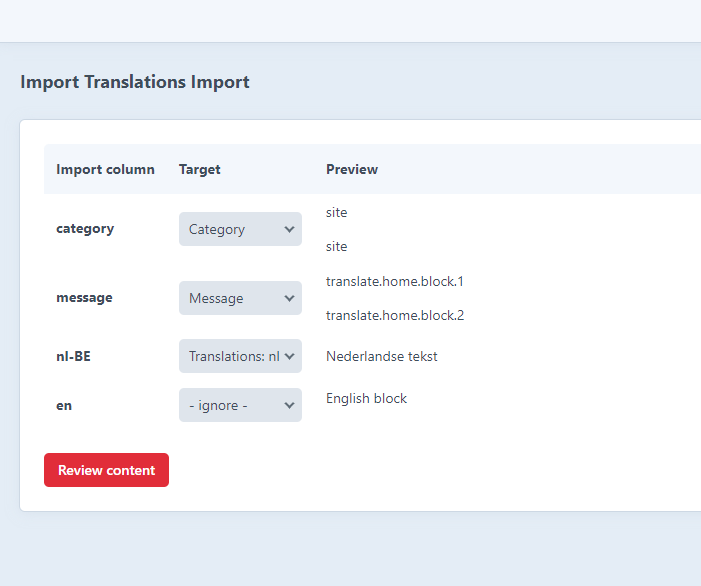
The found results are listed in a review-step, select the rows you want to add to the database.
-
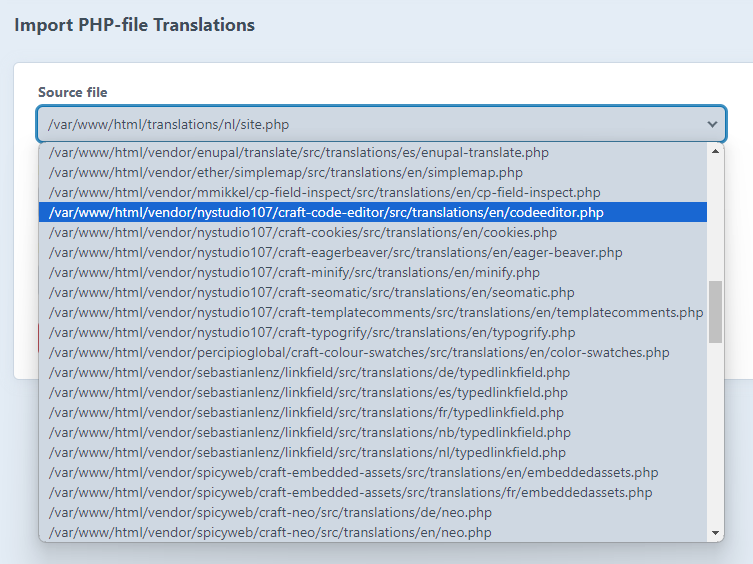
Parse php translation files
The native translation files in ./translations folder can be mapped to database rows. The found results are listed in a review-step, select the rows you want to add to the database. You can even import files from plugins in the vendor folder.


Exporting
- Export all the rows using the export tab
- Or, in the overview table, select the rows and languages to export
- as csv file
- as a content migration file
Migration file export
The advantage of exporting to a migration file is that your content can be pushed to git and then the server when deploying. The migration file adds the rows to your database when craft up or craft migrate/all is executed.
Manage translations

Copy entries in bulk action
To enable this functionality both enable this in the settings and set the permission for the user ("Copy content bulk action").
You can now select Entries in the index table, and select the bulk action. The content will be copied over to the other site in a queue job.

digitalpulsebe/craft-database-translations 适用场景与选型建议
digitalpulsebe/craft-database-translations 是一款 基于 PHP 开发的 Composer 扩展包,目前已累计 2.19k 次下载、GitHub Stars 达 2, 最近一次更新时间为 2023 年 12 月 18 日, 在 PHP 生态内属于活跃度较高的组件。
它主要适用于以下技术方向: 「cms」 「Craft」 「craftcms」 「craft-plugin」 「utm tracker」 等业务场景。在实际项目中,围绕这些方向常见需要落地的问题包括:接口对接、性能调优、并发安全、与既有框架(Laravel / ThinkPHP / Yii / Webman 等)的兼容适配,以及生产环境的日志埋点与稳定性保障。
我们在过去多个企业项目中使用过 digitalpulsebe/craft-database-translations 或与其功能相近的方案,如果你在选型或落地过程中遇到问题,例如 版本兼容、二次改造、私有化封装、与内部系统对接、生产 BUG 排查,欢迎联系我们协助评估。
基于 digitalpulsebe/craft-database-translations 在你已有业务上做功能扩展、字段裁剪、UI 适配、与内部账号 / 权限 / 日志系统的深度对接。
线上偶发问题、内存泄漏、慢查询、并发异常等排查修复;针对高流量场景做缓存、队列、索引层面的调优。
承接完整的项目从需求 → 设计 → 开发 → 上线 → 长期运维;也可按月提供技术保姆服务。
与 digitalpulsebe/craft-database-translations 相关的其它包
同方向 / 同关键字的高下载量 PHP Composer 包推荐,方便对比选型:
Expand, collapse, change the status of, or delete multiple blocks in a Matrix field simultaneously.
GraphQL authentication for your headless Craft CMS applications.
Set Links with a specific language parameter
Supercharged text field validation.
Integrate with Snipcart.
Restrict user registration by domain in Craft CMS, allows you to limit who can register for your site based on their email address.
统计信息
- 总下载量: 2.19k
- 月度下载量: 0
- 日度下载量: 0
- 收藏数: 2
- 点击次数: 20
- 依赖项目数: 0
- 推荐数: 0
其他信息
- 授权协议: MIT
- 更新时间: 2023-12-18