emporiqa/shopware-plugin
Composer 安装命令:
composer require emporiqa/shopware-plugin
包简介
Integrates your Shopware store with the Emporiqa chat assistant.
README 文档
README
A shopper types "warm jacket under 100, waterproof" into your store. Your search returns everything with "jacket" in the title. The shopper scrolls, gives up, and leaves.
The Emporiqa AI chatbot for Shopware 6 is an online salesperson that closes sales in your Shopware store. The plugin syncs your product catalog and CMS pages to Emporiqa, embeds the chat widget on your storefront, and exposes endpoints for in-chat cart operations and order tracking.
The chatbot acts like an online salesperson. Shoppers describe what they need (or upload a photo of something they like), it finds matching products from your catalog, handles objections like "too expensive" with alternatives instead of a discount, answers questions from your CMS pages, compares items, and walks them to cart and checkout in 65+ languages.
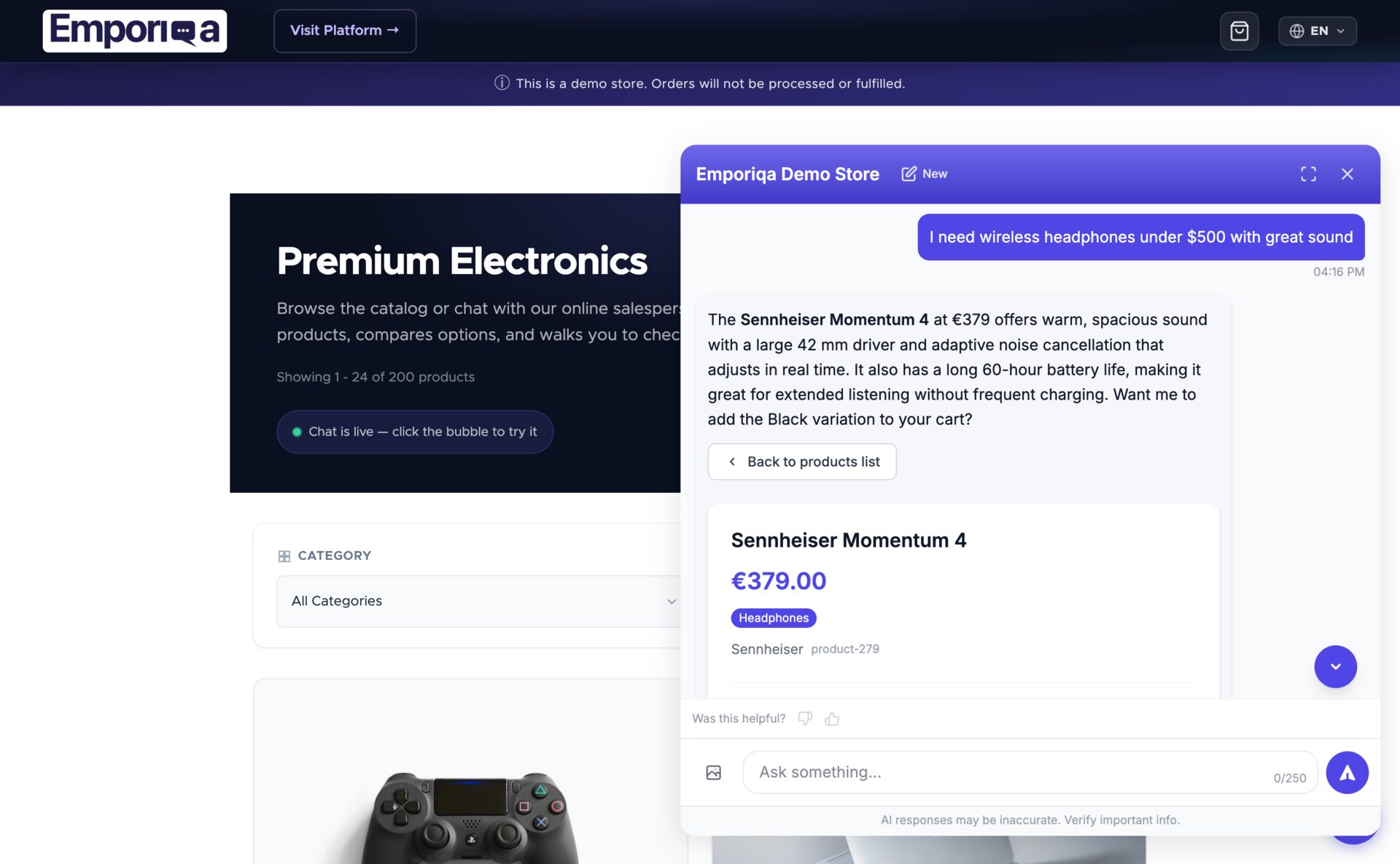
Integration overview · Full Documentation · Live Demo · Pricing
Watch the 30-second demo (recommends, handles objections, closes):
Features
- Closes sales: Handles objections like "too expensive" by suggesting alternatives from your catalog, instead of a discount.
- Visual search: Shoppers upload a photo in the widget; the chatbot describes it and finds matching products in your synced Shopware catalog (no extra config required).
- Brand-safe answers: Every reply comes from your synced products and CMS pages, never from training data. Low-confidence questions hand off to your team.
- Product sync: Real-time sync of catalog products and variants. Parent/child relationships, variant options, prices (including advanced rule prices / tier pricing), stock levels, images, and the
is_virtualflag for downloadable products are all included. - Page sync: Landing pages and category shop pages synced with per-language CMS content so the assistant can answer support questions from your own content.
- Chat widget: Automatically embedded on your storefront in the correct language for the current visitor.
- In-chat cart: Shoppers can add, update, remove items, and proceed to checkout directly from the chat.
- Order tracking: HMAC-signed order lookup with customer email verification to protect customer data. The response includes order status and items plus shipping details, carrier name, tracking number, and a tracking URL once the order has shipped.
- Conversion tracking: Captures chat session IDs at checkout and reports order completion events for revenue attribution.
- Multi-language: Automatic language mapping. All translations are consolidated into single webhook payloads per entity.
- Multi-channel: Auto-discovers sales channels and maps each to an Emporiqa channel. Products and pages assigned to multiple channels include per-channel links, prices, stock, and languages in a single payload.
- One-click connect: A signed PKCE handshake links your store to your Emporiqa account in one click. No Store ID or Webhook Secret to copy across tabs. Manual paste stays available on HTTP sites.
- Non-blocking delivery: Catalog, page, and order events are dispatched to Shopware's message queue and delivered by the worker, so admin saves and checkout responses are never held up waiting on Emporiqa.
- Extensibility events: Symfony events for developers to customize sync payloads, order tracking responses, and widget behavior.
Requirements
- Shopware 6.6 or 6.7
- PHP 8.2+
- An Emporiqa account. Sign up with no card; $25 of signup credit (~100 free conversations) auto-applied
Installation
Via the Extension Manager
- Download the latest
EmporiqaIntegration-x.y.z.zipfrom the Releases page. - In your Shopware Administration, go to Extensions > My Extensions > Upload extension and upload the zip.
- Install and activate the extension.
Via Composer (self-hosted)
composer require emporiqa/shopware-plugin
bin/console plugin:refresh
bin/console plugin:install --activate EmporiqaIntegration
bin/console cache:clear
Connect and sync
After installing by either method above:
- Open the Emporiqa extension and click Connect to Emporiqa. A new tab opens on emporiqa.com. Create a free account (no card required, $25 of signup credit) or sign in if you already have one, then pick the store you want to connect (or create a new one). The plugin is connected when you return.
- On the Sync tab, click Sync All. Products and pages flow through; the widget appears on your storefront when the first product arrives.
On HTTP, or prefer to paste credentials yourself? In the Connection settings, paste a Store ID and Webhook Secret from your Emporiqa dashboard under Settings → Store Integration. Both flows reach the same place.
For order tracking, copy the Order Tracking URL shown on the settings page and paste it into your Emporiqa dashboard under Store Integration → Order Tracking (the URL is also auto-derived by one-click connect on most setups).
Configuration
All settings are managed from the plugin configuration page (Extensions > My Extensions > Emporiqa > ⋯ > Settings):
Connection Settings
The recommended path is Connect to Emporiqa (one-click handshake, no credentials to paste). For HTTP sites or manual setup, enter the values by hand:
| Setting | Description | Default |
|---|---|---|
| Store ID | Your Emporiqa store identifier (filled automatically by one-click connect) | (none) |
| Webhook Secret | HMAC-SHA256 signing secret (filled automatically by one-click connect) | (none) |
| Order Tracking URL | Read-only endpoint to paste into your Emporiqa dashboard | auto-generated |
Advanced
| Setting | Description | Default |
|---|---|---|
| Sync Products | Enable real-time product sync | On |
| Sync Pages | Enable real-time CMS page sync | On |
| Webhook URL | Emporiqa webhook endpoint | https://emporiqa.com/webhooks/sync/ |
| Batch Size | Products/pages per webhook request during bulk sync | 50 |
Order tracking (with customer email verification) and in-chat cart operations are always enabled. No configuration needed.
Keeping your catalog in sync
The plugin pushes product, page, and order changes to Emporiqa automatically as they happen, through Shopware's data layer (DAL) events. Pure stock or out-of-stock changes emit a compact availability-only update instead of rebuilding the whole product, and product media or price changes re-emit the affected product on their own.
Some changes affect the whole catalog (category, brand, or currency edits, a new language, promotion changes). Running a synchronous per-product re-sync from those events would block the admin request, so the plugin logs an actionable warning to Shopware's log (var/log/) instead and leaves the catalog refresh to a manual run.
Re-run a full sync from the Sync tab when:
- You see one of the "catalog-wide change" warnings in the Shopware log
- You add or reassign a sales channel (existing products won't carry the new channel's data until something else touches them)
- You import products in bulk or write catalog data directly to the database (bulk paths can bypass standard events)
- Emporiqa was unreachable for an extended period (network outage, planned maintenance, expired credentials)
As a safety net, run a full sync once a week to catch any drift that may have built up from background failures.
Plugin Structure
EmporiqaIntegration/
├── src/
│   ├── EmporiqaIntegration.php          # Plugin lifecycle (uninstall cleanup: config + order markers)
│   ├── Command/                         # CLI: sync:products, sync:pages, sync:all, test-connection
│   ├── Controller/
│   │   ├── Admin/SyncController.php     # Admin sync + data-preview endpoints
│   │   ├── Admin/ConnectController.php  # One-click connect (PKCE) endpoints
│   │   ├── CartController.php           # In-chat cart API
│   │   └── OrderTrackingController.php  # HMAC-signed order tracking endpoint
│   ├── Service/
│   │   ├── SyncService.php              # Bulk sync orchestration + channel contexts
│   │   ├── ProductFormatter.php         # Product/variant payload formatting
│   │   ├── CmsPageFormatter.php         # Landing page / category page payload formatting
│   │   ├── ChannelResolver.php          # Sales channel to Emporiqa channel mapping
│   │   ├── ConnectService.php           # One-click connect (PKCE) handshake
│   │   ├── ConfigService.php            # Settings access
│   │   └── WebhookClient.php            # HMAC-SHA256 signed webhook HTTP client
│   ├── Subscriber/                      # Real-time DAL event listeners
│   ├── MessageQueue/                    # Async webhook and full-sync handlers
│   ├── Event/                           # Extension events (payload / widget hooks)
│   └── Resources/
│       ├── app/administration/          # Admin UI (sync dashboard, settings, one-click connect)
│       ├── app/storefront/              # Widget embed and cart storefront plugins
│       └── config/                      # config.xml, services, snippets
├── composer.json
└── CHANGELOG.md
How It Works
Webhook Sync
When a product or CMS page is created, updated, or deleted in Shopware, the plugin dispatches the change to Shopware's message queue. The worker delivers one webhook per touched entity, so the merchant's admin save or checkout response is sent first and the delivery happens in the background. All webhooks are signed with HMAC-SHA256 via the X-Webhook-Signature header for payload integrity verification.
Pure stock or availability changes skip the full rebuild and send a compact product.availability event carrying only the identification number, SKU, per-channel availability statuses, and stock quantities, one entry per simple product or per variant.
Product Variants
Shopware products with variants are synced with their full variation structure. The parent product carries the shared name, description, and images, while each variant carries its specific options (size, color, etc.), price, and stock. The assistant understands "this jacket comes in blue and red, sizes S through XL."
The full product (and variant) payload also includes merchandising and pricing fields so the assistant can describe and sell products accurately:
tier_prices: per-currency list of quantity-based breaks ([{min_quantity, price}]) from Shopware's advanced rule prices, present on a price entry only when the product or variant has them configured, so the assistant can quote "X each at 10+".is_virtual: boolean; true for downloadable products with no shipping (from Shopware's downloadable-product state).condition: included for cross-platform payload parity. Shopware has no native product-condition field, so it ships as a fixednull.available_for_order: included for cross-platform payload parity. Shopware has no native display-only / catalog-mode flag, so it ships as a fixedtrue.
Multi-Language
Each active language on a sales channel is mapped to a standard language code. A single product with translations in multiple languages is sent as one webhook payload with all translations nested: fewer HTTP requests, consistent data. Landing page and category content is resolved per language from each page's own translatable slot configuration.
Registered Subscribers
| Subscriber | Purpose |
|---|---|
StorefrontSubscriber |
Embeds the chat widget on the storefront (StorefrontRenderEvent) |
ProductSubscriber |
Syncs products on write/delete, variant-precise deletes, and re-syncs on media or price changes |
ProductSubscriber (availability) |
Emits a lightweight product.availability event on stock changes (ProductStockAlteredEvent), no full rebuild |
LandingPageSubscriber |
Syncs landing pages on create/update/delete |
CategorySubscriber |
Syncs category shop pages on create/update/delete |
OrderSubscriber |
Captures the chat session and sends order.completed on order placement and completing state transitions |
CatalogChangeSubscriber |
Logs an actionable warning for catalog-wide changes (category, manufacturer, currency, language, promotion, tax, pricing rule) so the merchant can run a full sync |
CLI Commands
bin/console emporiqa:sync:products      # Bulk sync all products
bin/console emporiqa:sync:pages         # Bulk sync all pages
bin/console emporiqa:sync:all           # Bulk sync products and pages
bin/console emporiqa:test-connection    # Validate credentials and connectivity
Add --dry-run to a sync command to build and validate payloads without sending them.
Extensibility
Developers can subscribe to Symfony events to customize payloads or widget behavior:
| Event | Purpose |
|---|---|
PostProductFormatEvent |
Modify the product/variant payload before sending |
PostPageFormatEvent |
Modify the page payload before sending |
PostOrderFormatEvent |
Modify the order payload before sending |
OrderTrackingResponseEvent |
Modify the order tracking response |
WidgetParamsEvent |
Modify the chat widget embed parameters |
PreSyncEvent / PostSyncEvent |
Run logic before and after a bulk sync session |
Every service is defined against an interface (ProductFormatterInterface, CmsPageFormatterInterface, SyncServiceInterface, WebhookClientInterface, ChannelResolverInterface, ConfigServiceInterface, ConnectServiceInterface), so you can decorate any of them with a standard Symfony service decorator.
Pricing
The plugin is free. Emporiqa is Pay-as-you-go: $0/month base + $0.25/conversation. New accounts get $25 of signup credit (about 100 conversations on us), no card required at signup. After the credit, the monthly cap defaults to $59 and is customer-adjustable from the billing dashboard. Enterprise option for catalogs over 30,000 products. Full pricing at emporiqa.com/pricing/.
Emporiqa also works with PrestaShop, Drupal Commerce, WooCommerce, Magento, Sylius, and any store via webhook API. One Emporiqa account and dashboard runs across all of them.
Documentation & Support
- Integration overview: https://emporiqa.com/integrations/shopware/
- Full documentation: https://emporiqa.com/docs/shopware/ (configuration details, webhook format reference, event examples, troubleshooting)
- Email: support@emporiqa.com
License
统计信息
- 总下载量: 0
- 月度下载量: 0
- 日度下载量: 0
- 收藏数: 1
- 点击次数: 0
- 依赖项目数: 0
- 推荐数: 0
其他信息
- 授权协议: MIT
- 更新时间: 2026-07-13