exzm/yii2-jwt
Composer 安装命令:
composer require exzm/yii2-jwt
包简介
JWT based on Icobucci
README 文档
README
This extension provides the JWT integration for the Yii framework 2.0 (requires PHP 7.4 or ^8.0). It includes basic HTTP authentication support.
Table of contents
Installation
Package is available on Packagist, you can install it using Composer.
composer require sizeg/yii2-jwt
Dependencies
- PHP 7.4 or 8.0+
- OpenSSL Extension
- lcobucci/jwt 4.2
Basic usage
Add jwt component to your configuration file,
'components' => [
    'jwt' => [
        'class' => \sizeg\jwt\Jwt::class,
        'constraints' => [
            function () {
                return new \Lcobucci\JWT\Validation\Constraint\LooseValidAt(
                    \Lcobucci\Clock\SystemClock::fromSystemTimezone()
                );
            },
        ],
    ],
],
Configure the authenticator behavior as follows.
namespace app\controllers;

class ExampleController extends \yii\rest\Controller
{

    /**
     * @inheritdoc
     */
    public function behaviors()
    {
        $behaviors = parent::behaviors();
        $behaviors['authenticator'] = [
            'class' => \sizeg\jwt\JwtHttpBearerAuth::class,
        ];

        return $behaviors;
    }
}
Also, you can use it with CompositeAuth refer to a doc.
Creating
Just use the builder to create a new JWT/JWS tokens:
$now = new DateTimeImmutable();
$algorithm = $this->jwt->getSigner();
$key = $this->jwt->getSignerKey();

$token = Yii::$app->jwt->getBuilder()
   // Configures the issuer (iss claim)
   ->issuedBy('http://example.com')
   // Configures the audience (aud claim)
   ->permittedFor('http://example.org')
   // Configures the id (jti claim)
   ->identifiedBy('4f1g23a12aa')
   // Configures the time that the token was issue (iat claim)
   ->issuedAt($now)
   // Configures the time that the token can be used (nbf claim)
   ->canOnlyBeUsedAfter($now->modify('+1 minute'))
   // Configures the expiration time of the token (exp claim)
   ->expiresAt($now->modify('+1 hour'))
   // Configures a new claim, called "uid"
   ->withClaim('uid', 1)
   // Configures a new header, called "foo"
   ->withHeader('foo', 'bar')
   // Builds a new token
   ->getToken($algorithm, $key);

$token->headers(); // Retrieves the token headers
$token->claims(); // Retrieves the token claims

echo $token->headers()->get('foo'); // will print "bar"
echo $token->claims()->get('jti'); // will print "4f1g23a12aa"
echo $token->claims()->get('iss'); // will print "http://example.com"
echo $token->claims()->get('uid'); // will print "1"
echo $token->toString(); // The string representation of the object is a JWT string (pretty easy, right?)
Parsing from strings
Use the parser to create a new token from a JWT string (using the previous token as example):
use Lcobucci\JWT\Encoding\CannotDecodeContent;
use Lcobucci\JWT\Token\InvalidTokenStructure;
use Lcobucci\JWT\Token\UnsupportedHeaderFound;
use Lcobucci\JWT\UnencryptedToken;

try {
    /** @var string $jwt JWT token string */
    $token = Yii::$app->jwt->parse($jwt); // Parses from a string
} catch (CannotDecodeContent | InvalidTokenStructure | UnsupportedHeaderFound $e) {
    echo 'Oh no, an error: ' . $e->getMessage();
}

assert($token instanceof UnencryptedToken);
Validating
We can easily validate if the token is valid (using the previous token as example):
use \Lcobucci\JWT\Validation\Constraint\IssuedBy;

if (!Yii::$app->jwt->validate($token, new IssuedBy('http://example.com'))) {
    echo 'Invalid token (1)!', PHP_EOL; // will not print this
}

if (!Yii::$app->jwt->validate($token, new IssuedBy('http://example.org'))) {
    echo 'Invalid token (1)!', PHP_EOL; // will print this
}
Available constraints
\Lcobucci\JWT\Validation\Constraint\IdentifiedBy: verifies if the claim jti matches the expected value\Lcobucci\JWT\Validation\Constraint\IssuedBy: verifies if the claim iss is listed as expected values\Lcobucci\JWT\Validation\Constraint\PermittedFor: verifies if the claim aud contains the expected value\Lcobucci\JWT\Validation\Constraint\RelatedTo: verifies if the claim sub matches the expected value\Lcobucci\JWT\Validation\Constraint\SignedWith: verifies if the token was signed with the expected signer and key\Lcobucci\JWT\Validation\Constraint\StrictValidAt: verifies presence and validity of the claims iat, nbf, and exp (supports leeway configuration)\Lcobucci\JWT\Validation\Constraint\LooseValidAt: verifies the claims iat, nbf, and exp, when present (supports leeway configuration)\Lcobucci\JWT\Validation\Constraint\HasClaimWithValue: verifies that a custom claim has the expected value (not recommended when comparing cryptographic hashes)
Important
- You have to configure
\sizeg\jwt\Jwt::$constraintsinforming all claims you want to validate the token byYii::$app->jwt->loadToken(), this method also called inside\sizeg\jwt\JwtHttpBearerAuth.
Token signature
We can use signatures to be able to verify if the token was not modified after its generation. This extension implements Hmac, RSA and ECDSA signatures (using 256, 384 and 512).
Important
Do not allow the string sent to the Parser to dictate which signature algorithm to use, or else your application will be vulnerable to a critical JWT security vulnerability.
The examples below are safe because the choice in Signer is hard-coded and cannot be influenced by malicious users.
Hmac
Hmac signatures are really simple to be used.
You may configure component:
'components' => [
    'jwt' => [
        'class' => \sizeg\jwt\Jwt::class,
        'signer' => \sizeg\jwt\JwtSigner::HS256,
        'signerKey' => \sizeg\jwt\JwtKey::PLAIN_TEXT,
        'signerKeyContents' => random_bytes(32),
        'signerKeyPassphrase' => 'secret',
        'constraints' => [
            function () {
                // Verifies the claims iat, nbf, and exp, when present (supports leeway configuration)
                return new \Lcobucci\JWT\Validation\Constraint\LooseValidAt(
                    \Lcobucci\Clock\SystemClock::fromSystemTimezone()
                );
            },
            function () {
                // Verifies if the token was signed with the expected signer and key
                return new \Lcobucci\JWT\Validation\Constraint\SignedWith(
                    Yii::$app->jwt->getSigner(),
                    Yii::$app->jwt->getSignerKey()
                );
            },
        ],
    ],
],
use \Lcobucci\JWT\Validation\Constraint\SignedWith;

$now = new DateTimeImmutable();

$algorithm = $this->jwt->getSigner(\sizeg\jwt\JwtSigner::HS256);
// ... and key
$contents = random_bytes(32);
$passphrase = 'secret';
$key = $this->jwt->getSignerKey(\sizeg\jwt\JwtKey::PLAIN_TEXT, $contents, $passphrase);

$token = Yii::$app->jwt->getBuilder()
    // Configures the issuer (iss claim)
    ->issuedBy('http://example.com')
    // Configures the audience (aud claim)
    ->permittedFor('http://example.org')
    // Configures the id (jti claim)
    ->identifiedBy('4f1g23a12aa')
    // Configures the time that the token was issue (iat claim)
    ->issuedAt($now)
    // Configures the time that the token can be used (nbf claim)
    ->canOnlyBeUsedAfter($now->modify('+1 minute'))
    // Configures the expiration time of the token (exp claim)
    ->expiresAt($now->modify('+1 hour'))
    // Configures a new claim, called "uid"
    ->withClaim('uid', 1)
    // Configures a new header, called "foo"
    ->withHeader('foo', 'bar')
    // Builds a new token
    ->getToken($algorithm, $key);

if (!Yii::$app->jwt->validate($token, new SignedWith(
    Yii::$app->jwt->getSigner(\sizeg\jwt\JwtSigner::HS256),
    Yii::$app->jwt->getSignerKey(JwtKey::PLAIN_TEXT, $contents, $passphrase)
))) {
    echo 'Invalid token (1)!', PHP_EOL; // will not print this
}

if (!Yii::$app->jwt->validate($token, new SignedWith(
    Yii::$app->jwt->getSigner(\sizeg\jwt\JwtSigner::HS256),
    Yii::$app->jwt->getSignerKey(JwtKey::PLAIN_TEXT, random_bytes(32), 'other-secret')
))) {
    echo 'Invalid token (1)!', PHP_EOL; // will print this
}
RSA and ECDSA
RSA and ECDSA signatures are based on public and private keys so you have to generate using the private key and verify using the public key:
use \Lcobucci\JWT\Validation\Constraint\SignedWith;

$now = new DateTimeImmutable();

// you can use 'ES256' if you're using ECDSA keys
$algorithm = Yii::$app->jwt->getSigner(\sizeg\jwt\JwtSigner::RS256);
$privateKey = Yii::$app->jwt->getSignerKey(\sizeg\jwt\JwtKey::FILE, 'file://{path to your private key}');

$token = Yii::$app->jwt->getBuilder()
    // Configures the issuer (iss claim)
    ->issuedBy('http://example.com')
    // Configures the audience (aud claim)
    ->permittedFor('http://example.org')
    // Configures the id (jti claim)
    ->identifiedBy('4f1g23a12aa')
    // Configures the time that the token was issue (iat claim)
    ->issuedAt($now)
    // Configures the time that the token can be used (nbf claim)
    ->canOnlyBeUsedAfter($now->modify('+1 minute'))
    // Configures the expiration time of the token (exp claim)
    ->expiresAt($now->modify('+1 hour'))
    // Configures a new claim, called "uid"
    ->withClaim('uid', 1)
    // Configures a new header, called "foo"
    ->withHeader('foo', 'bar')
    // Builds a new token
    ->getToken($algorithm, $privateKey);

$publicKey = Yii::$app->jwt->getSignerKey(\sizeg\jwt\JwtKey::FILE, 'file://{path to your public key}');

var_dump(Yii::$app->jwt->validate($token, new SignedWith(
    Yii::$app->jwt->getSigner(\sizeg\jwt\JwtSigner::RS256),
    Yii::$app->jwt->getSignerKey(JwtKey::FILE, $publicKey)
))); // true when the public key was generated by the private one =)
It's important to say that if you're using RSA keys you shouldn't invoke ECDSA signers (and vice-versa), otherwise sign() and verify() will raise an exception!
Yii2 basic template example
Basic scheme
- Client send credentials. For example, login + password
- Backend validate them
- If credentials is valid client receive token
- Client store token for the future requests
Step-by-step usage example
-
Create Yii2 application
In this example we will use basic template, but you can use advanced template in the same way.
composer create-project --prefer-dist --stability=dev yiisoft/yii2-app-basic yii2-jwt-test
-
Install component
composer require sizeg/yii2-jwt
-
Add to config/web.php into
componentssection$config = [ 'components' => [ // other default components here.. 'jwt' => [ 'class' => \sizeg\jwt\Jwt::class, 'constraints' => [ function () { return new \Lcobucci\JWT\Validation\Constraint\LooseValidAt( \Lcobucci\Clock\SystemClock::fromSystemTimezone() ); }, ], ], ], ];
-
Change method
app\models\User::findIdentityByAccessToken()/** * {@inheritdoc} * @param \Lcobucci\JWT\Token $token */ public static function findIdentityByAccessToken($token, $type = null) { foreach (self::$users as $user) { if ($user['id'] === (string) $token->claims()->get('uid')) { return new static($user); } } return null; }
-
Create controller
   <?php

   namespace app\controllers;

   use sizeg\jwt\Jwt;
   use sizeg\jwt\JwtHttpBearerAuth;
   use Yii;
   use yii\rest\Controller;

   class RestController extends Controller
   {
       /**
        * @inheritdoc
        */
       public function behaviors()
       {
           $behaviors = parent::behaviors();
           $behaviors['authenticator'] = [
               'class' => JwtHttpBearerAuth::class,
               'optional' => [
                   'login',
               ],
           ];

           return $behaviors;
       }

       /**
        * @return \yii\web\Response
        */
       public function actionLogin()
       {
           $now = new DateTimeImmutable();
           $algorithm = $this->jwt->getSigner();
           $key = $this->jwt->getSignerKey();

           /** @var Jwt $jwt */
           $jwt = Yii::$app->jwt;

           $token = Yii::$app->jwt->getBuilder()
               // Configures the issuer (iss claim)
               ->issuedBy('http://example.com')
               // Configures the audience (aud claim)
               ->permittedFor('http://example.org')
               // Configures the id (jti claim)
               ->identifiedBy('4f1g23a12aa')
               // Configures the time that the token was issue (iat claim)
               ->issuedAt($now)
               // Configures the expiration time of the token (exp claim)
               ->expiresAt($now->modify('+1 hour'))
               // Configures a new claim, called "uid"
               ->withClaim('uid', 100)
               // Builds a new token
               ->getToken($algorithm, $key);

        return $this->asJson([
            'token' => $token->toString(),
        ]);
    }

    /**
     * @return \yii\web\Response
     */
    public function actionData()
    {
        return $this->asJson([
            'success' => true,
        ]);
    }
}
-
Send simple login request to get token. Here we does not send any credentials to simplify example. As we specify in
authenticatorbehavior actionloginas optional theauthenticatorskip auth check for that action.
-
First of all we try to send request to rest/data without token and getting error
Unauthorized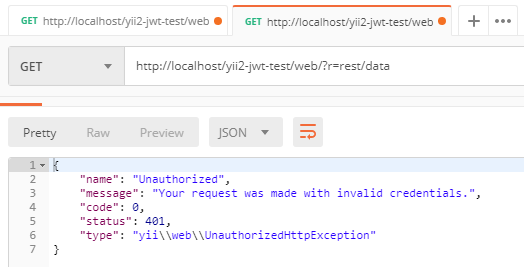
-
Then we retry request but already adding
Authorizationheader with our token
exzm/yii2-jwt 适用场景与选型建议
exzm/yii2-jwt 是一款 基于 PHP 开发的 Composer 扩展包,目前已累计 588 次下载、GitHub Stars 达 0, 最近一次更新时间为 2025 年 12 月 02 日, 在 PHP 生态内属于活跃度较高的组件。
它主要适用于以下技术方向: 「jwt」 「yii2」 「yii 2」 等业务场景。在实际项目中,围绕这些方向常见需要落地的问题包括:接口对接、性能调优、并发安全、与既有框架(Laravel / ThinkPHP / Yii / Webman 等)的兼容适配,以及生产环境的日志埋点与稳定性保障。
我们在过去多个企业项目中使用过 exzm/yii2-jwt 或与其功能相近的方案,如果你在选型或落地过程中遇到问题,例如 版本兼容、二次改造、私有化封装、与内部系统对接、生产 BUG 排查,欢迎联系我们协助评估。
基于 exzm/yii2-jwt 在你已有业务上做功能扩展、字段裁剪、UI 适配、与内部账号 / 权限 / 日志系统的深度对接。
线上偶发问题、内存泄漏、慢查询、并发异常等排查修复;针对高流量场景做缓存、队列、索引层面的调优。
承接完整的项目从需求 → 设计 → 开发 → 上线 → 长期运维;也可按月提供技术保姆服务。
与 exzm/yii2-jwt 相关的其它包
同方向 / 同关键字的高下载量 PHP Composer 包推荐,方便对比选型:
A custom URL rule class for Yii 2 which allows to create translated URL rules
Yii2 LightBox image galary widget uses Lightbox v2.10.0 by Lokesh Dhakar
A simple library to decode and parse Apple Sign In client tokens.
JWT API authentication driver (Guard) for Laravel.
Priveate for SkeekS CMS
Laravel JWT auth service package
统计信息
- 总下载量: 588
- 月度下载量: 0
- 日度下载量: 0
- 收藏数: 0
- 点击次数: 12
- 依赖项目数: 0
- 推荐数: 0
其他信息
- 授权协议: BSD-3-Clause
- 更新时间: 2025-12-02