faithfm/laravel-simple-permissions
Composer 安装命令:
composer require faithfm/laravel-simple-permissions
包简介
Simple user permissions for Laravel (Eloquent-based authorisation gates)
README 文档
README

A simple way to define user permissions in your Laravel application:
-
Authorization Gates are are automatically created for all
'defined_permissions'inconfig/auth.php:'defined_permissions' => [ 'use-app', // minimum permission to use the app 'admin-master', // master admin privilege 'view-assets', // access assets but not able to edit them 'edit-assets', // access assets and able to edit them ],
-
These can be tested via normal Laravel Authorization methods:
$allowed = Gate::allows('use-app');             // simple test
$allowed = Gate::allows('use-app|edit-assets'); // ORed permissions (SPECIAL FEATURE)
...->middleware('can:use-app');                 // protect in route definitions
Gate::authorize('use-app');                     // protect elsewhere (ie: controllers)
@can('use-app')                                 // blade templates
Tip
Notice the special '|' character that can be used to test multiple (ORed) permissions in a single gate
-
Permissions are assigned to each user via the
user_permissionstable: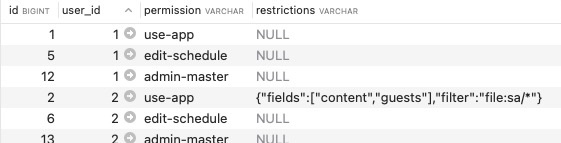
-
Additional Javascript library included - typically used to check additional restrictions in the front-end. (see below)

Note
This package is the Authorization (AuthZ) component of our overall AuthN/AuthZ design pattern that we deploy for our apps. (Our Faith FM Laravel Auth0 Pattern package is more opinionated than this generic package, and includes a number of published template files that may be less helpful for a wider audience, but you're welcome to use them if they are helpful.)
Installation + Configuration:
composer require faithfm/laravel-simple-permissions
php artisan vendor:publish --tag=laravel-simple-permissions
php artisan migrate                                        # create the 'user_permissions' table
- Add the permissions relationship to the
Models\User.phpmodel:
/**
 * The permissions relationship should be eager-loaded.
 */
protected $with = ['permissions'];

/**
 * Get the permissions for the user.
 */
public function permissions()
{
    return $this->hasMany(\App\Models\UserPermission::class);
}
-
Create a simple list of
'defined_permissions'for your app (as a new section inconfig/auth.php). (See example above) -
Assign these permissions to relevant users (by adding records in the
user_permissionstable). (See example above)
Usage:
You can now test user permissions using regular Laravel Authorization Gate checks! (See examples above)
Advanced Usage: Vue front-end
LaravelUserPermissions.js is a helper library that allows additional permission-checks to be performed in the front-end.
This helper assumes that user permissions are passed from back-end to front-end using a global javascript LaravelAppGlobals variable (which is usually passed by the Blade file). Specifically it is looking for the existence of the global LaravelAppGlobals.user.permissions property.
In the examples below we will primarily consider the fourth row of the sample user_permissions table above:
id:            2
user_id:       2
permission:    use-app
restrictions:  {"fields":["content","guests"],"filter":"file:folder/*"}
Simple permission checks use the laravelUserCan() function:
import { laravelUserCan } from "../LaravelUserPermissions";
if (laravelUserCan("use-app"))
  // ALLOW STUFF TO HAPPEN
More complex restrictions checks/filtering test user capabilities against JSON settings stored in the restrictions field. In our example above, a call to the laravelUserRestrictions('use-app') function returns:
{
+ status: "SOME PERMITTED",
  fields: ["content","guests"],
  filter: "file:sa/*"
}
The status property is injected along with any JSON data in the restrictions field, and is set to one of the following values:
NOT PERMITTED- if the requested permission (ie: "use-app") does not exist for the user.ALL PERMITTED- if the requested permission does exist... AND the 'restrictions' field is blank.SOME PERMITTED- if the requested permission does exist... AND the 'restrictions' field contains valid JSON data.
The example below tests these conditions, and also checks to see if an app variable "currentItem" starts with the value of the "filter" property.
import { laravelUserRestrictions } from "../LaravelUserPermissions";
const restrictions = laravelUserRestrictions("use-app");
if (restrictions.status == "NOT PERMITTED")
  // PREVENT STUFF FROM HAPPENING
if (restrictions.status == "ALL PERMITTED")
  // UNFILTERED ACCESS
if (restrictions.status == "SOME PERMITTED") {
  // PARTIAL/FILTERED ACCESS BASED ON RESTRICTIONS JSON DATA - IE: ASSUMING 'filter' field
  if (currentItem.startsWith(restrictions.filter)
    // DO STUFF IF FILTER ALLOWS
Important
You should not rely solely on front-end code to enforce important security features. These should be performed in the back-end as well.
Sample code to pass permissions via LaravelAppGlobals to front-end:
The following sample code shows one way the 'user' object (including permissions) can be passed to your front-end Vue app via the LaravelAppGlobals front-end variable.
In your Route/Controller:
  $LaravelAppGlobals = [
    'user' => auth()->user(),     # THIS IS THE IMPORTANT ONE
    'guest' => auth()->guest(),
    'other-stuff' => $myStuff,
    ...
  ];
  return view('myview')->with('LaravelAppGlobals', $LaravelAppGlobals);
Blade file:
<!doctype html>
<head>
    <!-- Scripts -->
    <script>
        var LaravelAppGlobals = Object.freeze({!! json_encode($LaravelAppGlobals) !!});
    </script>
    ...
Extended Usage: Laravel back-end
An equivalent of the javascript laravelUserRestrictions() function has not yet been implemented in the back-end to perform more complex testing based on the restrictions field. In the mean-time you could probably use something like this:
if (Gate::allows('use-app'))
  if (auth()->user()->permissions->restrictions['file'] == 'restrictedfile')
    // ALLOW/DENY STUFF FROM HAPPENING
faithfm/laravel-simple-permissions 适用场景与选型建议
faithfm/laravel-simple-permissions 是一款 基于 PHP 开发的 Composer 扩展包,目前已累计 48 次下载、GitHub Stars 达 1, 最近一次更新时间为 2024 年 05 月 02 日, 在 PHP 生态内属于活跃度较高的组件。
它主要适用于以下技术方向: 「package」 「template」 「composer」 等业务场景。在实际项目中,围绕这些方向常见需要落地的问题包括:接口对接、性能调优、并发安全、与既有框架(Laravel / ThinkPHP / Yii / Webman 等)的兼容适配,以及生产环境的日志埋点与稳定性保障。
我们在过去多个企业项目中使用过 faithfm/laravel-simple-permissions 或与其功能相近的方案,如果你在选型或落地过程中遇到问题,例如 版本兼容、二次改造、私有化封装、与内部系统对接、生产 BUG 排查,欢迎联系我们协助评估。
基于 faithfm/laravel-simple-permissions 在你已有业务上做功能扩展、字段裁剪、UI 适配、与内部账号 / 权限 / 日志系统的深度对接。
线上偶发问题、内存泄漏、慢查询、并发异常等排查修复;针对高流量场景做缓存、队列、索引层面的调优。
承接完整的项目从需求 → 设计 → 开发 → 上线 → 长期运维;也可按月提供技术保姆服务。
与 faithfm/laravel-simple-permissions 相关的其它包
同方向 / 同关键字的高下载量 PHP Composer 包推荐,方便对比选型:
This composer plugin enables installation of GravityForms WordPress plugin and its addons.
Simple ASCII output of array data
E2E Studios PHP Framework adaptation of leafsphp/blade package
Generate a Composer repository from installed WordPress plugins and themes.
统计信息
- 总下载量: 48
- 月度下载量: 0
- 日度下载量: 0
- 收藏数: 1
- 点击次数: 24
- 依赖项目数: 1
- 推荐数: 0
其他信息
- 授权协议: GPL-3.0-or-later
- 更新时间: 2024-05-02