falconmedia/magento2-product-data-sync
Composer 安装命令:
composer require falconmedia/magento2-product-data-sync
包简介
Safe, repeatable, multi-store product data synchronization between products
README 文档
README
A powerful Magento 2 module for safely synchronizing product data between products with support for multi-store configurations, attribute filtering, and comprehensive logging.
Features
-
Multi-Store Support: Sync product data across multiple store views with three modes:
- All for target: Sync only to default store and target product's stores
- All from source: Link all source stores to target and copy all overridden attributes
- Specific: Sync to a specific store view
-
Profile-Based Configuration: Create reusable sync profiles with:
- Custom attribute selection
- Protected attributes (never synced)
- Sync behavior settings (skip empty, fill empty only, etc.)
- Store scope behavior configuration
- Execution settings (batch size, max pairs per run)
-
Safe Attribute Handling:
- Automatically skips global attributes when syncing to store views
- Skips unique attributes (SKU, URL key, etc.) in store views
- Detects and skips attributes that use default values to prevent constraint violations
- Validates image file existence before syncing
-
Comprehensive Logging:
- Detailed run history with success/failure tracking
- Per-item logging with store view information
- Custom log file:
var/log/product-data-sync.log - Detailed error messages with stack traces
-
Dry Run Support: Validate product pairs before actual sync
-
Run History: Track all sync operations with detailed results
-
Batch Processing: Process large product sets efficiently
Requirements
- Magento 2.4.x
- PHP 8.1, 8.2, or 8.3
- MySQL/MariaDB
Installation
Via Composer
composer require falconmedia/magento2-product-data-sync
bin/magento setup:upgrade
bin/magento cache:clean
Manual Installation
- Copy the module to
app/code/FalconMedia/ProductDataSyncor add as a package - Run:
bin/magento setup:upgrade
bin/magento cache:clean
Usage
Creating a Sync Profile
- Navigate to Catalog > Product Data Sync > Profiles
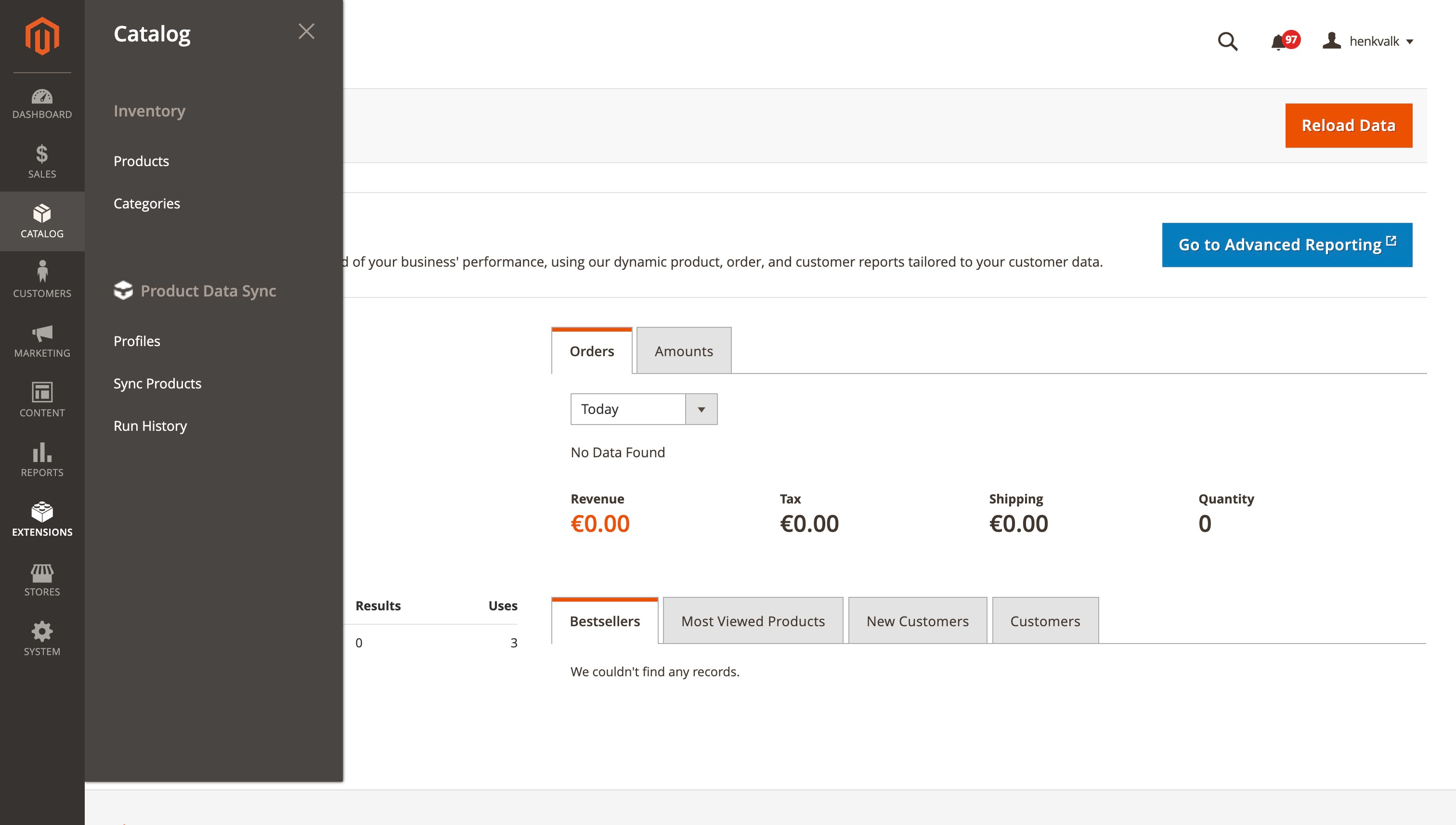
- Click Add New Profile
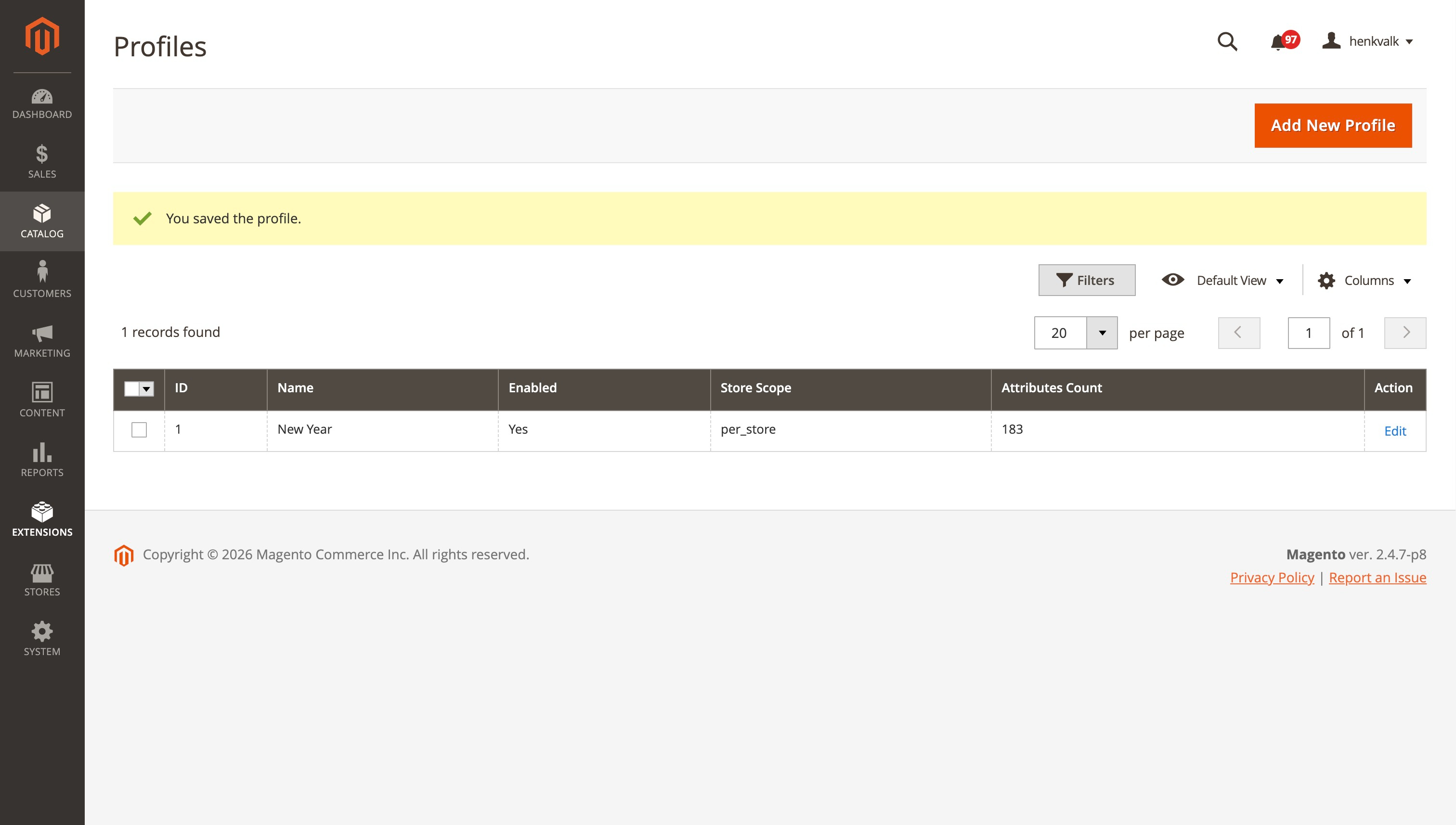
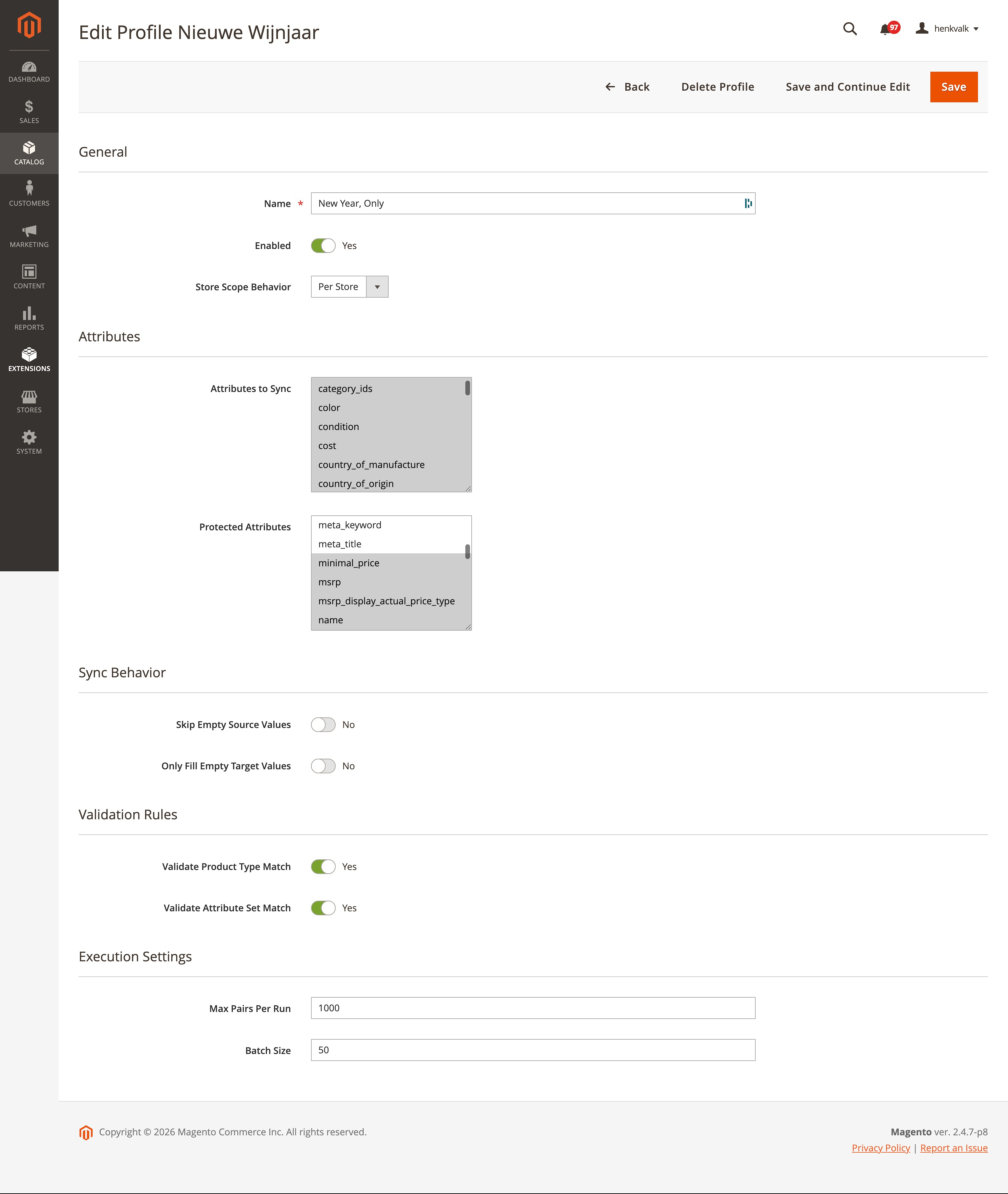
- Configure:
- Profile Name: Descriptive name for the profile
- Attributes: Select which attributes to sync
- Protected Attributes: Attributes that should never be synced (default: SKU, entity_id, type_id, attribute_set_id)
- Sync Behavior: Configure how to handle empty values
- Store Scope Behavior: How to handle store-scoped attributes
- Execution Settings: Batch size and limits


Syncing Products
- Navigate to Catalog > Product Data Sync > Sync Products
- Select a Profile
- Choose Stores Mode:
- All for target: Sync to default + target product's stores
- All from source: Link all source stores and copy overridden attributes
- Specific: Sync to a specific store view
 4. Add product pairs (Source SKU → Target SKU)
- Click on
Add Rowto add an extra row - You can copy two rows from a spreadsheet and paste it through
Paste from Clipboard - You can upload a comma separeted CSV file through
Upload CSV

- Click Validate to check pairs, Dry Run to test, or Run Sync to execute
Viewing Run History
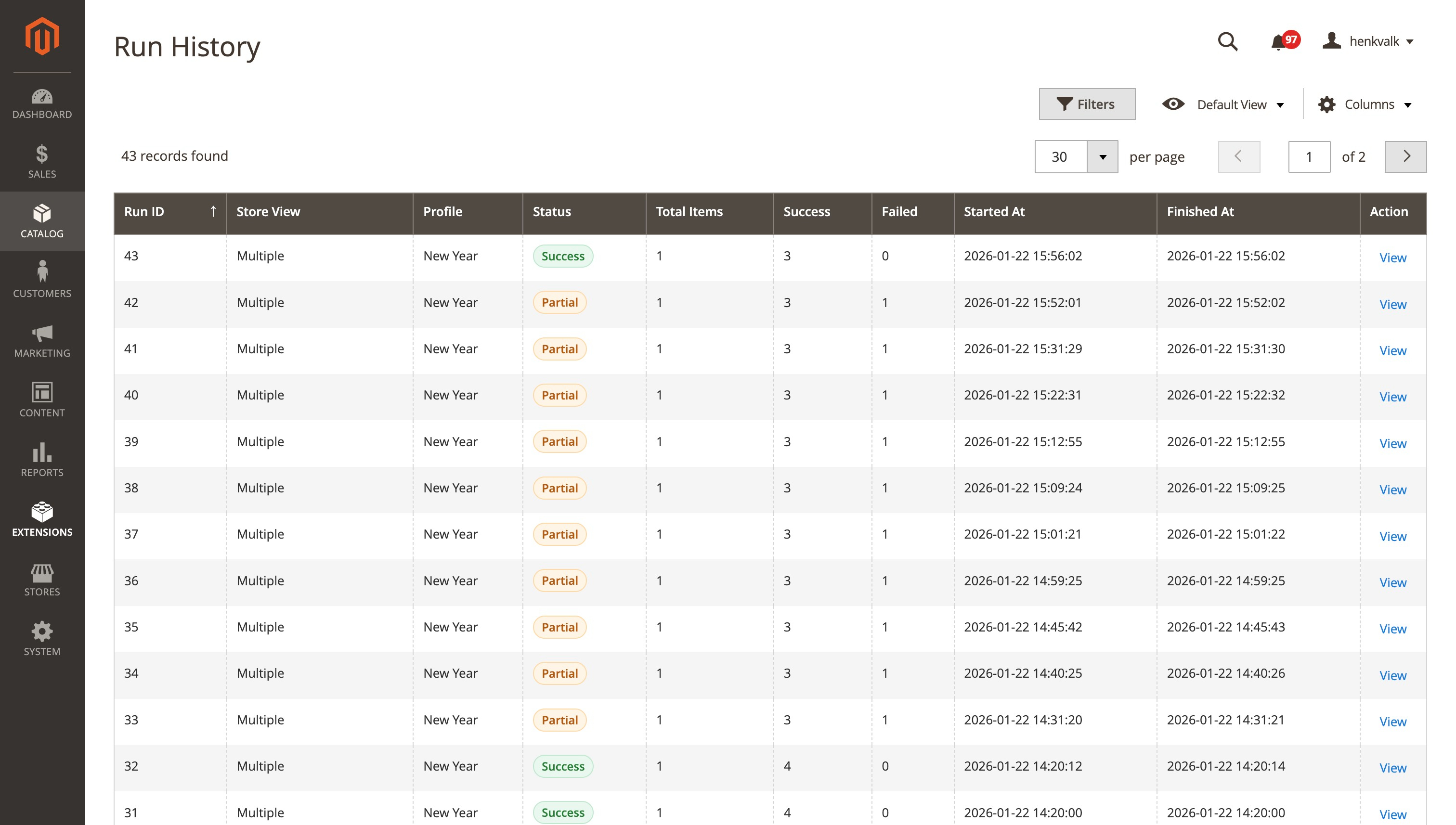
- Navigate to Catalog > Product Data Sync > Run History
- View all sync runs with status, item counts, and duration
- Click View to see detailed results per product pair
- To see the changes of the attributes click on the button Show synced attributes to execute the same sync again


Configuration
Store Scope Behavior
- Per Store: All attributes saved with selected store context
- Global: Global attributes saved on store 0, store attributes with selected store
- Inherit: Use attribute's own scope setting
Sync Behavior
- Skip Empty Source: Don't copy attributes with empty source values
- Only Fill Empty Target: Only copy if target attribute is empty
Logging
All sync operations are logged to var/log/product-data-sync.log with:
- Start/end of sync operations
- Product loading details
- Attribute processing results
- Detailed error information with stack traces
- Skipped attributes with reasons
Troubleshooting
Unique Constraint Violations
If you encounter unique constraint violations:
- The module automatically skips attributes that use default values
- Check the log file for detailed information about which attributes are skipped
- Ensure you're not trying to sync global attributes to store views
License
Copyright (c) 2026 Falcon Media (https://www.falconmedia.nl/) See LICENSE file for details.
Support
For issues, questions, or contributions, please open an issue on GitHub.
Author
Falcon Media
- Website: https://www.falconmedia.nl/
- Email: info@falconmedia.nl
falconmedia/magento2-product-data-sync 适用场景与选型建议
falconmedia/magento2-product-data-sync 是一款 基于 PHP 开发的 Composer 扩展包,目前已累计 4 次下载、GitHub Stars 达 9, 最近一次更新时间为 2026 年 01 月 22 日, 在 PHP 生态内属于活跃度较高的组件。
我们在过去多个企业项目中使用过 falconmedia/magento2-product-data-sync 或与其功能相近的方案,如果你在选型或落地过程中遇到问题,例如 版本兼容、二次改造、私有化封装、与内部系统对接、生产 BUG 排查,欢迎联系我们协助评估。
基于 falconmedia/magento2-product-data-sync 在你已有业务上做功能扩展、字段裁剪、UI 适配、与内部账号 / 权限 / 日志系统的深度对接。
线上偶发问题、内存泄漏、慢查询、并发异常等排查修复;针对高流量场景做缓存、队列、索引层面的调优。
承接完整的项目从需求 → 设计 → 开发 → 上线 → 长期运维;也可按月提供技术保姆服务。
统计信息
- 总下载量: 4
- 月度下载量: 0
- 日度下载量: 0
- 收藏数: 9
- 点击次数: 18
- 依赖项目数: 0
- 推荐数: 0
其他信息
- 授权协议: OSL-3.0
- 更新时间: 2026-01-22