filamerce/filament-activitylog
Composer 安装命令:
composer require filamerce/filament-activitylog
包简介
This is my package activitylog
README 文档
README
Spatie/Laravel-activitylog for Filament
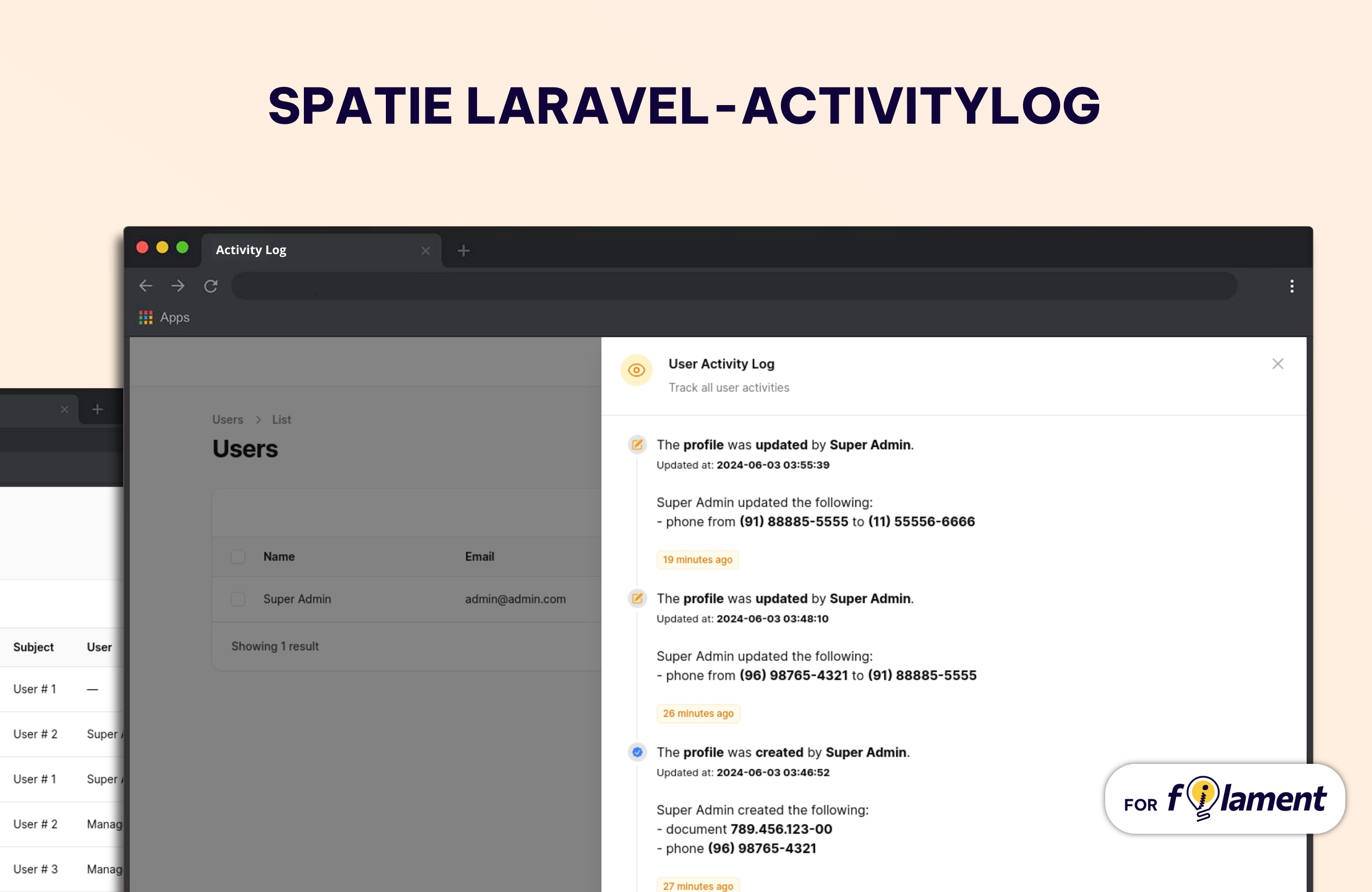
This package provides a Filament resource that shows you all of the activity logs and detailed view of each log created using the spatie/laravel-activitylog package. It also provides a relationship manager for related models.
Requirements
- Laravel v11
- Filament v3
- Spatie/Laravel-activitylog v4
Languages Supported
ActivityLog Plugin is translated for :
- 🇧🇷 Brazilian Portuguese
- 🇺🇸 English
- 🇩🇪 German
- 🇪🇸 Spanish
- 🇫🇷 French
- 🇮🇷 Persian
- 🇦🇪 Arabic
- 🇵🇹 Portuguese
- 🇮🇱 Hebrew
- 🇱🇻 Latvian
Installation
You can install the package via composer:
composer require filamerce/filament-activitylog
After that run the install command:
php artisan activitylog:install
This will publish the config & migrations from spatie/laravel-activitylog
And run migrates
php artisan migrate
You can manually publish the configuration file with:
php artisan vendor:publish --tag="activitylog-config"
This is the contents of the published config file:
return [
    'resources' => [
        'label'                     => 'Activity Log',
        'plural_label'              => 'Activity Logs',
        'navigation_item'           => true,
        'navigation_group'          => null,
        'navigation_icon'           => 'heroicon-o-shield-check',
        'navigation_sort'           => null,
        'default_sort_column'       => 'id',
        'default_sort_direction'    => 'desc',
        'navigation_count_badge'    => false,
        'resource'                  => \Rmsramos\Activitylog\Resources\ActivitylogResource::class,
    ],
    'datetime_format' => 'd/m/Y H:i:s',
];
Optionally, you can publish the views using
php artisan vendor:publish --tag="activitylog-views"
Usage
Basic Spatie ActivityLog usage
In you Model add Spatie\Activitylog\Traits\LogsActivity trait, and configure getActivitylogOption function
For more configuration, Please review Spatie Docs
use Illuminate\Database\Eloquent\Model;
use Spatie\Activitylog\Traits\LogsActivity;
use Spatie\Activitylog\LogOptions;

class NewsItem extends Model
{
    use LogsActivity;

    protected $fillable = ['name', 'text'];

    public function getActivitylogOptions(): LogOptions
    {
        return LogOptions::defaults()
        ->logOnly(['name', 'text']);
    }
}
Plugin usage
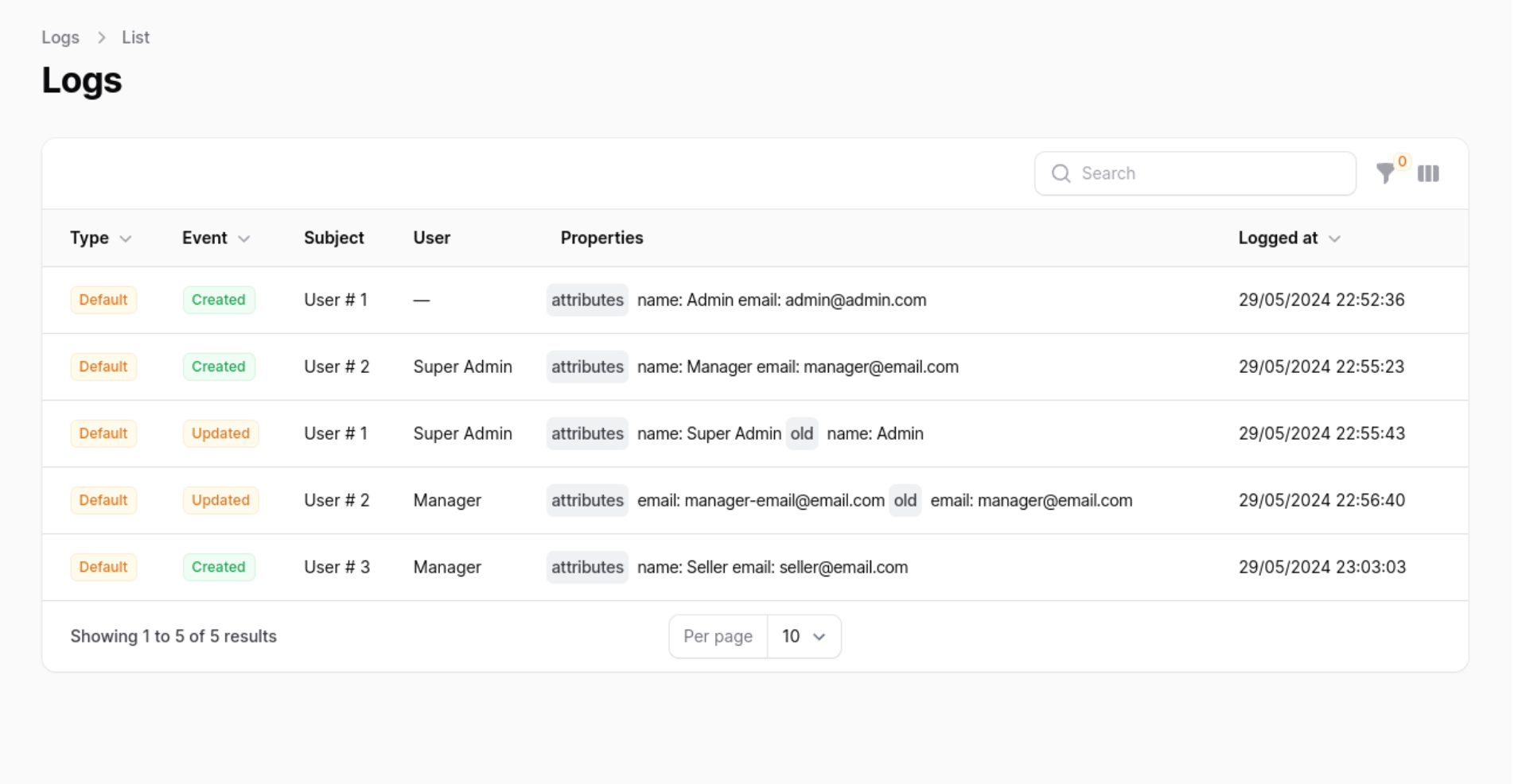
In your Panel ServiceProvider (App\Providers\Filament) active the plugin
Add the Rmsramos\Activitylog\ActivitylogPlugin to your panel config
use Rmsramos\Activitylog\ActivitylogPlugin;

public function panel(Panel $panel): Panel
{
    return $panel
        ->plugins([
            ActivitylogPlugin::make(),
        ]);
}
Customising the ActivitylogResource
You can swap out the ActivitylogResource used by updating the ->resource() value. Use this to create your own CustomResource class and extend the original at \Rmsramos\Activitylog\Resources\ActivitylogResource::class. This will allow you to customise everything such as the views, table, form and permissions.
Note
If you wish to change the resource on List and View page be sure to replace the getPages method on the new resource and create your own version of the ListPage and ViewPage classes to reference the custom CustomResource.
use Rmsramos\Activitylog\ActivitylogPlugin;

public function panel(Panel $panel): Panel
{
    return $panel
        ->plugins([
            ActivitylogPlugin::make()
                ->resource(\Path\For\Your\CustomResource::class),
        ]);
}
Customising label Resource
You can swap out the Resource label used by updating the ->label() and ->pluralLabel() value.
use Rmsramos\Activitylog\ActivitylogPlugin;

public function panel(Panel $panel): Panel
{
    return $panel
        ->plugins([
            ActivitylogPlugin::make()
                ->label('Log')
                ->pluralLabel('Logs'),
        ]);
}
Displaying the resource in the navigation
You can enable or disable the Resource navigation item by updating the ->navigationItem() value.
use Rmsramos\Activitylog\ActivitylogPlugin;

public function panel(Panel $panel): Panel
{
    return $panel
        ->plugins([
            ActivitylogPlugin::make()
                ->navigationItem(false), // by default is true
        ]);
}
Grouping resource navigation items
You can add a Resource navigation group updating the ->navigationGroup() value.
use Rmsramos\Activitylog\ActivitylogPlugin;

public function panel(Panel $panel): Panel
{
    return $panel
        ->plugins([
            ActivitylogPlugin::make()
                ->navigationGroup('Activity Log'),
        ]);
}
Customising a resource navigation icon
You can swap out the Resource navigation icon used by updating the ->navigationIcon() value.
use Rmsramos\Activitylog\ActivitylogPlugin;

public function panel(Panel $panel): Panel
{
    return $panel
        ->plugins([
            ActivitylogPlugin::make()
                ->navigationIcon('heroicon-o-shield-check'),
        ]);
}
Active a count badge
You can active Count Badge updating the ->navigationCountBadge() value.
use Rmsramos\Activitylog\ActivitylogPlugin;

public function panel(Panel $panel): Panel
{
    return $panel
        ->plugins([
            ActivitylogPlugin::make()
                ->navigationCountBadge(true),
        ]);
}
Set navigation sort
You can set the Resource navigation sort used by updating the ->navigationSort() value.
use Rmsramos\Activitylog\ActivitylogPlugin;

public function panel(Panel $panel): Panel
{
    return $panel
        ->plugins([
            ActivitylogPlugin::make()
                ->navigationSort(3),
        ]);
}
Authorization
If you would like to prevent certain users from accessing the logs resource, you should add a authorize callback in the ActivitylogPlugin chain.
use Rmsramos\Activitylog\ActivitylogPlugin;

public function panel(Panel $panel): Panel
{
    return $panel
        ->plugins([
            ActivitylogPlugin::make()
                ->authorize(
                    fn () => auth()->user()->id === 1
                ),
        ]);
}
Role Policy
To ensure ActivitylogResource access via RolePolicy you would need to add the following to your AppServiceProvider:
use App\Policies\ActivityPolicy;
use Illuminate\Support\Facades\Gate;
use Spatie\Activitylog\Models\Activity;

class AppServiceProvider extends ServiceProvider
{
    public function boot(): void
    {
        Gate::policy(Activity::class, ActivityPolicy::class);
    }
}
Full configuration
use Rmsramos\Activitylog\ActivitylogPlugin;

public function panel(Panel $panel): Panel
{
    return $panel
        ->plugins([
            ActivitylogPlugin::make()
                ->resource(\Path\For\Your\CustomResource::class)
                ->label('Log')
                ->pluralLabel('Logs')
                ->navigationItem(true)
                ->navigationGroup('Activity Log')
                ->navigationIcon('heroicon-o-shield-check')
                ->navigationCountBadge(true)
                ->navigationSort(2)
                ->authorize(
                    fn () => auth()->user()->id === 1
                ),
        ]);
}
Relationship manager
If you have a model that uses the Spatie\Activitylog\Traits\LogsActivity trait, you can add the Rmsramos\Activitylog\RelationManagers\ActivitylogRelationManager relationship manager to your Filament resource to display all of the activity logs that are performed on your model.
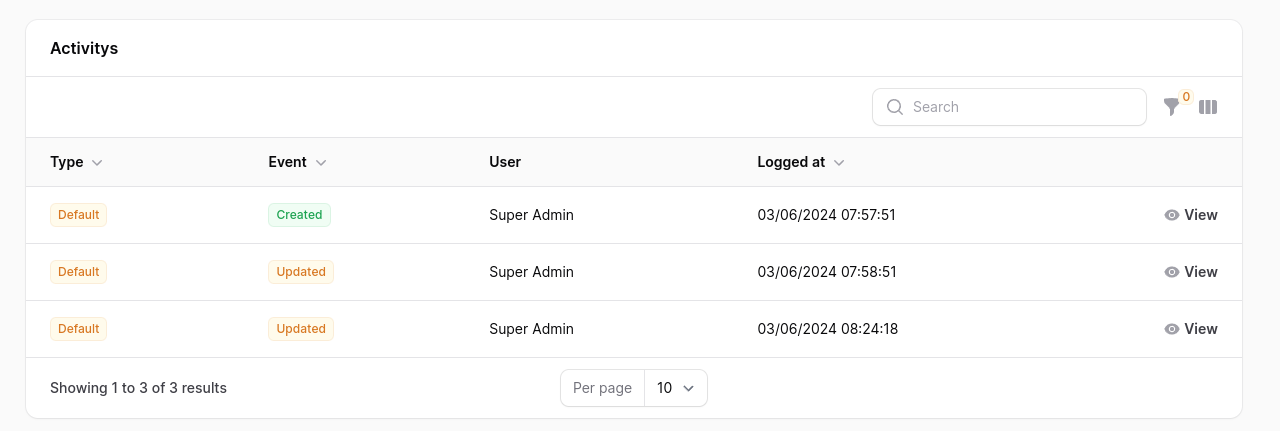
use Rmsramos\Activitylog\RelationManagers\ActivitylogRelationManager;

public static function getRelations(): array
{
    return [
        ActivitylogRelationManager::class,
    ];
}
Timeline Action
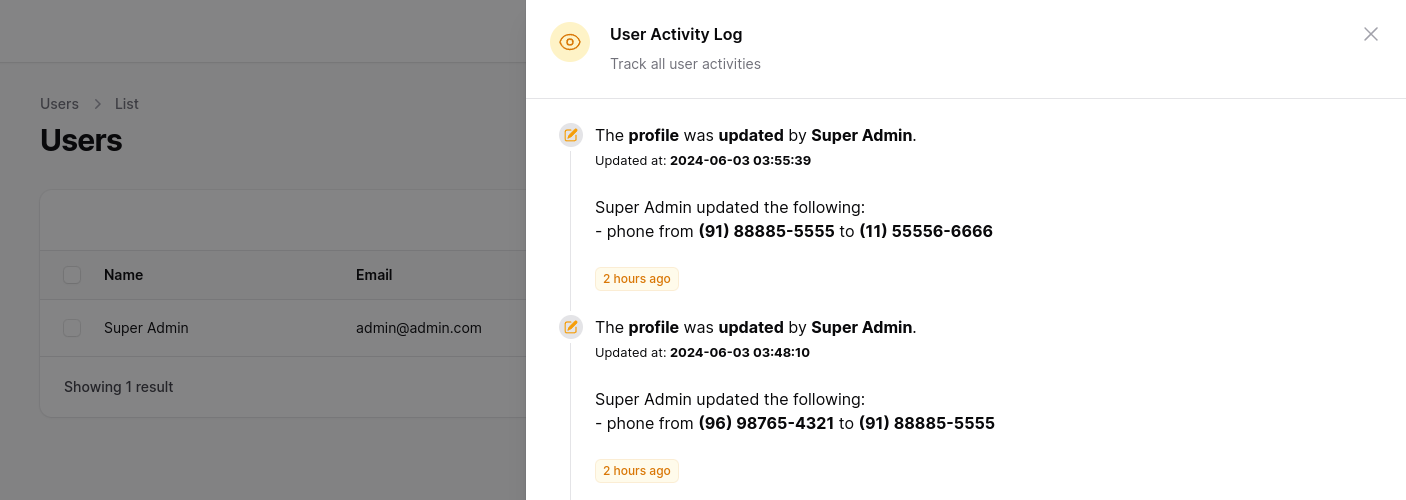
To make viewing activity logs easier, you can use a custom action. In your UserResource in the table function, add the ActivityLogTimelineTableAction.
use Rmsramos\Activitylog\Actions\ActivityLogTimelineTableAction;

public static function table(Table $table): Table
{
    return $table
        ->actions([
            ActivityLogTimelineTableAction::make('Activities'),
        ]);
}
you can pass a matrix with the relationships, remember to configure your Models.
public static function table(Table $table): Table
{
    return $table
        ->actions([
            ActivityLogTimelineTableAction::make('Activities')
                ->withRelations(['profile', 'address']), //opcional
        ]);
}
You can configure the icons and colors, by default the 'heroicon-m-check' icon and the 'primary' color are used.
use Rmsramos\Activitylog\Actions\ActivityLogTimelineTableAction;

public static function table(Table $table): Table
{
    return $table
        ->actions([
            ActivityLogTimelineTableAction::make('Activities')
                ->timelineIcons([
                    'created' => 'heroicon-m-check-badge',
                    'updated' => 'heroicon-m-pencil-square',
                ])
                ->timelineIconColors([
                    'created' => 'info',
                    'updated' => 'warning',
                ])
        ]);
}
You can limit the number of results in the query by passing a limit, by default the last 10 records are returned.
use Rmsramos\Activitylog\Actions\ActivityLogTimelineTableAction;

public static function table(Table $table): Table
{
    return $table
        ->actions([
            ActivityLogTimelineTableAction::make('Activities')
                ->limit(30),
        ]);
}
Full Timeline configuration
use Rmsramos\Activitylog\Actions\ActivityLogTimelineTableAction;

public static function table(Table $table): Table
{
    return $table
        ->actions([
            ActivityLogTimelineTableAction::make('Activities')
                ->withRelations(['profile', 'address'])
                ->timelineIcons([
                    'created' => 'heroicon-m-check-badge',
                    'updated' => 'heroicon-m-pencil-square',
                ])
                ->timelineIconColors([
                    'created' => 'info',
                    'updated' => 'warning',
                ])
                ->limit(10),
        ]);
}
Changelog
Please see CHANGELOG for more information on what has changed recently.
Contributing
Please see CONTRIBUTING for details.
Security Vulnerabilities
Please review our security policy on how to report security vulnerabilities.
Acknowledgements
Special acknowledgment goes to these remarkable tools and people (developers), the Activity Log plugin only exists due to the inspiration and at some point the use of these people's codes.
Credits
License
The MIT License (MIT). Please see License File for more information.
filamerce/filament-activitylog 适用场景与选型建议
filamerce/filament-activitylog 是一款 基于 PHP 开发的 Composer 扩展包,目前已累计 728 次下载、GitHub Stars 达 0, 最近一次更新时间为 2025 年 04 月 17 日, 在 PHP 生态内属于活跃度较高的组件。
它主要适用于以下技术方向: 「laravel」 「activitylog」 「Rmsramos」 等业务场景。在实际项目中,围绕这些方向常见需要落地的问题包括:接口对接、性能调优、并发安全、与既有框架(Laravel / ThinkPHP / Yii / Webman 等)的兼容适配,以及生产环境的日志埋点与稳定性保障。
我们在过去多个企业项目中使用过 filamerce/filament-activitylog 或与其功能相近的方案,如果你在选型或落地过程中遇到问题,例如 版本兼容、二次改造、私有化封装、与内部系统对接、生产 BUG 排查,欢迎联系我们协助评估。
基于 filamerce/filament-activitylog 在你已有业务上做功能扩展、字段裁剪、UI 适配、与内部账号 / 权限 / 日志系统的深度对接。
线上偶发问题、内存泄漏、慢查询、并发异常等排查修复;针对高流量场景做缓存、队列、索引层面的调优。
承接完整的项目从需求 → 设计 → 开发 → 上线 → 长期运维;也可按月提供技术保姆服务。
与 filamerce/filament-activitylog 相关的其它包
同方向 / 同关键字的高下载量 PHP Composer 包推荐,方便对比选型:
This is my package activitylog
Yii2 ActivityLog
Filament v4/v5 admin resources for managing Laravel Passport OAuth2 clients, tokens, and scopes with full auditability.
Auto-log all models, enrich with request/device data, and browse activity logs via a web UI
This is my rmsramos package activitylog
Auto-log all models, enrich with request/device data, and browse activity logs via a web UI
统计信息
- 总下载量: 728
- 月度下载量: 0
- 日度下载量: 0
- 收藏数: 0
- 点击次数: 21
- 依赖项目数: 0
- 推荐数: 0
其他信息
- 授权协议: MIT
- 更新时间: 2025-04-17