firefly/filament-blog
Composer 安装命令:
composer require firefly/filament-blog
包简介
An advance blog package for Filament Admin Panel
README 文档
README
The Filament Blog Plugin is a feature-rich plugin designed to enhance your blogging experience on your website. It comes with a variety of powerful features to help you manage and customize your blog posts effectively.
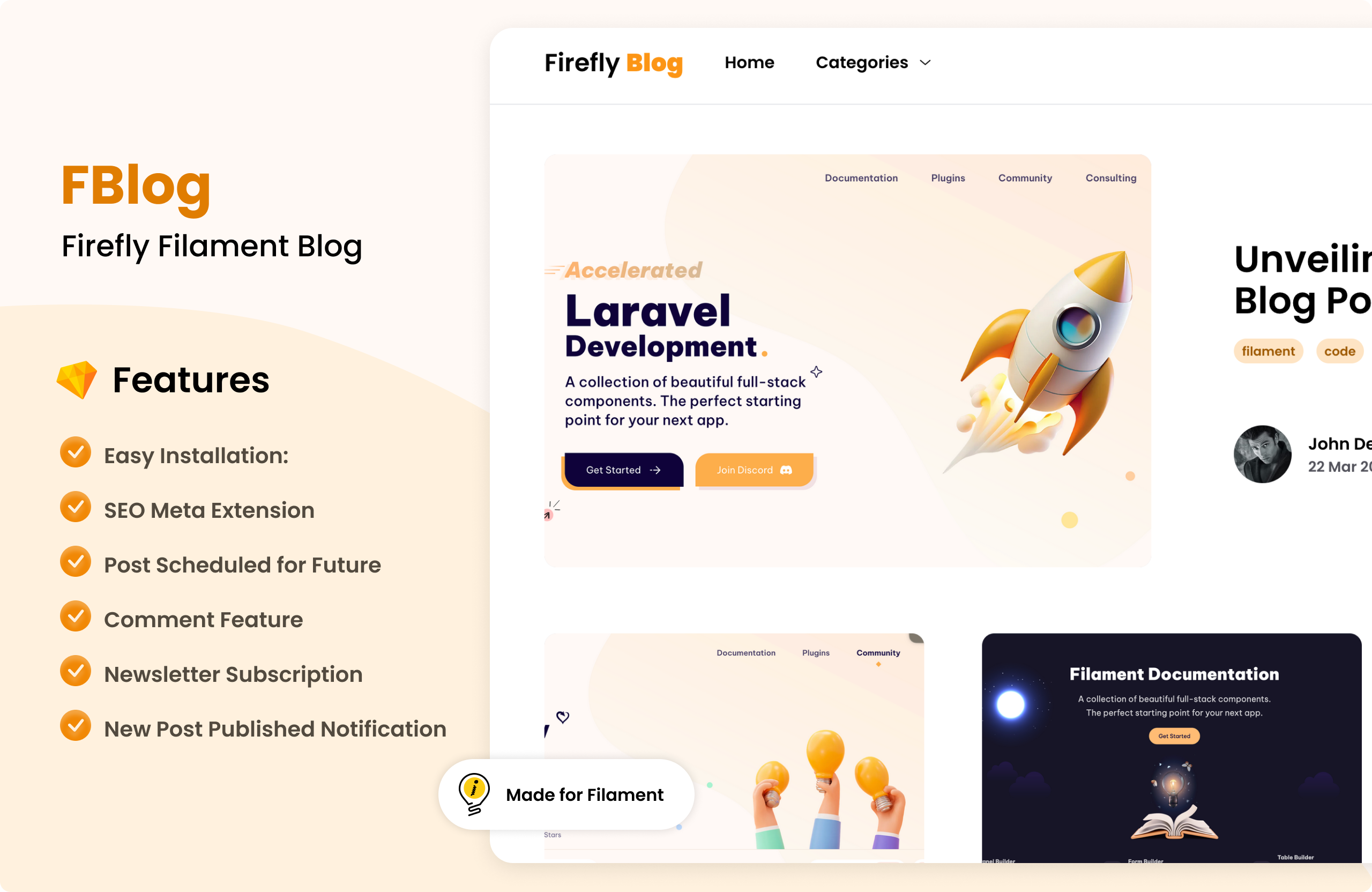
Features
-
Easy Installation: Simple and straightforward installation process.
-
User-Friendly Interface: Intuitive and user-friendly interface for easy management of blog posts.
-
SEO Meta Extension: Enhance your blog's search engine optimization with built-in meta tag customization.
-
Post Scheduled for Future: Schedule your blog posts to be published at a future date and time.
-
Social Media Share Feature: Allow users to easily share your blog posts on social media platforms.
-
Comment Feature: Enable comments on your blog posts to encourage engagement and discussion.
-
Newsletter Subscription: Integrate newsletter subscription forms to grow your email list.
-
New Post Published Notification: Notify subscribers when a new blog post is published.
-
Category Search: Categorize your blog posts for easy navigation and search.
-
Author Block: Shows author photo, name, and a short description on the post show page (configurable).
-
Support: Laravel 11 and Filament 3.x
-
Table of Contents (TOC): Automatically generate a table of contents from headings inside a post body. This is configurable via the package config (see below).
Demo Video
Upgrade Note
Important: If you are upgrading from version 1.x to 2.x, please follow the steps below:
- Backup your database before running the migration. This is just for safety purposes.
- Now you can add prefix on blog tables from the config file.
'tables' => [
    'prefix' => 'fblog_', // prefix for all blog tables
],
- After set the prefix please run the migration by running the following command:
php artisan filament-blog:upgrade-tables
Installation
If your project is not already using Filament, you can install it by running the following commands:
composer require filament/filament:"^3.2" -W
php artisan filament:install --panels
Install the Filament Blog Plugin by running the following command:
composer require firefly/filament-blog
Usage
After composer require, you can start using the Filament Blog Plugin by runing the following command:
php artisan filament-blog:install
This command will publish filamentblog.php config file and create_blog_tables.php migration file.
<?php

/**
 * |--------------------------------------------------------------------------
 * | Set up your blog configuration
 * |--------------------------------------------------------------------------
 * |
 * | The route configuration is for setting up the route prefix and middleware.
 * | The user configuration is for setting up the user model and columns.
 * | The seo configuration is for setting up the default meta tags for the blog.
 * | The recaptcha configuration is for setting up the recaptcha for the blog.
 * | The filesystem configuration is for setting up the filesystem for the blog.
 */

use Firefly\FilamentBlog\Models\User;

return [
    /**
     * ------------------------------------------------------------
     * Tables
     * This is the prefix for all blog tables.
     * ------------------------------------------------------------
     */
    'tables' => [
        'prefix' => 'fblog_',
    ],

    /**
     * ------------------------------------------------------------
     * Route
     * This is the route configuration for the blog.
     * ------------------------------------------------------------
     */
    'route' => [
        'prefix' => 'blogs',
        'middleware' => ['web'],
        'home' => [
            'name' => 'filamentblog.home',
            'url' => env('APP_URL'),
        ],
        'login' => [
            'name' => 'filamentblog.post.login',
        ],
    ],

    /**
     * ------------------------------------------------------------
     * User
     * This is the user configuration for the blog.
     * ------------------------------------------------------------
     */
    'user' => [
        'model' => User::class,
        'foreign_key' => 'user_id',
        'columns' => [
            'name' => 'name',
            'avatar' => 'profile_photo_path',
        ],
    ],

    /**
     * ------------------------------------------------------------
     * SEO
     * This is the SEO configuration for the blog.
     * ------------------------------------------------------------
     */
    'seo' => [
        'meta' => [
            'title' => 'Filament Blog',
            'description' => 'This is filament blog seo meta description',
            'keywords' => [],
        ],
    ],

    /**
     * ------------------------------------------------------------
     * Recaptcha
     * This is the recaptcha configuration for the blog.
     * ------------------------------------------------------------
     */
    'recaptcha' => [
        'enabled' => false,
        'site_key' => env('RECAPTCHA_SITE_KEY'),
        'secret_key' => env('RECAPTCHA_SECRET_KEY'),
    ],

    /**
     * ------------------------------------------------------------
     * Filesystem
     * This is the filesystem configuration for the blog.
     * ------------------------------------------------------------
     */
    'filesystem' => [
        'visibility' => 'public',
        'disk' => 'public',
    ],

    /**
     * Blog Post Options
     * Configure how the blog post body is processed and displayed.
     */
    'post_rendering' => [
        'table_of_content' => [
            'enabled' => true,
            'title' => true, // Whether to include the manual post title as first TOC entry

        ],
        'show_author' => env('FILAMENT_BLOG_SHOW_AUTHOR', false),
    ],
];
If you have a different url for the home page, you can set it in the home key in the route configuration.
Before running the migration, you can modify the filamentblog.php config file to suit your needs.
If you want to publish config, views, components, and migrations individually you can run the following command:
php artisan vendor:publish --provider="Firefly\FilamentBlog\FilamentBlogServiceProvider" --tag=filament-blog-views
php artisan vendor:publish --provider="Firefly\FilamentBlog\FilamentBlogServiceProvider" --tag=filament-blog-config
php artisan vendor:publish --provider="Firefly\FilamentBlog\FilamentBlogServiceProvider" --tag=filament-blog-components
php artisan vendor:publish --provider="Firefly\FilamentBlog\FilamentBlogServiceProvider" --tag=filament-blog-migrations
What if you have already a User model?
- If you already have a User model, you can modify the
filamentblog.phpconfig file to use your User model. - Make sure the name column is the user's
namecolumn. - If you have already
avatarcolumn in your User model, you can set it in thefilamentblog.phpconfig file inuser.columns.avatarkey. - If you want to change
foreign_keycolumn name, you can modify thefilamentblog.phpconfig file.
Migrate the database
After modifying the filamentblog.php config file, you can run the migration by running the following command:
php artisan migrate
Storage Link
After running the migration, you can create a symbolic link to the storage directory by running the following command:
php artisan storage:link
Attach filament blog panel to the dashboard
You can attach the Filament Blog panel to the dashboard by adding the following code to your panel provider:
Add Blog::make() to your panel passing the class to your plugins() method.
use Firefly\FilamentBlog\Blog;

public function panel(Panel $panel): Panel
{
    return $panel
        ->plugins([
            Blog::make()
        ])
}
Manage user relationship
If you want to manage the user relationship, you can modify the User model to have a relationship with the Post model.
<?php

namespace App\Models;

// use Illuminate\Contracts\Auth\MustVerifyEmail;
use Firefly\FilamentBlog\Traits\HasBlog;
use Illuminate\Foundation\Auth\User as Authenticatable;

class User extends Authenticatable
{
    use HasBlog;
}
Allow user to comment
If you want to allow users to comment on blog posts, you can modify the User model to add a method canComment().
<?php

namespace App\Models;

// use Illuminate\Contracts\Auth\MustVerifyEmail;
use Firefly\FilamentBlog\Traits\HasBlog;
use Illuminate\Foundation\Auth\User as Authenticatable;

class User extends Authenticatable
{
   public function canComment(): bool
    {
        // your conditional logic here
        return true;
    }

}
Now you can start using the Filament Blog Plugin to manage your blog posts effectively.
yourdomain.com/blogs
You can change the route prefix in the filamentblog.php config file.
Social Media Share
For social media share, please visit Sharethis and generate the JS Script and HTML code and save from our share snippet section.
Recaptcha
To add the recaptcha to the blog comment form, you can add environment variables in your .env file.
And make sure enabled is set to true in the filamentblog.php config file.
RECAPTCHA_SITE_KEY
RECAPTCHA_SECRET_KEY
Credits
Security
If you discover a security vulnerability within this package, please send an e-mail to dev@thefireflytech.com, All security vulnerabilities will be promptly addressed.
🤝 Contributing
Please see CONTRIBUTING for details.
📄 License
The MIT License (MIT). Please see License File for more information.
Made with love by Firefly IT Solutions, Nepal - thefireflytech.com
firefly/filament-blog 适用场景与选型建议
firefly/filament-blog 是一款 基于 PHP 开发的 Composer 扩展包,目前已累计 28.35k 次下载、GitHub Stars 达 141, 最近一次更新时间为 2024 年 03 月 26 日, 在 PHP 生态内属于活跃度较高的组件。
它主要适用于以下技术方向: 「blog」 「laravel」 「firefly」 「filament」 等业务场景。在实际项目中,围绕这些方向常见需要落地的问题包括:接口对接、性能调优、并发安全、与既有框架(Laravel / ThinkPHP / Yii / Webman 等)的兼容适配,以及生产环境的日志埋点与稳定性保障。
我们在过去多个企业项目中使用过 firefly/filament-blog 或与其功能相近的方案,如果你在选型或落地过程中遇到问题,例如 版本兼容、二次改造、私有化封装、与内部系统对接、生产 BUG 排查,欢迎联系我们协助评估。
基于 firefly/filament-blog 在你已有业务上做功能扩展、字段裁剪、UI 适配、与内部账号 / 权限 / 日志系统的深度对接。
线上偶发问题、内存泄漏、慢查询、并发异常等排查修复;针对高流量场景做缓存、队列、索引层面的调优。
承接完整的项目从需求 → 设计 → 开发 → 上线 → 长期运维;也可按月提供技术保姆服务。
与 firefly/filament-blog 相关的其它包
同方向 / 同关键字的高下载量 PHP Composer 包推荐,方便对比选型:
Laravel package for opinionated blog implementation
Firefly III Data Import Tool.
Import an RSS-feed into blog
Faker provider for NumberNine CMS
An advance blog package for Filament Admin Panel
A blog module for AsgardCMS.
统计信息
- 总下载量: 28.35k
- 月度下载量: 0
- 日度下载量: 0
- 收藏数: 141
- 点击次数: 27
- 依赖项目数: 2
- 推荐数: 0
其他信息
- 授权协议: MIT
- 更新时间: 2024-03-26