fortytwostudio/updatenotifier
Composer 安装命令:
composer require fortytwostudio/updatenotifier
包简介
Plugin to let you know if your CMSes/plugins need updated
README 文档
README
Plugin to let you know if your CMS/plugins need updated from your own external tools, without having to log in to your dashboard.
Installation
To install Update Notifier, follow these steps:
- Download & unzip the file and place the
updatenotifierdirectory into yourcraft/pluginsdirectory - -OR- do a
git clone https://github.com/fortytwostudio/updatenotifier.gitdirectly into yourcraft/pluginsfolder. You can then update it withgit pull - -OR- install with Composer via
composer require fortytwostudio/updatenotifier - Install plugin in the Craft Control Panel under Settings > Plugins
- The plugin folder should be named
updatenotifierfor Craft to see it. GitHub recently started appending-master(the branch name) to the name of the folder for zip file downloads.
Update Notifier works on Craft 2.4.x and Craft 2.5.x.
Update Notifier Overview
This plugin allows you to check if your Craft CMS install (and plugins) have pending updates, without having to log in to your dashboard.
Configuring Update Notifier
There are a couple of settings you'll need to change before using this plugin.
Restrict access to a specific domain
If you only want a specific web tool to access this tool, you should input the domain here. (This sets up a Access-Control-Allow-Origin value, as well as does some checks on the referrer in the code) Leave this field blank if you want to be able to use this tool from anywhere.
Secret key
This is a required field and is used to verify that the request is coming from you. Only requests that have this key in them will be allowed to access the checks.
Using Update Notifier
This plugin is a simple wrapper for the core Craft code to check for updates. It returns the updates as a JSON response for you to use in your apps however you want. Simply make a POST request to the URL given in the plugin's settings page, with the parameters shown.
-
Key: updatenotifierkey
-
Value: 33a6306c-a1e7-2656-4daa-76689d017c36 (for example)
-
Key: action
-
Value: UpdateNotifier/getUpdates
Example Code
I've just stuck some jQuery code on here because everybody knows how to use jQuery right.
Obviously if you use Axios or Guzzle or cURL, you can adjust to suit. This isn't particularly useful code…
$.post('https://example.com', {
    updatenotifierkey: '33a6306c-a1e7-2656-4daa-76689d017c36',
    action: 'UpdateNotifier/getUpdates'
}, function (response) {
    console.log(response.app);
    console.log(response.plugins);
});
Here's a screenshot of the sort of structure that you may get back:
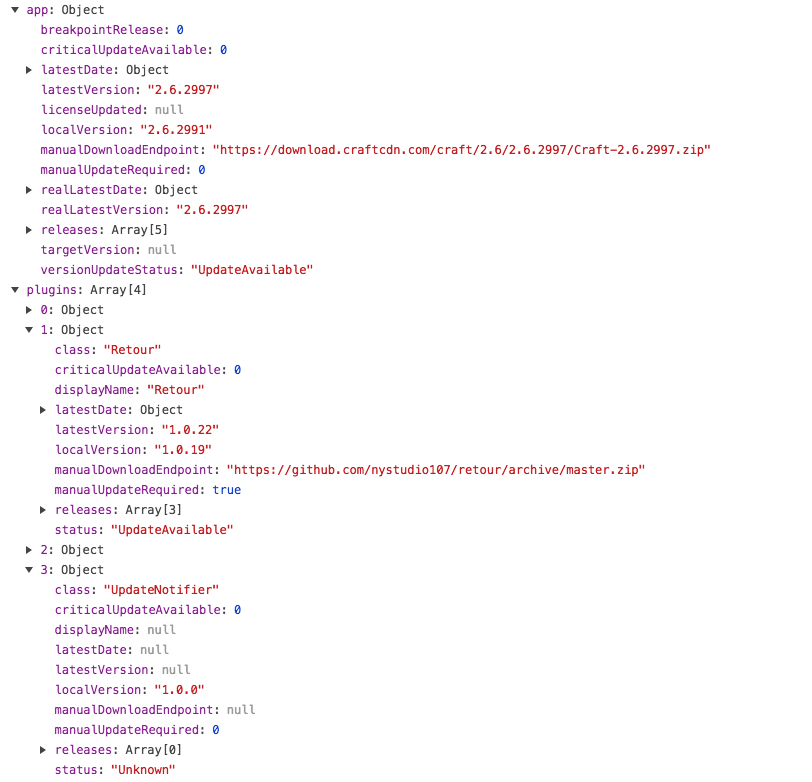
You can use this JSON response however you want.
Changelog
0.0.2 - 19/Dec/2017
- Fixed javascript bug
0.0.1 - 14/Nov/2017
- initial release
Brought to you by FortyTwo Studio
统计信息
- 总下载量: 14
- 月度下载量: 0
- 日度下载量: 0
- 收藏数: 0
- 点击次数: 0
- 依赖项目数: 0
- 推荐数: 0
其他信息
- 授权协议: MIT
- 更新时间: 2017-12-19