fourstacks/nova-repeatable-fields
最新稳定版本:v1.3.0
Composer 安装命令:
composer require fourstacks/nova-repeatable-fields
包简介
A Laravel Nova field.
README 文档
README
NOTE
It is strongly recommended that you use the Nova Flexible Content package rather than this one:
The Nova Flexible Content package is actively maintained and allows you to use any valid Nova field as a sub field. Due to other commitment, this package is only sporadically maintained and is unlikely to have new features added so new users should strongly consider Nova Flexible Content instead of this package.
Existing users of this package who would like to move to Nova Flexible Content will need to do a little bit of work to migrate your data across. Please see the appendix below offering a potential solution for migrating your data.
A repeatable field for Nova apps
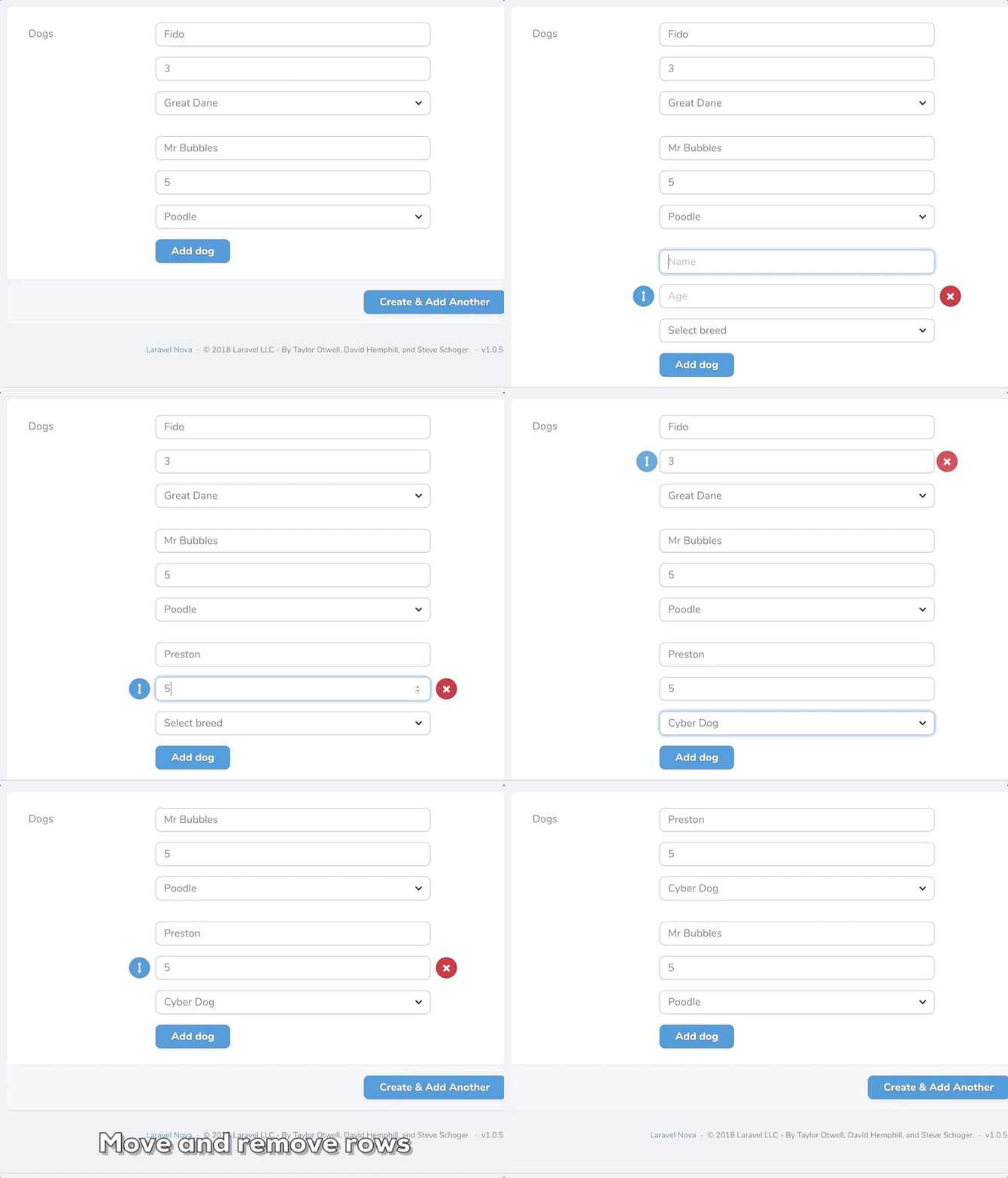
This package contains a Laravel Nova field that enables the creation of repeatable sets of 'sub' fields. Nova users are free to create, reorder and delete multiple rows of data with the sub fields you define. Data is saved to the database as JSON.
Example
Installation
You can install this package in to a Laravel app that uses Nova via composer:
composer require fourstacks/nova-repeatable-fields
Usage
To add a repeater field, use the Fourstacks\NovaRepeatableFields\Repeater field in your Nova resource:
namespace App\Nova;

use Fourstacks\NovaRepeatableFields\Repeater;

// ...

class Petstore extends Resource
{
    // ...

    public function fields(Request $request)
    {
        return [
            // ...

            Repeater::make('Dogs'),

            // ...
        ];
    }
}
In order to use this package you should also ensure the Eloquent model that your Nova resource represents, is casting the attribute you wish to use a repeater field for, to an array:
namespace App;

// ...

class Petstore extends Model
{
    protected $casts = [
        'dogs' => 'array'
    ]
}
The underlying database field should be either a string or text type field.
Configuration
This package comes with various options that you can use to define the sub fields within your repeater and
addField
Parameters: array
Every repeater field you create should contain at least one sub field added via addField. The addField method accepts an array of sub field configuration options:
Repeater::make('Dogs')
    ->addField([
        // configuation options
    ])
Configuration options are:
label
[
    'label' => 'Dog name',
    //...
]
All sub fields must, at a minimum, be defined with a 'label'. This is a human-readable string that will appear in the Nova UI.
name
[
    'name' => 'dog_name',
    //...
]
By default, the name of the sub field (used when saving the data in the database) will be generated automatically using a snake case version of the sub field label. Alternatively you are free to override this convention and define a custom name to be used.
type
[
    'type' => 'number',
    //...
]
By default, the input type of the sub field will be a standard text field. You are free to define a different field type if you wish. Currently supported sub field types are: 'text', 'number', 'select', 'textarea'.
placeholder
[
    'placeholder' => 'Name that dog',
    //...
]
By default, the input placeholder will be the same as the sub field label. However you are free to define a custom placeholder using this option that will appear instead.
width
[
    'width' => 'w-1/2',
    //...
]
If you choose to display your sub fields in a row (rather than stacked - see the displayStackedForm option below) you can define the widths of your fields using Tailwind's fractional width classes. You do not need to define widths for all your fields unless you want to. If no widths are entered for any sub fields all sub fields will be the same width.
Note that you are free to mix and match widths. For example you may with to set your first two fields to 50% width using w-1/2 then set the final field to be full width via w-full.
If you are displaying your sub fields in a stacked layout then width options will have no effect.
options
[
    'options' => [
        'fido' => 'Fido',
        'mr_bubbles' => 'Mr Bubbles',
        'preston' => 'Preston'
    ],
    //...
]
If the type of the sub field you are defining is 'select', you will need to define an array of options for the select field. These are defined using an array of key/value pairs.
attributes
[
    'attributes' => [
        'min' => 1,
        'max' => '20',
        'style' => 'color: red'
    ],
    //...
]
Via the attributes key you are free to define any custom properties you wish to add to the input via an associative array. These will be added via v-bind. For example you may wish to add min or max steps to a number field or a style attribute to a text field.
addButtonText
Repeater::make('Dogs')
    ->addButtonText('Add new dog');
You are free to configure the text for the button used to add a new set of sub fields in the Nova UI. By default this button is labelled 'Add row' but you can override this using the addButtonText option.
summaryLabel
Repeater::make('Dogs')
    ->summaryLabel('Dogs');
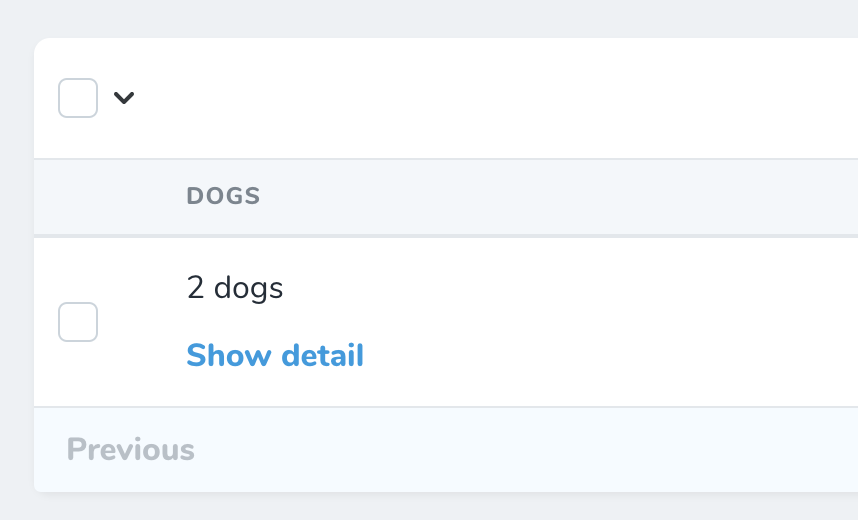
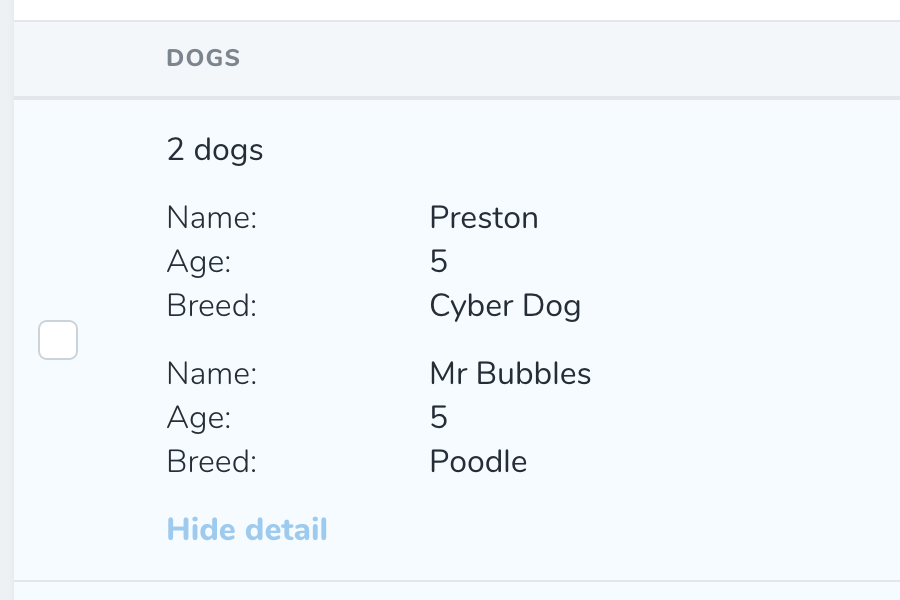
The detail and index views show a summary of the data inputted using the repeater field. By default this will show the count of the rows e.g. '3 rows' along with a link to expand to show the full data that was inputted:
You can overrides this summary text to something more specific e.g. '3 dogs':
displayStackedForm
Repeater::make('Dogs')
    ->displayStackedForm();
By default, a set of sub fields will appear as a series of horizontally aligned input fields:
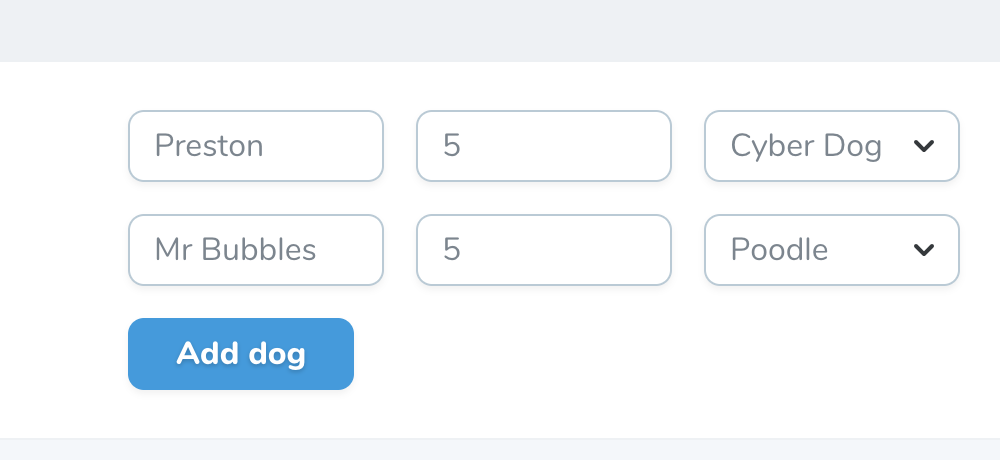
This works well for repeater fields with only 2 or 3 sub fields, however for larger field sets a stacked form that displays repeater sub fields above one another will generally be a more usable layout. You can switch to a stacked layout using this option.
initialRows
Repeater::make('Dogs')
    ->initialRows(4);
Sets the initial number of rows that will be pre-added on form initialization. For forms with existing rows, it will append up to the set number of rows.
maximumRows
Repeater::make('Dogs')
    ->maximumRows(4);
Sets the maximum number of rows as the upper limit. Upon reaching this limit, you will not be able to add new rows.
heading
Repeater::make('Dogs')
    ->heading('Dog');
Sets the heading between each row (eg. Dog #1, Dog #2). Only works when used with "displayStackedForm".
Appendix - Migrating data to Nova Flexible Content
This guide is only intended for existing users of this package that wish to use the Nova Flexible Content package instead and want an idea of how to migrate data.
Please note that the following solution is a guide only. It is up to you to implement and test a solution for your data and you are strongly recommended to backup any data before running any code that mutates multiple database rows.
I accept no responsibility for changes made to existing data as a result of you using the code below. Got it? OK, on with the show...
This guide assumes that you have already installed the Nova Flexible Content package and you have set up a layout the for the data that you wish to migrate.
Next, in your application, create a new artisan command: php artisan make:command MigrateRepeaterData
Add the following code so that your command looks something like this:
<?php

namespace App\Console\Commands;

use Illuminate\Console\Command;
use Illuminate\Support\Facades\Schema;

class MigrateRepeaterData extends Command
{
    /**
     * The name and signature of the console command.
     *
     * @var string
     */
    protected $signature = 'nfc:migrate';

    /**
     * The console command description.
     *
     * @var string
     */
    protected $description = 'Migrate your repeater data to be compatible with Nova Flexible Content';


    /**
     * Execute the console command.
     *
     * @return mixed
     */
    public function handle()
    {
        // Get the model to run this command for
        $model = $this->ask('Which model do you want to migrate data for?  Enter the full namespace e.g. App\Post');

        if(! class_exists($model)){
            $this->error("Sorry - could not find a model called {$model}");
            return;
        }

        // Get the attribute on the model that holds the old repeater data
        $attribute = $this->ask('Which model attribute holds the data you want to migrate?');

        if(! Schema::hasColumn((new $model)->getTable(), $attribute) ){
            $this->error("Sorry - could not find a database column  called {$attribute} for {$model}");
            return;
        }

        // Get the Nova Flexible Content layout name
        $layout = $this->ask('What is the name of the Nova Flexible Content layout for this data?');

        $models = $model::all();

        if ($this->confirm("About to migrate data for {$models->count()} models.  Do you wish to continue?")) {
            $models->each(function($model) use ($attribute, $layout){
                $model->$attribute = $this->updateValues($model->$attribute, $layout);
                $model->save();
            });

            $this->info('All done!  Please check your data to ensure it was migrated correctly');
        }
    }

    protected function updateValues($data, $layout)
    {
        // Skip anything that is not an array with elements and keep the value the same
        if(! $data){
            return $data;
        }

        return collect($data)
            ->map(function($attributes) use ($layout){
                return [
                    // Create a random key
                    'key' => $this->generateKey(),
                    // my_nova_flexible_content_layout should match the name
                    // you gave to your Nova Flexible Content layout
                    'layout' => $layout,
                    // The data for a given repeater 'row'
                    'attributes' => $attributes
                ];
            })
            ->all();
    }

    protected function generateKey()
    {
        if (function_exists("random_bytes")) {
            $bytes = random_bytes(ceil(16/2));
        }
        elseif (function_exists("openssl_random_pseudo_bytes")) {
            $bytes = openssl_random_pseudo_bytes(ceil(16/2));
        }
        else {
            throw new \Exception("No cryptographically secure random function available");
        }
        return substr(bin2hex($bytes), 0, 16);
    }
}
Changelog
Please see CHANGELOG for more information on what has changed recently.
Credits
License
The MIT License (MIT). Please see License File for more information.
fourstacks/nova-repeatable-fields 适用场景与选型建议
fourstacks/nova-repeatable-fields 是一款 基于 Vue 开发的 Composer 扩展包,目前已累计 421.76k 次下载、GitHub Stars 达 119, 最近一次更新时间为 2026 年 01 月 04 日, 在 PHP 生态内属于活跃度较高的组件。
它主要适用于以下技术方向: 「nova」 「laravel」 等业务场景。在实际项目中,围绕这些方向常见需要落地的问题包括:接口对接、性能调优、并发安全、与既有框架(Laravel / ThinkPHP / Yii / Webman 等)的兼容适配,以及生产环境的日志埋点与稳定性保障。
我们在过去多个企业项目中使用过 fourstacks/nova-repeatable-fields 或与其功能相近的方案,如果你在选型或落地过程中遇到问题,例如 版本兼容、二次改造、私有化封装、与内部系统对接、生产 BUG 排查,欢迎联系我们协助评估。
基于 fourstacks/nova-repeatable-fields 在你已有业务上做功能扩展、字段裁剪、UI 适配、与内部账号 / 权限 / 日志系统的深度对接。
线上偶发问题、内存泄漏、慢查询、并发异常等排查修复;针对高流量场景做缓存、队列、索引层面的调优。
承接完整的项目从需求 → 设计 → 开发 → 上线 → 长期运维;也可按月提供技术保姆服务。
与 fourstacks/nova-repeatable-fields 相关的其它包
同方向 / 同关键字的高下载量 PHP Composer 包推荐,方便对比选型:
A Laravel Nova card that shows you your system information.
A Laravel Nova card.
A Laravel Nova package for publishable fields
A Laravel Nova package for translatable fields
A Laravel Nova Image field. you can paste or drag or chose an image
A Laravel Nova Mail testing tool.
统计信息
- 总下载量: 421.76k
- 月度下载量: 0
- 日度下载量: 0
- 收藏数: 119
- 点击次数: 24
- 依赖项目数: 0
- 推荐数: 0
其他信息
- 授权协议: MIT
- 更新时间: 2026-01-04