huuhadev/filament-translatable
Composer 安装命令:
composer require huuhadev/filament-translatable
包简介
Filament support for `spatie/laravel-translatable`.
README 文档
README
Installation
Install the plugin with Composer:
composer require huuhadev/filament-translatable
After the package is installed, if you wish to use flag images, you can publish the assets using the following command:
php artisan filament-translatable:install
Adding the plugin to a panel
To add a plugin to a panel.
use HuuHaDev\FilamentTranslatable\FilamentTranslatablePlugin;

public function panel(Panel $panel): Panel
{
    return $panel
        // ...
        ->plugins([
            FilamentTranslatablePlugin::make()
                ->locales([
                    'en' => asset('/vendor/filament-translatable/assets/flags/gb.svg'),
                    'ar' => asset('/vendor/filament-translatable/assets/flags/ar.svg')
                ])
                ->onlyFlag() // Default: false
                ->rounded(false) // Default: true
                ->renderHook('panels::global-search.before') // Default: 'panels::global-search.after'
                ->displayLocale('ar') // Display locale as an optional parameter to get the language names in a specific language. If no display locale is specified, the application's current locale is used.
                ->labels(['en' => 'English (EN)', 'ar' => 'Arabic (AR)']) // Custom text labels for each locale that your application supports. Default use PHP's native function locale_get_display_name()
                ->size('lg') // By default, the avatar will be "medium" size. You can set the size to either sm, md, or lg using the size attribute: `w-8 h-8`
                ->buttonClasses('rounded-full') // Default: 'rounded-lg',
        ])
}
Translate Action
This only supports TextInput, Textarea, and RichEditor fields.
TextInput::make('name')
    ->translator('Auto translate') // This line to make field translatable,
Preparing your model class
You need to make your model translatable. You can read how to do this in Spatie's documentation.
Preparing your resource class
You must apply the Huuhadev\FilamentTranslatable\Concerns\ResourcesTranslatable trait to your resource class:
use HuuHaDev\FilamentTranslatable\Concerns\ResourcesTranslatable;
use Filament\Resources\Resource;

class PostResource extends Resource
{
    use ResourcesTranslatable;

    // ...
}
Making resource pages translatable
use Filament\Resources\Pages\ListRecords;
use HuuHaDev\FilamentTranslatable\Actions\SelectLocale;
use HuuHaDev\FilamentTranslatable\Concerns\ListRecordsTranslatable;

class ListPosts extends ListRecords
{
    use ListRecordsTranslatable;

    protected function getHeaderActions(): array
    {
        return [
            SelectLocale::make(),
            // ...
        ];
    }

    // ...
}
Translating Manager Records
use Filament\Resources\Pages\ManageRecords;
use HuuHaDev\FilamentTranslatable\Actions\SelectLocale;
use HuuHaDev\FilamentTranslatable\Concerns\ManageRecordsTranslatable;

class ManageAuthors extends ManageRecords
{
    use ManageRecordsTranslatable;

    protected function getHeaderActions(): array
    {
        return [
            SelectLocale::make(),
            // ...
        ];
    }

    // ...
}
Translating create page
use Filament\Resources\Pages\CreateRecord;
use HuuHaDev\FilamentTranslatable\Actions\SelectLocale;
use HuuHaDev\FilamentTranslatable\Concerns\CreateRecordTranslatable;

class CreateBlogPost extends CreateRecord
{
    use CreateRecordTranslatable;

    protected function getHeaderActions(): array
    {
        return [
            SelectLocale::make(),
            // ...
        ];
    }

    // ...
}
Translating edit page
use Filament\Resources\Pages\EditRecord;
use HuuHaDev\FilamentTranslatable\Actions\SelectLocale;
use HuuHaDev\FilamentTranslatable\Concerns\EditRecordTranslatable;

class EditBlogPost extends EditRecord
{
    use EditRecordTranslatable;

    protected function getHeaderActions(): array
    {
        return [
            SelectLocale::make(),
            // ...
        ];
    }

    // ...
}
Translating view page
use Filament\Resources\Pages\ViewRecord;
use HuuHaDev\FilamentTranslatable\Actions\SelectLocale;
use HuuHaDev\FilamentTranslatable\Concerns\ViewRecordTranslatable;

class ViewBlogPost extends ViewRecord
{
    use ViewRecordTranslatable;

    protected function getHeaderActions(): array
    {
        return [
            SelectLocale::make(),
            // ...
        ];
    }

    // ...
}
Setting the translatable locales for a particular resource
Customize the translatable locales for a particular resource by overriding the getTranslatableLocales() method in your resource class:
use Filament\Resources\Resource;
use HuuHaDev\FilamentTranslatable\Concerns\ResourceTranslatable;

class PostResource extends Resource
{
    use ResourceTranslatable;

    // ...

    public static function getTranslatableLocales(): array
    {
        return ['en', 'fr'];
    }
}
Translating relation managers
use Filament\Resources\RelationManagers\RelationManager;
use HuuHaDev\FilamentTranslatable\Concerns\RelationManagersTranslatable;

class PostsRelationManager extends RelationManager
{
    use RelationManagersTranslatable;

    // ...
}
Now, you can add a new TableSelectLocale action to the header of the relation manager's table():
use Filament\Tables\Table;
use HuuHaDev\FilamentTranslatable\Actions\Tables\TableSelectLocale;

public function table(Table $table): Table
{
    return $table
        ->columns([
            // ...
        ])
        ->headerActions([
            // ...
            TableSelectLocale::make(),
        ]);
}
Override the $activeLocale property and add Livewire's Reactive attribute to it:
use Filament\Resources\RelationManagers\RelationManager;
use Livewire\Attributes\Reactive;
use HuuHaDev\FilamentTranslatable\Concerns\RelationManagersTranslatable;

class PostsRelationManager extends RelationManager
{
    use RelationManagersTranslatable;

    #[Reactive]
    public ?string $activeLocale = null;

    // ...
}
If you do this, you no longer need a SelectLocale action in the table().
Setting the translatable locales for a particular relation manager
Customize the translatable locales for a particular relation manager by overriding the getTranslatableLocales() method in your relation manager class:
use Filament\Resources\RelationManagers\RelationManager;
use HuuHaDev\FilamentTranslatable\Concerns\RelationManagersTranslatable;

class PostsRelationManager extends RelationManager
{
    use RelationManagersTranslatable;

    // ...

    public function getTranslatableLocales(): array
    {
        return ['en', 'ar'];
    }
}
After the trait is applied on the model you can do these things:
$newsItem = new NewsItem;
$newsItem
   ->setTranslation('name', 'en', 'Name in English')
   ->setTranslation('name', 'nl', 'Naam in het Nederlands')
   ->save();

$newsItem->name; // Returns 'Name in English' given that the current app locale is 'en'
$newsItem->getTranslation('name', 'nl'); // returns 'Naam in het Nederlands'

app()->setLocale('nl');

$newsItem->name; // Returns 'Naam in het Nederlands'

// If you want to query records based on locales, you can use the `whereLocale` and `whereLocales` methods.

NewsItem::whereLocale('name', 'en')->get(); // Returns all news items with a name in English

NewsItem::whereLocales('name', ['en', 'nl'])->get(); // Returns all news items with a name in English or Dutch

// Returns all news items that has name in English with value `Name in English`
NewsItem::query()->whereJsonContainsLocale('name', 'en', 'Name in English')->get();

// Returns all news items that has name in English or Dutch with value `Name in English`
NewsItem::query()->whereJsonContainsLocales('name', ['en', 'nl'], 'Name in English')->get();

// The last argument is the "operand" which you can tweak to achieve something like this:

// Returns all news items that has name in English with value like `Name in...`
NewsItem::query()->whereJsonContainsLocale('name', 'en', 'Name in%', 'like')->get();

// Returns all news items that has name in English or Dutch with value like `Name in...`
NewsItem::query()->whereJsonContainsLocales('name', ['en', 'nl'], 'Name in%', 'like')->get();
Translator
Default
By default, the package use Google Translator is the default, The plugin allows integration with other translation services. For integration, create a class that adheres to the Huuhadev\FilamentTranslatable\Contracts\Translator contract and update the filament-translatable.php config file accordingly.
AWS Translate Integration
Ensure you've set the necessary configurations as specified in the AWS Service Provider for Laravel documentation, and have the following environment variables:
AWS_ACCESS_KEY_ID=your-access-key-id
AWS_SECRET_ACCESS_KEY=your-secret-access-key
AWS_REGION=your-region  # default is us-east-1
Publishing
You can publish the views file with:
php artisan vendor:publish --tag=filament-translatable-views
You can publish the config file with:
php artisan vendor:publish --tag=filament-translatable-config
php artisan vendor:publish --tag=filament-translatable-translations
Screenshots
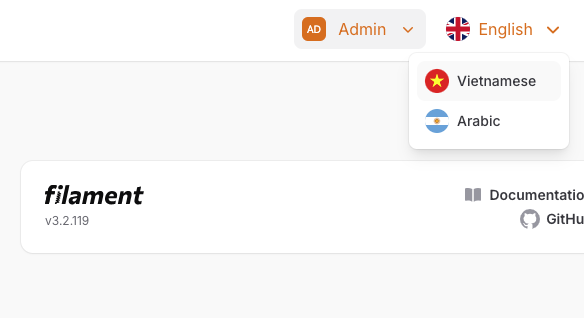
Application language switcher
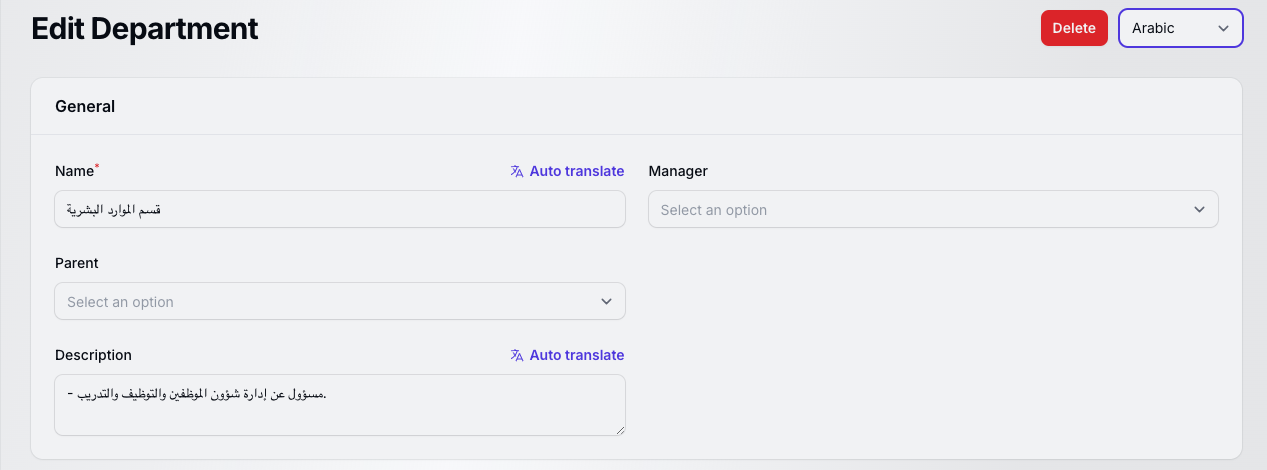
Content language switcher
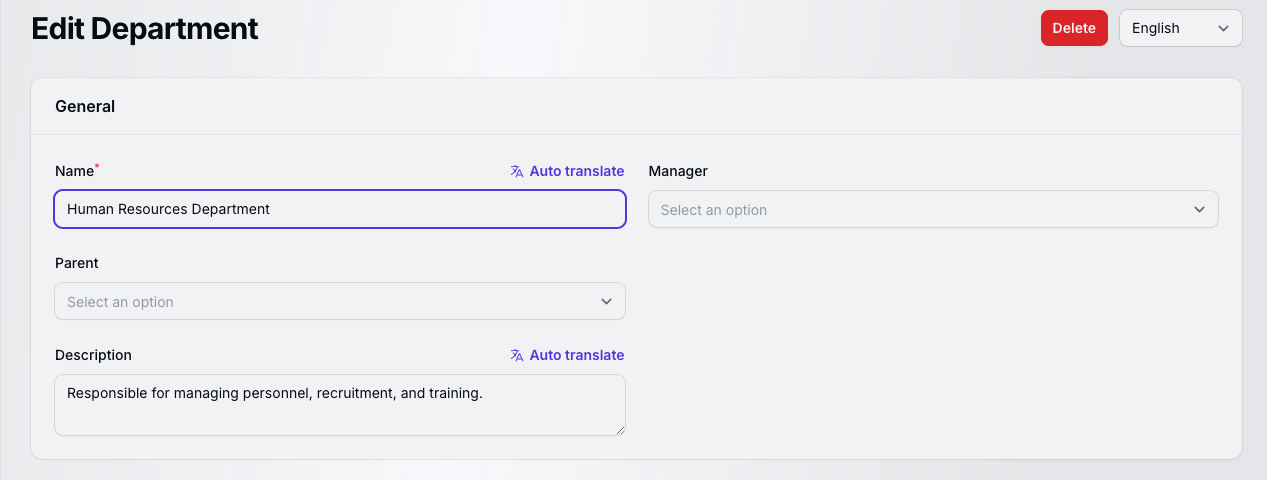
Translator field
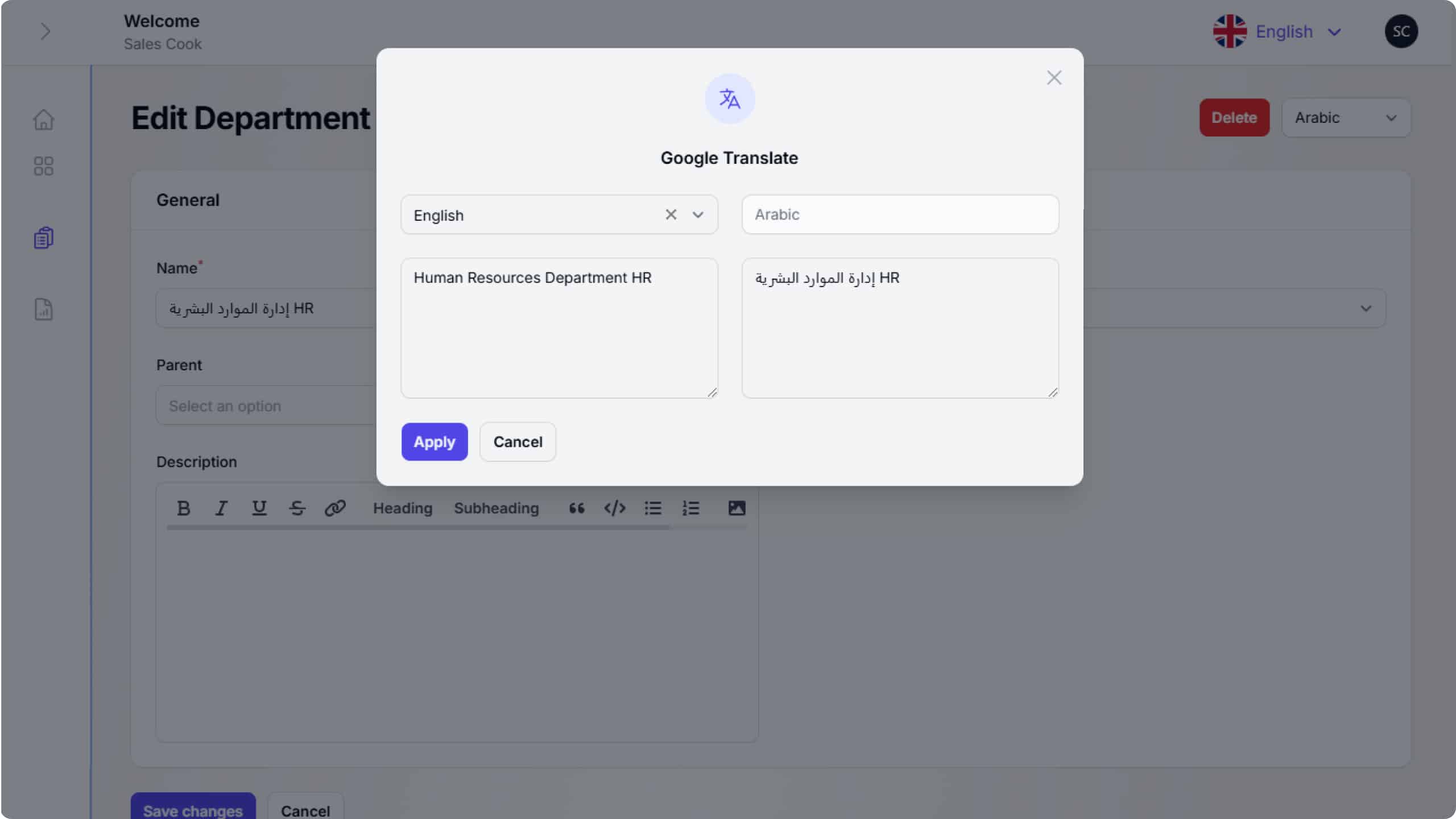
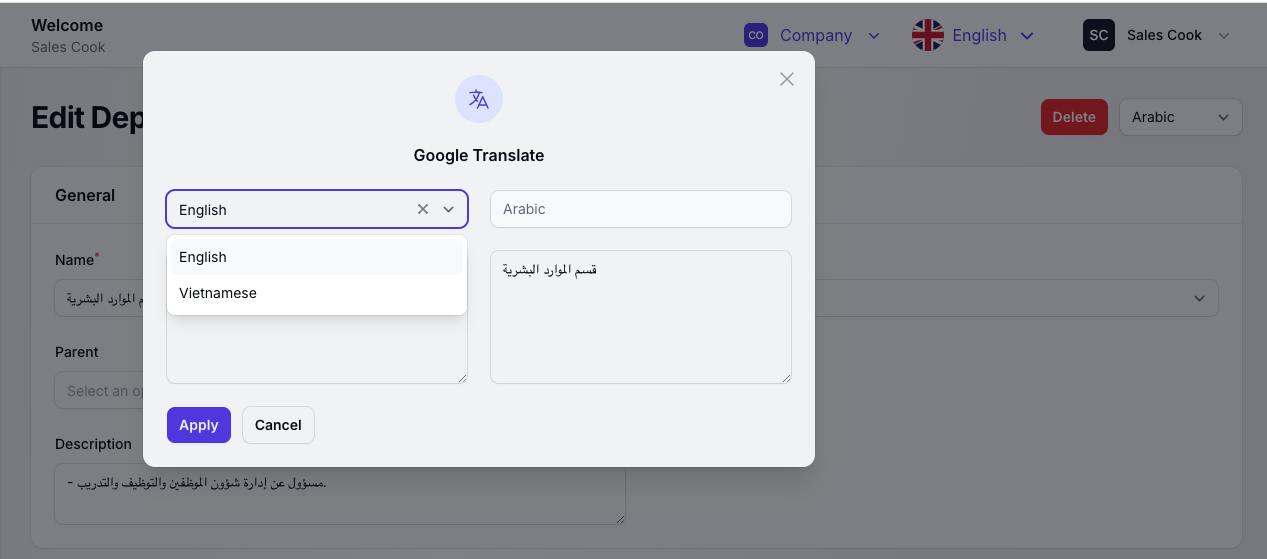
Google translate
huuhadev/filament-translatable 适用场景与选型建议
huuhadev/filament-translatable 是一款 基于 PHP 开发的 Composer 扩展包,目前已累计 198 次下载、GitHub Stars 达 0, 最近一次更新时间为 2024 年 11 月 03 日, 在 PHP 生态内属于活跃度较高的组件。
我们在过去多个企业项目中使用过 huuhadev/filament-translatable 或与其功能相近的方案,如果你在选型或落地过程中遇到问题,例如 版本兼容、二次改造、私有化封装、与内部系统对接、生产 BUG 排查,欢迎联系我们协助评估。
基于 huuhadev/filament-translatable 在你已有业务上做功能扩展、字段裁剪、UI 适配、与内部账号 / 权限 / 日志系统的深度对接。
线上偶发问题、内存泄漏、慢查询、并发异常等排查修复;针对高流量场景做缓存、队列、索引层面的调优。
承接完整的项目从需求 → 设计 → 开发 → 上线 → 长期运维;也可按月提供技术保姆服务。
统计信息
- 总下载量: 198
- 月度下载量: 0
- 日度下载量: 0
- 收藏数: 0
- 点击次数: 15
- 依赖项目数: 0
- 推荐数: 0
其他信息
- 授权协议: MIT
- 更新时间: 2024-11-03