iktbd/captcha-image
Composer 安装命令:
composer require iktbd/captcha-image
包简介
Make your security captcha image
README 文档
README
Make your security captcha image
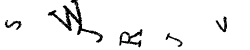
Features
- Make your own captcha image and use
- Make your system safe
- More!
Installation & loading
captcha-image is available on Packagist (using semantic versioning), and installation via Composer is the recommended way to install captcha-image. Just add this line to your composer.json file:
"iktbd/captcha-image": "^2.00"
or run
composer require iktbd/captcha-image
Note that the vendor folder and the vendor/autoload.php script are generated by Composer; they are not part of captcha-image.
Use the captcha-image
Create captcher
<?php
use Iktbd\CaptchaImage\Captcha;

//Set your password as your wish
$password='djhfhdfywh53477';

//Create new captcha
$src_string=Captcha::create($password);
Use the $src_string in the html image
<form id="" action="#" method="post">
<img src="{{$src_string}}" height="50" width="250">
<input type="text" name="captcha_text" value="">
<input type="submit" value="Submit">
</form>
Varify Captcha data
<?php
use Iktbd\CaptchaImage\Captcha;


//Set your same password
$password='djhfhdfywh53477';

//Get the input value from the form submit
$text=$_POST['captcha_text'];

//Check submitted captcha data
$result=Captcha::verify($password,$text);

if($result==true)
{
    echo 'Captcha is correct';
}
else
{
    echo 'Captcha is wrong';
}
Note
- If you want to create a new captcha and verify your old submitted captcha then verify your old submitted captcha first then create new captcha
- You should remember that every new captcha generate a new session and delete the old session.
- So, if you create a new captcha than if you verify the old submitted captcha then it will return false. Because the old captcha data already deleted when you create a new captcha
Error Note
- Be sure that your PHP GD extension is enable else you will get an error.
- If your PHP GD extension is not enable, then enable the GD extension.
- To enable PHP GD extension, go to your cpanel then go to PHP version selector then tick the GD check box and save it.
- Or check if in your
php.inifile has the following line;extension=gd - If exists, change it to
extension=gd - If not found, Add this
extension=gdto yourphp.ini
统计信息
- 总下载量: 16
- 月度下载量: 0
- 日度下载量: 0
- 收藏数: 1
- 点击次数: 1
- 依赖项目数: 0
- 推荐数: 0
其他信息
- 授权协议: MIT
- 更新时间: 2022-06-30