inspheric/nova-indicator-field
Composer 安装命令:
composer require inspheric/nova-indicator-field
包简介
A Laravel Nova indicator field.
关键字:
README 文档
README
A colour-coded indicator field for Laravel Nova
Installation
Install the package into a Laravel app that uses Nova with Composer:
composer require inspheric/nova-indicator-field
Usage
Add the field to your resource in the fields method:
use Inspheric\Fields\Indicator;

Indicator::make('Status'),
The field extends the base Laravel\Nova\Fields\Field field, so all the usual methods are available.
Options
Labels
Add your desired status labels:
Indicator::make('Status')
    ->labels([
        'banned' => 'Banned',
        'active' => 'Active',
        'invited' => 'Invited',
        'inactive' => 'Inactive',
    ])
The array key is the raw field value and the array value is the desired label.
You can, of course use the Laravel trans() or __() functions to translate the labels.
If a label is not defined for a value that appears in the field, the "unknown" label will be used (see below).
Without Labels
If you do not need to specify a different label, you can simply display the raw field value:
Indicator::make('Status')
    ->withoutLabels()
Unknown Label
Specify the label when the raw field value does not correspond to one of the labels you defined:
Indicator::make('Status')
    ->unknown('Unknown')
You can, of course use the Laravel trans() or __() functions to translate the unknown label.
If this is not set, an em dash will be displayed instead.
This setting does not apply when withoutLabels() has been used. In that case, an unknown label will display with its raw value.
Should Hide
The indicator can be hidden if the field value is equal to a given value(s) or a callback:
Indicator::make('Status')
    ->shouldHide('active')
Indicator::make('Status')
    ->shouldHide(['invited', 'requested'])
Indicator::make('Status')
    ->shouldHide(function($value) {
        return $value == 'inactive';
    })
This is useful if you only want to highlight particular values in the grid and hide others, e.g. you want banned users to be displayed with a red indicator and label, and for active (not banned) users, you don't want the indicator displayed at all.
Should Hide If No
The indicator can be hidden if the field value is anything that PHP considers as falsy, i.e. false, 0, null or '':
Indicator::make('Status')
    ->shouldHideIfNo()
This is a shortcut for a common scenario for the above shouldHide() method.
Colours
Named Colours
Add your desired status colours:
Indicator::make('Status')
    ->colors([
        'banned' => 'red',
        'active' => 'green',
        'invited' => 'blue',
        'inactive' => 'grey',
    ])
The array key is the raw field value and the array value is the desired colour.
If a colour is not specified for a status, it will be displayed as grey.
The available colours are the default "base" colours from Tailwind, with the addition of black:
- 'black'
#22292F - 'grey' or 'gray'
#B8C2CC - 'red'
#E3342F - 'orange'
#F6993F - 'yellow'
#FFED4A - 'green'
#38C172 - 'teal'
#4DC0B5 - 'blue'
#3490DC - 'indigo'
#6574CD - 'purple'
#9561E2 - 'pink'
#F66D9B
As well as the following Nova variable colours:
- 'success'
var(--success) - 'warning'
var(--warning) - 'danger'
var(--danger) - 'info'
var(--info)
Colour classes are not validated against the lists above, so if you enter an invalid colour, it will fall back to grey.
Literal Colours
You can also use your own hexadecimal, RGB/RGBA or HSL/HSLA literal colours or variables, as in CSS:
Indicator::make('Status')
    ->colors([
        '...' => '#ff0000',
        '...' => 'rgb(0, 255, 0)',
        '...' => 'rgba(0, 0, 0, 0.5)',
        '...' => 'hsl(120, 100%, 50%)',
        '...' => 'hsla(120, 100%, 50%, 0.5)',
        '...' => 'var(--success)',
    ])
Literal colours are not validated, so if you enter an invalid CSS colour, it will fall back to grey.
Additional Colour Classes
If you want to specify your own colours as reusable classes, you can serve your own CSS file using Nova's Asset functionality. The classes must be prefixed with indicator-:
.indicator-yourcolourname {
    background: #000000;
}
Which you would use in the field definition without the 'indicator-' prefix, as:
Indicator::make('Status')
    ->colors([
        'yourstatus' => 'yourcolourname',
    ])
Appearance
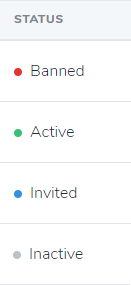
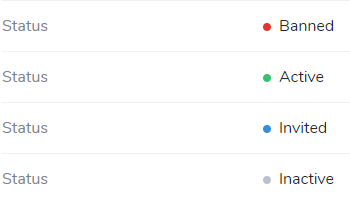
The field is displayed similarly to the built-in Laravel\Nova\Fields\Boolean field, with the ability to have more than a true/false value, and different labels and colours defined.
Index
Detail
Form
(Same as detail.)
The indicator is not displayed on forms by default. If you choose to display it as a form field with showOnUpdate(), the indicator is not editable and does not write back to the server, as it is intended to come from a read-only or derived model attribute.
If you do need an editable status field, you might want to add your own additional Laravel\Nova\Fields\Select field to your resource, referencing the same attribute name, and with onlyOnForms() set.
inspheric/nova-indicator-field 适用场景与选型建议
inspheric/nova-indicator-field 是一款 基于 PHP 开发的 Composer 扩展包,目前已累计 999.76k 次下载、GitHub Stars 达 128, 最近一次更新时间为 2018 年 08 月 27 日, 在 PHP 生态内属于活跃度较高的组件。
它主要适用于以下技术方向: 「nova」 「laravel」 「field」 「status」 「indicator」 等业务场景。在实际项目中,围绕这些方向常见需要落地的问题包括:接口对接、性能调优、并发安全、与既有框架(Laravel / ThinkPHP / Yii / Webman 等)的兼容适配,以及生产环境的日志埋点与稳定性保障。
我们在过去多个企业项目中使用过 inspheric/nova-indicator-field 或与其功能相近的方案,如果你在选型或落地过程中遇到问题,例如 版本兼容、二次改造、私有化封装、与内部系统对接、生产 BUG 排查,欢迎联系我们协助评估。
基于 inspheric/nova-indicator-field 在你已有业务上做功能扩展、字段裁剪、UI 适配、与内部账号 / 权限 / 日志系统的深度对接。
线上偶发问题、内存泄漏、慢查询、并发异常等排查修复;针对高流量场景做缓存、队列、索引层面的调优。
承接完整的项目从需求 → 设计 → 开发 → 上线 → 长期运维;也可按月提供技术保姆服务。
与 inspheric/nova-indicator-field 相关的其它包
同方向 / 同关键字的高下载量 PHP Composer 包推荐,方便对比选型:
A Laravel Nova card that shows you your system information.
A Laravel Nova card.
ConfirmationField is a form field for Atk14 applications. It's like the BooleanField (checkbox) but the ConfirmationField must be ticked.
Field for number with restricted count of digits and decimal places
A simple state dropdown field for SilverStripe forms
A Laravel Nova package for publishable fields
统计信息
- 总下载量: 999.76k
- 月度下载量: 0
- 日度下载量: 0
- 收藏数: 129
- 点击次数: 26
- 依赖项目数: 1
- 推荐数: 0
其他信息
- 授权协议: MIT
- 更新时间: 2018-08-27