iperamuna/laravel-supervisor-manager
Composer 安装命令:
composer require iperamuna/laravel-supervisor-manager
包简介
A comprehensive FilamentPHP dashboard for managing Supervisor processes and configurations in Laravel applications.
README 文档
README
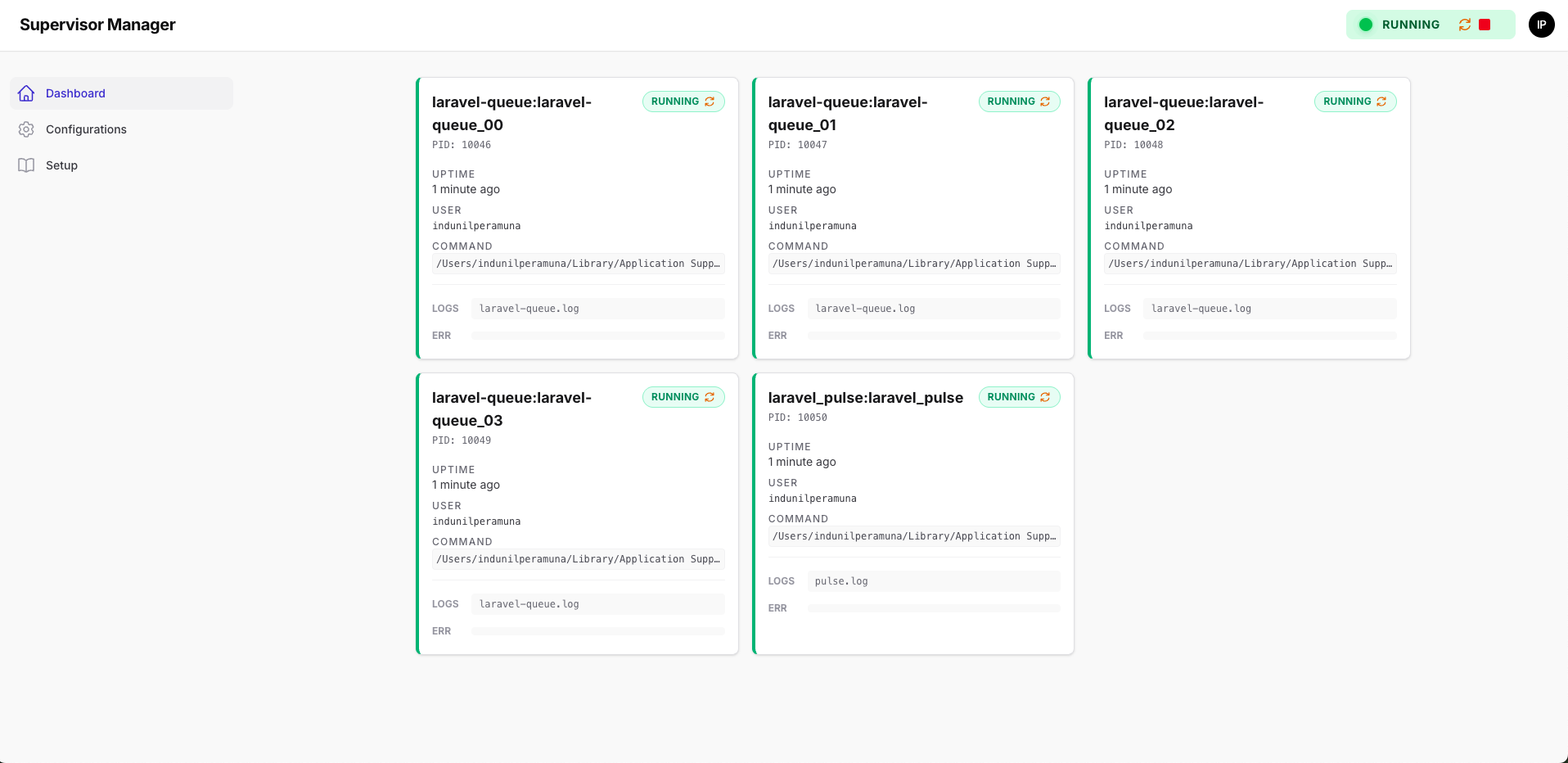
A powerful FilamentPHP panel for managing Supervisor processes directly from your Laravel application.
✨ Features
- Dashboard Overview: View real-time status of your Supervisor instance and all processes.
- Smart Process Control:
- Global Controls: Start, Stop, or Restart all processes with a single click from the status widget.
- Contextual Actions: Configuration cards automatically toggle between Start and Stop actions based on the process state.
- Log Viewer: View
stdoutandstderrlogs live in a modal (tailing the last 10KB of output). - Configuration Manager:
- Manage
.conffiles directly from the UI. - Sync configurations to your system's Supervisor directory.
- Deploy changes (reread/update) via the UI.
- Detect orphaned (system-only) or unsynced (local-only) configurations.
- Manage
- Filament Powered: Built with Filament V3/V4, offering a beautiful, responsive, and dark-mode compatible UI.
- Secure: Uses XML-RPC to communicate with Supervisor (localhost only recommended).
🚀 Installation
You can install the package via composer:
composer require iperamuna/laravel-supervisor-manager
After installing, run the installation command to publish assets and configure the connection:
php artisan supervisor-manager:install
This command will prompt you for:
- The URL path for the dashboard (default:
supervisor). - The Supervisor XML-RPC credentials (URL, Port, Username, Password).
⚙️ Configuration
1. Enabling XML-RPC in Supervisor
For this package to work, you must enable the HTTP server in your supervisord.conf file (usually in /etc/supervisord.conf or /etc/supervisor/supervisord.conf).
Add or uncomment the following section:
[inet_http_server]
port=127.0.0.1:9125
username=user
password=strongpass
⚠️ Security Warning: Only bind to
127.0.0.1to prevent external access. This interface gives full control over your processes.
2. Secure File Copy Setup (Recommended)
The package uses a secure architecture to handle supervisor configuration files:
How It Works
Laravel writes here (your project):
storage/supervisors/laravel-queue.conf
         ↓
Laravel calls secure script with sudo:
sudo /usr/local/bin/supervisor-copy <file>
         ↓
Script copies to system directory:
/opt/homebrew/etc/supervisor.d/laravel-queue.conf
         ↓
Script runs: supervisorctl reread && supervisorctl update
Why This Approach?
- ✅ Laravel never needs write access to system directories
- ✅ Controlled sudo access to a single, auditable script
- ✅ Automatic reread/update after deployment
- ✅ Works on macOS (Homebrew) and Linux systems
Automated Setup
Run the included setup script:
cd vendor/iperamuna/laravel-supervisor-manager/scripts
bash setup-secure-copy.sh
This will:
- Install the copy script to
/usr/local/bin/supervisor-copy - Guide you through sudoers configuration
- Test the setup automatically
Manual Setup
If you prefer manual installation:
Step 1: Install the copy script
sudo cp vendor/iperamuna/laravel-supervisor-manager/scripts/supervisor-copy /usr/local/bin/
sudo chmod +x /usr/local/bin/supervisor-copy
Step 2: Configure sudoers
sudo visudo
Add this line (replace your-username with your actual user):
your-username ALL=(root) NOPASSWD: /usr/local/bin/supervisor-copy *
For Laravel Herd on macOS, use your Mac username:
iperamuna ALL=(root) NOPASSWD: /usr/local/bin/supervisor-copy *
For production servers, use your web server user:
www-data ALL=(root) NOPASSWD: /usr/local/bin/supervisor-copy *
Step 3: Update your .env
SUPERVISOR_SYSTEM_USER=your-username
SUPERVISOR_CONF_PATH=/opt/homebrew/etc/supervisor.d  # or /etc/supervisor/conf.d
SUPERVISOR_USE_SECURE_COPY=true
SUPERVISOR_LOCAL_DIR=/path/to/your/project/supervisors
Legacy Mode (Not Recommended)
If you can't use the secure copy script, you can disable it:
SUPERVISOR_USE_SECURE_COPY=false
Note: This requires your web server user to have write permissions to the supervisor directory, which is a security risk.
🛡️ Access Control
By default, the package uses App\Models\User in the configuration. To control who can access the dashboard, ensure your User model implements FilamentUser and defines the canAccessPanel method, or configure a different user model in config/supervisor-manager.php.
// app/Models/User.php
use Filament\Models\Contracts\FilamentUser;
use Filament\Panel;

class User extends Authenticatable implements FilamentUser
{
    public function canAccessPanel(Panel $panel): bool
    {
        return $this->email === 'admin@example.com';
    }
}
🔧 Usage
Visit the dashboard at /supervisor (or your configured path).
Managing Processes
- Global Control: The status widget (top right) allows you to Start All, Stop All, or Restart the supervisor daemon.
- Smart Toggle: The status widget automatically hides the "Start All" button if processes are running, keeping the UI clean.
- Process Cards: Use the Restart button on any process card to restart it individually.
- Logs: Click LOGS or ERR on a process card to view the latest log output.
Managing Configurations
- Navigate to the Configurations page.
- Create new configurations locally.
- Sync them to the system directory (
/etc/supervisor/conf.dby default). - Deploy changes to reload the Supervisor daemon.
- Start/Stop: Each configuration card features a smart Start/Stop button that reflects the current running state of the process group.
🛠️ Development
If you are contributing to the package and need to update the styles:
- Install dependencies:
composer install
- Build the Tailwind assets:
composer build
🤝 Contributing
Please see CONTRIBUTING for details.
📄 License
The MIT License (MIT). Please see License File for more information.
iperamuna/laravel-supervisor-manager 适用场景与选型建议
iperamuna/laravel-supervisor-manager 是一款 基于 PHP 开发的 Composer 扩展包,目前已累计 86 次下载、GitHub Stars 达 0, 最近一次更新时间为 2026 年 01 月 21 日, 在 PHP 生态内属于活跃度较高的组件。
它主要适用于以下技术方向: 「queue」 「ui」 「laravel」 「worker」 「supervisor」 「process-manager」 等业务场景。在实际项目中,围绕这些方向常见需要落地的问题包括:接口对接、性能调优、并发安全、与既有框架(Laravel / ThinkPHP / Yii / Webman 等)的兼容适配,以及生产环境的日志埋点与稳定性保障。
我们在过去多个企业项目中使用过 iperamuna/laravel-supervisor-manager 或与其功能相近的方案,如果你在选型或落地过程中遇到问题,例如 版本兼容、二次改造、私有化封装、与内部系统对接、生产 BUG 排查,欢迎联系我们协助评估。
基于 iperamuna/laravel-supervisor-manager 在你已有业务上做功能扩展、字段裁剪、UI 适配、与内部账号 / 权限 / 日志系统的深度对接。
线上偶发问题、内存泄漏、慢查询、并发异常等排查修复;针对高流量场景做缓存、队列、索引层面的调优。
承接完整的项目从需求 → 设计 → 开发 → 上线 → 长期运维;也可按月提供技术保姆服务。
与 iperamuna/laravel-supervisor-manager 相关的其它包
同方向 / 同关键字的高下载量 PHP Composer 包推荐,方便对比选型:
Queue
PHP AMQP Binding Library
SlimQ Enables You to push jobs to background workers
A Laravel package to monitor queue jobs.
A lightweight task queue on top of rybakit/phive-queue
A replica of the AWS Elastic Beanstalk worker SQS daemon (sqsd) in PHP
统计信息
- 总下载量: 86
- 月度下载量: 0
- 日度下载量: 0
- 收藏数: 0
- 点击次数: 33
- 依赖项目数: 0
- 推荐数: 0
其他信息
- 授权协议: MIT
- 更新时间: 2026-01-21