jaocero/activity-timeline
Composer 安装命令:
composer require jaocero/activity-timeline
包简介
Add timelines to custom pages or infolist entries effortlessly. Plus, it teams up smoothly with Spatie Activitylog for easy tracking.
README 文档
README
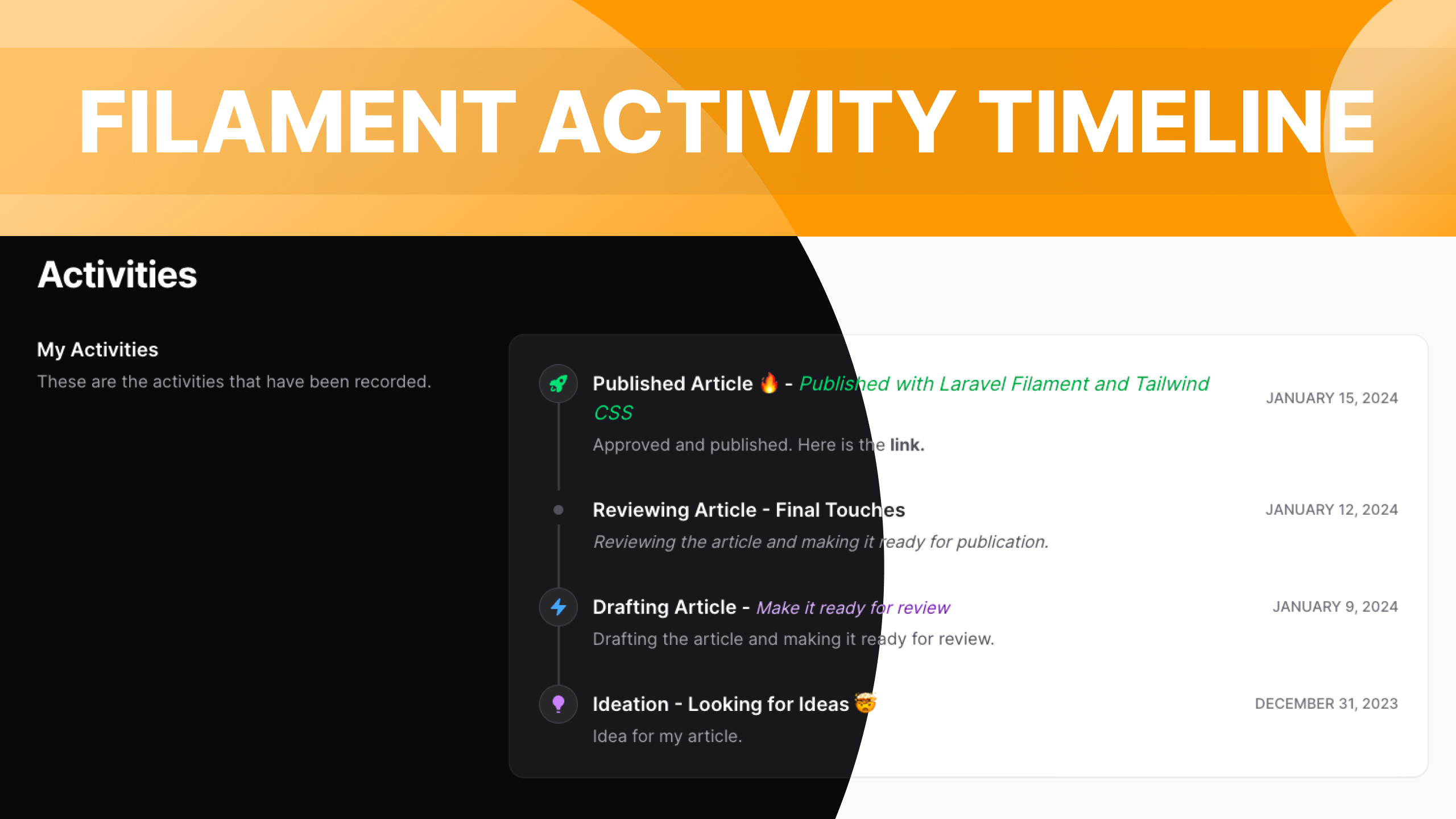
Add timelines to custom pages or infolist entries effortlessly. Plus, it teams up smoothly with Spatie Activitylog for easy tracking.
Installation
You can install the package via composer:
composer require jaocero/activity-timeline
To adhere to Filament's theming approach, you'll be required to employ a personalized theme in order to utilize this plugin.
Custom Theme Installation > Filament Docs
Add the plugin's views to your tailwind.config.js file.
content: [
    ...'./vendor/jaocero/activity-timeline/resources/views/**/*.blade.php',
]
Usage
This plugin is already accessible within the Infolists builder and now supports both the ->state([]) and ->record() methods.
use JaOcero\ActivityTimeline\Enums\IconAnimation;

public function activityTimelineInfolist(Infolist $infolist): Infolist
{
    return $infolist
        ->state([
            'activities' => [
                    [
                        'title' => "Published Article 🔥 - <span class='italic font-normal dark:text-success-400 text-success-600'>Published with Laravel Filament and Tailwind CSS</span>",
                        'description' => "<span>Approved and published. Here is the <a href='#' class='font-bold hover:underline dark:text-orange-300'>link.</a></span>",
                        'status' => 'published',
                        'created_at' => now()->addDays(8),
                    ],
                    [
                        'title' => 'Reviewing Article - Final Touches',
                        'description' => "<span class='italic'>Reviewing the article and making it ready for publication.</span>",
                        'status' => '',
                        'created_at' => now()->addDays(5),
                    ],
                    [
                        'title' => "Drafting Article - <span class='text-sm italic font-normal text-purple-800 dark:text-purple-300'>Make it ready for review</span>",
                        'description' => 'Drafting the article and making it ready for review.',
                        'status' => 'drafting',
                        'created_at' => now()->addDays(2),
                    ],
                    [
                        'title' => 'Ideation - Looking for Ideas 🤯',
                        'description' => 'Idea for my article.',
                        'status' => 'ideation',
                        'created_at' => now()->subDays(7),
                    ]
                ]
        ])
        ->schema([

         /*
    	    You should enclose the entire components within a personalized "ActivitySection" entry.
            This section functions identically to the repeater entry; you simply have to provide the array state's key.
    	 */

            ActivitySection::make('activities')
                ->label('My Activities')
                ->description('These are the activities that have been recorded.')
                ->schema([
                    ActivityTitle::make('title')
                        ->placeholder('No title is set')
                        ->allowHtml(), // Be aware that you will need to ensure that the HTML is safe to render, otherwise your application will be vulnerable to XSS attacks.
                    ActivityDescription::make('description')
                        ->placeholder('No description is set')
                        ->allowHtml(),
                    ActivityDate::make('created_at')
                        ->date('F j, Y', 'Asia/Manila')
                        ->placeholder('No date is set.'),
                    ActivityIcon::make('status')
                        ->icon(fn (string | null $state): string | null => match ($state) {
                            'ideation' => 'heroicon-m-light-bulb',
                            'drafting' => 'heroicon-m-bolt',
                            'reviewing' => 'heroicon-m-document-magnifying-glass',
                            'published' => 'heroicon-m-rocket-launch',
                            default => null,
                        })
                        /*
                            You can animate icon with ->animation() method.
                            Possible values : IconAnimation::Ping, IconAnimation::Pulse, IconAnimation::Bounce, IconAnimation::Spin or a Closure
                         */
                        ->animation(IconAnimation::Ping)
                        ->color(fn (string | null $state): string | null => match ($state) {
                            'ideation' => 'purple',
                            'drafting' => 'info',
                            'reviewing' => 'warning',
                            'published' => 'success',
                            default => 'gray',
                        }),
                ])
                ->showItemsCount(2) // Show up to 2 items
                ->showItemsLabel('View Old') // Show "View Old" as link label
                ->showItemsIcon('heroicon-m-chevron-down') // Show button icon
                ->showItemsColor('gray') // Show button color and it supports all colors
                ->aside(true)
                ->headingVisible(true) // make heading visible or not
                ->extraAttributes(['class'=>'my-new-class']) // add extra class
        ]);
}
When utilizing the ->record() function, you provide your model in a manner similar to the code showcased below:
protected $activities;

public function __construct()
{
    $this->activities = User::query()->with('activities')->where('id', auth()->user()->id)->first();
}

public function activityTimelineInfolist(Infolist $infolist): Infolist
{
    return $infolist
        ->record($this->activities)
        // ... remaining code
}
Sometimes, when we don't have any info to show to users, it's important to improve their experience by displaying something. So, I include an empty state, like the one in the Filament Table Empty State.
public function activityTimelineInfolist(Infolist $infolist): Infolist
{
    return $infolist
        ->state([
            'activities' => []
        )]
        ->schema([
            ActivitySection::make('activities')
                // ... other code
                ->emptyStateHeading('No activities yet.')
                ->emptyStateDescription('Check back later for activities that have been recorded.')
                ->emptyStateIcon('heroicon-o-bolt-slash')
        ])
}
Usage with Spatie Activity Log Package
This plugin works with spatie/laravel-activitylog, making it easy to log user actions in your app. It can also automatically log model events, storing everything in the activity_log table. To use the plugin, just install spatie/laravel-activitylog, set it up, and you're good to go.
Creating a Custom Page
You are required to create a custom page within your resources to display all activities based on the record passed to the route.
php artisan make:filament-page ViewOrderActivities --resource=OrderResource --type=custom
Including the Page in your Resource Class
Simply include the custom page in the getPages() method so that we can access it.
public static function getPages(): array
{
    return [
        // ... other pages
        // The format of route doesn't matter, as long as it includes the route parameter {record}.
        'activities' => Pages\ViewOrderActivities::route('/order/{record}/activities'),
    ];
}
In the actions method of your table, include an additional custom action. This action should redirect users to the custom page we've generated earlier.
public static function table(Table $table): Table
{
    return $table
        ->columns([
            // ...
        ])
        ->filters([
            // ...
        ])
        ->actions([
            Tables\Actions\Action::make('view_activities')
                ->label('Activities')
                ->icon('heroicon-m-bolt')
                ->color('purple')
                ->url(fn ($record) => OrderResource::getUrl('activities', ['record' => $record])),
        ])
        ->bulkActions([
            // ...
        ]);
}
Setting up your Custom Page
Changes are needed in your custom page. Instead of extending using the regular Page class will make use of a specific class called ActivityTimelinePage provided by the plugin. Additionally, you should include your resource class.
use App\Filament\Resources\OrderResource;
use JaOcero\ActivityTimeline\Pages\ActivityTimelinePage;

class ViewOrderActivities extends ActivityTimelinePage
{
    protected static string $resource = OrderResource::class;
}
Configuration
Behind the scenes, the plugin utilizes the previously mentioned infolists entry. We only modify the properties/data, but the logic remains unchanged.
use App\Filament\Resources\OrderResource;
use JaOcero\ActivityTimeline\Pages\ActivityTimelinePage;

class ViewOrderActivities extends ActivityTimelinePage
{
    protected static string $resource = OrderResource::class;

    protected function configuration(): array
    {
        return [
            'activity_section' => [
                'label' => 'Activities', // label for the section
                'description' => 'These are the activities that have been recorded.', // description for the section
                'show_items_count' => 0, // show the number of items to be shown
                'show_items_label' => 'Show more', // show button label
                'show_items_icon' => 'heroicon-o-chevron-down', // show button icon,
                'show_items_color' => 'gray', // show button color,
                'aside' => true, // show the section in the aside
                'empty_state_heading' => 'No activities yet', // heading for the empty state
                'empty_state_description' => 'Check back later for activities that have been recorded.', // description for the empty state
                'empty_state_icon' => 'heroicon-o-bolt-slash', // icon for the empty state
                'heading_visible' => true, // show the heading
                'extra_attributes' => [], // extra attributes
            ],
            'activity_title' => [
                'placeholder' => 'No title is set', // this will show when there is no title
                'allow_html' => true, // set true to allow html in the title

                /**
                 * You are free to adjust the state before displaying it on your page.
                 * Take note that the state returns these data below:
                 *      [
                 *       'log_name' => $activity->log_name,
                  *      'description' => $activity->description,
                  *      'subject' => $activity->subject,
                  *      'event' => $activity->event,
                  *      'causer' => $activity->causer,
                  *      'properties' => json_decode($activity->properties, true),
                  *      'batch_uuid' => $activity->batch_uuid,
                  *     ]

                  * If you wish to make modifications, please refer to the default code in the HasSetting trait.
                 */

                // 'modify_state' => function (array $state) {
                //
                // }

            ],
            'activity_description' => [
                'placeholder' => 'No description is set', // this will show when there is no description
                'allow_html' => true, // set true to allow html in the description

                /**
                 * You are free to adjust the state before displaying it on your page.
                 * Take note that the state returns these data below:
                 *      [
                 *       'log_name' => $activity->log_name,
                  *      'description' => $activity->description,
                  *      'subject' => $activity->subject,
                  *      'event' => $activity->event,
                  *      'causer' => $activity->causer,
                  *      'properties' => json_decode($activity->properties, true),
                  *      'batch_uuid' => $activity->batch_uuid,
                  *     ]

                  * If you wish to make modifications, please refer to the default code in the HasSetting trait.
                 */

                // 'modify_state' => function (array $state) {
                //
                // }

            ],
            'activity_date' => [
                'name' => 'created_at', // or updated_at
                'date' => 'F j, Y g:i A', // date format
                'placeholder' => 'No date is set', // this will show when there is no date
                'modify_state' => function ($state) {
                    return new HtmlString($state);
                }
            ],
            'activity_icon' => [
                'icon' => fn (string | null $state): string | null => match ($state) {
                    /**
                     * 'event_name' => 'heroicon-o-calendar',
                     * ... and more
                     */
                    default => null
                },
                'color' => fn (string | null $state): string | null => match ($state) {
                    /**
                     * 'event_name' => 'primary',
                     * ... and more
                     */
                    default => null
                },
            ]
        ];
    }
}
Style customization
Similar to Filament, this plugin also includes CSS hook classes that enable the customization of different HTML elements through CSS.
.fi-timeline-section {
    @apply bg-transparent !important;
}
This plugin comes with numerous CSS hook classes. For a straightforward approach, consider using your browser's developer tools to carefully examine the element and identify these classes.
That's all! If you encounter any issues or have features you'd like to discuss, feel free to chat with me in our Discord channel.
Changelog
Please see CHANGELOG for more information on what has changed recently.
Contributing
Please see CONTRIBUTING for details.
Security Vulnerabilities
Please review our security policy on how to report security vulnerabilities.
Credits
License
The MIT License (MIT). Please see License File for more information.
jaocero/activity-timeline 适用场景与选型建议
jaocero/activity-timeline 是一款 基于 PHP 开发的 Composer 扩展包,目前已累计 168.54k 次下载、GitHub Stars 达 91, 最近一次更新时间为 2024 年 01 月 07 日, 在 PHP 生态内属于活跃度较高的组件。
它主要适用于以下技术方向: 「timeline」 「laravel」 「filamentphp」 「jaocero」 「activity-timeline」 「filament-infolists」 等业务场景。在实际项目中,围绕这些方向常见需要落地的问题包括:接口对接、性能调优、并发安全、与既有框架(Laravel / ThinkPHP / Yii / Webman 等)的兼容适配,以及生产环境的日志埋点与稳定性保障。
我们在过去多个企业项目中使用过 jaocero/activity-timeline 或与其功能相近的方案,如果你在选型或落地过程中遇到问题,例如 版本兼容、二次改造、私有化封装、与内部系统对接、生产 BUG 排查,欢迎联系我们协助评估。
基于 jaocero/activity-timeline 在你已有业务上做功能扩展、字段裁剪、UI 适配、与内部账号 / 权限 / 日志系统的深度对接。
线上偶发问题、内存泄漏、慢查询、并发异常等排查修复;针对高流量场景做缓存、队列、索引层面的调优。
承接完整的项目从需求 → 设计 → 开发 → 上线 → 长期运维;也可按月提供技术保姆服务。
与 jaocero/activity-timeline 相关的其它包
同方向 / 同关键字的高下载量 PHP Composer 包推荐,方便对比选型:
Add timelines to custom pages or infolist entries effortlessly. Plus, it teams up smoothly with Spatie Activitylog for easy tracking.
Logs information about scheduler task execution and displays them in a graphical timeline
Bundle extension that installs and loads Semantic MediaWiki and associated extensions
A Filament plugin that integrates tabler icons, allowing you to use them seamlessly across Filament forms, tables, actions, and more.
jitone-ai is a powerful FilamentPHP plugin that integrates AI-powered features directly into your Filament forms.
Send Notification to discord channel Webhook using native FilamentPHP Notification Facade class
统计信息
- 总下载量: 168.54k
- 月度下载量: 0
- 日度下载量: 0
- 收藏数: 91
- 点击次数: 39
- 依赖项目数: 0
- 推荐数: 0
其他信息
- 授权协议: MIT
- 更新时间: 2024-01-07