jeleb-smile/php-git-hooks
Composer 安装命令:
composer require jeleb-smile/php-git-hooks
包简介
Git hooks for PHP projects.
README 文档
README
Git hooks for PHP projects.
Library based in git hook scripts for PHP projects.
Installation
Step 1: Composer
You must add the following line to the composer.json file to use with Symfony 3.0:
{
    "require-dev": {
        "bruli/php-git-hooks": "~3.0"
    }
}
You can use "~2.0" for Symfony version 2.X.
Or you can write in your console:
$ composer require bruli/php-git-hooks --dev
If you don't have composer, you need download the binary file and run it:
wget http://getcomposer.org/composer.phar
# or
curl -O http://getcomposer.org/composer.phar

php composer.phar install
Step 2: Configuration
Composer configuration.
After download all repositories, composer ask you about configuration.

Composer configuration in Symfony2 projects.
In Symfony2 projects you need add this lines in your composer.json:
"scripts": {
    "post-install-cmd": [
      ...other lines...
      "PhpGitHooks\\Application\\Composer\\ConfiguratorScript::buildConfig"
    ],
    "post-update-cmd": [
      ...other lines...
      "PhpGitHooks\\Application\\Composer\\ConfiguratorScript::buildConfig"
    ]
Important: To use 2.X version you need symfony 2.7 version.
Bin directory configuration.
If your project haven't a "bin" directory, you can add this in your compose.json file.
 "config": {
        "bin-dir": "bin"
    }
Note: Not necessary for Symfony projects.
Manual config file for git hooks.
You can configure php-git-hooks, creating a php-git-hooks.yml file with...
pre-commit:
  enabled: true
  execute:
    php-cs-fixer:
        enabled:  true
        levels:
            psr0:       true
            psr1:       true
            psr2:       true
            symfony:    true
    phpunit:
        enabled:     true
        random-mode: true
    phplint:         true
    phpcs:
        enabled:     true
        standard:    PSR2
    phpmd:           true
    composer:        true
commit-msg:
    enabled: true
    regular-expression: '#[0-9]{2,7}'
... or you can copy php-git-hooks.yml.sample from vendor/bruli/php-git-hooks.
Update from v1.3.*
Php-cs-fixer configuration in php-git-hooks.yml file, is not compatible with 2.0 version. You should remove php-cs-fixer entry and execute "composer install".
Most easy way to update is delete php-git-hooks.yml and execute "composer install". You will see all the configuration questions again.
Config file for phpunit.
If you want use phpunit tool, you must create a phpunit.xml.dist in your project root directory. Alternatively you can copy from vendor/bruli/php-git-hooks/phpunit.xml.dist in your project root directory.
Config file for phpmd.
The same case that phpunit. You must create a PmdRules.xml in your project root directory or copy from php-git-hook directory.
Step 3: Enabling hooks.
The most easy way to enable hook is copy hook file into your .git/hooks directory.
#For pre-commit hook:
You can enable this hooks with composer or manually executing
$cp vendor/bruli/php-git-hooks/hooks/pre-commit .git/hooks
#For commit-msg hook:
$cp vendor/bruli/php-git-hooks/hooks/commit-msg .git/hooks
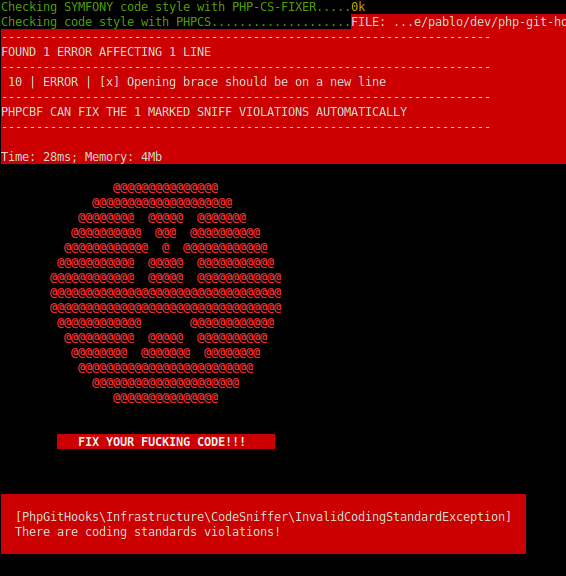
execute.
####Valid pre-commit.
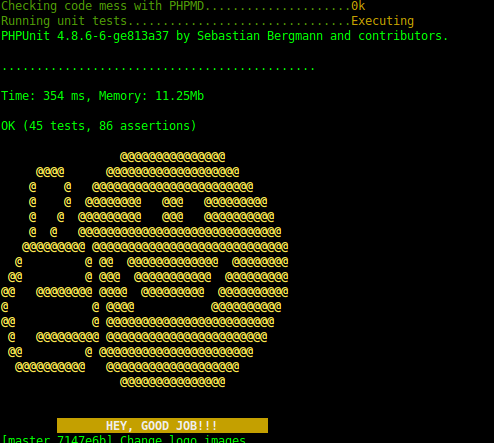 ####Fail pre-commit.
Credits
- Pablo Braulio (@brulics)
- All contributors
License
php-git-hooks is released under the MIT License. See the bundled LICENSE file for details.
统计信息
- 总下载量: 1.04k
- 月度下载量: 0
- 日度下载量: 0
- 收藏数: 0
- 点击次数: 2
- 依赖项目数: 0
- 推荐数: 0
其他信息
- 授权协议: MIT
- 更新时间: 2017-02-17