jenzri-nizar/zf3-geolocation
Composer 安装命令:
composer require jenzri-nizar/zf3-geolocation
包简介
Zend Framework geolocation
关键字:
README 文档
README
zf3-geolocation
zend framework 3 geolocation
##Installation
- Ajouter l'exigence suivante à votre fichier composer.json. Dans la section:"require"
composer require jenzri-nizar/zf3-geolocation v1.0
- Ouvrez votre ligne de commande et exécutez
composer update
Le module doit être enregistré dans config/modules.config.php
'modules' => array(
    '...',
    'Zf3\Geolocation'
),
##Configuration Copiez le fichier situé dans vendor\jenzri-nizar\zf3-geolocation\config\geoip.local.php à config/geoip.local.php
Modifiez les paramètres dans le fichier config/geoip.local.php
provider - Le nom du plug-in à utiliser (voir exemples @vendor/jenzri-nizar/zf3-geolocation/src/Service/plugins/);

return_formats - Les formats de retour pris en charge par le plugin

api_key - Si nécessaire, vous pouvez passer votre clé api.
Plugins
Plugins sont des fichiers PHP simples, qui renvoie un tableau avec trois variables:
- plugin_url :URL du service Web, avec trois balises spéciales:
a) {{accepted_formats}}
b) {{ip}}
c) {{api_key}}
Ces balises seront remplacées par leurs valeurs respectives.
-
accepted_formats : Un tableau avec les formats acceptables (exemple ['csv', 'php', 'json', 'xml'])
-
default_accepted_format : Chaîne avec le format de retour par défaut. (exemple "php")
Exemple de fichier Plugin
<?php

$plugin = [
            'plugin_url'                => 'http://www.geoplugin.net/{{accepted_formats}}.gp?ip={{ip}}',
            'accepted_formats'          => ['json', 'php', 'xml'],
            'default_accepted_format'   => 'php',
    ];
##Exemple
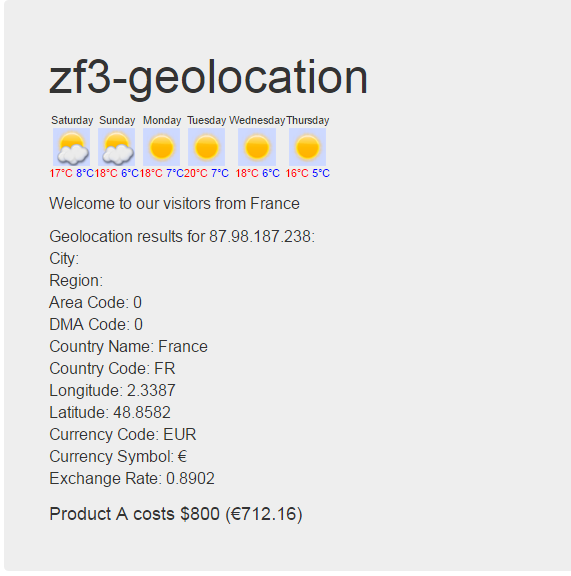
public function geopipAction(){
        $GeoIp=$this->GeoIp()->getInfo("87.98.187.238");
        $Weather=$this->GeoIp()->GetWeather($GeoIp->geoplugin_latitude,$GeoIp->geoplugin_longitude,$GeoIp->geoplugin_currencyCode);
        return new ViewModel(array("Weather"=>$Weather,"GeoIp"=>$GeoIp));
    }
geopip.phtml
<?php
function cc($amount,$GeoIp) {

    if ( isset($GeoIp->geoplugin_currencyCode) && $GeoIp->geoplugin_currencyCode != 'USD' ) {
        return '(' . $GeoIp->geoplugin_currencySymbol . round( ($amount * $GeoIp->geoplugin_currencyConverter),2) . ')';
    }
    return false;
}
?>
<div class="jumbotron">
    <h1>zf3-geolocation</span></h1>

    <p>
<?php echo $Weather?>
    </p>
    <p>
        <?php echo 'Welcome to our visitors from '.$GeoIp->geoplugin_countryName;?>
    </p>
    <p>
   <?php  echo "Geolocation results for {$GeoIp->geoplugin_request}: <br />\n".
    "City: {$GeoIp->geoplugin_city} <br />\n".
    "Region: {$GeoIp->geoplugin_region} <br />\n".
    "Area Code: {$GeoIp->geoplugin_areaCode} <br />\n".
    "DMA Code: {$GeoIp->geoplugin_dmaCode} <br />\n".
    "Country Name: {$GeoIp->geoplugin_countryName} <br />\n".
    "Country Code: {$GeoIp->geoplugin_countryCode} <br />\n".
    "Longitude: {$GeoIp->geoplugin_longitude} <br />\n".
    "Latitude: {$GeoIp->geoplugin_latitude} <br />\n".
    "Currency Code: {$GeoIp->geoplugin_currencyCode} <br />\n".
    "Currency Symbol: {$GeoIp->geoplugin_currencySymbol} <br />\n".
    "Exchange Rate: {$GeoIp->geoplugin_currencyConverter} <br />\n";
    ?></p>
   <p><?php  echo '<h3>Product A costs $800  ' . cc(800,$GeoIp) . '</h3>'; ?></p>
</div>
统计信息
- 总下载量: 37
- 月度下载量: 0
- 日度下载量: 0
- 收藏数: 0
- 点击次数: 1
- 依赖项目数: 0
- 推荐数: 0
其他信息
- 授权协议: MIT
- 更新时间: 2016-09-30