johnbillion/user-switching
Composer 安装命令:
composer require johnbillion/user-switching
包简介
Instant switching between user accounts in WordPress and WooCommerce.
README 文档
README
This plugin allows you to quickly switch between user accounts in WordPress at the click of a button. You'll be instantly logged out and logged in as your desired user. This is handy for helping customers on WooCommerce sites, membership sites, testing environments, or for any site where administrators need to switch between multiple accounts.
Features
- Switch user: Instantly switch to any user account from the Users screen.
- Switch back: Instantly switch back to your originating account.
- Switch off: Log out of your account but retain the ability to instantly switch back in again.
- Compatible with Multisite, WooCommerce, BuddyPress, and bbPress.
- Compatible with most membership and user management plugins.
- Compatible with most two-factor authentication solutions (see the FAQ for more info).
- Approved for use on enterprise-grade WordPress platforms such as Altis and WordPress VIP.
Note: User Switching supports versions of WordPress up to three years old, and PHP version 7.4 or higher.
Security
- Only users with the ability to edit other users can switch user accounts. By default this is only Administrators on single site installations, and Super Admins on Multisite installations.
- Passwords are not (and cannot be) revealed.
- Uses the cookie authentication system in WordPress when remembering the account(s) you've switched from and when switching back.
- Implements the nonce security system in WordPress, meaning only those who intend to switch users can switch.
- Full support for user session validation where appropriate.
- Full support for HTTPS.
Usage
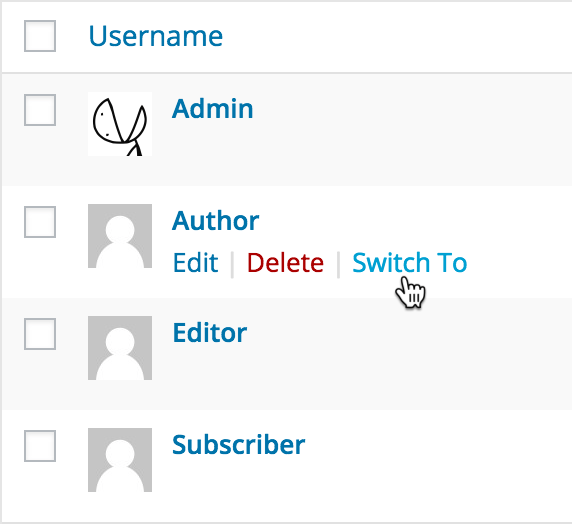
- Visit the Users menu in WordPress and you'll see a Switch To link in the list of action links for each user.
- Click this and you will immediately switch into that user account.
- You can switch back to your originating account via the Switch back link on each dashboard screen or in your profile menu in the WordPress toolbar.
Alternatively, in the WordPress Command Palette you can search for a user and immediately switch into their account. You can switch off and switch back from there too.
Frequently Asked Questions
See the FAQ on the WordPress.org plugin page for User Switching.
Other Plugins
I maintain several other plugins for developers. Check them out:
- Query Monitor is the developer tools panel for WordPress
- WP Crontrol lets you view and control what's happening in the WP-Cron system
Privacy Statement
User Switching does not send data to any third party, nor does it include any third party resources, nor will it ever do so.
User Switching makes use of browser cookies in order to allow users to switch to another account. Its cookies operate using the same mechanism as the authentication cookies in WordPress core, which means their values contain the user's user_login field in plain text which should be treated as potentially personally identifiable information (PII) for privacy and regulatory reasons (GDPR, CCPA, etc). The names of the cookies are:
wordpress_user_sw_{COOKIEHASH}wordpress_user_sw_secure_{COOKIEHASH}wordpress_user_sw_olduser_{COOKIEHASH}
See also the FAQ for some questions relating to privacy and safety when switching between users.
Accessibility Statement
User Switching aims to be fully accessible to all of its users. It implements best practices for web accessibility, outputs semantic and structured markup, adheres to the default styles and accessibility guidelines of WordPress, uses the accessibility APIs provided by WordPress and web browsers where appropriate, and is fully accessible via keyboard.
User Switching should adhere to Web Content Accessibility Guidelines (WCAG) 2.0 at level AA when used with a recent version of WordPress where its admin area itself adheres to these guidelines. If you've experienced or identified an accessibility issue in User Switching, please open a thread in the User Switching plugin support forum and I'll address it swiftly.
Sponsors
The time that I spend maintaining this plugin and others is in part sponsored by:
Plus all my kind sponsors on GitHub:
Click here to find out about supporting my open source tools and plugins.
Screenshots
- The Switch To link on the Users screen
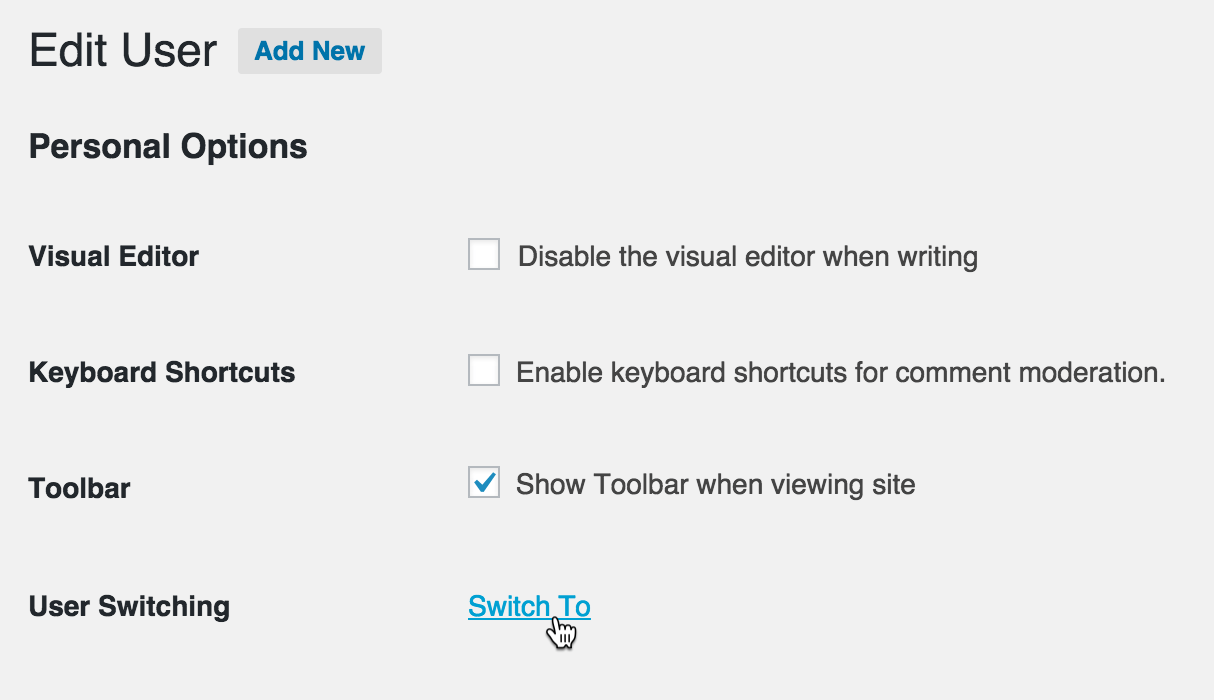
- The Switch To link on a user's profile


johnbillion/user-switching 适用场景与选型建议
johnbillion/user-switching 是一款 基于 PHP 开发的 Composer 扩展包,目前已累计 75.36k 次下载、GitHub Stars 达 200, 最近一次更新时间为 2014 年 09 月 08 日, 在 PHP 生态内属于活跃度较高的组件。
我们在过去多个企业项目中使用过 johnbillion/user-switching 或与其功能相近的方案,如果你在选型或落地过程中遇到问题,例如 版本兼容、二次改造、私有化封装、与内部系统对接、生产 BUG 排查,欢迎联系我们协助评估。
基于 johnbillion/user-switching 在你已有业务上做功能扩展、字段裁剪、UI 适配、与内部账号 / 权限 / 日志系统的深度对接。
线上偶发问题、内存泄漏、慢查询、并发异常等排查修复;针对高流量场景做缓存、队列、索引层面的调优。
承接完整的项目从需求 → 设计 → 开发 → 上线 → 长期运维;也可按月提供技术保姆服务。
统计信息
- 总下载量: 75.36k
- 月度下载量: 0
- 日度下载量: 0
- 收藏数: 204
- 点击次数: 19
- 依赖项目数: 2
- 推荐数: 0
其他信息
- 授权协议: GPL-2.0-or-later
- 更新时间: 2014-09-08