jorisros/feed-builder-bundle
最新稳定版本:v1.3.5
Composer 安装命令:
composer require jorisros/feed-builder-bundle
包简介
Bundle that based on output channel bundle, this bundle can be triggered by publish a object or by commandline.
README 文档
README
Feedbuilder bundle is export bundle that helps to export data of pimcore to other systems.
Installation
The installation can be installed though composer.
- Run
composer require jorisros/feed-builder-bundleto receive the bundle - Enable the bundle
bin/console pimcore:bundle:enable FeedBuilderBundleand then run./bin/console pimcore:bundle:enable OutputDataConfigToolkitBundlebecause you need to have both enabled. - Then reload the GUI of Pimcore, and there is a new menu item on the following location: Settings->Settings feedbuilder, this interface saves the in a configuration file on the following location
var/config/feedbuilder.php
How does it works?
The working is quite simple, you discibe your export method to the level you want, that's give you data you want. This is based on the output channel bundle
Events
We can easily extend the feedbuilder to fit your own situation. The following event handlers are inside the builder to you can subscribe to events on different levels of the building of the feeds.
| Event | Description |
|---|---|
| feedbuilder.before.run | This event is triggered as first event, the input of this event is the configuration of the feeed. |
| feedbuilder.after.selection | The event after the selection has been runned, this input for this event is the object listener. This is desgined for customize the query |
| feedbuilder.before.row | This is the event before the object is converted to array, the input of this event is a object |
| feedbuilder.after.row | The event after the object is converted from a object to a array. The input of this event is a array |
| feedbuilder.after.run | Latest step of building the feed, this is triggered after looping through the objects. The input of the event is de result in a array. |
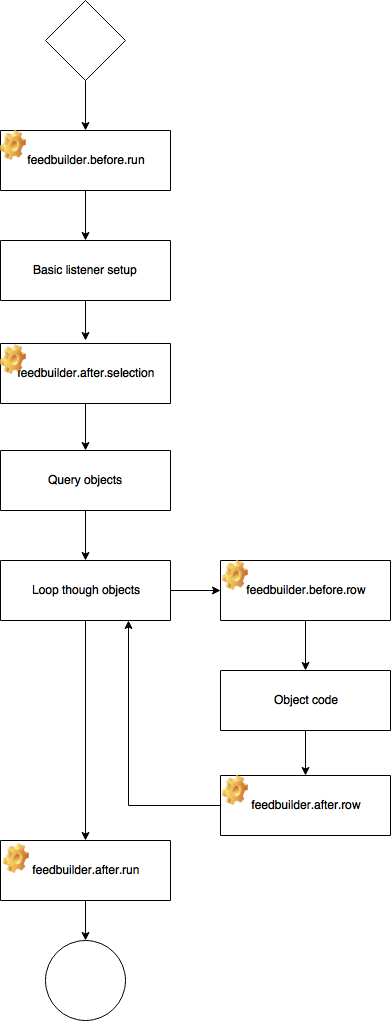
Ignore cache in your feed
It is possible to ignore the cache in your feed while developing or testing. You can give the run method in the composer a second boolean parameter, so it clears the cache before it runs the query code.
In the browser you can add the following get parameter to the feed: ...name-of-json.json?ignoreCache=true then the cache will be cleared before you run the feedbuilder.
Example of a export to JSON
Create a class and a method where the writer is been located.
<?php

namespace FeedBuilderBundle\EventListener;

use FeedBuilderBundle\Event\FeedBuilderEvent;

class ExportExample
{
    const FEED_TITLE = 'Testfeed';

    public function fileHandler(FeedBuilderEvent $event){

        if($event->getConfig()->get('title') === self::FEED_TITLE)
        {
            $arr['products'] = $event->getResult();

            $dir = PIMCORE_SYSTEM_TEMP_DIRECTORY.DIRECTORY_SEPARATOR.'export';

            $name = 'json_export_'.time().'.json';
            if(!file_exists($dir)){
                mkdir($dir);
            }
            file_put_contents($dir.DIRECTORY_SEPARATOR.$name,json_encode($arr, JSON_PRETTY_PRINT));
        }
    }
}
Now we have a writer that writes the json content to a file. Now we have to connect the listener after that the export has been runned.
We will do that in the service.yml
    FeedBuilderBundle\EventListener\ExportExample:
        tags:
            - { name: kernel.event_listener, event: feedbuilder.after.run, method: fileHandler }
统计信息
- 总下载量: 2.31k
- 月度下载量: 0
- 日度下载量: 0
- 收藏数: 5
- 点击次数: 3
- 依赖项目数: 0
- 推荐数: 0
其他信息
- 授权协议: MIT
- 更新时间: 2018-01-02