kamaro/sdc
Composer 安装命令:
composer require kamaro/sdc
包简介
A package to interact with Sales Data Controllers (SDC) for Rwanda Revenue Authority
README 文档
README
Sales Data Controller is the a device that is enforced by law to monitor all sales that takes place within a shop that pays VAT. This package controls SDC devices.
Structure
src/
tests/
vendor/
Installation
Installation
Server Requirements
KAMARO SDC has a few system requirements. Of course, most of these requirements are satisfied by the Laragon, so it's highly recommended that you use Laragon as your local Laravel development environment.
However, if you are not using Laragon, you will need to make sure your server meets the following requirements:
- PHP >= 7.1.0
- OpenSSL PHP Extension
- Mbstring PHP Extension
- Windows 10
- Php Serial extension for windows
Installing KAMARO SDC
KAMARO utilizes Composer to manage its dependencies. So, before using this package, make sure you have Composer installed on your machine.
Via Composer Create-Project
Alternatively, you may also install Laravel by issuing the Composer create-project command in your terminal:
composer create-project kamaro/sdc your_project_name_here dev-master
Install in existing project
composer require Kamaro/Sdc
Usage
Register php serial extension.
Each time you are opening the port, You are required to register it with your license from the vendor or the Serial Port.
<?php
$device = new Kamaro\Sdc\SDCController('COM5','KAMARO LAMBERT #1','12345123'); // Assume your SDC is connect to COM Port 5
echo $device->isOpen(); // true
Get SDC id
<?php
$device = new Kamaro\Sdc\SDCController('COM5'); // Assume your SDC is connect to COM Port 5
echo $device->getID(); // SDC002001531 equivalent to the connected SDC
Get SDC status
<?php
$device = new Kamaro\Sdc\SDCController('COM5');
print_r($device->getStatus());
Results
array(6) {
  ["SDC_SERIAL_NUMBER"]=>
  string(12) "SDC002000173"
  ["FIRMWARE_VERSION"]=>
  string(10) "2.1302.2.8"
  ["HARDWARE_REVISION"]=>
  string(3) "530"
  ["THE_NUMBER_OF_CURRENT_SDC_DAILY_REPORT"]=>
  string(2) "37"
  ["LAST_REMOTE_AUDIT_DATE_TIME"]=>
  string(19) "28/03/2014 11:14:08"
  ["LAST_LOCAL_AUDIT_DATE_TIME"]=>
  string(0) ""
}
Send Receipt Data
This is is when you want to send tax information to the SDC, you will need to follow below format other wise The package will throw an exception.
Types of Invoice
| RECEIPT TYPE | TRANSACTION TYPE | RECEIPT LABEL |
|---|---|---|
| NORMAL | SALES | NS |
| NORMAL | REFUND | NR |
| COPY | SALES | CS |
| COPY | REFUND | CR |
| TRAINING | SALES | TS |
| TRAINING | REFUND | TR |
| PRO FORMA | SALES | PS |
Format
RtypeTTypeMRC,TIN,Date TIME, Rnumber,TaxRate1,TaxrRate2,TaxRate3,TaxRate4,Amount1,Amount2,Amount3,Amount4,Tax1,Tax2,Tax3,Tax4
Example
NS01012345,100600570,11/05/2016 12:35:20,23,0.00,18.00,0.00,0.00,11.00,12.00,0.00,0.00,0.00,1.83,0.00,0.00
<?php
// Set Data
$data = "NS01012345,100600570,14/04/2017 12:35:20,23,0.00,18.00,0.00,0.00,11.00,12.00,0.00,0.00,0.00,1.83,0.00,0.00";

// Get Device Instance on PORT 5
$device = new Kamaro\Sdc\SDCController('COM5');
echo $device->sendReceiptData($data); // P for success or ERROR
Get Signature
After sending receipt data to the device, You will need to send another request to get Internal Data and signature to Be put on the Invoice. You have to pass invoice Number as parameter
<?php
// Get Device Instance on PORT 5
$device = new Kamaro\Sdc\SDCController('COM5');
$results = $device->getSignature(23); // Previous Sent Invoice Number 23

var_dump($results);
Results
array(5) {
  ["date_time"]=>
  string(19) "14/04/2017 15:50:40"
  ["SDC_ID"]=>
  string(12) "SDC002000173"
  ["SDC_RECEIPT_NUMBER"]=>
  string(12) "1127/1429/NS"
  ["INTERNAL_DATA"]=>
  string(32) "6RUG-P4NR-7UIJ-EL7I-WS54-UN7R-MI"
  ["RECEIPT_SIGNATURE"]=>
  string(19) "5T54-N5GG-B2WY-IY6S"
}
Send Electronic Journal
Now at this stage you have all information required to build a certified invoice, You will add Internal Data and signature you got from getSignature method to your invoice then build your invoice and send it line by line.
B mark for begin of the receipt or the first line of the receipt N mark for line into the body of receipt E mark for end of receipt or the last line of the receipt Read the file and display it line by line.
Assume our final receipt looks like below
B 				  Trade Name
N 				Gikondo, Kigali
N 				TIN: 100600570
N                      COPY
N -------------------------------------------------
N                    Normal Sale
N -------------------------------------------------
N           REFUND IS APPROVED ONLY FOr
N              ORIGINAL SALES RECEIPT
N                    400600570
N ------------------------------------------------
N Plain Bread            1000.00x 1.00 1000.00A-EX
N Wriggly gum                  60.00x 5.00 300.00B
N ------------------------------------------------
N         THIS IS NOT AN OFFICIAL RECEIPT
N ------------------------------------------------
N TOTAL                                  -36139.50
N TOTAL                         B-18.00% -36139.50
N TOTAL                             TAX B -5512.81
N ------------------------------------------------
N CASH                                   -36139.50
N ITEMS NUMBER                                   1
N ------------------------------------------------
N               SDC INFORMATION
N Date: 14/04/2017                  Time: 11:48:27
N SDC ID:                            SDC001000001
N RECEIPT NUMBER:                       12/259 NR
N                Internal Data:
N         IR84-99TN-FCYY-CE22-4HWE-V5TA-EE
N              Receipt Signature:
N             669X-TBMM-GPE4-445D
N -----------------------------------------------
N RECEIPT NUMBER:                             153
N DATE: 25/5/2012                  TIME: 11:50:24
N MRC:                                   01012345
N -----------------------------------------------
N                 THANK YOU
E         WE APPRECIATE YOUR BUSINESS
Assume you are reading a file that has a receipt called receipt.txt You would do it like below.
	$receipt = __DIR__.'/stubs/A8.txt';
	$lines   = file($receipt);
	$endLine = count($lines) - 1;

	$sequence = 32;

	$device = new Kamaro\Sdc\SDCController('COM5');

	foreach ($lines as $key => $line) {
	    // Update sequence
	    if ($sequence > 127) {
			$sequence = 32;
		}
		switch ($key) {
			case 0:
				$results = $device->sendElectronicJournal('B'.$line,$sequence);
				break;
			case $endLine:
				$results = $device->sendElectronicJournal('E'.$line,$sequence);
				break;
			default:
				$results = $device->sendElectronicJournal('N'.$line,$sequence);
				break;
		}
		$sequence++;
	}
Change log
Please see CHANGELOG for more information on what has changed recently.
Testing
Using composer and PHPUNIT
If you have phpunit installed globally then go to the project directory and run
$ composer test
Using traditional way.
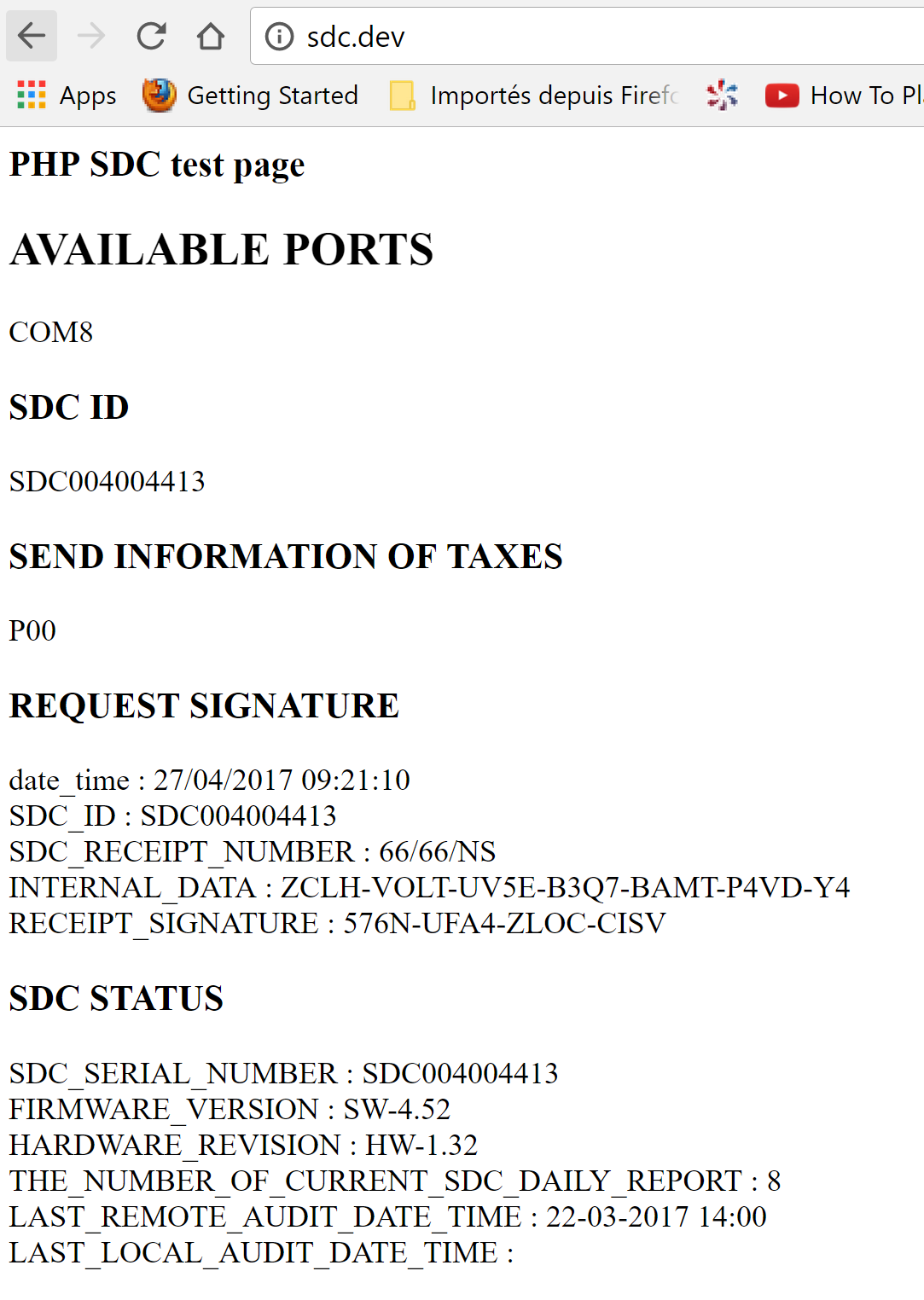
Go to your the index.php from root directory of this package and update the port of the SDC then visit it from your browser.
You should see a page like below
Contributing
Please see CONTRIBUTING and CONDUCT for details.
Security
If you discover any security related issues, please email :author_email instead of using the issue tracker.
Credits
- KAMARO Lambert
- [All Contributors][link-contributors]
License
The MIT License (MIT). Please see License File for more information.
kamaro/sdc 适用场景与选型建议
kamaro/sdc 是一款 基于 PHP 开发的 Composer 扩展包,目前已累计 24 次下载、GitHub Stars 达 4, 最近一次更新时间为 2017 年 04 月 14 日, 在 PHP 生态内属于活跃度较高的组件。
它主要适用于以下技术方向: 「sdc」 「kamaro」 等业务场景。在实际项目中,围绕这些方向常见需要落地的问题包括:接口对接、性能调优、并发安全、与既有框架(Laravel / ThinkPHP / Yii / Webman 等)的兼容适配,以及生产环境的日志埋点与稳定性保障。
我们在过去多个企业项目中使用过 kamaro/sdc 或与其功能相近的方案,如果你在选型或落地过程中遇到问题,例如 版本兼容、二次改造、私有化封装、与内部系统对接、生产 BUG 排查,欢迎联系我们协助评估。
基于 kamaro/sdc 在你已有业务上做功能扩展、字段裁剪、UI 适配、与内部账号 / 权限 / 日志系统的深度对接。
线上偶发问题、内存泄漏、慢查询、并发异常等排查修复;针对高流量场景做缓存、队列、索引层面的调优。
承接完整的项目从需求 → 设计 → 开发 → 上线 → 长期运维;也可按月提供技术保姆服务。
与 kamaro/sdc 相关的其它包
同方向 / 同关键字的高下载量 PHP Composer 包推荐,方便对比选型:
CLI tool to validate Drupal Single Directory Component (.component.yml) files.
A performance-optimized SDC implementation for Symfony UX components with automatic discovery and static metadata registry.
Awesome package for unit conversion
统计信息
- 总下载量: 24
- 月度下载量: 0
- 日度下载量: 0
- 收藏数: 4
- 点击次数: 15
- 依赖项目数: 0
- 推荐数: 0
其他信息
- 授权协议: MIT
- 更新时间: 2017-04-14