loupekit/laravel
Composer 安装命令:
composer require loupekit/laravel
包简介
Loupe for Laravel — embeddable visual feedback that stores comments in your own database, gates access per user, serves the Loupe dashboard, and exposes the backlog to Claude Code over MCP.
README 文档
README

loupekit/laravel
Loupe for Laravel — visual feedback, in your own app.
Your users pin a comment to any element on your live product and capture a screenshot.
Comments are stored in your database, gated to your users, triaged on your dashboard,
and handed to Claude Code over MCP — no separate backend to run.
Website · GitHub · Full guide · Changelog · SDK
Overview
Traditional feedback — "the revenue card looks off on the dashboard" — loses the one thing an engineer needs: which element, in what state, on which page. Loupe captures all of it at the moment of the comment. This package brings that loop into any Laravel app: the widget is a single Blade directive, comments are Eloquent rows in your database, and the triage board is a route you own behind your auth.
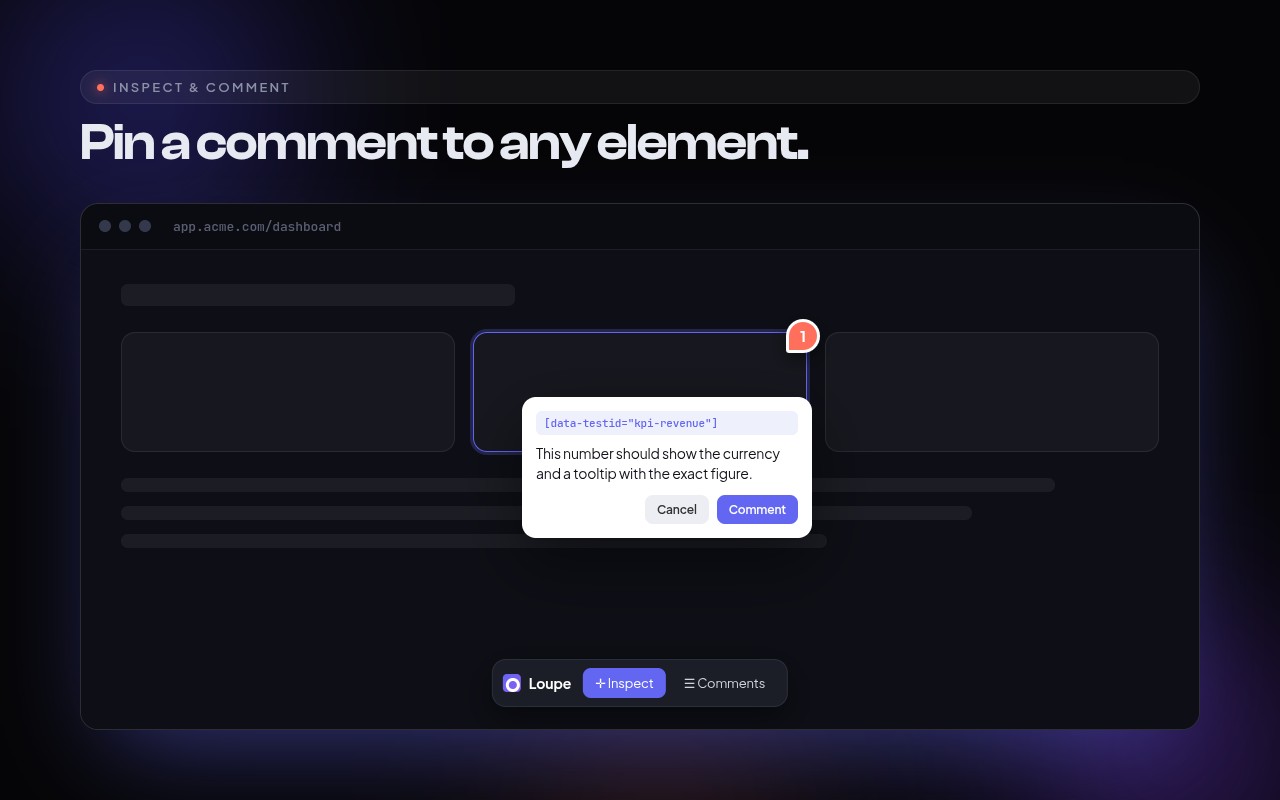
Table of contents
- Features
- Requirements
- Install
- Quick start
- How it works
- Authorization — who can use it
- The dashboard
- Claude Code over MCP
- Configuration
- Data model
- Try it locally
- Publishing
- Testing
- Related packages
Features
| 🎯 Click-to-comment inspector | Hover-highlight any element, click to pin a comment — dropped in with one @loupeWidget directive. |
| ▭ Free-region screenshots | Drag a free-size box, screenshot exactly that area, comment on it. Anchors to the element under its center so it tracks reflow and scrolling. |
| 🔁 Redeploy-surviving re-anchoring | A multi-signal fingerprint re-locates the element after the UI changes; if it can't, the pin detaches instead of pointing at the wrong thing. |
| 🗄️ Your database | Comments are an Eloquent Comment model in a loupe_comments table. Swap in your own subclass to add relations/scopes. |
| 🔐 Per-user gating | loupe:use / loupe:admin Gate abilities and config closures decide who sees the widget and who opens the dashboard. |
| 📋 Dashboard on your routes | The full Kanban triage board at /loupe/dashboard, behind your session auth. |
| 🤖 Claude Code over MCP | php artisan mcp:start loupe hands Claude the fully-contextual backlog. |
| 🔑 No secrets to manage | Authenticates with your existing session + CSRF token. No HMAC keys. |
| ✅ 100% tested | A Testbench suite with a hard 100% line-coverage gate, across Laravel 11/12/13. |
Requirements
| Supported | |
|---|---|
| PHP | 8.4 and higher |
| Laravel | 11, 12, 13 |
| Database | anything Eloquent supports (MySQL, PostgreSQL, SQLite, SQL Server) |
| MCP (optional) | laravel/mcp ^0.8 — Laravel 11, 12 & 13 |
Install
composer require loupekit/laravel
php artisan loupe:install
php artisan migrate
loupe:install publishes the config, migration and browser assets (to public/vendor/loupe),
then publishes and registers an App\Providers\LoupeServiceProvider where you control access.
Quick start
1. Add the widget to your Blade layout, just before </body>:
@loupeWidget
</body>
2. Decide who sees it. By default the widget and dashboard are visible only in local.
Open app/Providers/LoupeServiceProvider.php and grant access:
Gate::define('loupe:use', fn ($user) => $user->is_staff);   // who sees the widget
Gate::define('loupe:admin', fn ($user) => $user->is_admin);  // who opens the dashboard
3. Open the board at /loupe/dashboard. That's the whole setup.
How it works
flowchart LR
  subgraph App["Your Laravel app"]
    W["@loupeWidget<br/>(Loupe SDK)"]
    API["/loupe/v1/*<br/>Comment + Blob controllers"]
    DASH["/loupe/dashboard<br/>Kanban board"]
    DB[("loupe_comments<br/>your database")]
    FS[["screenshots<br/>your disk"]]
    MCP["php artisan<br/>mcp:start loupe"]
  end
  CLAUDE["Claude Code"]

  W -->|"session cookie + CSRF"| API --> DB
  API --> FS
  DASH --> API
  MCP --> DB
  CLAUDE <-->|MCP| MCP
Loading
Identity is always the authenticated session user (auth()->user()); the store endpoint rejects
a comment whose author.id is not the current user, so nobody can post as someone else.
Authorization — who can use it
Two abilities, checked in this order — config closure, then Gate ability:
// Option A — Gate abilities (in the published App\Providers\LoupeServiceProvider)
Gate::define('loupe:use',   fn ($user) => $user->hasRole('staff'));
Gate::define('loupe:admin', fn ($user) => $user->hasRole('admin'));

// Option B — config closures (config/loupe.php); take precedence over the Gates
'authorize' => [
    'use'       => fn ($user) => $user->can_give_feedback,
    'dashboard' => fn ($user) => $user->is_admin,
],
Denied users never receive the widget markup, and the API/dashboard return 403.
The dashboard
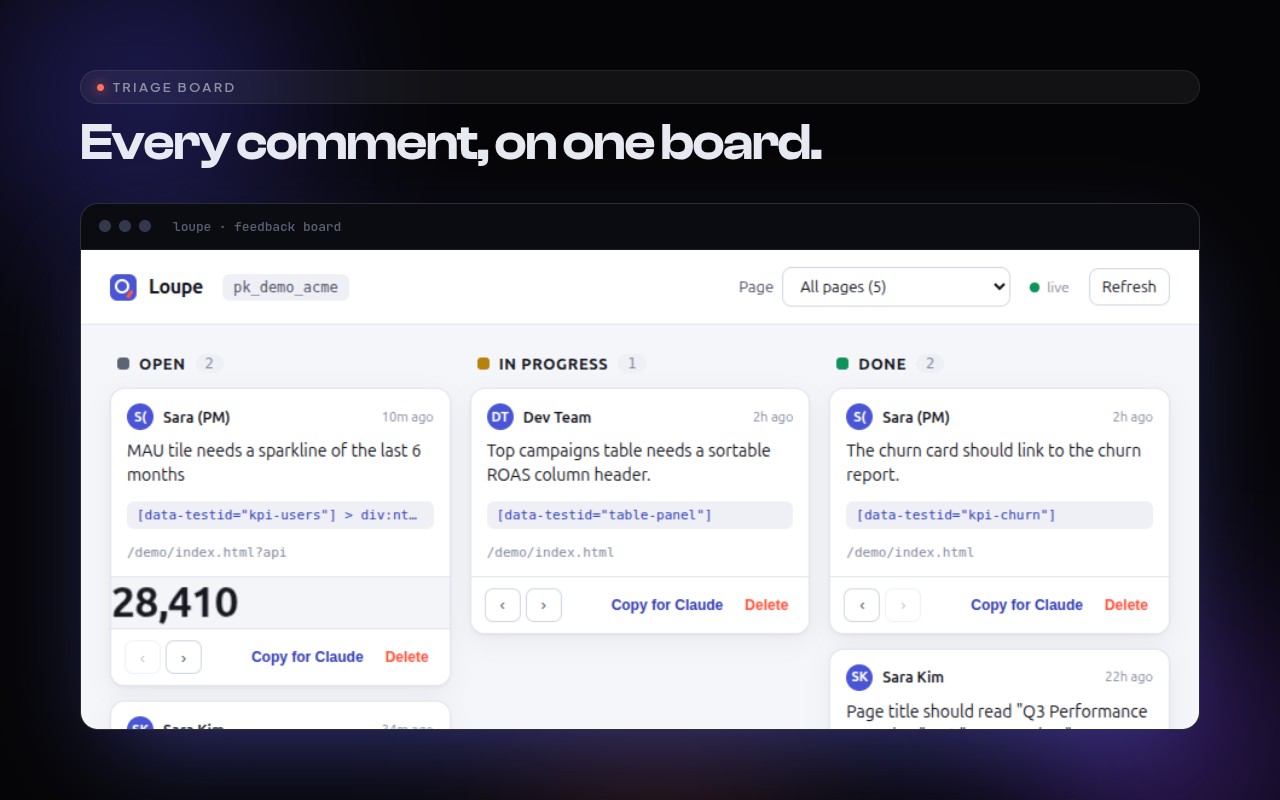
The full Kanban board — open / in progress / done, page filter, screenshot thumbnails, status
moves, delete, and Copy for Claude — served at /loupe/dashboard behind your web+auth
middleware and the loupe:admin ability. Configuration is injected server-side, so no secret
ever reaches the browser.
Claude Code over MCP
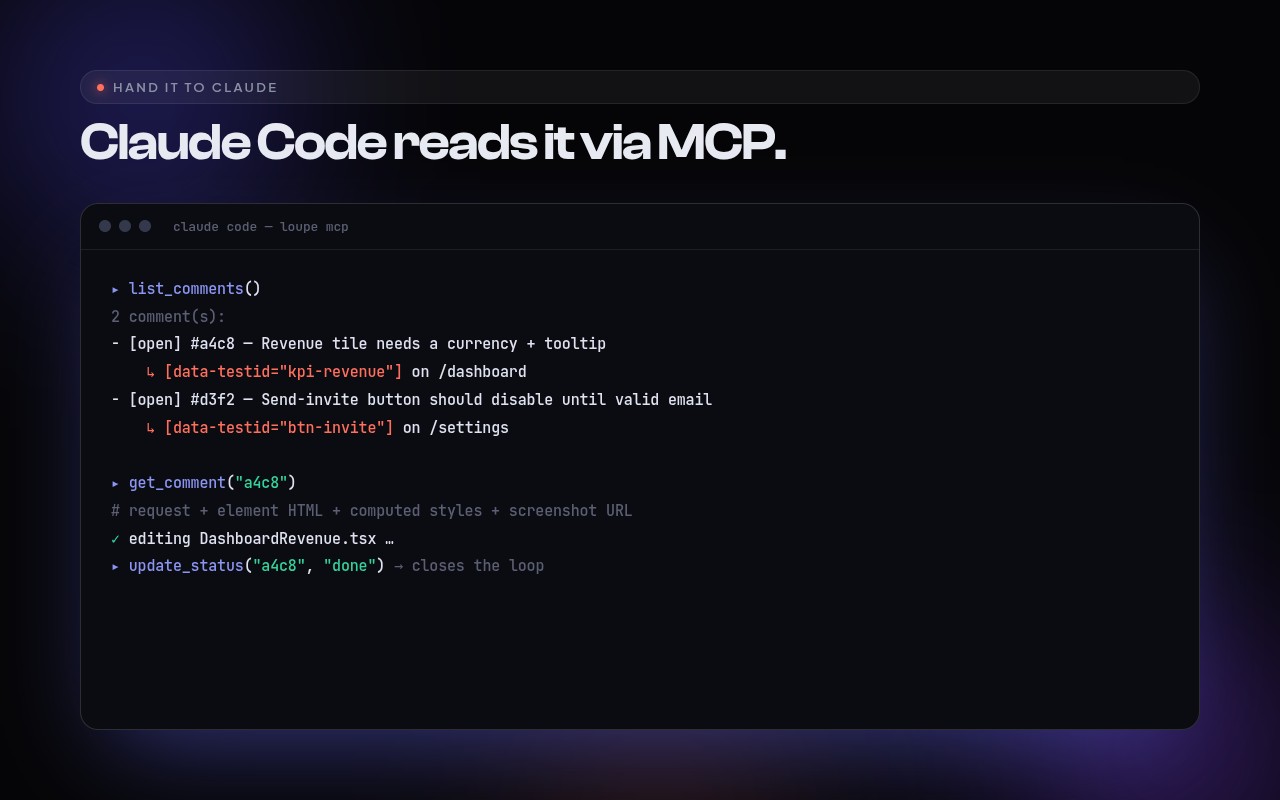
With laravel/mcp installed, a local MCP server named loupe is registered automatically:
php artisan mcp:start loupe
It reads your database directly (no HTTP hop, no admin key) and exposes three tools:
| Tool | Arguments | Returns |
|---|---|---|
list_comments |
status?, url? |
the backlog, newest first |
get_comment |
id |
Claude-ready package: request + element HTML + computed styles + screenshot (or region rect) |
update_status |
id, status |
marks a comment open / in_progress / done |
Configuration
config/loupe.php (published by loupe:install):
| Key | Default | Purpose |
|---|---|---|
enabled |
true |
Master switch. |
path |
loupe |
Route prefix for the API + dashboard. |
project_key |
app |
Scopes comments (one app = one project). |
middleware.api |
['web','auth'] |
Guards the JSON API. |
middleware.dashboard |
['web','auth'] |
Guards the dashboard. |
authorize.use / authorize.dashboard |
null |
Closures fn($user): bool (take precedence over Gates). |
user_resolver |
null |
Customize the {id,name,email} payload sent to the SDK. |
comment_model |
Loupekit\Loupe\Models\Comment |
Swap for your own subclass. |
disk |
public |
Filesystem disk for screenshots. |
See the full guide for Sanctum/SPA setups, private screenshot disks, and the complete reference.
Data model
Migration create_loupe_comments_table → loupe_comments:
| Column | Type | Notes |
|---|---|---|
id |
string (PK) | client-generated UUID |
project_key |
string, indexed | scopes to this app |
url |
text | normalized (utm / click ids stripped) |
status |
string, indexed | open · in_progress · done |
body |
text | the comment |
kind |
string | element · region |
author / author_id |
json / string | {id,name,email?} + denormalized id |
anchor / context / offset |
json | fingerprint, element HTML + styles, pin position |
region |
json, nullable | rectangle for region comments |
screenshot_url |
text, nullable | URL of the stored screenshot |
created_at / updated_at |
timestamps |
Try it locally
Point a scratch Laravel app at this package with a path repository:
// composer.json of your test app
"repositories": [
  { "type": "path", "url": "../loupe/packages/laravel" }
]
composer require loupekit/laravel:@dev php artisan loupe:install && php artisan migrate # add @loupeWidget to resources/views/…, log in, and open /loupe/dashboard
Publishing
This package lives in the Loupe monorepo under packages/laravel. Packagist reads a
repo's root composer.json, so it's mirrored to a dedicated repo automatically by
.github/workflows/laravel-split.yml:
- every push to
mainsyncs the split repo'smain; - every
vX.Y.Ztag is forwarded to the split repo → Packagist auto-updates.
The same tag also drives the npm release (@loupekit/*), so one vX.Y.Z tag ships the
npm packages and the Packagist package together.
One-time setup:
- Create the target repo (default
loupekit/laravel; override via theLARAVEL_SPLIT_ORG/LARAVEL_SPLIT_REPOrepository variables). - Add a Personal Access Token with
reposcope as theACCESS_TOKENsecret. - Submit the split repo once at packagist.org/packages/submit and enable Auto-update (the Packagist GitHub webhook).
After that, releasing is just: git tag -a vX.Y.Z && git push --tags.
Testing
composer install
composer test               # run the suite
composer test:coverage-100  # run with the hard 100% coverage gate
Every push runs the suite across Laravel 11/12/13 in CI
(.github/workflows/laravel.yml).
The browser bundles in resources/dist are vendored from @loupekit/sdk and
@loupekit/dashboard; refresh them with bin/sync-assets.sh after changing either.
Related packages
- @loupekit/sdk — the embeddable widget (bundled here).
- @loupekit/mcp — the standalone MCP server.
- @loupekit/shared — canonical types +
normalizeUrl.
Author
Created and maintained by Mohamed Ashraf Elsaed — LinkedIn · GitHub · m.ashraf.saed@gmail.com
License
统计信息
- 总下载量: 0
- 月度下载量: 0
- 日度下载量: 0
- 收藏数: 0
- 点击次数: 1
- 依赖项目数: 0
- 推荐数: 0
其他信息
- 授权协议: MIT
- 更新时间: 2026-07-11