macocci7/bash-colorizer
Composer 安装命令:
composer require macocci7/bash-colorizer
包简介
Let's make your bash terminal full of colors!
README 文档
README

1. Features
Bash Colorizer outputs strings to the bash terminal with specified colors and attributes.
Let's make your bash terminal full of colors!
use Macocci7\BashColorizer\Colorizer;

Colorizer::attributes(['italic'])
        ->foreground('#ffff00')
        ->background('#0000ff')
        ->echo('Hi, there!', PHP_EOL);
2. Contents
- 1. Features
- 2. Contents
- 3. Verified Terminals
- 4. Requirements
- 5. Installation
- 6. Usage
- 7. Examples
- 8. LICENSE
3. Verified Terminals
- VSCode Terminal (VSCode 1.99.1 / Windows 11)
- Windows Terminal 1.22.10731.0
4. Requirements
- PHP 8.1 or later installed
- Composer v2 installed
- Bash v5 installed (or Zsh)
5. Installation
composer require macocci7/bash-colorizer
6. Usage
6.1. Basic Usage
-
Import composer's
autoload.phpat first.<?php require_once __DIR__ . '/../vendor/autoload.php';
-
Displaying messages:
static calls:
use Macocci7\BashColorizer\Colorizer;

Colorizer::echo("Hi, there!");
Colorizer::echo(" How's it going with you?", PHP_EOL);
method chains:
Colorizer::echo("Hi, there!");
    ->echo(" How's it going with you?", PHP_EOL);
creating an instance:
$colorizer = new Colorizer;
$colorizer->echo("Hi, there!")
    ->echo(" How's it going with you?", PHP_EOL);
-
Configuration:
static call:
$config = [
    'attributes' => ['italic', 'bold'],
    'foreground' => 'black',
    'background' => 'green',
];

Colorizer::config($config);
Colorizer::echo("Hi, there!");
method chain:
Colorizer::config($config)
    ->echo("Hi, there!");
creating an instance:
// several ways
$colorizer = new Colorizer;
$colorizer = new Colorizer($config);
$colorizer = Colorizer::config($config);

$colorizer->config($config)
    ->echo("Hi, there!")
    ->echo(" How's it going with you?", PHP_EOL);
-
Setting attributes:
Colorizer::attributes(['underline', 'strike'])
    ->echo("Hi, there!", PHP_EOL);
See more: Available Attributes
-
Setting foreground color:
by name:
Colorizer::foreground('green')
    ->echo("Hi, there!", PHP_EOL);
by hex code:
Colorizer::foreground('#ffcc00')  // or #fc0
    ->echo("Hi, there!", PHP_EOL);
by number [0 - 255] (256 colors):
Colorizer::foreground(2)
    ->echo("Hi, there!", PHP_EOL);
by (RGB) array (24bit 16777216 colors):
Colorizer::foreground([0, 255, 0])
    ->echo("Hi, there!", PHP_EOL);
See more: Available Colors
-
Setting background color:
by name:
Colorizer::background("red")
    ->echo("Hi, there!", PHP_EOL);
by hex code:
Colorizer::background("#ffcc00")  // or #fc0
    ->echo("Hi, there!", PHP_EOL);
by number [0 - 255] (256 colors):
Colorizer::background(1)
    ->echo("Hi, there!", PHP_EOL);
by (RGB) array (24bit 16777216 colors):
Colorizer::background([255, 0, 0])
    ->echo("Hi, there!", PHP_EOL);
See more: Available Colors
-
Equivalent to
config():Colorizer::attributes(['double-underline', 'italic']) ->foreground("yellow") ->background("blue") ->echo("Hi, there!", PHP_EOL);
-
Setting underline color:
by hex code:
Colorizer::underline("#ffcc00")  // or #fc0
    ->echo("Hi, there!", PHP_EOL);
by number [0 - 255] (256 colors):
Colorizer::underline(1)
    ->echo("Hi, there!", PHP_EOL);
by (RGB) array (24bit 16777216 colors):
Colorizer::underline([255, 0, 0])
    ->echo("Hi, there!", PHP_EOL);
See more: Available Colors
-
Returning colorized string:
As an argument of echo:
echo Colorizer::config($config)
    ->encode("Hi, there!") . PHP_EOL;
This is also effective:
echo sprintf(
    "%s: %s%s",
    $name,
    Colorizer::config($config)
        ->encode("Hi, there!"),
    PHP_EOL
);
-
Returning human readable encoded string:
echo Colorizer::attributes(["bold"])
    ->background([255, 255, 0])
    ->foreground([0, 128, 255])
    ->readable('Hi, There!', PHP_EOL);
This code outputs the following string:
\033[1;38;2;0;128;255;48;2;255;255;0mHi, there!\033[m
Running bash command
echowith-eoption on this string takes colorizing effect:bash-$ echo -e '\033[1;38;2;0;128;255;48;2;255;255;0mHi, there!\033[m'
6.2. Available Attributes
| Attribute | VSCode Terminal | Windows Terminal |
|---|---|---|
reset |
〇 | 〇 |
bold |
〇 | ❌ |
faint |
〇 | 〇 |
italic |
〇 | 〇 |
underline |
〇 | 〇 |
blink |
❌ | ▲ *1 |
fast-blink |
❌ | ▲ *1, *2 |
reverse |
〇 | 〇 |
conceal |
〇 | 〇 |
strike |
〇 | 〇 |
gothic |
❌ | ❌ |
double-underline |
〇 | 〇 |
normal |
〇 | 〇 |
no-italic |
〇 | 〇 |
no-underline |
〇 | 〇 |
no-blink |
ー *3 |
〇 *4 |
proportional-spacing |
ー | ー |
no-reverse |
〇 | 〇 |
no-conceal |
〇 | 〇 |
no-strike |
〇 | 〇 |
no-proportional-spacing |
ー | ー |
framed |
❌ | ❌ |
encircled |
❌ | ❌ |
overlined |
〇 | 〇 |
no-framed-no-encircled |
ー *3 |
ー *3 |
no-overlined |
〇 | 〇 |
underline-color |
〇 | ▲ *5 |
*1: No effect with
faint
*2: Notfast(blinks at the same rate asblink)
*3: Unknown because the corresponding attribute has no effect
*4: Also effective againstfast-blink
*5: Partially effective
e.g.) on VSCode Terminal (theme:Dark Modern)

See more: Select Graphic Rendition parameters | ANSI escape code | Wikipedia
6.3. Available Colors
-
foreground/backgroundcolor names:blackredgreenyellowbluemagentacyanwhiteextendeddefault
e.g.) on VSCode Terminal (theme:
Dark Modern)Foregound Colors Background Colors 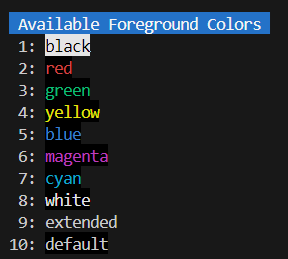
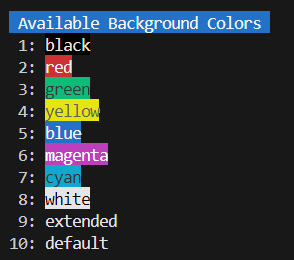
-
256 colors [ 0 - 255 ]:
foreground/background/underlinee.g.) foreground colors on VSCode Terminal (theme:
Dark Modern):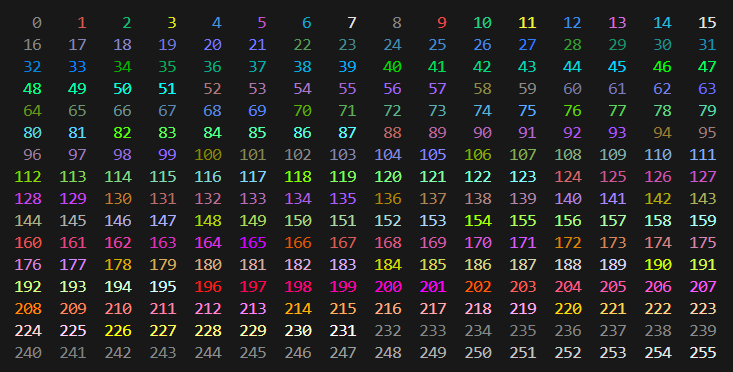
e.g.) background colors on VSCode Terminal (theme:
Dark Modern):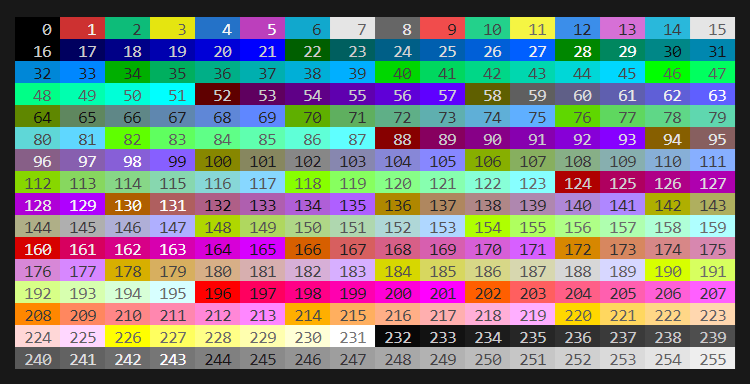
e.g.) underline colors on VSCode Terminal (theme:
Dark Modern):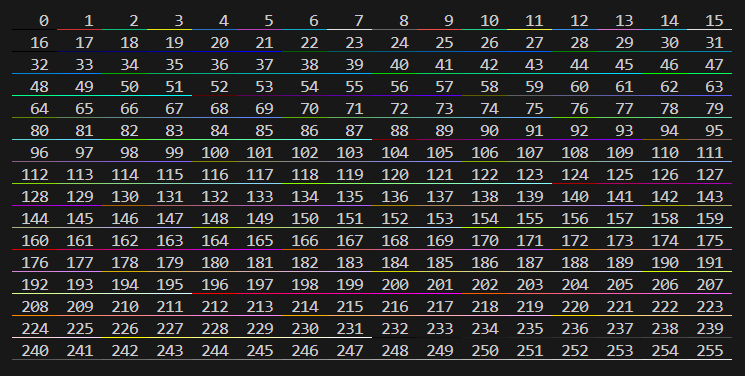
-
24bit (16777216) colors:
e.g.) foreground colors on VSCode Terminal (theme:
Dark Modern):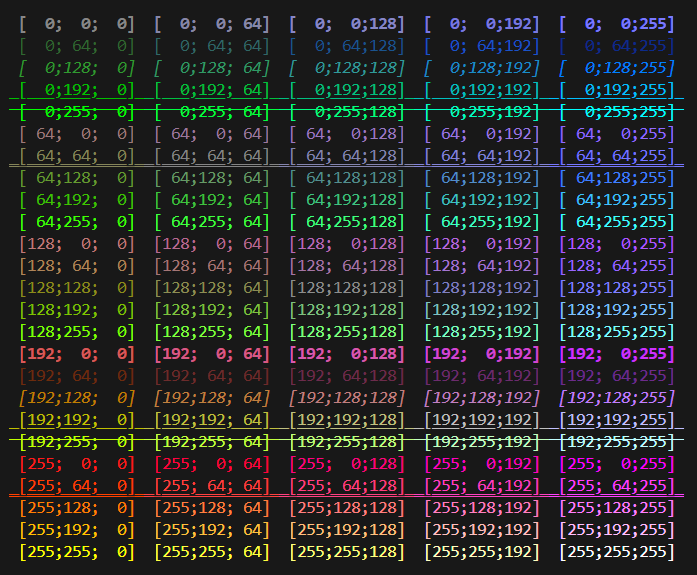
e.g.) background colors on VSCode Terminal (theme:
Dark Modern):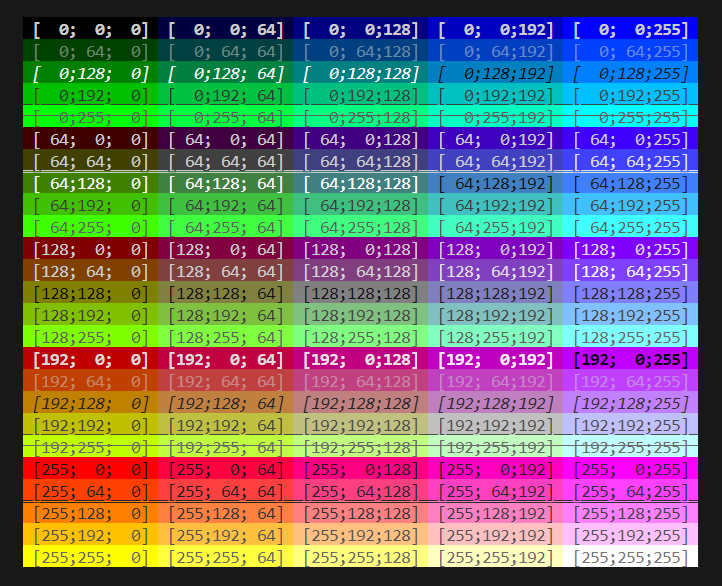
e.g.) underline colors on VSCode Terminal (theme:
Dark Modern):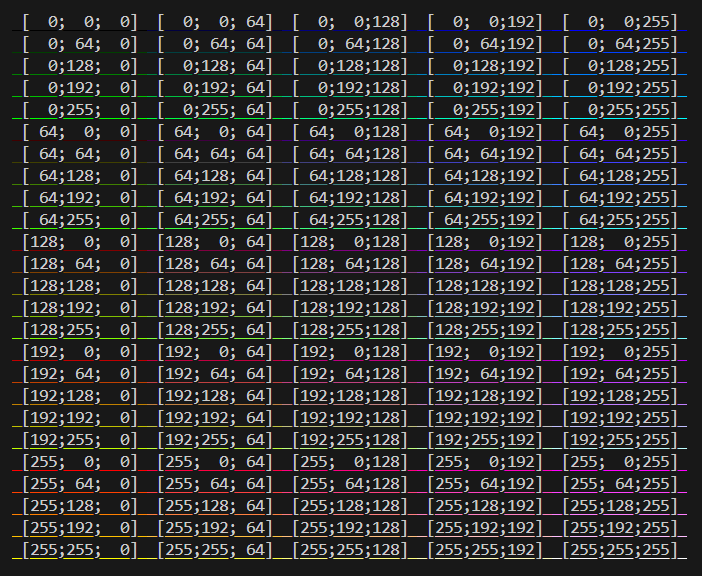


7. Examples
Example codes are in playground directory.
- colorizer.php
- attributes.php
- foreground.php
- background.php
- foreground_256colors.php
- foreground_24bitcolors.php
- background_256colors.php
- background_24bitcolors.php
- underline_256colors.php
- underline_24bitcolors.php
- readable.php
- converter.php
8. LICENSE
Copyright 2025 macocci7.
macocci7/bash-colorizer 适用场景与选型建议
macocci7/bash-colorizer 是一款 基于 PHP 开发的 Composer 扩展包,目前已累计 10 次下载、GitHub Stars 达 1, 最近一次更新时间为 2025 年 04 月 09 日, 在 PHP 生态内属于活跃度较高的组件。
我们在过去多个企业项目中使用过 macocci7/bash-colorizer 或与其功能相近的方案,如果你在选型或落地过程中遇到问题,例如 版本兼容、二次改造、私有化封装、与内部系统对接、生产 BUG 排查,欢迎联系我们协助评估。
基于 macocci7/bash-colorizer 在你已有业务上做功能扩展、字段裁剪、UI 适配、与内部账号 / 权限 / 日志系统的深度对接。
线上偶发问题、内存泄漏、慢查询、并发异常等排查修复;针对高流量场景做缓存、队列、索引层面的调优。
承接完整的项目从需求 → 设计 → 开发 → 上线 → 长期运维;也可按月提供技术保姆服务。
统计信息
- 总下载量: 10
- 月度下载量: 0
- 日度下载量: 0
- 收藏数: 1
- 点击次数: 11
- 依赖项目数: 0
- 推荐数: 0
其他信息
- 授权协议: MIT
- 更新时间: 2025-04-09