macocci7/php-frequency-table
Composer 安装命令:
composer require macocci7/php-frequency-table
包简介
it's easy to use for creating frequency distribution tables.
README 文档
README
1. Features
PHP-FrequencyTable is a library to operate Frequency Tables easily.
You can create Frequency Tables easily just by setting data in array and Class Range.
You can get or save them in some formats, Markdown Table, CSV, TSV and HTML.
English(default) and Japanese are supported.
You can also get parsed data as hash array of PHP.
2. Contents
3. Requirements
- PHP 8.3 or later
- Composer
4. Installation
composer require macocci7/php-frequency-table
5. Usage
- 5.1. Basic Usage
- 5.2. Changing Data and Class Range
- 5.3. Changing Columns for Output
- 5.4. Changing Language
- 5.5. Saving data into CSV
- 5.6. Saving data into TSV
- 5.7. Saving data into HTML
- 5.8. Saving data into Markdown
- 5.9. Retrieving Parsed Data
5.1. Basic Usage
You can use FrequencyTable class as follows.
-
<?php

require_once __DIR__ . '/../vendor/autoload.php';

use Macocci7\PhpFrequencyTable\FrequencyTable;

$ft = new FrequencyTable([
    'data' => [ 0, 5, 10, 15, 20, ],
    'classRange' => 10,
]);
echo $ft->meanOn()->markdown();
-
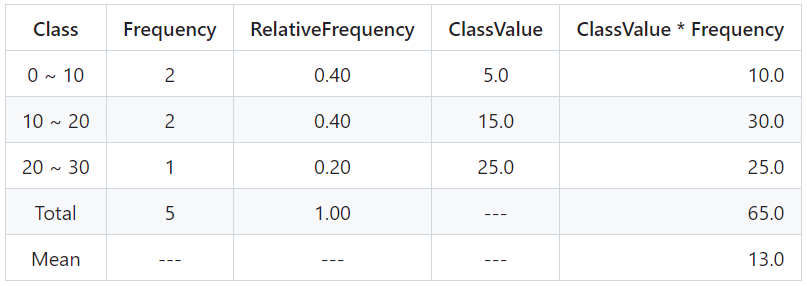
Output: examples/BasicUsage.md
|Class|Frequency|RelativeFrequency|ClassValue|ClassValue * Frequency|
|:---:|:---:|:---:|:---:|---:|
|0 ~ 10|2|0.40|5.0|10.0|
|10 ~ 20|2|0.40|15.0|30.0|
|20 ~ 30|1|0.20|25.0|25.0|
|Total|5|1.00|---|65.0|
|Mean|---|---|---|13.0|
-
View: examples/BasicUsage.md
Class Frequency RelativeFrequency ClassValue ClassValue * Frequency 0 ~ 10 2 0.40 5.0 10.0 10 ~ 20 2 0.40 15.0 30.0 20 ~ 30 1 0.20 25.0 25.0 Total 5 1.00 --- 65.0 Mean --- --- --- 13.0 -
Details:
- Import autoloader:
require_once __DIR__ . '/../vendor/autoload.php'; - Declare:
use Macocci7\PhpFrequencyTable\FrequencyTable; - Instantiate:
new FrequencyTable()- Option Params:
data,classRange,columns2Showdata: arrayclassRange: intcolumns2Show: array, acceptable values are as follows- 'Class'
- 'Frequency'
- 'CumulativeFrequency'
- 'RelativeFrequency'
- 'CumulativeRelativeFrequency'
- 'ClassValue'
- 'ClassValue * Frequency'
- 'Subtotal'
- 'RelativeSubtotal'
- 'CumulativeRelativeSubtotal'
- Option Params:
- Mean Row:
meanOff()as default, add bymeanOn(). - Get Frequency Table: by
markdown()in markdown format.
- Import autoloader:
5.2. Changing Data and Class Range
You can change data and class range after instantiation.
-
PHP: examples/ChangeDataClassRange.php
<?php

require_once __DIR__ . '/../vendor/autoload.php';

use Macocci7\PhpFrequencyTable\FrequencyTable;

$ft = new FrequencyTable();

$dataset = [
    'Group A' => [
        'data' => [ 90, 20, 80, 30, 70, 40, 60, ],
        'classRange' => 20,
    ],
    'Group B' => [
        'data' => [ 100, 10, 65, 40, 55, 90, 72, 84, ],
        'classRange' => 25,
    ],
];

echo "# Frequency Tables\n\n";
foreach ($dataset as $key => $data) {
    $ft->setClassRange($data['classRange']);
    $ft->setData($data['data']);
    echo "## " . $key . "\n\n";
    echo $ft->meanOn()->markdown() . "\n\n";
}
-
Output: examples/ChangeDataClassRange.md
# Frequency Tables

## Group A

|Class|Frequency|RelativeFrequency|ClassValue|ClassValue * Frequency|
|:---:|:---:|:---:|:---:|---:|
|20 ~ 40|2|0.29|30.0|60.0|
|40 ~ 60|1|0.14|50.0|50.0|
|60 ~ 80|2|0.29|70.0|140.0|
|80 ~ 100|2|0.29|90.0|180.0|
|Total|7|1.00|---|430.0|
|Mean|---|---|---|61.4|


## Group B

|Class|Frequency|RelativeFrequency|ClassValue|ClassValue * Frequency|
|:---:|:---:|:---:|:---:|---:|
|0 ~ 25|1|0.13|12.5|12.5|
|25 ~ 50|1|0.13|37.5|37.5|
|50 ~ 75|3|0.38|62.5|187.5|
|75 ~ 100|2|0.25|87.5|175.0|
|100 ~ 125|1|0.13|112.5|112.5|
|Total|8|1.00|---|525.0|
|Mean|---|---|---|65.6|
-
View: examples/ChangeDataClassRange.md
Frequency Tables
Group A
Class Frequency RelativeFrequency ClassValue ClassValue * Frequency 20 ~ 40 2 0.29 30.0 60.0 40 ~ 60 1 0.14 50.0 50.0 60 ~ 80 2 0.29 70.0 140.0 80 ~ 100 2 0.29 90.0 180.0 Total 7 1.00 --- 430.0 Mean --- --- --- 61.4 Group B
Class Frequency RelativeFrequency ClassValue ClassValue * Frequency 0 ~ 25 1 0.13 12.5 12.5 25 ~ 50 1 0.13 37.5 37.5 50 ~ 75 3 0.38 62.5 187.5 75 ~ 100 2 0.25 87.5 175.0 100 ~ 125 1 0.13 112.5 112.5 Total 8 1.00 --- 525.0 Mean --- --- --- 65.6 -
Details:
- Set Class Range:
setClassRange() - Set Data:
setData()
- Set Class Range:
5.3. Changing Columns for Output
-
PHP: examples/ChangeColumns.php
<?php

require_once __DIR__ . '/../vendor/autoload.php';

use Macocci7\PhpFrequencyTable\FrequencyTable;

$columns = [ 'Class', 'Frequency', ];
$ft = new FrequencyTable([
    'data' => [ 5, 10, 15, 20, 24, 27, 29, 30, 35, 40, ],
    'classRange' => 10,
    'columns2Show' => $columns,
]);

echo "# Changing Columns\n\n";

echo "## Case1:\n\n";
echo $ft->markdown() . "\n\n";

$columns = [ 'Class', 'Frequency', 'RelativeFrequency', ];
echo "## Case2:\n\n";
echo $ft->setColumns2Show($columns)->markdown() . "\n\n";

$columns = $ft->getValidColumns2Show();
echo "## Case3:\n\n";
echo $ft->setColumns2Show($columns)->meanOn()->markdown() . "\n\n";
-
Output: examples/ChangeColumns.md
# Changing Columns

## Case1:

|Class|Frequency|
|:---:|:---:|
|0 ~ 10|1|
|10 ~ 20|2|
|20 ~ 30|4|
|30 ~ 40|2|
|40 ~ 50|1|
|Total|10|


## Case2:

|Class|Frequency|RelativeFrequency|
|:---:|:---:|:---:|
|0 ~ 10|1|0.10|
|10 ~ 20|2|0.20|
|20 ~ 30|4|0.40|
|30 ~ 40|2|0.20|
|40 ~ 50|1|0.10|
|Total|10|1.00|


## Case3:

|Class|Frequency|CumulativeFrequency|RelativeFrequency|CumulativeRelativeFrequency|ClassValue|ClassValue * Frequency|Subtotal|RelativeSubtotal|CumulativeRelativeSubtotal|
|:---:|:---:|:---:|:---:|:---:|:---:|---:|---:|---:|---:|
|0 ~ 10|1|1|0.10|0.10|5.0|5.0|5.00|0.02|0.02|
|10 ~ 20|2|3|0.20|0.30|15.0|30.0|25.00|0.11|0.13|
|20 ~ 30|4|7|0.40|0.70|25.0|100.0|100.00|0.43|0.55|
|30 ~ 40|2|9|0.20|0.90|35.0|70.0|65.00|0.28|0.83|
|40 ~ 50|1|10|0.10|1.00|45.0|45.0|40.00|0.17|1.00|
|Total|10|10|1.00|1.00|---|250.0|235.00|1.00|1.00|
|Mean|---|---|---|---|---|25.0|23.50|---|---|
-
View: examples/ChangeColumns.md
Changing Columns
Case1:
Class Frequency 0 ~ 10 1 10 ~ 20 2 20 ~ 30 4 30 ~ 40 2 40 ~ 50 1 Total 10 Case2:
Class Frequency RelativeFrequency 0 ~ 10 1 0.10 10 ~ 20 2 0.20 20 ~ 30 4 0.40 30 ~ 40 2 0.20 40 ~ 50 1 0.10 Total 10 1.00 Case3:
Class Frequency CumulativeFrequency RelativeFrequency CumulativeRelativeFrequency ClassValue ClassValue * Frequency Subtotal RelativeSubtotal CumulativeRelativeSubtotal 0 ~ 10 1 1 0.10 0.10 5.0 5.0 5.00 0.02 0.02 10 ~ 20 2 3 0.20 0.30 15.0 30.0 25.00 0.11 0.13 20 ~ 30 4 7 0.40 0.70 25.0 100.0 100.00 0.43 0.55 30 ~ 40 2 9 0.20 0.90 35.0 70.0 65.00 0.28 0.83 40 ~ 50 1 10 0.10 1.00 45.0 45.0 40.00 0.17 1.00 Total 10 10 1.00 1.00 --- 250.0 235.00 1.00 1.00 Mean --- --- --- --- --- 25.0 23.50 --- --- -
Details:
- Get Acceptable Columns:
getValidColumns2Show() - Get Current Columns:
getColumns2Show() - Set Columns:
setColumns2Show()
- Get Acceptable Columns:
5.4. Changing Language
English and Japanese are supported. (English as default)
-
<?php

require_once __DIR__ . '/../vendor/autoload.php';

use Macocci7\PhpFrequencyTable\FrequencyTable;

$ft = new FrequencyTable([
    'data' => [ 5, 10, 12, 15, 20, 25, 30, ],
    'classRange' => 10,
]);
$ft->meanOn()->setColumns2Show($ft->getValidColumns2Show());

echo "# Supported Languages\n\n";
foreach ($ft->langs() as $index => $lang) {
    echo "## Language:[" . $lang . "]\n\n";
    echo $ft->lang($lang)->markdown() . "\n\n";
}
-
Output: examples/ChangeLang.md
# Supported Languages

## Language:[eng]

|Class|Frequency|CumulativeFrequency|RelativeFrequency|CumulativeRelativeFrequency|ClassValue|ClassValue * Frequency|Subtotal|RelativeSubtotal|CumulativeRelativeSubtotal|
|:---:|:---:|:---:|:---:|:---:|:---:|---:|---:|---:|---:|
|0 ~ 10|1|1|0.14|0.14|5.0|5.0|5.00|0.04|0.04|
|10 ~ 20|3|4|0.43|0.57|15.0|45.0|37.00|0.32|0.36|
|20 ~ 30|2|6|0.29|0.86|25.0|50.0|45.00|0.38|0.74|
|30 ~ 40|1|7|0.14|1.00|35.0|35.0|30.00|0.26|1.00|
|Total|7|7|1.00|1.00|---|135.0|117.00|1.00|1.00|
|Mean|---|---|---|---|---|19.3|16.71|---|---|


## Language:[ja]

|階級|度数|累積度数|相対度数|累積相対度数|階級値|階級値 × 度数|小計|相対小計|累積相対小計|
|:---:|:---:|:---:|:---:|:---:|:---:|---:|---:|---:|---:|
|0 ~ 10|1|1|0.14|0.14|5.0|5.0|5.00|0.04|0.04|
|10 ~ 20|3|4|0.43|0.57|15.0|45.0|37.00|0.32|0.36|
|20 ~ 30|2|6|0.29|0.86|25.0|50.0|45.00|0.38|0.74|
|30 ~ 40|1|7|0.14|1.00|35.0|35.0|30.00|0.26|1.00|
|合計|7|7|1.00|1.00|---|135.0|117.00|1.00|1.00|
|平均|---|---|---|---|---|19.3|16.71|---|---|
-
View: examples/ChangeLang.md
Supported Languages
Language:[eng]
Class Frequency CumulativeFrequency RelativeFrequency CumulativeRelativeFrequency ClassValue ClassValue * Frequency Subtotal RelativeSubtotal CumulativeRelativeSubtotal 0 ~ 10 1 1 0.14 0.14 5.0 5.0 5.00 0.04 0.04 10 ~ 20 3 4 0.43 0.57 15.0 45.0 37.00 0.32 0.36 20 ~ 30 2 6 0.29 0.86 25.0 50.0 45.00 0.38 0.74 30 ~ 40 1 7 0.14 1.00 35.0 35.0 30.00 0.26 1.00 Total 7 7 1.00 1.00 --- 135.0 117.00 1.00 1.00 Mean --- --- --- --- --- 19.3 16.71 --- --- Language:[ja]
階級 度数 累積度数 相対度数 累積相対度数 階級値 階級値 × 度数 小計 相対小計 累積相対小計 0 ~ 10 1 1 0.14 0.14 5.0 5.0 5.00 0.04 0.04 10 ~ 20 3 4 0.43 0.57 15.0 45.0 37.00 0.32 0.36 20 ~ 30 2 6 0.29 0.86 25.0 50.0 45.00 0.38 0.74 30 ~ 40 1 7 0.14 1.00 35.0 35.0 30.00 0.26 1.00 合計 7 7 1.00 1.00 --- 135.0 117.00 1.00 1.00 平均 --- --- --- --- --- 19.3 16.71 --- --- -
Details:
- Get Supported Langs:
langs() - Get Current Lang:
lang() - Set Lang:
- English(default):
lang('eng') - Japanese:
lang('ja')
- English(default):
- Get Supported Langs:
5.5. Saving data into CSV
-
PHP
<?php

require_once __DIR__ . '/../vendor/autoload.php';

use Macocci7\PhpFrequencyTable\FrequencyTable;

$ft = new FrequencyTable([
    'data' => [ 0, 5, 10, 15, 20, ],
    'classRange' => 10,
]);

$ft->meanOn()->save('test.csv');
-
Result:
test.csv"Class","Frequency","RelativeFrequency","ClassValue","ClassValue * Frequency" "0 ~ 10","2","0.40","5.0","10.0" "10 ~ 20","2","0.40","15.0","30.0" "20 ~ 30","1","0.20","25.0","25.0" "Total","5","1.00","---","65.0" "Mean","---","---","---","13.0" -
Details:
- There're 2 options for saving CSV.
-
save(PATH):PATHmust have.csvextension. -
csv(): params as followscsv( string|null $path = null, string $quotation = '"', string $eol = "\n" )
$path: File Path.- Bytes of csv file will be returned as type of int.
falsewill be returned when saving fails.- When
nullis given, csv will be returned as type of string.
$quotation: each values will be quoted with$quotation.- double quot(default): specify
'"' - single quot: specify
"'"
- double quot(default): specify
$eol: The end of each line will end with$eol."\n":LF(Line Feed)"\r":CR(Carrige Return)"\r\n":CRLF(Carrige Return + Line Feed)
For example:
echo $ft->csv(
    quotation: "'",
    eol: "\r\n",
);
results in
'Class','Frequency','RelativeFrequency','ClassValue','ClassValue * Frequency'
'0 ~ 10','2','0.40','5.0','10.0'
'10 ~ 20','2','0.40','15.0','30.0'
'20 ~ 30','1','0.20','25.0','25.0'
'Total','5','1.00','---','65.0'
-
- There're 2 options for saving CSV.
5.6. Saving data into TSV
-
PHP
<?php

require_once __DIR__ . '/../vendor/autoload.php';

use Macocci7\PhpFrequencyTable\FrequencyTable;

$ft = new FrequencyTable([
    'data' => [ 0, 5, 10, 15, 20, ],
    'classRange' => 10,
]);

$ft->meanOn()->save('test.tsv');
-
Result:
test.tsv"Class" "Frequency" "RelativeFrequency" "ClassValue" "ClassValue * Frequency" "0 ~ 10" "2" "0.40" "5.0" "10.0" "10 ~ 20" "2" "0.40" "15.0" "30.0" "20 ~ 30" "1" "0.20" "25.0" "25.0" "Total" "5" "1.00" "---" "65.0" "Mean" "---" "---" "---" "13.0" -
Details:
- There're 2 options for saving TSV
-
save(PATH):PATHmust have.tsvextension. -
tsv(): params as followstsv( string|null $path = null, string $quotation = '"', string $eol = "\n" )
$path: File Path.- Bytes of tsv file will be returned as type of int.
falsewill be returned when saving fails.- When
nullis given, tsv will be returned as type of string.
$quotation: each values will be quoted with$quotation.- double quot(default): specify
'"' - single quot: specify
"'"
- double quot(default): specify
$eol: The end of each line will end with$eol."\n":LF(Line Feed)"\r":CR(Carrige Return)"\r\n":CRLF(Carrige Return + Line Feed)
For example:
echo $ft->tsv(
    quotation: "'",
    eol: "\r\n",
);
results in
'Class' 'Frequency'     'RelativeFrequency'     'ClassValue'    'ClassValue * Frequency'
'0 ~ 10'        '2'     '0.40'  '5.0'   '10.0'
'10 ~ 20'       '2'     '0.40'  '15.0'  '30.0'
'20 ~ 30'       '1'     '0.20'  '25.0'  '25.0'
'Total' '5'     '1.00'  '---'   '65.0'
-
- There're 2 options for saving TSV
5.7. Saving data into HTML
-
PHP
<?php

require_once __DIR__ . '/../vendor/autoload.php';

use Macocci7\PhpFrequencyTable\FrequencyTable;

$ft = new FrequencyTable([
    'data' => [ 0, 5, 10, 15, 20, ],
    'classRange' => 10,
]);

$ft->meanOn()->save('test.html');
-
Result:
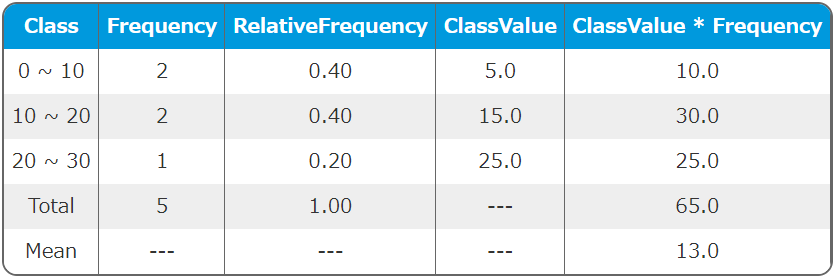
test.html<table> <tr><td>Class</td><td>Frequency</td><td>RelativeFrequency</td><td>ClassValue</td><td>ClassValue * Frequency</td></tr> <tr><td>0 ~ 10</td><td>2</td><td>0.40</td><td>5.0</td><td>10.0</td></tr> <tr><td>10 ~ 20</td><td>2</td><td>0.40</td><td>15.0</td><td>30.0</td></tr> <tr><td>20 ~ 30</td><td>1</td><td>0.20</td><td>25.0</td><td>25.0</td></tr> <tr><td>Total</td><td>5</td><td>1.00</td><td>---</td><td>65.0</td></tr> <tr><td>Mean</td><td>---</td><td>---</td><td>---</td><td>13.0</td></tr> </table>
-
View:
-
with css like this:
<style>
    table {
        border-collapse: separate;
        border-spacing: 0;
        border: 2px #666666 solid;
        border-radius: 12px;
        overflow: hidden;
    }
    table tr:nth-child(odd) td {
        background-color: #eeeeee;
    }
    table th {
        border-right: 1px #666666 solid;
        background-color: #0099dd;
        padding: 6px;
        white-space: nowrap;
        font-weight: bold;
        color: #ffffff;
    }
    table td {
        border-right: 1px #666666 solid;
        background-color: #ffffff;
        padding: 6px;
        white-space: nowrap;
        color: #333333;
        text-align: center;
    }
</style>
-
html view:
-
-
Details:
- There're 2 options for saving html:
save(PATH):PATHmust have.htmlextension.html(PATH): param as followshtml(string|null $path = null)
$path: File Path.- Bytes of html file will be returned as type of int.
falsewill be returned when saving fails.- When
nullis given, html will be returned as type of string.
- There're 2 options for saving html:

5.8. Saving data into Markdown
-
PHP
<?php

require_once __DIR__ . '/../vendor/autoload.php';

use Macocci7\PhpFrequencyTable\FrequencyTable;

$ft = new FrequencyTable([
    'data' => [ 0, 5, 10, 15, 20, ],
    'classRange' => 10,
]);

$ft->meanOn()->save('test.md');
-
Result:
test.md|Class|Frequency|RelativeFrequency|ClassValue|ClassValue * Frequency| |:---:|:---:|:---:|:---:|---:| |0 ~ 10|2|0.40|5.0|10.0| |10 ~ 20|2|0.40|15.0|30.0| |20 ~ 30|1|0.20|25.0|25.0| |Total|5|1.00|---|65.0| |Mean|---|---|---|13.0|
-
View:
test.mdClass Frequency RelativeFrequency ClassValue ClassValue * Frequency 0 ~ 10 2 0.40 5.0 10.0 10 ~ 20 2 0.40 15.0 30.0 20 ~ 30 1 0.20 25.0 25.0 Total 5 1.00 --- 65.0 Mean --- --- --- 13.0 -
Details:
- There're 2 options for saving markdown
save(PATH):PATHmust have.mdextension.markdown(): param as follows.\markdown(string|null $path = null)
$path: File Path.- Bytes of markdown file will be returned as type of int.
falsewill be returned when saving fails.- When
nullis given, markdown will be returned as type of string.
- There're 2 options for saving markdown
5.9. Retrieving Parsed Data
You can also retrieve parsed data without showing Frequency Table.
Use parse() method. parse() method returns Hash Array as follows.
-
PHP
<?php

require_once __DIR__ . '/../vendor/autoload.php';

use Macocci7\PhpFrequencyTable\FrequencyTable;

$ft = new FrequencyTable([
    'data' => [ 0, 5, 10, 15, 20, ],
    'classRange' => 10,
]);

print_r($ft->parse());
-
Result
Array
(
    [classRange] => 10
    [data] => Array
        (
            [0] => 0
            [1] => 5
            [2] => 10
            [3] => 15
            [4] => 20
        )

    [Max] => 20
    [Min] => 0
    [DataRange] => 20
    [Mode] => 5
    [Total] => 5
    [Mean] => 13
    [Median] => 10
    [MedianClass] => Array
        (
            [index] => 1
            [bottom] => 10
            [top] => 20
        )

    [FirstQuartile] => 2.5
    [ThirdQuartile] => 17.5
    [InterQuartileRange] => 15
    [QuartileDeviation] => 7.5
    [Classes] => Array
        (
            [0] => Array
                (
                    [bottom] => 0
                    [top] => 10
                )

            [1] => Array
                (
                    [bottom] => 10
                    [top] => 20
                )

            [2] => Array
                (
                    [bottom] => 20
                    [top] => 30
                )

        )

    [Frequencies] => Array
        (
            [0] => 2
            [1] => 2
            [2] => 1
        )

    [Subtotals] => Array
        (
            [0] => 5
            [1] => 25
            [2] => 20
        )

    [FrequencyTable] => Array
        (
            [tableHead] => Array
                (
                    [0] => Class
                    [1] => Frequency
                    [2] => RelativeFrequency
                    [3] => ClassValue
                    [4] => ClassValue * Frequency
                )

            [classData] => Array
                (
                    [0] => Array
                        (
                            [Class] => 0 ~ 10
                            [Frequency] => 2
                            [RelativeFrequency] => 0.40
                            [ClassValue] => 5.0
                            [ClassValue * Frequency] => 10.0
                        )

                    [1] => Array
                        (
                            [Class] => 10 ~ 20
                            [Frequency] => 2
                            [RelativeFrequency] => 0.40
                            [ClassValue] => 15.0
                            [ClassValue * Frequency] => 30.0
                        )

                    [2] => Array
                        (
                            [Class] => 20 ~ 30
                            [Frequency] => 1
                            [RelativeFrequency] => 0.20
                            [ClassValue] => 25.0
                            [ClassValue * Frequency] => 25.0
                        )

                )

            [total] => Array
                (
                    [Class] => Total
                    [Frequency] => 5
                    [RelativeFrequency] => 1.00
                    [ClassValue] => ---
                    [ClassValue * Frequency] => 65.0
                )

            [mean] => Array
                (
                    [Class] => Mean
                    [Frequency] => ---
                    [RelativeFrequency] => ---
                    [ClassValue] => ---
                    [ClassValue * Frequency] => 13.0
                )

        )

)
You can use the parsed data like this:
-
PHP
<?php

require_once __DIR__ . '/../vendor/autoload.php';

use Macocci7\PhpFrequencyTable\FrequencyTable;

$ft = new FrequencyTable([
    'classRange' => 10,
    'data' => [ 0, 5, 10, 15, 20, ],
]);

$parsed = $ft->parse();
echo "Data:[" . implode(', ', $parsed['data']) . "]\n";
echo "Max:" . $parsed['Max'] . "\n";
echo "Min:" . $parsed['Min'] . "\n";
echo "Median:" . $parsed['Median'] . "\n";
echo "Median is in the class of "
     . $parsed['MedianClass']['bottom']
     . " ~ "
     . $parsed['MedianClass']['top'] . "\n";
echo "Total:" . $parsed['Total'] . "\n";
echo "Mean:" . $parsed['Mean'] . "\n";
echo "Q1:" . $parsed['FirstQuartile'] . "\n";
echo "Q3:" . $parsed['ThirdQuartile'] . "\n";
echo "IQR:" . $parsed['InterQuartileRange'] . "\n";
echo "QD:" . $parsed['QuartileDeviation'] . "\n";
-
Output
Data:[0, 5, 10, 15, 20]
Max:20
Min:0
Median:10
Median is in the class of 10 ~ 20
Total:5
Mean:13
Q1:2.5
Q3:17.5
IQR:15
QD:7.5
5.10. Reverse Classes
You can set the list of classes in reverse order by using reverseClasses() method.
-
PHP:
<?php

require_once __DIR__ . '/../vendor/autoload.php';

use Macocci7\PhpFrequencyTable\FrequencyTable;

$ft = new FrequencyTable([
    'data' => [0, 5, 10, 15, 20, ],
    'classRange' => 10,
]);
echo $ft
    ->reverseClasses()
    ->markdown();
-
Output:
|Class|Frequency|RelativeFrequency|ClassValue|ClassValue * Frequency|
|:---:|:---:|:---:|:---:|---:|
|20 ~ 30|1|0.20|25.0|25.0|
|10 ~ 20|2|0.40|15.0|30.0|
|0 ~ 10|2|0.40|5.0|10.0|
|Total|5|1.00|---|65.0|
-
View:
Class Frequency RelativeFrequency ClassValue ClassValue * Frequency 20 ~ 30 1 0.20 25.0 25.0 10 ~ 20 2 0.40 15.0 30.0 0 ~ 10 2 0.40 5.0 10.0 Total 5 1.00 --- 65.0
6. Examples
- Example.php >> results in Example.md
- ChangeDataClassRange.php >> results in ChangeDataClassRange.md
- ChangeColumns.php >> results in ChangeColumns.md
- ChangeLang.php >> results in ChangeLang.md
- ExampleCases.php >> results in ExampleCases.md
- OhtaniShohei2025-2026.php >> results in OhtaniShohei2025-2026.md
- OutlierDetection.php >> results in OutlierDetection.md
- RetrieveParsedData.php >> results in RetrieveParsedData.txt
- ReverseClasses.php >> results in ReverseClasses.md
- FrequencyTableTest.php : all usage is written in this code.
7. LICENSE
macocci7/php-frequency-table 适用场景与选型建议
macocci7/php-frequency-table 是一款 基于 PHP 开发的 Composer 扩展包,目前已累计 551 次下载、GitHub Stars 达 2, 最近一次更新时间为 2023 年 05 月 27 日, 在 PHP 生态内属于活跃度较高的组件。
我们在过去多个企业项目中使用过 macocci7/php-frequency-table 或与其功能相近的方案,如果你在选型或落地过程中遇到问题,例如 版本兼容、二次改造、私有化封装、与内部系统对接、生产 BUG 排查,欢迎联系我们协助评估。
基于 macocci7/php-frequency-table 在你已有业务上做功能扩展、字段裁剪、UI 适配、与内部账号 / 权限 / 日志系统的深度对接。
线上偶发问题、内存泄漏、慢查询、并发异常等排查修复;针对高流量场景做缓存、队列、索引层面的调优。
承接完整的项目从需求 → 设计 → 开发 → 上线 → 长期运维;也可按月提供技术保姆服务。
统计信息
- 总下载量: 551
- 月度下载量: 0
- 日度下载量: 0
- 收藏数: 3
- 点击次数: 19
- 依赖项目数: 4
- 推荐数: 0
其他信息
- 授权协议: MIT
- 更新时间: 2023-05-27