madewithlove/htaccess-cli
Composer 安装命令:
composer require madewithlove/htaccess-cli
包简介
CLI interface for the best htaccess tester in the world.
README 文档
README

A CLI tool to test how .htaccess files behave.
Installation
To start performing analysis on your code, require htaccess CLI in Composer:
composer require --dev madewithlove/htaccess-cli
Composer will install htaccess-cli's executable in its bin-dir, which defaults to vendor/bin.
Global installation
composer global require madewithlove/htaccess-cli
Then make sure you have the global Composer binaries directory in your PATH. This directory is platform-dependent, see Composer documentation <https://getcomposer.org/doc/03-cli.md#composer-home>_ for details.
This allows you to use the tool as htaccess from every location in your system.
Usage
Run the .htaccess CLI tester from a directory containing a .htaccess file.
# using global installation
htaccess http://localhost/foo

# using project-specific installation
vendor/bin/htaccess http://localhost/foo
Where the url is the request url you want to test your .htaccess file with.
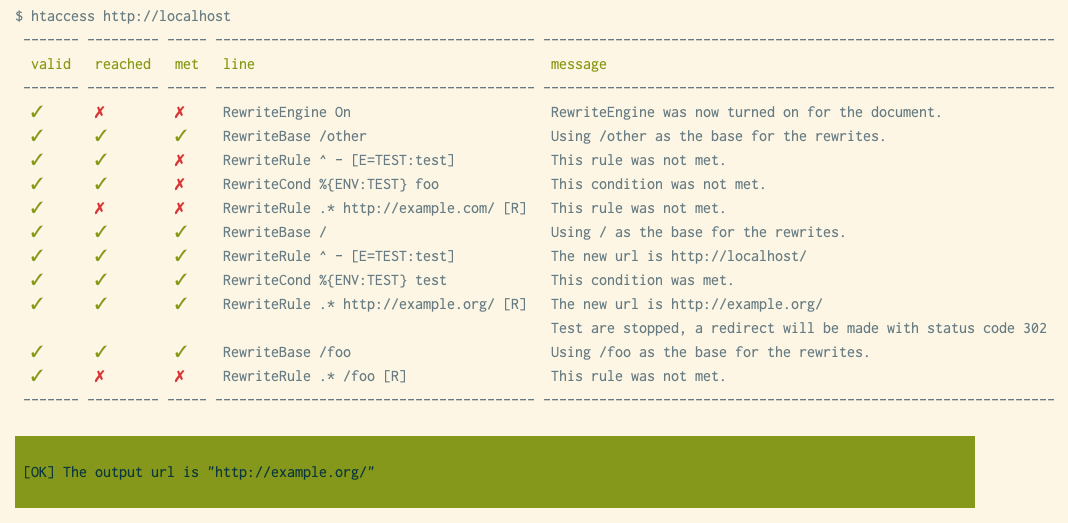
Usage through Docker
# install the container
docker pull madewithlove/htaccess-cli

# run the htaccess tester in the current folder
docker run --rm -v $PWD:/app madewithlove/htaccess-cli [url] <options>
Usage as a GitHub Action
Check https://github.com/madewithlove/htaccess-cli-github-action if you want to verify how .htaccess files behave in a GitHub Action.
CLI Options
The following options are available:
-r, --referrer[=REFERRER]           The referrer header, used as HTTP_REFERER in apache
--http-user-agent[=HTTP_USER_AGENT] The User Agent header, used as HTTP_USER_AGENT in apache
-s, --server-name[=SERVER-NAME]     The configured server name, used as SERVER_NAME in apache
-e, --expected-url[=EXPECTED-URL]   When configured, errors when the output url does not equal this url
    --share                         When passed, you'll receive a share url for your test run
-l, --url-list[=URL-LIST]           Location of the yaml file containing your url list
-p, --path[=WORKING_DIR]            Path to the location of the .htaccess file you wish to test
-h, --help                          Display a help message
Usages with multiple url's
To test one htaccess file with multiple url's, you can use a yaml file that contains them.
- http://localhost/foo
- http://localhost/bar
If you want to pass an expected url for every url you're testing, you can use this yaml structure, where each url maps to an expected url.
http://localhost/foo: http://localhost/test
http://localhost/bar: http://localhost/test
You can then run the command using
htaccess --url-list ./url-list.yaml
Testing against a working directory
If you want to test for a .htaccess file outside of the current working directory, you can use the -p ./path_to_directory option in the command. For example,
htaccess -p ./html http://localhost/
Note
The tool simulates only one pass through the server, while Apache will do multiple if you get back on the same domain. This is a feature we might still add in the future, but it's a limitation for now.
madewithlove/htaccess-cli 适用场景与选型建议
madewithlove/htaccess-cli 是一款 基于 PHP 开发的 Composer 扩展包,目前已累计 31.93k 次下载、GitHub Stars 达 43, 最近一次更新时间为 2019 年 11 月 21 日, 在 PHP 生态内属于活跃度较高的组件。
我们在过去多个企业项目中使用过 madewithlove/htaccess-cli 或与其功能相近的方案,如果你在选型或落地过程中遇到问题,例如 版本兼容、二次改造、私有化封装、与内部系统对接、生产 BUG 排查,欢迎联系我们协助评估。
基于 madewithlove/htaccess-cli 在你已有业务上做功能扩展、字段裁剪、UI 适配、与内部账号 / 权限 / 日志系统的深度对接。
线上偶发问题、内存泄漏、慢查询、并发异常等排查修复;针对高流量场景做缓存、队列、索引层面的调优。
承接完整的项目从需求 → 设计 → 开发 → 上线 → 长期运维;也可按月提供技术保姆服务。
统计信息
- 总下载量: 31.93k
- 月度下载量: 0
- 日度下载量: 0
- 收藏数: 45
- 点击次数: 22
- 依赖项目数: 0
- 推荐数: 1
其他信息
- 授权协议: GPL-3.0-or-later
- 更新时间: 2019-11-21