mehedi250/laravel-structure-kit
Composer 安装命令:
composer require mehedi250/laravel-structure-kit
包简介
Laravel scaffolding package with a browser UI and Artisan command — generates Model, Controller, Migration, Service Pattern (interface + implementation), and Repository Pattern (interface + implementation) with correct namespaces.
关键字:
README 文档
README
 ██████╗████████╗██████╗ ██╗   ██╗ ██████╗████████╗██╗   ██╗██████╗ ███████╗
██╔════╝╚══██╔══╝██╔══██╗██║   ██║██╔════╝╚══██╔══╝██║   ██║██╔══██╗██╔════╝
╚█████╗    ██║   ██████╔╝██║   ██║██║        ██║   ██║   ██║██████╔╝█████╗
 ╚═══██╗   ██║   ██╔══██╗██║   ██║██║        ██║   ██║   ██║██╔══██╗██╔══╝
██████╔╝   ██║   ██║  ██║╚██████╔╝╚██████╗   ██║   ╚██████╔╝██║  ██║███████╗
╚═════╝    ╚═╝   ╚═╝  ╚═╝ ╚═════╝  ╚═════╝   ╚═╝    ╚═════╝ ╚═╝  ╚═╝╚══════╝
Laravel Structure Kit
A browser-based scaffolding panel for Laravel — generate Models, Controllers, Services, Repositories, and Migrations in one click.
No terminal required. Open the UI, pick your components, hit Generate.
Overview
Laravel Structure Kit gives you a clean browser panel for scaffolding Laravel file structures. Enter a model name, check the components you want, optionally adjust directory paths, and click Generate Files — all selected files are created instantly with the correct namespaces.
It supports the Service Pattern and Repository Pattern out of the box, generating both the interface (contract) and the implementation class for each.
Requirements
| Dependency | Version |
|---|---|
| PHP | ^8.1 |
| Laravel | ^10.0 | ^11.0 | ^12.0 | ^13.0 |
Installation
composer require mehedi250/laravel-structure-kit
The package registers itself automatically via Laravel's package auto-discovery. No config file or service provider registration required.
Using the UI Panel
Open the panel
Start your local server and visit:
http://localhost:8000/structure-kit
The panel is only accessible in
localenvironment. It returns a403in any other environment.
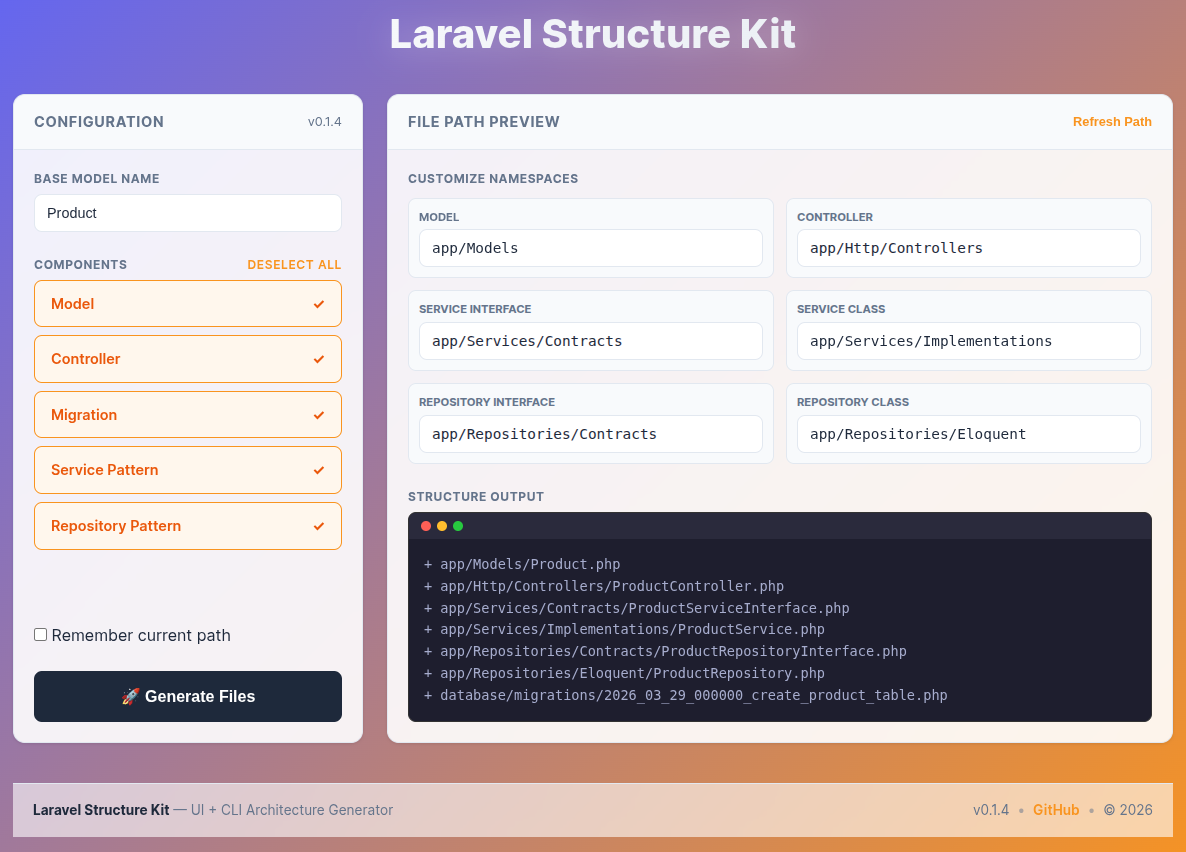
Step 1 — Enter a model name
Type your base model name in the Base Model Name field at the top of the Configuration panel.
Product
Every generated filename is derived from this name:
| Generated file | Derived name |
|---|---|
Product.php |
Model |
ProductController.php |
Controller |
ProductServiceInterface.php |
Service Interface |
ProductService.php |
Service Class |
ProductRepositoryInterface.php |
Repository Interface |
ProductRepository.php |
Repository Class |
xxxx_xx_xx_create_products_table.php |
Migration |
Step 2 — Select components
All five components are selected by default. Uncheck anything you don't need. Use Deselect All / Select All to toggle everything at once.
| Component | What gets generated |
|---|---|
| Model | Eloquent model class |
| Controller | Resource controller wired to the service interface |
| Migration | Timestamped create_table migration |
| Service Pattern | ProductServiceInterface.php + ProductService.php |
| Repository Pattern | ProductRepositoryInterface.php + ProductRepository.php |
Selecting Service Pattern without Repository Pattern generates a service that works directly with the model — no repository dependency.
Step 3 — Review and customize paths (optional)
The right panel shows Customize Namespaces — one editable path field per selected component. The defaults match standard Laravel conventions:
| Component | Default path |
|---|---|
| Model | app/Models |
| Controller | app/Http/Controllers |
| Service Interface | app/Services/Contracts |
| Service Class | app/Services/Implementations |
| Repository Interface | app/Repositories/Contracts |
| Repository Class | app/Repositories/Eloquent |
You can change any path before generating. All paths must start with app/ — the UI blocks submission if a path does not.
Refresh Path resets all fields back to the defaults above.
Remember current path — tick this checkbox to save your custom paths in the browser. The next time you open the panel, your paths are pre-filled automatically.
Step 4 — Preview the file tree
The Structure Output terminal on the right updates live as you type the model name, check components, or edit paths. It shows exactly what will be written to disk before you commit to generating.
+ app/Models/Product.php
+ app/Http/Controllers/ProductController.php
+ app/Services/Contracts/ProductServiceInterface.php
+ app/Services/Implementations/ProductService.php
+ app/Repositories/Contracts/ProductRepositoryInterface.php
+ app/Repositories/Eloquent/ProductRepository.php
+ database/migrations/2026_06_07_xxxxxx_create_products_table.php
Step 5 — Generate
Click 🚀 Generate Files.
The form submits via Fetch API — no page reload. A success or error message appears at the top of the page. Files that already exist on disk are skipped (not overwritten).
Generated file structure
Running the generator with model name Product and all components selected produces:
app/
├── Models/
│   └── Product.php
├── Http/
│   └── Controllers/
│       └── ProductController.php
├── Services/
│   ├── Contracts/
│   │   └── ProductServiceInterface.php
│   └── Implementations/
│       └── ProductService.php
└── Repositories/
    ├── Contracts/
    │   └── ProductRepositoryInterface.php
    └── Eloquent/
        └── ProductRepository.php
database/
└── migrations/
    └── 2026_06_07_xxxxxx_create_products_table.php
Artisan Command (CLI alternative)
Prefer the terminal? The Artisan command generates the same files without the browser.
php artisan structure-kit {ModelName} {flags}
Flags
| Flag | Component |
|---|---|
m |
Model |
c |
Controller |
s |
Service + Service Interface |
r |
Repository + Repository Interface |
t |
Migration |
Examples
# Generate everything
php artisan structure-kit Product mcsrt

# Service + Repository only
php artisan structure-kit Product sr

# Model + Controller only
php artisan structure-kit Product mc

# Preview without writing files
php artisan structure-kit Product mcsrt --dry-run
Use Cases
- New projects — establish a consistent structure from the first model
- Team environments — everyone generates files the same way, same paths, same conventions
- Rapid prototyping — scaffold a full feature in seconds, then fill in the logic
- Learning clean architecture — see how Interfaces, Services, and Repositories connect before writing a line
Contributing
All contributions are welcome — bug fixes, new features, documentation improvements.
# Fork on GitHub, then:
git clone https://github.com/YOUR_USERNAME/laravel-structure-kit.git
git checkout -b feature/your-feature
git commit -m "feat: describe your change"
git push origin feature/your-feature
# Open a Pull Request
Repository: github.com/mehedi250/laravel-structure-kit
License
Released under the MIT License.
Copyright © 2026 Md. Mehedi Hasan Shawon
See the LICENSE file for full details.
If this package saved you time, consider giving it a ⭐ on GitHub.
Made with ❤️ for the Laravel community · Report a Bug · Request a Feature
mehedi250/laravel-structure-kit 适用场景与选型建议
mehedi250/laravel-structure-kit 是一款 基于 Blade 开发的 Composer 扩展包,目前已累计 28 次下载、GitHub Stars 达 9, 最近一次更新时间为 2026 年 02 月 17 日, 在 PHP 生态内属于活跃度较高的组件。
它主要适用于以下技术方向: 「generator」 「php」 「boilerplate」 「backend」 「scaffold」 「laravel」 等业务场景。在实际项目中,围绕这些方向常见需要落地的问题包括:接口对接、性能调优、并发安全、与既有框架(Laravel / ThinkPHP / Yii / Webman 等)的兼容适配,以及生产环境的日志埋点与稳定性保障。
我们在过去多个企业项目中使用过 mehedi250/laravel-structure-kit 或与其功能相近的方案,如果你在选型或落地过程中遇到问题,例如 版本兼容、二次改造、私有化封装、与内部系统对接、生产 BUG 排查,欢迎联系我们协助评估。
基于 mehedi250/laravel-structure-kit 在你已有业务上做功能扩展、字段裁剪、UI 适配、与内部账号 / 权限 / 日志系统的深度对接。
线上偶发问题、内存泄漏、慢查询、并发异常等排查修复;针对高流量场景做缓存、队列、索引层面的调优。
承接完整的项目从需求 → 设计 → 开发 → 上线 → 长期运维;也可按月提供技术保姆服务。
与 mehedi250/laravel-structure-kit 相关的其它包
同方向 / 同关键字的高下载量 PHP Composer 包推荐,方便对比选型:
Memio's PrettyPrinter, used to generate PHP code from given Model
PHP class to extend when building a WordPress plugin allowing you to follow smart plugin setup standards.
Anax htmlform module.
Laravel 5.7 Boilerplate based on Bootstrap 4 and Tabler for Backend.
WordPress Plugin Framework
A Laravel 6 API Boilerplate to create a ready-to-use REST API. User Authentication using JWT.
统计信息
- 总下载量: 28
- 月度下载量: 0
- 日度下载量: 0
- 收藏数: 9
- 点击次数: 36
- 依赖项目数: 0
- 推荐数: 0
其他信息
- 授权协议: MIT
- 更新时间: 2026-02-17